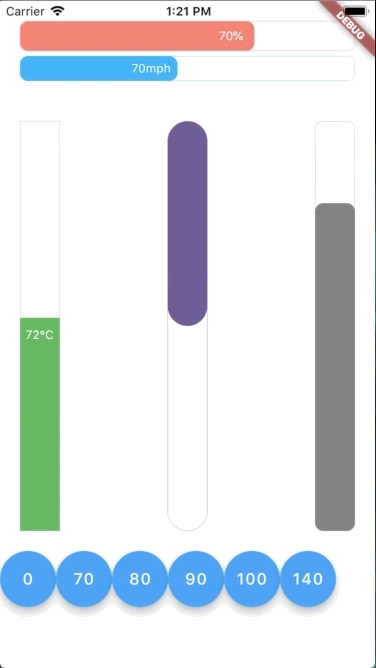
수평 및 수직 방향의 애니메이션 진행 바를 제공하는 생기 넘치는 Flutter 패키지입니다. 반응형 스타일로 설계되어 진행률 값을 부드럽게 업데이트하고 모든 주요 플랫폼에서 실시간 시각 피드백을 지원합니다. 로딩 표시기, 작업 완료 추적 또는 동적 진행 시각화가 필요한 모든 UI 요소에 적합합니다. 이 패키지는 가볍고 사용자 정의 가능하며 Flutter 앱에 원활하게 통합됩니다.
사용 사례
로딩 화면
작업 완료 표시기
양식 진행 추적
인터랙티브 튜토리얼
게임 진행 바
주요 기능
수평 및 수직 방향 지원
반응형 애니메이션 업데이트
색상이 풍부하고 사용자 정의 가능한 디자인
크로스 플랫폼 호환성
부드러운 전환 애니메이션
pub를 통한 간편한 통합
적합한 대상
인터랙티브 UI를 구축하는 개발자
시각적 진행 상태 피드백이 필요한 앱
애니메이션 인디케이터를 찾는 디자이너
크로스 플랫폼 Flutter 프로젝트
풍부한 시각 효과와 최소한의 설정을 원하는 사용자
고려 사항
다크 모드용 추가 스타일링이 필요할 수 있습니다
고주파 업데이트에 대한 성능 영향
기본 속성 외의 맞춤 설정이 제한적입니다
매우 큰 진행 값에 최적화되지 않음
Flutter의 애니메이션 엔진 안정성에 의존
원본 README
연결된 소스 저장소의 README 원문 스냅샷입니다. 최신 내용은 저장소에서 확인하세요.
Flutter Animation Progress Bar
This colorful Flutter widget package aims to show an animation progress bar in reactive style. It also supports both vertical and horizontal bar.
Flutter Create Contest
This package is also a submission to Flutter Create contest. The basic rule of this contest is to measure the total Dart file size less or equal 5KB.
After unzipping the compressed file, run following command to update dependencies:
In this table, you can find all attributes provided by this package:
Attribute
Default value
Description
currentValue
0
Set the current value for progress bar. This value should be in stateful so that whenever setState() has been called, the progress bar will trigger an animation from latest currentValue to new currentValue
maxValue
100
Max value to be displayed as progress bar. Current value can be greater than max value
size
30
The bar height if direction in Axis.horizontal. The bar width if direction in Axis.vertical
animatedDuration
const Duration(milliseconds: 300)
Set the duration for an animation cycle
direction
Axis.horizontal
The bar can be in Axis.horizontal or Axis.vertical direction
verticalDirection
VerticalDirection.down
With vertical direction, the bar can be VerticalDirection.up or VerticalDirection.down direction
borderRadius
8
Set the bar border radius
border
null
Set the bar border style by BoxBorder
backgroundColor
const Color(0x00FFFFFF)
Set the bar background color
progressColor
const Color(0xFFFA7268)
Set the bar progressing color
progressGradient
null
Set the bar progressing gradient. Overrides progressColor
changeColorValue
null
Set a value that progress color should be changed to [0---blue----[70]-red-100]
changeProgressColor
const Color(0xFF5F4B8B)
Color that progressing color will be changed to, whenever currentValue greater than changeColorValue
displayText
null
Text to display belonging with currentValue. Examples: % -> 20% °F -> 80°F