패키지, 저장소 및 앱 카테고리 검색

패키지 상세v1.2.0

flutter_asset_generator

pubspec.yaml에 정의된 자산을 스캔하여 리소스 파일을 생성하며, R 파일의 짧은 이름을 모방합니다.

AndroidiOSmacOSWindowsLinux
30일 다운로드
8.2천
좋아요
112
Pub 점수
130

패키지 설치

flutter pub add flutter_asset_generator

패키지 개요

공개 정보를 바탕으로 생성한 선택 가이드입니다.

Flutter용 코드 생성 도구로, pubspec.yaml에 나열된 자산을 스캔하여 자동으로 리소스 클래스를 생성합니다. Android의 R.java와 유사합니다. 타입 안전하고 컴파일 시점에 검증되는 참조를 통해 자산 접근을 단순화하여 오류를 줄이고 유지보수성을 높입니다. 생성된 파일은 이미지, 폰트 및 기타 자산에 대해 짧고 읽기 쉬운 이름을 제공하여 여러 플랫폼에서 개발 워크플로우를 간소화합니다.

사용 사례

  • 대규모 Flutter 프로젝트에서 자산 관리 간소화
  • 잘못된 자산 경로로 인한 런타임 오류 줄이기
  • 앱 리소스에 대한 타입 안전한 액세스 활성화
  • 빌드 중 리소스 클래스 생성 자동화
  • 간결한 자산 참조를 통한 코드 가독성 향상

주요 기능

  • pubspec.yaml에서 리소스 클래스를 자동으로 생성합니다
  • 짧고 깔끔한 자산 이름을 제공합니다
  • 타입 안전한 자산 접근
  • 이미지, 폰트 및 기타 자산을 지원합니다
  • 크로스 플랫폼 호환성

적합한 대상

  • Flutter 앱에서 많은 자산을 관리하는 개발자
  • 자산 관련 버그를 줄이려는 팀
  • 일관된 자산 이름 규칙을 요구하는 프로젝트
  • 자동 리소스 생성이 필요한 빌드 파이프라인 구축
  • 다중 플랫폼을 대상으로 하는 앱

고려 사항

  • build_runner 및 종속성 설정이 필요합니다
  • 생성된 파일은 수동으로 편집해서는 안 됩니다
  • 빌드 시간을 약간 증가시킬 수 있습니다
  • pubspec.yaml을 올바르게 구성해야 합니다
  • 코드 분석 도구와 함께 사용하는 것이 가장 좋습니다

원본 README

연결된 소스 저장소의 README 원문 스냅샷입니다. 최신 내용은 저장소에서 확인하세요.

flutter_asset_generator

English | 中文文档

Automatically generate the dart file for pubspec.yaml

The purpose of this library is to help flutter developers automatically generate asset corresponding dart files to help developers release their hands from this meaningless job, and the open source community has a lot of the same functionality.

This library is based on dartlang's build library.

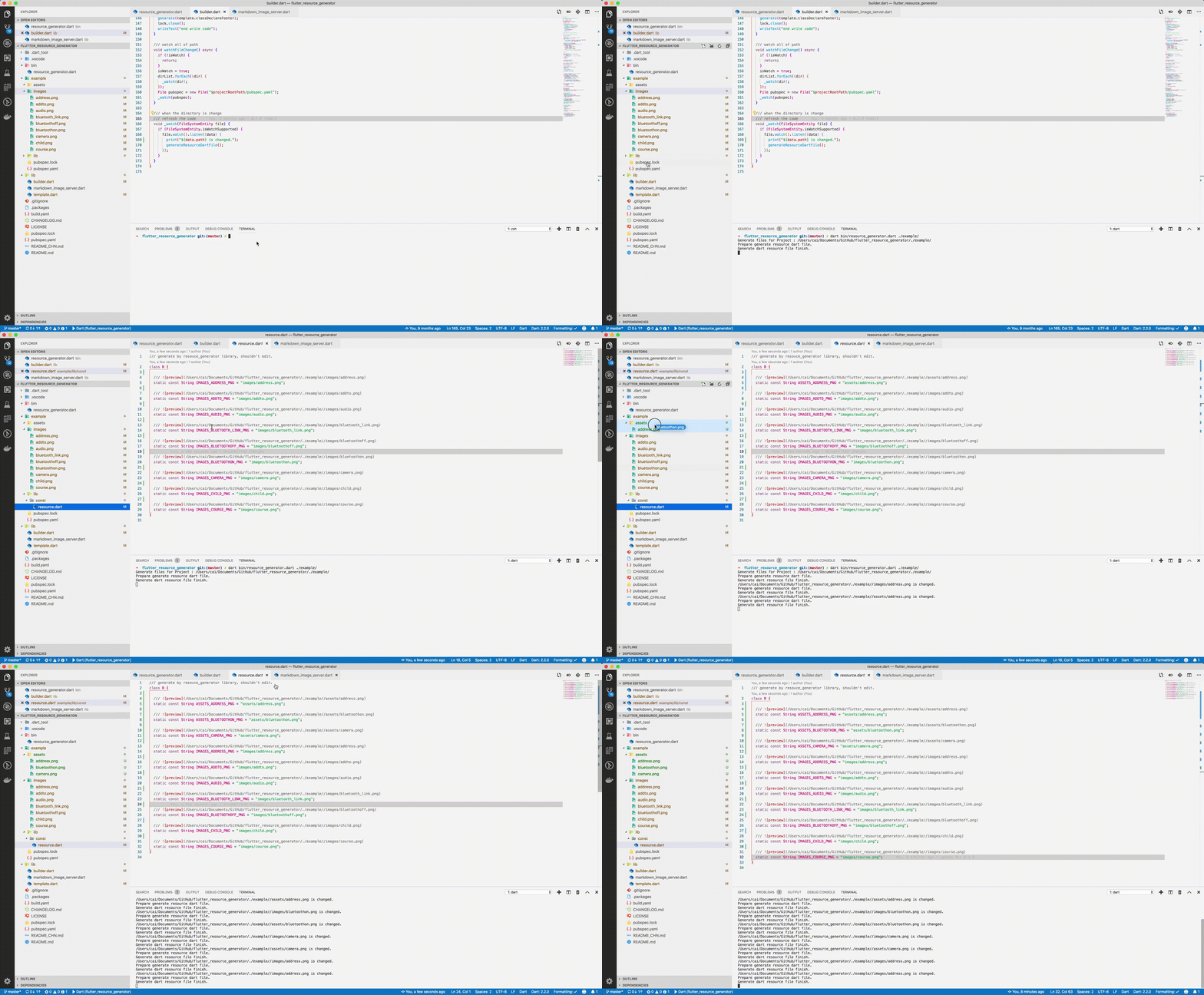
screenshot

img

Usage

Run from source

Add dart to your $PATH environment.

git clone https://github.com/fluttercandies/flutter_asset_generator
cd flutter_asset_generator
dart pub get
dart bin/asset_generator.dart $flutter_project
Run from pub global
  1. Install using pub global:
dart pub global activate flutter_asset_generator

# or 

dart pub global activate -s git https://github.com/fluttercandies/flutter_asset_generator.git                 
  1. Run below commands: fgen or fgen -s $flutter_project
Support options

Use $ fgen -h or $ fgen --help see usage document.

fgen -h
-w, --[no-]watch    Continue to monitor changes after execution of orders.
                    (defaults to on)

-p, --[no-]preview  Generate file with preview comments.
                    (defaults to on)

-o, --output        Your resource file path.
                    If it's a relative path, the relative flutter root directory
                    (defaults to "lib/const/resource.dart")

-s, --src           Flutter project root path
                    (defaults to ".")

-n, --name          The class name for the constant.
                    (defaults to "R")

-h, --[no-]help     Help usage

-d, --[no-]debug    debug info

File name

Space, '.' and '-' in the path will be converted to _. @ will be converted to _AT_.

convert filed name example:

images/1.png => IMAGES_PNG
images/hello_world.jpg => IMAGES_HELLO_WORLD_JPG
images/hello-world.jpg => IMAGES_HELLO_WORLD_JPG

Errors will occur in the following situations:

images/
├── main_login.png
├── main/
    ├── login.png

Because the two field names will be exactly the same.

Config file

The location of the configuration file is conventional. Configuration via commands is not supported. The specified path is fgen.yaml in the flutter project root directory.

Config schema for vscode

Install YAML Support plugin.

Config your vscode settings.json file.

It can be used to prompt the configuration file.

{
  "yaml.schemas": {
    "https://raw.githubusercontent.com/fluttercandies/flutter_asset_generator/master/fgen_schema.json": ["fgen.yaml"]
  }
}
exclude and include rules

The file is yaml format, every element is glob style.

The name of the excluded file is under the exclude node, and the type is a string array. If no rule is included, it means no file is excluded.

The include node is the name of the file that needs to be imported, and the type is a string array. If it does not contain any rules, all file are allowed.

In terms of priority, exclude is higher than include, in other words:

First import the file according to the include nodes, and then exclude the files.

Replacement Rules

File names can be replaced according to the configuration file as shown below:


replace:
  - from: “
    to: 
  - from: ”
    to: 
  - from: ’
    to:
  - from: (
    to:
  - from: )
    to:
  - from: "!"
    to:
Example
exclude:
  - "**/add*.png"
  - "**_**"

include:
  - "**/a*.png"
  - "**/b*"
  - "**/c*"
assets
├── address.png           # exclude by "**/add*.png"
├── address@at.png        # exclude by "**/add*.png"
├── bluetoothon-fjdfj.png
├── bluetoothon.png
└── camera.png

images
├── address space.png     # exclude by "**/add*.png"
├── address.png           # exclude by "**/add*.png"
├── addto.png             # exclude by "**/add*.png"
├── audio.png
├── bluetooth_link.png    # exclude by **_**
├── bluetoothoff.png
├── child.png
└── course.png
/// Generate by [asset_generator](https://github.com/fluttercandies/flutter_asset_generator) library.
/// PLEASE DO NOT EDIT MANUALLY.
class R {
  const R._();

  /// ![preview](file:///Users/jinglongcai/code/dart/self/flutter_resource_generator/example/assets/bluetoothon-fjdfj.png)
  static const String ASSETS_BLUETOOTHON_FJDFJ_PNG = 'assets/bluetoothon-fjdfj.png';

  /// ![preview](file:///Users/jinglongcai/code/dart/self/flutter_resource_generator/example/assets/bluetoothon.png)
  static const String ASSETS_BLUETOOTHON_PNG = 'assets/bluetoothon.png';

  /// ![preview](file:///Users/jinglongcai/code/dart/self/flutter_resource_generator/example/assets/camera.png)
  static const String ASSETS_CAMERA_PNG = 'assets/camera.png';

  /// ![preview](file:///Users/jinglongcai/code/dart/self/flutter_resource_generator/example/images/audio.png)
  static const String IMAGES_AUDIO_PNG = 'images/audio.png';

  /// ![preview](file:///Users/jinglongcai/code/dart/self/flutter_resource_generator/example/images/bluetoothoff.png)
  static const String IMAGES_BLUETOOTHOFF_PNG = 'images/bluetoothoff.png';

  /// ![preview](file:///Users/jinglongcai/code/dart/self/flutter_resource_generator/example/images/child.png)
  static const String IMAGES_CHILD_PNG = 'images/child.png';

  /// ![preview](file:///Users/jinglongcai/code/dart/self/flutter_resource_generator/example/images/course.png)
  static const String IMAGES_COURSE_PNG = 'images/course.png';
}
Other config

Since version 1.1.0:

Next command config option also support in config file.

But the command line option has a higher priority than the config file.


watch: false
# watch: true

preview: false

output: lib/const/r.dart
# output: lib/const/resource.dart

name: RRR

카테고리

의존성

의존성 목록 6 개

소스 저장소

이 패키지를 사용하는 프로젝트

아직 데이터가 없습니다.