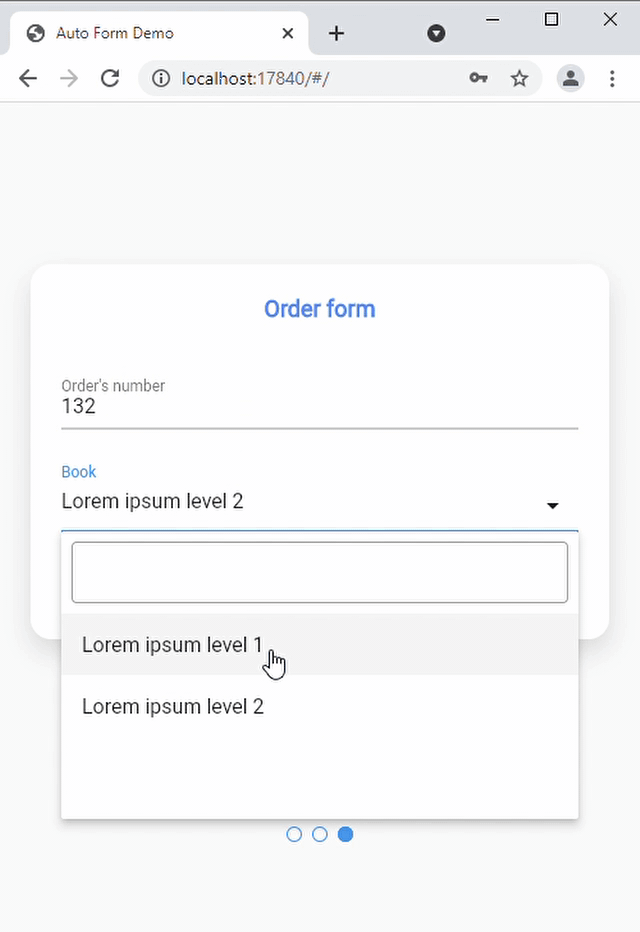
Flutter Auto Form은 Flutter 애플리케이션에서 사용자 친화적인 폼을 쉽게 만들 수 있도록 설계된 패키지입니다. 데이터 모델에 기반하여 폼 필드를 자동으로 생성함으로써 반복 코드를 줄이고 개발 속도와 일관성을 향상시킵니다. 내장된 검증, 오류 처리 및 사용자 정의 가능한 위젯을 통해 개발자 경험과 최종 사용자 상호작용을 모두 향상시킵니다. 이 패키지는 모든 주요 플랫폼을 지원하므로 크로스플랫폼 폼 구현에 이상적입니다.
사용 사례
데이터 모델에서 동적 폼 만들기
반복적인 폼 코드 줄이기
다양한 플랫폼 간에 일관된 UI 만들기
간편하게 폼 검증 구현하기
입력 화면의 빠른 프로토타이핑
주요 기능
자동 폼 필드 생성
내장 검증 지원
사용자 지정 가능한 폼 위젯
크로스 플랫폼 호환성
필요한 보일러플레이트 최소화
적합한 대상
더 빠른 폼 생성을 원하는 개발자
일관된 폼 디자인을 필요로 하는 프로젝트
크로스 플랫폼 플러터 앱
빠른 폼 구현이 필요한 프로토타입
유지보수 가능한 폼 코드를 우선시하는 팀
고려 사항
매우 복잡한 양식에 대한 제한된 사용자 정의
고급 검증을 위해 추가 구성이 필요할 수 있습니다
고유하고 비표준 레이아웃을 가진 양식에는 적합하지 않습니다
자동 생성을 위한 모델 구조에 따라 다릅니다
자동 폼 패턴에 익숙하지 않은 새 사용자를 위한 학습 곡선
원본 README
연결된 소스 저장소의 README 원문 스냅샷입니다. 최신 내용은 저장소에서 확인하세요.
Flutter Auto Form
The easiest way to create fully customizable forms with only a tiny amount of code.
Introduction
Are you tired of writing endless lines of code to create forms in your Flutter apps? Look no further! Our Flutter Auto
Form package is here to revolutionize your form-building experience.
Our primary goal is to significantly reduce the amount of code required to create forms in Flutter. We achieve this by
embracing a clear separation of concerns between form logic and form display.
With Flutter Auto Form, you write the form logic in pure Dart, without any direct mention of widgets. Instead, we
introduce the AFWidget, which dynamically renders all the necessary widgets based on a straightforward form
declaration—a simple Dart class that extends the TemplateForm class.
But that's not all! Our package empowers you to design your custom fields and linked widgets, making nearly any form
conceivable. Whether you're working on basic forms or tackling complex ones, Flutter Auto Form has got you covered.
The true magic of Flutter Auto Form shines when you're dealing with multiple forms, especially complex ones. All your
validators are automatically called when you submit a form, and you can even create sub-forms that cascade into one
another.
Dynamic form generation is also feasible but still in experimental mode. It is accessible through the
JsonSchemaForm class.
dependencies:flutter:sdk:flutter# Your other packages ...flutter_auto_form:^1.0.6
Support
Platforms: All platforms currently supported
Autofill hints: Automatic support through AFTextFieldType
Validators: Email, Url, Hex colour, Not null, Minimum string length, Same as another field, Alphanumeric.
Fields: Password (auto obscure toggle), Text, Number, Model (built-in support for search through an api),
Boolean, Sub-form (cascading forms), Select (dropdown field allowing only predefined values)
Custom code: You can customize and create new fields, validators, widgets as you please without even touching the
source code of this package !
Usage
The first step in creating a form with Flutter Auto Form is to create a class inheriting from the TemplateForm class.
The second & (already) last step is to add the AFWidget wherever you would like to display a form.
AFWidget<RegistrationForm>(
formBuilder: () => RegistrationForm(),
submitButton: (Function({bool showLoadingDialog}) submit) => Padding(
padding: constEdgeInsets.only(top: 32),
child: MaterialButton(
child: Text('Submit'),
onPressed: () => submit(showLoadingDialog: true),
),
),
onSubmitted: (RegistrationForm form) {
// do whatever you want when the form is submittedprint(form.toMap());
},
);
Example
A demo video can be found here. The
four forms displayed in the video are all created with Flutter Auto Form, even the model search field.
The source code is located in the example folder.
Advanced usage
If you need to create your own field (color field, image field, ...) you can always create it by overriding the Field
class. Then to display a custom widget, create a stateful widget that extends the FieldStatefulWidget, and of which the
state extends the FieldState class.
This package is still under construction ! Do not hesitate to create an issue on the GitHub page if you find any bug
or if you would like to see a new type of validator, field !