패키지, 저장소 및 앱 카테고리 검색

flutter_awesome_buttons 표지
패키지 상세v1.1.0

flutter_awesome_buttons

새로운 Flutter 패키지 프로젝트입니다.

AndroidiOSWebmacOSWindowsLinux
30일 다운로드
126
좋아요
34
Pub 점수
110

패키지 설치

flutter pub add flutter_awesome_buttons

패키지 개요

공개 정보를 바탕으로 생성한 선택 가이드입니다.

모바일, 웹, 데스크톱 애플리케이션용으로 시각적으로 매력적이고 사용자 정의 가능한 버튼 모음을 제공하는 플러터 패키지입니다. 현대적이고 애니메이션 효과가 있는 버튼 스타일로 사용자 인터페이스를 향상시키며, 다양한 테마와 상호작용 피드백을 지원합니다. 쉽게 통합할 수 있으며, 복잡한 커스텀 코드 없이 앱 UI의 미적 품질을 개선하고 싶은 개발자에게 이상적입니다. 안드로이드, iOS, 웹, 맥OS, 윈도우, 리눅스 등 모든 주요 플랫폼에서 작동합니다.

사용 사례

  • 스타일리시한 버튼으로 앱 UI 개선
  • 상호작용형 액션 버튼 요소 만들기
  • 표준 버튼에 애니메이션 추가
  • 시각적 피드백을 통한 사용자 참여도 향상
  • 매력적인 컨트롤로 반응형 양식 만들기

주요 기능

  • 사전 설계된 애니메이션 버튼 템플릿
  • 사용자 지정 가능한 색상 및 크기
  • 크로스 플랫폼 호환성
  • pub.dev를 통한 간편한 통합
  • 터치 및 호버 효과 지원

적합한 대상

  • Flutter를 사용하는 UI/UX 디자이너
  • 현대적인 미학을 갖춘 앱을 개발하는 개발자
  • 매력적인 상호작용 요소가 필요한 프로젝트
  • Flutter UI 컴포넌트를 배우는 초보자
  • 다중 플랫폼을 대상으로 하는 앱

고려 사항

  • 패키지 크기가 약간 증가할 수 있습니다
  • 기본적인 Flutter 레이아웃에 대한 이해가 필요합니다
  • 제공된 테마를 초과한 사용자 정의는 제한적
  • 매우 복잡한 버튼 로직에는 적합하지 않습니다
  • 일관된 디자인 시스템과 함께 사용하는 것이 가장 좋습니다

원본 README

연결된 소스 저장소의 README 원문 스냅샷입니다. 최신 내용은 저장소에서 확인하세요.

flutter_buttons

A new Flutter package project for createing Buttons.

Show some :heart: and star the repo to support the project
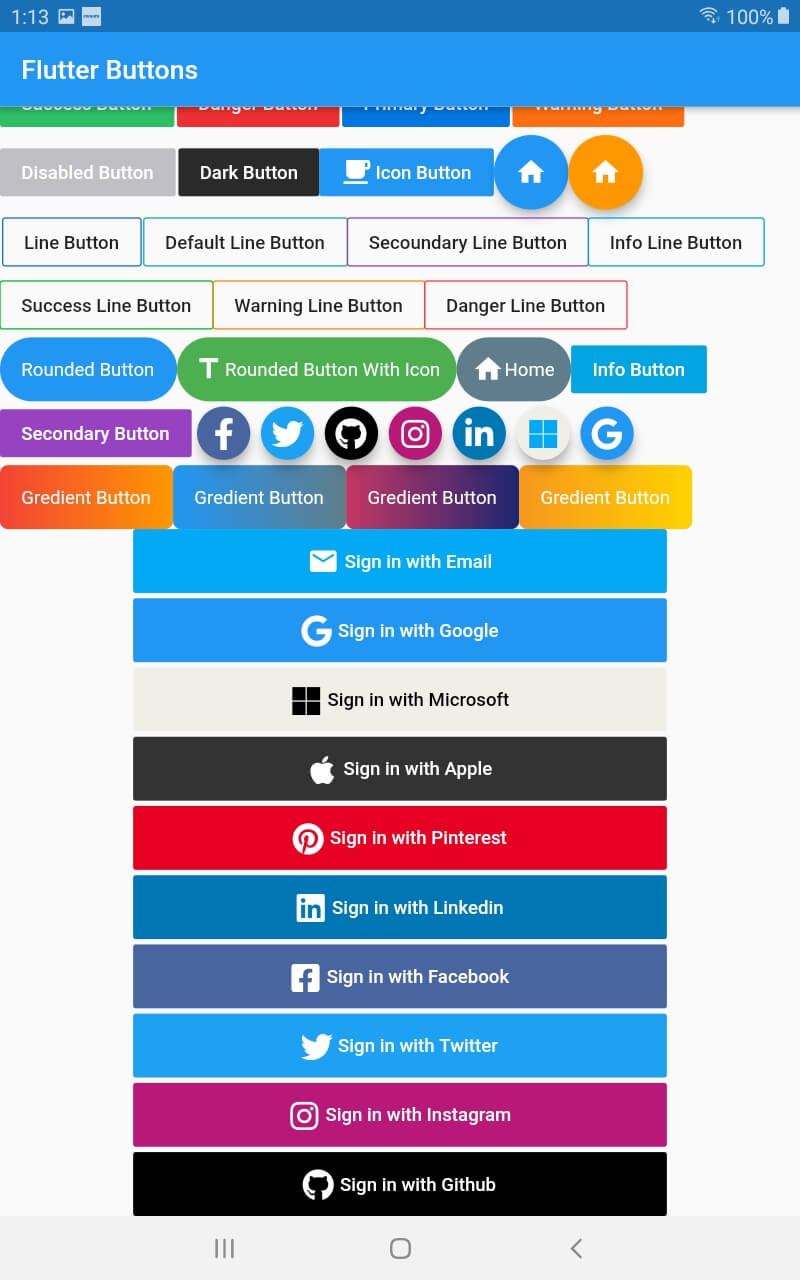
Screenshot Screenshot

Buttons

import 'package:flutter/material.dart';
import 'package:flutter_buttons/flutter_buttons.dart';

void main() => runApp(MyApp());

class MyApp extends StatelessWidget {
  
  @override
  Widget build(BuildContext context) {
    return MaterialApp(
      debugShowCheckedModeBanner: false,
      home: HomePage()
    );
  }
}

class HomePage extends StatefulWidget {
  @override
  _HomePageState createState() => _HomePageState();
}

class _HomePageState extends State<HomePage> {
  var testing = "123";
  @override
  Widget build(BuildContext context) {
    return Scaffold(
          appBar: AppBar(
            title: Text("Flutter Buttons"),
          ),
          body: ListView(
            children: <Widget>[
              Row(
                children: <Widget>[

Success Button

                 SuccessButton(
                   title: "Success Button",
                   onPressed: () {
                     
                   },
                 ),
                 SizedBox(width: 2.0,),

Danger Button

                 DangerButton(
                   title: "Danger Button",
                   onPressed: () {
                      
                   },
                 ),
                SizedBox(width: 2.0,),

Primary Button

                 PrimaryButton(
                   title: "Primary Button",
                   onPressed: () {                       
                   },
                 ),
                SizedBox(width: 2.0,),

Warning Button

                 WarningButton(
                   title: "Warning Button",
                   onPressed: () {                       
                   },
                 ),
                      
               ],
             ),
             Row(
               children: <Widget>[

Disabled Button

                 DisabledButtton(
                   onPressed: (){},
                   title: "Disabled Button",
                 ),
                  SizedBox(width: 2.0,),

Dark Button

               DarkButtton(
                 onPressed: (){},
                 title: "Dark Button",
               ),

ButttonWithIcon Button (we can use both button and icon in this button)

                ButttonWithIcon(icon: Icons.local_cafe,title: "Icon Button",onPressed: (){},),

Floating Icon Button

                FloatingIconButton(
                  icon: Icons.home,
                  onPressed: (){},
                ),
                FloatingIconButton(
                  icon: Icons.home,
                  onPressed: (){},
                  buttonColor: Colors.orange,
                )
                ],
              )
              ,Row(
                children: <Widget>[
                   SizedBox(width: 2,)

Line Buttons

                  PrimaryLineButton(
                    onPressed: (){},
                    title: "Line Button",
                  ),
                  SizedBox(width: 2,),
                  DefaultLineButton(
                    onPressed: (){},
                    title: "Default Line Button",
                  ),
                  SecoundaryLineButton(
                    onPressed: (){},
                    title: "Secoundary Line Button",
                  ),
                             
                  InfoLineButton(
                    onPressed: (){},
                    title: "Info Line Button",
                  ),
                ],
              ),
              Row(children: <Widget>[
              
                SuccessLineButton(
                    onPressed: (){},
                    title: "Success Line Button",
                  ),    
                
                  WarningLineButton(
                    onPressed: (){},
                    title: "Warning Line Button",
                  ),
                  DangerLineButton(
                    onPressed: (){},
                    title: "Danger Line Button",
                  ),
              ],),
              Row(
                children: <Widget>[

Rounded Button

                  RoundedButton(
                    onPressed: (){},
                    title: "Rounded Button",
                  ),
                   RoundedButtonWithIcon(
                    onPressed: (){},
                    icon:Icons.title,
                    title: "Rounded Button With Icon",
                    buttonColor: Colors.green,
                  ),
                  RoundedButtonWithIcon(
                    onPressed: (){},
                    icon:Icons.home,
                    title: "Home",
                    buttonColor: Colors.blueGrey,
                  )
                ,InfoButtton(
                    onPressed: (){},                   
                    title: "Info Button",                    
                  ),                               
                ],
              ),
              Row(
                children: <Widget>[
                  SecondaryButtton(
                    onPressed: (){},                   
                    title: "Secondary Button",                    
                  ),

Social Buttons

                  FacebookButton(onPressed: (){},),
                   TwitterButton(onPressed: (){},),
                   GithubButton(onPressed: (){},),
                   InstagramButton(onPressed: (){},),
                   LinkedinButton(onPressed: (){},),
                   MicrosoftButton(onPressed: (){},),
                   GoogleButton(onPressed: (){},),
                ],
              )
              ,Column(
                children: <Widget>[
                  Row(
                       children: <Widget>[

Gredient Buttons

                          GredientButton(onPressed: (){},
                  splashColor: Colors.orange,
                  colors: [
                    Colors.red,
                    Colors.orange,                    
                  ], title: "Gredient Button",),
                  GredientButton(onPressed: (){},
                  splashColor: Colors.orange,
                  colors: [
                    Colors.blue,
                    Colors.blueGrey,                    
                  ], title: "Gredient Button",),
                  GredientButton(onPressed: (){},
                  splashColor: Colors.orange,
                  colors: [
                    Color(0xFFC33764),
                    Color(0xFF1D2671),
                  ], title: "Gredient Button",),
                  GredientButton(onPressed: (){},
                  splashColor: Colors.orange,
                  colors: [
                    Color(0xFFF7971E),
                    Color(0xFFFFD200),
                  ], title: "Gredient Button",),
                       ],
                  ),
                  

Sign in Buttons

                  Padding(
                    padding: EdgeInsets.symmetric(horizontal: 100),
                    child: SignInWithEmail(onPressed: (){},),
                  ),
                  SizedBox(height: 4.0,),

                  Padding(
                    padding: EdgeInsets.symmetric(horizontal: 100),
                    child: SignInWithGoogle(onPressed: (){},),
                  ),
                  SizedBox(height: 4.0,),
                  Padding(
                    padding: EdgeInsets.symmetric(horizontal: 100),
                    child: SignInWithMicrosoft(onPressed: (){},),
                  ),
                  SizedBox(height: 4.0,),
                  Padding(
                    padding: EdgeInsets.symmetric(horizontal: 100),
                    child: SignInWithApple(onPressed: (){},),
                  ),
                  SizedBox(height: 4.0,),
                  Padding(
                    padding: EdgeInsets.symmetric(horizontal: 100),
                    child: SignInWithPinterest(onPressed: (){},),
                  ),
                   SizedBox(height: 4.0,),
                  Padding(
                    padding: EdgeInsets.symmetric(horizontal: 100),
                    child: SignInWithLinkedin(onPressed: (){},),
                  ),
                   SizedBox(height: 4.0,),
                  Padding(
                    padding: EdgeInsets.symmetric(horizontal: 100),
                    child: SignInWithFacebook(onPressed: (){},),
                  ),
                   SizedBox(height: 4.0,),
                  Padding(
                    padding: EdgeInsets.symmetric(horizontal: 100),
                    child: SignInWithTwitter(onPressed: (){},),
                  ),
                   SizedBox(height: 4.0,),
                  Padding(
                    padding: EdgeInsets.symmetric(horizontal: 100),
                    child: SignInWithInstagram(onPressed: (){},),
                  ),
                  SizedBox(height: 4.0,),
                  Padding(
                    padding: EdgeInsets.symmetric(horizontal: 100),
                    child: SignInWithGithub(onPressed: (){},),
                  ),


                ],
              )
            ],
          ));
  }
} 
카테고리

의존성

의존성 목록 1 개

소스 저장소

이 패키지를 사용하는 프로젝트

아직 데이터가 없습니다.