Android 및 iOS에서 동적 앱 아이콘 변경 및 일괄 번호 업데이트를 가능하게 하는 플러터 플러그인입니다. 개발자가 런타임에 프로그래밍 방식으로 앱 아이콘을 전환할 수 있게 해주며, 커스텀 브랜딩, 계절 테마 또는 사용자 선호도에 유용합니다. 플러그인은 플랫폼별 아이콘 관리와 버전 관리 또는 프로모션 목적의 일괄 번호 지정을 지원합니다. 네이티브 코드 수정 없이 플러터 앱과 원활하게 통합되도록 설계되어 있으며, 시각적 유연성 또는 인터랙티브한 아이콘 경험을 필요로 하는 앱에 적합합니다.
사용 사례
사용자 선호도에 따라 앱 아이콘 변경
계절 또는 이벤트 기반 아이콘 업데이트
앱 브랜딩 사용자 지정
다른 아이콘 변형 테스트
프로모션 캠페인 아이콘 전환
주요 기능
런타임 중 동적 아이콘 전환
Android 및 iOS 지원
배치 번호 관리
간단한 API 통합
원시 코드가 필요하지 않습니다
적합한 대상
사용자 정의 가능한 UI를 가진 앱
브랜딩 중심 애플리케이션
이벤트 기반 또는 계절적 앱
아이콘 테스트용 개발 도구
마케팅 또는 프로모션 캠페인
고려 사항
아이콘 변경 후 앱 재시작 필요
일부 오래된 장치에서 지원이 제한됨
iOS는 추가 구성이 필요합니다
아이콘 자산은 사전에 정의되어야 합니다
자주 아이콘을 변경하는 데 적합하지 않습니다
원본 README
연결된 소스 저장소의 README 원문 스냅샷입니다. 최신 내용은 저장소에서 확인하세요.
flutter_dynamic_icon
A flutter plugin for dynamically changing app icon and app icon batch number in the mobile platform. Supports only iOS (with version > 10.3).
Check out the example directory for a sample app using flutter_dynamic_icon.
iOS Integration
Index
2x - 120px x 120px
3x - 180px x 180px
To integrate your plugin into the iOS part of your app, follow these steps
First let us put a few images for app icons, they are
teamfortress@2x.png, teamfortress@3x.png
photos@2x.png, photos@3x.png,
chills@2x.png, chills@3x.png,
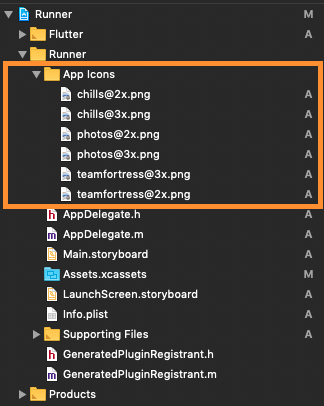
These icons shouldn't be kept in Assets.xcassets folder, but outside. When copying to Xcode, you can select 'create folder references' or 'create groups', if not you will get and error when uploading the build to the AppStore saying: (Thanks to @nohli for this observation)
TMS-90032: Invalid Image Path - - No image found at the path referenced under key 'CFBundleAlternateIcons':...
Here is my directory structure:
Next, we need to setup the Info.plist
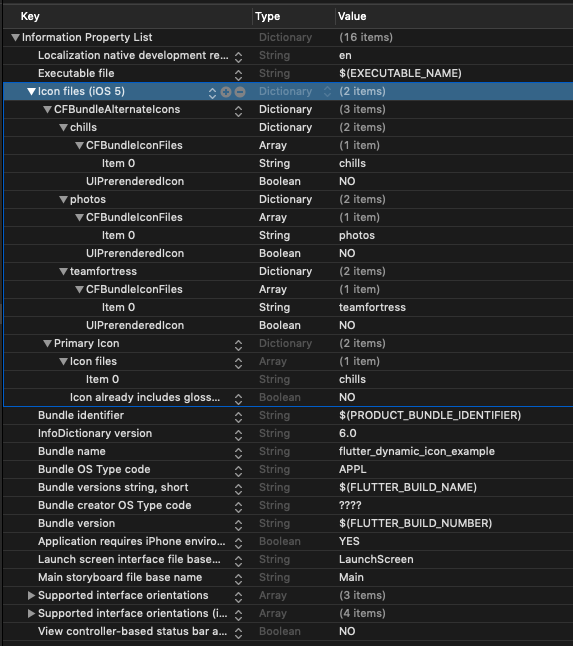
Add Icon files (iOS 5) to the Information Property List
Add CFBundleAlternateIcons as a dictionary, it is used for alternative icons
Set 3 dictionaries under CFBundleAlternateIcons, they are correspond to teamfortress, photos, and chills
For each dictionary, two properties — UIPrerenderedIcon and CFBundleIconFiles need to be configured
If the sub-property UINewsstandIcon is showing under Icon files (iOS 5) and you don't plan on using it (it is intended for use with Newstand features), erase it or the app will get rejected upon submission on the App Store
Note that if you need it work for iPads, You need to add these icon declarations in CFBundleIcons~ipad as well. See here for more details.
Here is my Info.plist after adding Alternate Icons
Now, you can call FlutterDynamicIcon.setAlternateIconName with the CFBundleAlternateIcons key as the argument to set that icon.
Dart/Flutter Integration
From your Dart code, you need to import the plugin and use it's static methods:
import'package:flutter_dynamic_icon/flutter_dynamic_icon.dart';
try {
if (awaitFlutterDynamicIcon.supportsAlternateIcons) {
awaitFlutterDynamicIcon.setAlternateIconName("photos");
print("App icon change successful");
return;
}
} onPlatformException {} catch (e) {}
print("Failed to change app icon");
...
// set batch numbertry {
awaitFlutterDynamicIcon.setApplicationIconBadgeNumber(9399);
} onPlatformException {} catch (e) {}
// gets currently set batch numberint batchNumber = FlutterDynamicIcon.getApplicationIconBadgeNumber();
Check out the example app for more details
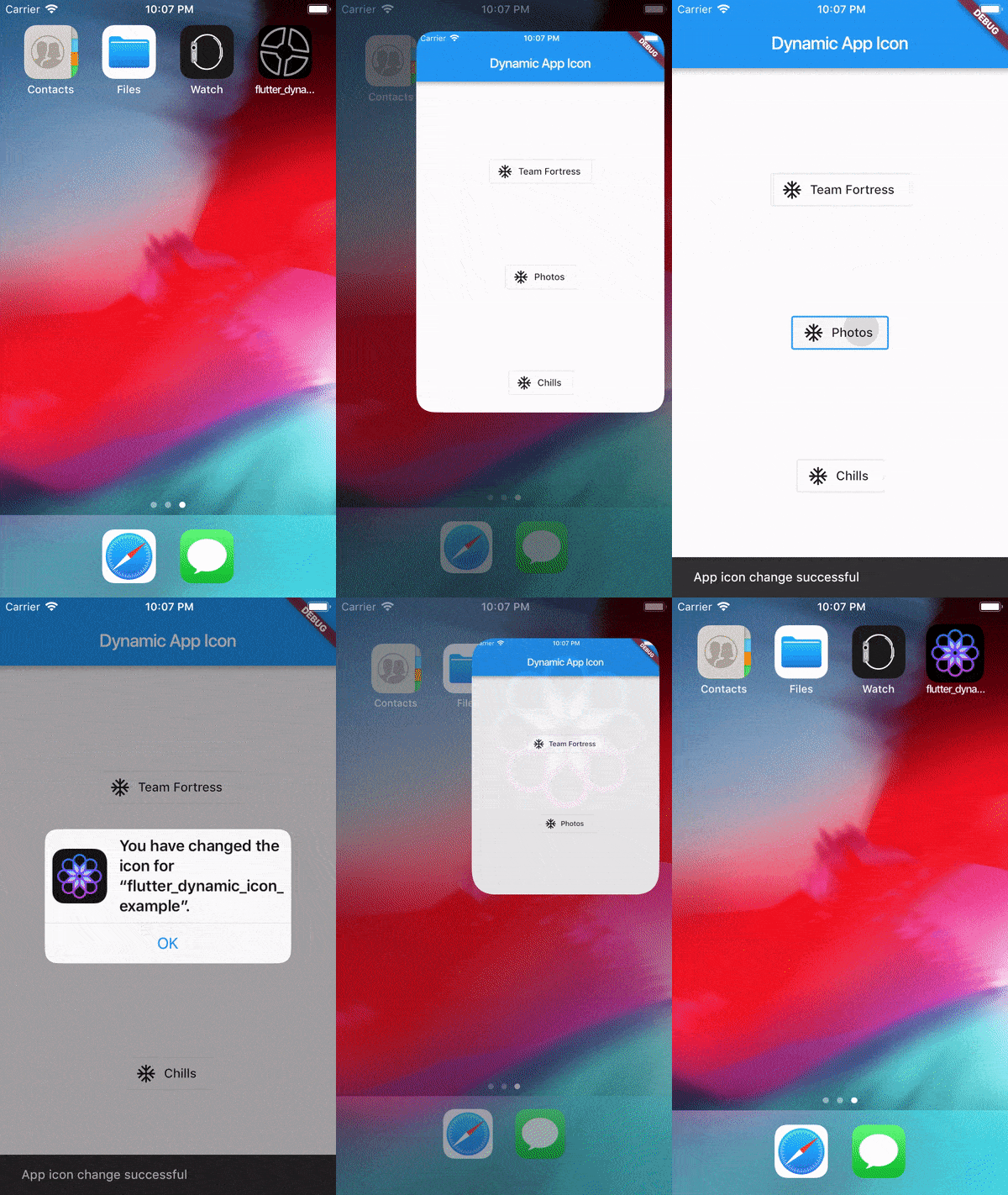
Screenrecord
Showing App Icon change
Showing Batch number on app icon change in SpringBoard
Reference
This was made possible because this blog. I borrowed a lot of words from this blog.
https://medium.com/ios-os-x-development/dynamically-change-the-app-icon-7d4bece820d2