패키지, 저장소 및 앱 카테고리 검색

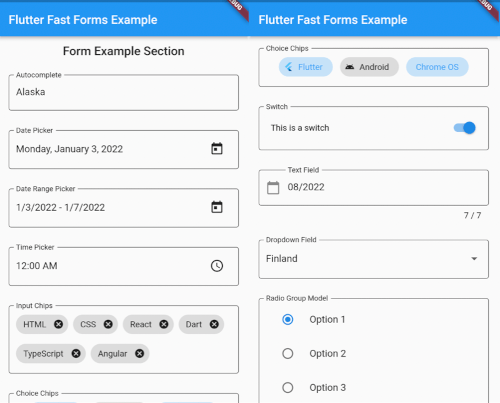
flutter_fast_forms 표지
패키지 상세v18.1.0

flutter_fast_forms

Flutter Fast Forms는 Flutter 폼을 빠르게 만들기 위해 필요한 유일한 Dart 패키지입니다.

AndroidiOSWebmacOSWindowsLinux
30일 다운로드
275
좋아요
91
Pub 점수
90

패키지 설치

flutter pub add flutter_fast_forms

패키지 개요

공개 정보를 바탕으로 생성한 선택 가이드입니다.

Flutter Fast Forms는 Flutter 폼 생성을 간소화하기 위해 설계된 Dart 패키지로, 개발자가 빠르게 강력하고 재사용 가능한 폼 컴포넌트를 만들 수 있도록 도와줍니다. 최소한의 반복 코드로 폼 필드, 검증 규칙 및 제출 로직을 정의할 수 있는 간단하고 선언적인 API를 제공합니다. Android, iOS, Web, macOS, Windows, Linux 등 주요 플랫폼을 모두 지원하여 크로스플랫폼 애플리케이션에 이상적입니다. 일반적인 입력 유형과 사용자 정의 가능한 검증기 기능을 내장하고 있어 유연성과 성능을 희생하지 않고 개발 속도를 높일 수 있습니다.

사용 사례

  • 빠른 형상 프로토타이핑
  • 크로스 플랫폼 폼 개발
  • 복잡한 검증 워크플로
  • 재사용 가능한 폼 컴포넌트
  • 간소화된 사용자 등록 흐름

주요 기능

  • 선언적 폼 구문
  • 내장 검증 보조 함수
  • 크로스 플랫폼 호환성
  • 확장 가능한 필드 유형
  • 최소한의 보일러플레이트 코드

적합한 대상

  • 초보자용 Flutter 개발자
  • 속도를 우선시하는 팀
  • 동적 폼이 필요한 앱
  • 엄격한 마감일이 있는 프로젝트
  • 양식의 복잡성에서 벗어나는 개발자

고려 사항

  • 기본 위젯 외의 사용자 정의가 제한적
  • 새로운 DSL 유사 구문을 배워야 할 수 있습니다
  • 매우 고유한 폼 레이아웃에는 적합하지 않음
  • 패키지 유지보수에 의존
  • 표준 양식 패턴에 가장 적합

원본 README

연결된 소스 저장소의 README 원문 스냅샷입니다. 최신 내용은 저장소에서 확인하세요.

Flutter Fast Forms

CI Pub Version codecov

Flutter Fast Forms is the only Dart package you need to build Flutter forms fast.

It adds these missing features to the Flutter SDK:

  • FastFormControl<T> convenience widgets that wrap Material / Cupertino form controls in a FormField<T> according to the already built-in TextFormField / DropdownButtonFormField
  • FastForm widget that wraps the built-in Form widget for providing the current form field values in onChanged callback
  • FastFormArray widget that aggregates a flexible number of homogeneous controls in a single FormField<T>
  • FastChipsInput widget that converts text input into chips as defined by Material Design
  • Conditional form fields
  • touched validation state
  • Common FormFieldValidator<T> functions

Table of Contents


Getting Started

1. Add a FastForm to your widget tree:

class MyFormPage extends StatelessWidget {
  MyFormPage({Key? key, required this.title}) : super(key: key);

  final formKey = GlobalKey<FormState>();
  final String title;

  @override
  Widget build(BuildContext context) {
    return Scaffold(
      appBar: AppBar(
        title: Text(title),
      ),
      body: SafeArea(
        child: SingleChildScrollView(
          child: FastForm(
            formKey: formKey,
            children: [],
          ),
        ),
      ),
    );
  }
}

2. Add FastFormControl<T> children to the FastForm:

FastForm(
  formKey: formKey,
  children: [
    const FastTextField(
      name: 'field_destination',
      labelText: 'Destination',
      placeholder: 'Where are you going?',
    ),
    FastDateRangePicker(
      name: 'field_check_in_out',
      labelText: 'Check-in - Check-out',
      firstDate: DateTime.now(),
      lastDate: DateTime.now().add(const Duration(days: 365)),
    ),
    const FastCheckbox(
      name: 'field_travel_purpose',
      labelText: 'Travel purpose',
      titleText: 'I am travelling for work',
    ),
  ],
),

3. Wrap the children in a FastFormSection for visual grouping and consistent padding:

FastForm(
  formKey: formKey,
  children: [
    FastFormSection(
      header: const Text('My Form'),
      padding: EdgeInsets.all(16.0),
      children: [
        const FastTextField(
          name: 'field_destination',
          labelText: 'Destination',
          placeholder: 'Where are you going?',
        ),
        // ...
      ],
    ),
  ]
),

Widget Catalog

FastFormControl<T> field value type wraps Material widget wraps Cupertino widget
when adaptive: true
FastAutocomplete<O> String Autocomplete<O> no
FastCheckbox bool CheckboxListTile CupertinoCheckbox
FastChoiceChips<T> Set<T> ChoiceChip no
FastCalendar DateTime CalendarDatePicker no
FastChipsInput List<String> RawAutocomplete<String> + InputChip no
FastDatePicker DateTime showDatePicker CupertinoDatePicker
FastDateRangePicker DateTimeRange showDateRangePicker no
FastDropdown<T> T DropdownButtonFormField<T> no
FastRadioGroup<T> T RadioListTile<T> no
FastRangeSlider RangeValues RangeSlider no
FastSegmentedButton<T> Set<T> SegmentedButton<T> no
FastSegmentedControl<T> T extends Object no CupertinoSlidingSegmentedControl<T>
FastSlider double Slider.adaptive CupertinoSlider
FastSwitch bool SwitchListTile CupertinoSwitch
FastTextField String TextFormField CupertinoTextFormFieldRow
FastTimePicker TimeOfDay showTimePicker no
use FastDatePicker with
CupertinoDatePickerMode.time

Adaptive Form Fields

While some form controls are unique to a certain platform, various others are present in multiple design languages.

By default, Flutter Fast Forms uses Material widgets on any platform.

This behavior is adjustable so that platform-specific Cupertino widgets are automatically rendered on iOS.

[!TIP] The widget catalog tells you which FastFormControl is adaptive.


📓 Example: Always use Cupertino widgets on iOS in a FastForm.

FastForm(
  formKey: formKey,
  adaptive: true,
  children: [
    const FastSwitch(
      name: 'switch',
      titleText: 'Disable text field',
    ),
    FastTextField(
      name: 'text_field',
      labelText: 'Just some sample text field',
    ),    
  ]
),

[!NOTE]

  • When adaptive is set to true any built-in FormFieldBuilder returns a corresponding Cupertino widget on iOS, if it exists.

📓 Example: Only use the Cupertino widget on iOS for a dedicated FastSwitch.

FastForm(
  formKey: formKey,
  children: [
    const FastSwitch(
      name: 'switch',
      adaptive: true,
      titleText: 'Disable text field',
    ),
  ]
),

Conditional Form Fields

Not all controls in a form are autonomous and act independent of each other.

Occasionally, the state of a form field might be directly related to the state of some other form field as well.

Flutter Fast Forms allows you to define such conditions declaratively.


📓 Example: A FastTextField that is disabled when a FastSwitch is selected.

1. Add the conditions property to the conditional form field and assign an empty Map:

const FastSwitch(
  name: 'switch',
  titleText: 'Disable text field',
),
FastTextField(
  name: 'text_field',
  labelText: 'Just some sample text field',
  conditions: {},
),

2. Choose a suitable FastConditionHandler as Map key and assign a FastConditionList:

const FastSwitch(
  name: 'switch',
  titleText: 'Disable text field when selected',
),
FastTextField(
  name: 'text_field',
  labelText: 'Just some sample text field',
  conditions: {
    FastCondition.disabled: FastConditionList([]),
  },
)

[!NOTE] A FastConditionHandler is a function that runs whenever a FastConditionList is checked and determines what happens when the condition is either met or not.

3. Add a FastCondition relating the field to another field:

const FastSwitch(
  name: 'switch',
  titleText: 'Disable text field when selected',
),
FastTextField(
  name: 'text_field',
  labelText: 'Just some sample text field',
  conditions: {
    FastCondition.disabled: FastConditionList([
      FastCondition(
        target: 'switch',
        test: (value, field) => value is bool && value,
      ),
    ]),
  },
),

[!NOTE] target is the name of the FastFormField that the form field depends on.


📓 Example: A FastTextField that is enabled when a FastSwitch or a FastCheckbox is selected.

const FastCheckbox(
  name: 'checkbox',
  titleText: 'Enable text field when selected',
),
const FastSwitch(
  name: 'switch',
  titleText: 'Enable text field when selected',
),
FastTextField(
  name: 'text_field',
  enabled: false,
  labelText: 'Just some sample text field',
  conditions: {
    FastCondition.enabled: FastConditionList([
      FastCondition(
        target: 'switch',
        test: (value, field) => value is bool && value,
      ),
      FastCondition(
        target: 'checkbox',
        test: (value, field) => value is bool && value,
      ),
    ]),
  },
),

📓 Example: A FastTextField that is disabled when both a FastSwitch and a FastCheckbox are selected.

const FastCheckbox(
  name: 'checkbox',
  titleText: 'Disable text field when selected',
),
const FastSwitch(
  name: 'switch',
  titleText: 'Disable text field when selected',
),
FastTextField(
  name: 'text_field',
  labelText: 'Just some sample text field',
  conditions: {
    FastCondition.enabled: FastConditionList(
      [
        FastCondition(
          target: 'switch',
          test: (value, field) => value is bool && value,
        ),
        FastCondition(
          target: 'checkbox',
          test: (value, field) => value is bool && value,
        ),
      ],
      match: FastConditionMatch.every,
    ),
  },
),

[!NOTE] match specifies how all individual test results in the list are evaluated to determine whether the condition is met.

Custom Form Fields

There are use cases where the widget catalog does not fully satisfy your individual requirements.

As a consequence you have to add non-standard controls to your form.

With Flutter Fast Forms you're free to wrap any custom widget into a form field.


📓 Example: A simple widget that provides a random integer whenever a button is pressed.

1. Create a stateful widget class extending FastFormField<T> with a corresponding FastFormFieldState<T>:

class MyCustomField extends FastFormField<int> {
  const MyCustomField({
    super.builder = myCustomFormFieldBuilder,
    super.key,
    required super.name,
  });

  @override
  MyCustomFieldState createState() => MyCustomFieldState();
}

class MyCustomFieldState extends FastFormFieldState<int> {
  @override
  MyCustomField get widget => super.widget as MyCustomField;
}

[!NOTE]

  • builder and name are required constructor parameters of FastFormField.
  • builder is a standard Flutter FormFieldBuilder<T>.

2. Implement the FormFieldBuilder<T> returning your custom widget:

Widget myCustomFormFieldBuilder(FormFieldState<int> field) {
  field as MyCustomFieldState;
  final MyCustomFieldState(:decoration, :didChange, :value) = field;

  return InputDecorator(
    decoration: decoration,
    child: Row(
      children: [
        ElevatedButton(
          child: const Text('Create random number'),
          onPressed: () => didChange(Random().nextInt(1 << 32)),
        ),
        if (value is int)
          Padding(
            padding: const EdgeInsets.symmetric(horizontal: 12.0),
            child: Text(value.toString()),
          )
      ],
    ),
  );
}

[!NOTE]

  • Casting field is mandatory to access FastFormField properties and functions.
  • Always call field.didChange() to update the value of the form field.

3. Add all super-initializer parameters that the form field should support:

class MyCustomField extends FastFormField<int> {
  const MyCustomField({
    super.builder = myCustomFormFieldBuilder,
    super.decoration,
    super.enabled,
    super.helperText,
    super.initialValue,
    super.key,
    super.labelText,
    required super.name,
    super.onChanged,
    super.onReset,
    super.onSaved,
    super.onTouched,
    super.validator,
  });

  @override
  MyCustomFieldState createState() => MyCustomFieldState();
}

[!NOTE] Always make sure that you apply certain super-initializer parameters like decoration or enabled in your builder functions. Otherwise assigning those arguments when invoking the constructor won't have any effect.

카테고리

의존성

의존성 목록 1 개

소스 저장소

이 패키지를 사용하는 프로젝트

아직 데이터가 없습니다.