패키지, 저장소 및 앱 카테고리 검색

flutter_flavor 표지
패키지 상세v3.1.4

flutter_flavor

다양한 플레이버를 만들 수 있으며, 이를 통해 앱 스토어와 구글 플레이에 게시하기 전에 앱의 다른 인스턴스를 가질 수 있습니다.

AndroidiOSWebmacOSWindowsLinux
30일 다운로드
3.4만
좋아요
479
Pub 점수
160

패키지 설치

flutter pub add flutter_flavor

패키지 개요

공개 정보를 바탕으로 생성한 선택 가이드입니다.

flutter_flavor는 개발자 도구로, 개발, 스테이징, 프로덕션과 같은 다양한 환경에 대해 별도의 구성 및 빌드를 가능하게 하여 앱 스토어에 게시하기 전에 서로 다른 설정을 제공할 수 있습니다. 코드 중복 없이 API 엔드포인트, 로깅 수준, 브랜딩과 같은 환경별 설정을 관리하는 것을 간소화합니다. 이 패키지는 Android, iOS, Web, macOS, Windows, Linux 등 모든 지원되는 플랫폼에서 Flutter 빌드 시스템과 원활하게 통합됩니다. 팀이 테스트 및 배포를 위한 깔끔하고 구성 가능한 워크플로우를 유지하는 데 도움을 줍니다.

사용 사례

  • 여러 환경 관리
  • 빌드 구성 사용자 지정
  • 릴리스 전 테스트
  • 개발/스테이징/프로덕션 설정 분리
  • CI/CD 파이프라인 간소화

주요 기능

  • 환경별 구성
  • 크로스 플랫폼 지원
  • Flutter와의 간편한 통합
  • 빌드 시 플레이버 구분
  • 최소한의 보일러플레이트

적합한 대상

  • 개발 팀
  • CI/CD 워크플로
  • 다중 환경 앱
  • 릴리스별 앱 맞춤 설정
  • 다른 배포 단계를 사용하는 팀

고려 사항

  • 빌드 스크립트에서 설정이 필요합니다
  • 맛 이름은 플랫폼 간에 일관성 있어야 합니다
  • 제한된 런타임 전환
  • 사용자에게 노출되는 풍미 선택을 위한 것이 아님
  • 팀원 간의 협조가 필요합니다

원본 README

연결된 소스 저장소의 README 원문 스냅샷입니다. 최신 내용은 저장소에서 확인하세요.

flutter_flavor

pub package Star on Github License: MIT

Flavors helps us to create builds for different instances of our app. For example, we can create a flavor for development, a flavor for production and another flavor for a demo of the app. In this way we can create different flavors, and thus have different instances of our apps before publishing it on the App Store and Google Play.

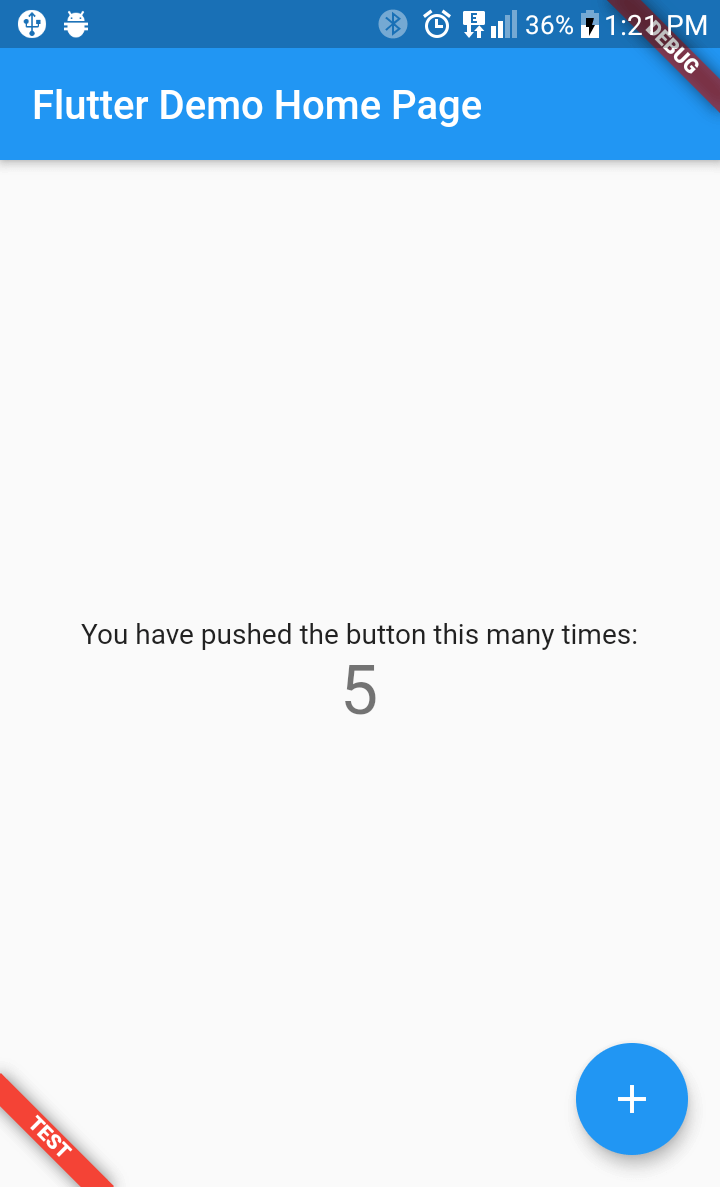
flutter_favor allows you to quickly configure and define dynamic variables for each flavor in your project. The flavors, as well as their names; they are dynamically defined by the developer or development team. In the configuration of a flavor you can set the name of each flavor, as well as the color and location of its banner. When attribute name is undefined or empty, the banner is hidden.

You can also configure the banners independently. The aforementioned attributes are globally configured in FlavorConfig, but can be changed in the FlavorBanner.

Screenshot

PROD DEV TEST
Screenshot Prod Screenshot Dev Screenshot Test

Note By default the banner is shown in BannerLocation.topStart and is visibility only when the attribute name of configuration is defined and not empty.

Getting Started

Adding package
flutter_flavor: ^3.1.4
Importing package
import 'package:flutter_flavor/flutter_flavor.dart';
Configuring
FlavorConfig(
    name: "DEVELOP",
    color: Colors.red,
    location: BannerLocation.bottomStart,
    variables: {
        "counter": 0,
        "baseUrl": "https://www.example.com",
    }
);
Using variables
 int _counter = FlavorConfig.instance.variables["counter"];

Example

Main
import 'package:flutter/material.dart';
import 'package:flutter_flavor/flutter_flavor.dart';

import 'app.dart';

void main() {
  FlavorConfig(
    name: "DEVELOP",
    color: Colors.red,
    location: BannerLocation.topStart,
    variables: {
      "counter": 5,
      "baseUrl": "https://www.example2.com",
    },
  );

  runApp(const MyApp());
}
App
import 'package:flutter/material.dart';
import 'package:flutter_flavor/flutter_flavor.dart';

class MyApp extends StatelessWidget {
  const MyApp({super.key});

  @override
  Widget build(BuildContext context) {
    return FlavorBanner(
      child: MaterialApp(
        title: 'Flutter Demo',
        theme: ThemeData(
          colorScheme: ColorScheme.fromSeed(seedColor: Colors.deepPurple),
          useMaterial3: true,
        ),
        home: const MyHomePage(title: 'Flutter Demo Home Page'),
      ),
    );
  }
}

class MyHomePage extends StatefulWidget {
  const MyHomePage({super.key, required this.title});
  final String title;

  @override
  State<MyHomePage> createState() => _MyHomePageState();
}

class _MyHomePageState extends State<MyHomePage> {
  int _counter = 0;

  void _incrementCounter() {
    setState(() {
      _counter++;
    });
  }

  @override
  Widget build(BuildContext context) {
    return Scaffold(
      appBar: AppBar(
        backgroundColor: Theme.of(context).colorScheme.inversePrimary,
        title: Text(widget.title),
      ),
      body: Center(
        child: Column(
          mainAxisAlignment: MainAxisAlignment.center,
          children: <Widget>[
            const Text(
              'You have pushed the button this many times:',
            ),
            Text(
              '$_counter',
              style: Theme.of(context).textTheme.headlineMedium,
            ),
          ],
        ),
      ),
      floatingActionButton: FloatingActionButton(
        onPressed: _incrementCounter,
        tooltip: 'Increment',
        child: const Icon(Icons.add),
      ),
    );
  }
}

VSCode Configuration

The .vscode folder is created in the workspace, if it does not exist it can be created by hand. Inside that folder a launch.json file is created and the configuration is established inside the file. For more information, visit: https://code.visualstudio.com/docs/editor/debugging and https://go.microsoft.com/fwlink/?linkid=830387

{
  "version": "0.2.0",
  "configurations": [
    {
      "name": "PROD-Flavor",
      "program": "[project-folder]/lib/main_prod.dart",
      "request": "launch",
      "type": "dart"
    },
    {
      "name": "DEV-Flavor",
      "program": "[project-folder]/lib/main_dev.dart",
      "request": "launch",
      "type": "dart"
    }
  ]
}

License

MIT License

카테고리

소스 저장소

이 패키지를 사용하는 프로젝트