패키지, 저장소 및 앱 카테고리 검색

flutter_list_view 표지
패키지 상세v1.1.29

flutter_list_view

점프 인덱스, 위치 유지 등이 포함된 향상된 리스트 뷰를 제공합니다.

AndroidiOSWebmacOSWindowsLinux
30일 다운로드
1.1만
좋아요
133
Pub 점수
140

패키지 설치

flutter pub add flutter_list_view

패키지 개요

공개 정보를 바탕으로 생성한 선택 가이드입니다.

표준 ListView를 개선하여 점프 인덱스 탐색, 재구성 중 위치 유지 및 개선된 스크롤 동작과 같은 고급 기능을 제공하는 플러터 패키지입니다. 대규모 데이터셋에서 빠른 탐색과 스크롤 상태 유지로 리스트 중심 애플리케이션에서 더 부드러운 사용자 경험을 제공하도록 설계되었습니다. 여러 플랫폼에서 효율적이고 반응성이 뛰어난 리스트 관리가 필요한 앱에 적합합니다.

사용 사례

  • 빠른 탐색 기능이 있는 대규모 데이터 목록
  • 업데이트 후 스크롤 위치 유지
  • 긴 목록에서 사용자 경험 향상
  • 크로스 플랫폼 목록 일관성
  • 스크롤 상태를 유지하면서 동적 콘텐츠를 다시 로드
  • 알파벳 건너뛰기 인덱스 구현

주요 기능

  • 빠른 탐색을 위한 점프 인덱스
  • 재구성 중에 스크롤 위치를 유지합니다
  • 대규모 목록을 위한 최적화된 성능
  • 모든 주요 플러터 플랫폼을 지원합니다
  • 사용자 정의 가능한 인덱스 지표
  • 부드러운 스크롤 전환

적합한 대상

  • 복잡한 리스트 인터페이스를 구축하는 개발자
  • 동적 또는 자주 업데이트되는 목록을 가진 앱
  • 직관적인 목록 탐색이 필요한 사용자
  • 크로스플랫폼 모바일 및 웹 애플리케이션
  • 고성능 리스트 렌더링이 필요한 애플리케이션

고려 사항

  • 기존 목록 로직과의 통합이 신중해야 합니다
  • 패키지 크기가 약간 증가할 수 있습니다
  • 50개 이상의 항목을 포함하는 목록에 가장 적합
  • 비표준 목록 레이아웃에 대한 제한된 사용자 정의
  • 안정적인 플러터 버전 호환성에 의존

원본 README

연결된 소스 저장소의 README 원문 스냅샷입니다. 최신 내용은 저장소에서 확인하세요.

Flutter List View

Enhance list view to support scroll to index, jump to index, header sticky, enable without scroll when insert data on top and turn performance to reused items.

Features

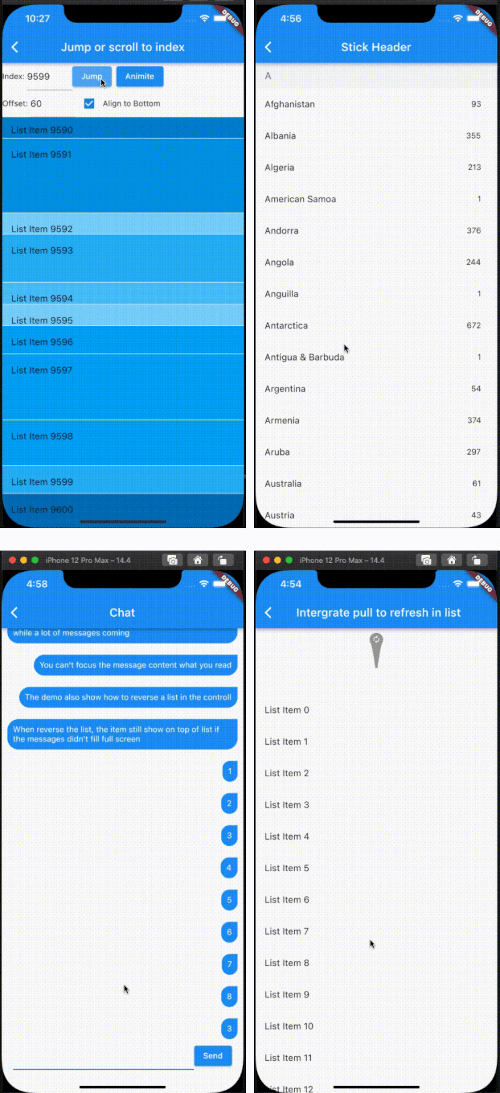
  1. Support the list view to jump to and scroll to index.
  2. Support for inserting data without scrolling
  3. Support for show top in reverse mode if the data can't fill the full viewport.
  4. Support sticky header.
  5. Support integrated pull_to_refresh
  6. When initializing data, allow for scrolling to specify an index.
  7. To save performance, flutter list_view always reuses the rendered item.
  8. Support to keep specifying items without reusing and disposing of them once the item is created.

[!NOTE]
The list item will be reuse when disableCacheItems=false and the invisible item will destroy. This mean, one item may be create or destroy multiple times. So The Item widget must not have any state, as it may lead to unforeseeable issues. If you want work same with list_view which item didn't destroy after create, please put onIsPermanent: (keyOrIndex) => true to FlutterListViewDelegate

FlutterListViewDelegate(
    (BuildContext context, int index) => _renderItem(index),
    childCount: messages.length,
    onItemKey: (index) => messages[index].id.toString(),
    // ...
    disableCacheItems: true,
    onIsPermanent: (keyOrIndex) => true,

Screen

Example

FlutterListView(
      delegate: FlutterListViewDelegate(
    (BuildContext context, int index) =>
        ListTile(title: Text('List Item ${data[index]}')),
    childCount: data.length,
  ))
Jump to index
flutterListViewController.jumpToIndex(100);

OR

/// Declare
FlutterListViewController controller = FlutterListViewController();
...
controller.sliverController
                      .jumpToIndex(100);
...
FlutterListView(
  controller: controller,
  delegate: FlutterListViewDelegate(
    (BuildContext context, int index) => Container(
      color: Colors.white,
      child: ListTile(title: Text('List Item ${data[index]}')),
    ),
    childCount: data.length,
  ))

If you want better user expierence, preferItemHeight or onItemHeight may set to.

  • preferItemHeight The package don't know the item's height, If you don't set, package alway think the item height is 50 util layout the item. If you know the height, you should set it.
  • onItemHeight like preferItemHeight, the function will used to get height of each item util the item layout.
Keep Position
_renderList() {
  return FlutterListView(
      reverse: true,
      delegate: FlutterListViewDelegate(
          (BuildContext context, int index) => Align(
                alignment: Alignment.centerRight,
                child: Padding(
                  padding: const EdgeInsets.all(10.0),
                  child: Container(
                    decoration: const BoxDecoration(
                        color: Colors.blue,
                        borderRadius: BorderRadius.only(
                            topLeft: Radius.circular(20),
                            bottomLeft: Radius.circular(20),
                            bottomRight: Radius.circular(20))),
                    child: Padding(
                      padding: const EdgeInsets.all(10.0),
                      child: Text(
                        chatListContents[index].msg,
                        style: const TextStyle(
                            fontSize: 14.0, color: Colors.white),
                      ),
                    ),
                  ),
                ),
              ),
          childCount: chatListContents.length,
          onItemKey: (index) => chatListContents[index].id.toString(),
          keepPosition: true,
          keepPositionOffset: 80,
          firstItemAlign: FirstItemAlign.end));
}

Notice: Keep positoin need implement onItemKey, the onItemKey used to identify the unique of item. The key should difference with other items' key. We use the key to know what position you insert to current list. if you insert a item before the rendered item, package should increase the scrollOffset.

Sticky header
Widget _renderHeader(String text) {
  return Container(
    color: const Color(0xFFF3F4F5),
    child: Padding(
      padding: const EdgeInsets.symmetric(horizontal: 16.0, vertical: 12.0),
      child: Text(
        text,
        style: const TextStyle(fontSize: 18, color: Color(0xFF767676)),
      ),
    ),
  );
}

Widget _renderItem(CountryModel itemData) {
  return Padding(
      padding: const EdgeInsets.only(right: 12.0),
      child: ListTile(
          title: Text(itemData.name), trailing: Text(itemData.phoneCode)));
}

@override
Widget build(BuildContext context) {
  return Scaffold(
    appBar: AppBar(title: const Text("Stick Header")),
    body: FlutterListView(
        delegate: FlutterListViewDelegate(
          (BuildContext context, int index) {
            var data = _countries[index];
            if (data is AlphabetHeader) {
              return _renderHeader(data.alphabet);
            } else {
              return _renderItem(data as CountryModel);
            }
          },
          childCount: _countries.length,
          onItemSticky: (index) => _countries[index] is AlphabetHeader,
        ),
        controller: controller),
  );
}

You can also check doc/stickyHeader.md

Integrate pull_to_refresh
@override
Widget build(BuildContext context) {
  return Scaffold(
    appBar: AppBar(
      title: const Text("Intergrate pull to refresh in list"),
    ),
    body: SmartRefresher(
      enablePullDown: true,
      enablePullUp: true,
      header: const WaterDropHeader(),
      footer: CustomFooter(
        builder: (context, mode) {
          Widget body;
          if (mode == LoadStatus.idle) {
            body = const Text("pull up load");
          } else if (mode == LoadStatus.loading) {
            body = const CupertinoActivityIndicator();
          } else if (mode == LoadStatus.failed) {
            body = const Text("Load Failed!Click retry!");
          } else if (mode == LoadStatus.canLoading) {
            body = const Text("release to load more");
          } else {
            body = const Text("No more Data");
          }
          return SizedBox(
            height: 55.0,
            child: Center(child: body),
          );
        },
      ),
      controller: _refreshController,
      onRefresh: _onRefresh,
      onLoading: _onLoading,
      child: FlutterListView(
          delegate: FlutterListViewDelegate(
        (BuildContext context, int index) =>
            ListTile(title: Text('List Item ${data[index]}')),
        childCount: data.length,
      )),
    ),
  );
}
Support to keep specifying items without reusing and disposing of them once the item is created.
FlutterListView(
  delegate: FlutterListViewDelegate(
      (BuildContext context, int index) =>
          Item(text: data[index].toString()),
      childCount: data.length,
      // If onItemKey is not given, the key is index
      // The example is indicate the "40" item will not be reused and disposed after it was created
      onIsPermanent: (key) => key == "40"))

카테고리

소스 저장소

이 패키지를 사용하는 프로젝트