Android 및 iOS 앱용으로 Facebook 로그인 통합을 원활하게 제공하는 Flutter 패키지입니다. 사용자가 자신의 Facebook 계정으로 로그인할 수 있도록 하여 인증 프로세스를 단순화하고, 이름, 이메일, 프로필 사진과 같은 사용자 프로필 정보를 자동으로 가져옵니다. 복잡한 설정 없이 소셜 로그인 기능을 쉽게 추가하고자 하는 개발자를 위한 것입니다. 내부적으로 Facebook의 SDK를 활용하여 현재 플랫폼 요구 사항과의 호환성을 보장합니다.
사용 사례
소셜 로그인 구현
페이스북을 통한 사용자 인증
프로필 데이터 검색
모바일 앱 온보딩
안전한 신원 확인
크로스 플랫폼 로그인 지원
주요 기능
Flutter와의 간편한 통합
자동 사용자 프로필 가져오기
Android 및 iOS 지원
최소한의 보일러플레이트 코드
보안 OAuth 흐름
내장된 오류 처리
적합한 대상
소셜 로그인을 요구하는 앱
빠르게 MVP를 구축하는 스타트업
주로 인증으로 페이스북을 사용하는 개발자
사용자 프로필 데이터가 필요한 프로젝트
크로스 플랫폼 모바일 애플리케이션
고려 사항
Facebook 앱 ID 구성이 필요합니다
적절한 권한 설정이 필요합니다
Facebook SDK에 의존합니다
추가적인 개인정보 보호 정책 공개가 필요할 수 있습니다
페이스북 인증만 가능
플랫폼별 구성이 필요합니다
원본 README
연결된 소스 저장소의 README 원문 스냅샷입니다. 최신 내용은 저장소에서 확인하세요.
flutter_login_facebook
Flutter Plugin to login via Facebook.
Easily add Facebook login feature in your application. User profile information included.
Add values to /android/app/src/main/res/values/strings.xml (create file if it doesn't exist).
You don't need to add fb_login_protocol_scheme, only facebook_app_id and facebook_client_token:
Generate Development and Release keys as described in the documentation. Note: if your application uses Google Play App Signing then you should get certificate SHA-1 fingerprint from Google Play Console and convert it to base64
echo"{sha1key}" | xxd -r -p | openssl base64
Add generated keys in Key Hashes.
Click "Save".
⚠️ Important! You should add key hashes for every build variants. E.g. if you have CI/CD which build APK for testing
with it's own certificate (it may be auto generated debug certificate or some another) than you should add it's key too.
Add your Bundle Identifier - set Bundle ID (you can find it in Xcode: Runner - Target Runner - General, section Identity, field Bundle Identifier) and click "Save".
Enable Single Sign-On for Your App if you need it and click "Save".
In Xcode right-click on Info.plist, and choose Open As Source Code.
Copy and paste the following XML snippet into the body of your file (<dict>...</dict>),
replacing [APP_ID] with Facebook application id,
[CLIENT_TOKEN] value found under Settings > Advanced > Client Token in your App Dashboard
and [APP_NAME] with Facebook application name
(you can copy prepared values from Step 4 in Facebook Quickstart).
⚠️ NOTE. Check if you already have CFBundleURLTypes or LSApplicationQueriesSchemes keys in your Info.plist. If you have, you should merge their values, instead of adding a duplicate key.
Skip Step 5 (Connect Your App Delegate) and all the rest.
And that's it for iOS.
Additional information
Privacy Manifest for App Store Review requirements
Additional guidance for developers from Facebook documentation:
Our Privacy Manifest only provides information collected by default and the SDKs that depend on the Core SDK for functionality may restate the data usage details of the Core SDK. Some app developers may choose to send us more or less information in code, or via the Events Manager or through Advanced matching functionality. These developers will need to provide details around additional data usage details in their Privacy Manifest or App Store Privacy Labels in accordance with their own practices. Refer to the following article for more information on additional data that may be sent by developers through Meta’s SDKs.
Note that we do not attempt to associate all collected data with Meta users.
We have pre-populated the tracking domain field for the FB SDK in the Privacy Manifest to help ensure that our services continue to function properly. We do not advise manually adding domains. Listing “www.facebook.com” or subdomains of “facebook.com” in the tracking domain field of a Privacy Manifest may break functionality.
Note: Developers can find additional details around the tracking domain field in the Privacy Manifests for Meta SDKs. What is pre-populated in the tracking domain field is intended to receive traffic when a user has provided AppTrackingTransparency (ATT) permission to the app. If our check determines that a request or event from an iOS14.5+ device lacks ATT permission, then usage of such data will be restricted and we will use privacy preserving methods (like those available in Aggregated Event Measurement) to remove or combine information before delivering or measuring ads.
Additional Facebook app setup
Go to My App on Facebook and select your application.
Icon
You should add the App Icon (in Settings -> Basic) to let users see
your application icon instead of the default icon when they attempt to log in.
Add store IDs
In Setting -> Basic -> iOS fill up field "iPhone Store ID" ("iPad Store ID").
Permissions and features
To use the profile data, you must raise the access level for the "public_profile" and "email" functions to "Advanced Access" in App Review -> Permissions and features (Administrator rights required).
Optional settings
You may want to change some other settings.
For example Display Name, Contact Email, Category, etc.
Enable application
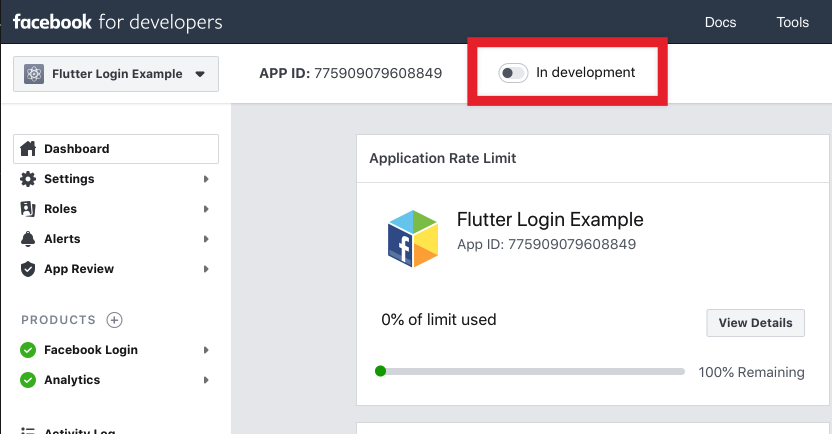
By default, your application has the status "In development".
You should enable application before log in feature goes public.
Facebook will show a warning if your application is not fully set up.
For example, you may need to provide a Privacy Policy. You can use your
Privacy Policy from Google Play/App Store.
Usage in application
You can:
log in via Facebook;
get access token;
get user profile;
get user profile image url;
get user email (if has permissions);
check if logged in;
log out.
Sample code:
import'package:flutter_login_facebook/flutter_login_facebook.dart';
// Create an instance of FacebookLoginfinal fb = FacebookLogin();
// Log infinal res = await fb.logIn(permissions: [
FacebookPermission.publicProfile,
FacebookPermission.email,
]);
// Check result statusswitch (res.status) {
caseFacebookLoginStatus.success:
// Logged in// Send access token to server for validation and authfinalFacebookAccessToken accessToken = res.accessToken;
print('Access token: ${accessToken.token}');
// Get profile datafinal profile = await fb.getUserProfile();
print('Hello, ${profile.name}! You ID: ${profile.userId}');
// Get user profile image urlfinal imageUrl = await fb.getProfileImageUrl(width: 100);
print('Your profile image: $imageUrl');
// Get email (since we request email permission)final email = await fb.getUserEmail();
// But user can decline permissionif (email != null)
print('And your email is $email');
break;
caseFacebookLoginStatus.cancel:
// User cancel log inbreak;
caseFacebookLoginStatus.error:
// Log in failedprint('Error while log in: ${res.error}');
break;
}
⚠️ WARNING! Important Changes in SDK v17.0 for iOS (plugin version 2.0.0)
With the release of SDK v17.0 for iOS, there are significant changes to the login behavior and token validation process:
Limited Login Mode: If the user has not granted the AdvertiserTracking permission
(Apple documentation, Facebook documentation),
the login process will now enter a Limited Login mode. This mode is indicated by the isLimitedLogin field in the AccessToken object.
Access Token in Limited Login Mode: In Limited Login mode, the access token is not valid and will fail server-side verification.
Additionally, it will not permit Graph API requests. For Limited Login you need to validate OIDC token.
OIDC Token Validation: the OIDC Token will be available in the new authenticationToken field in the AccessToken.
In Limited Login mode you should validate this token for the server-side verification.
Learn more about token validation in the documentation.
Profile Image URL: In Limited Login mode, the getProfileImageUrl() method will ignore size parameters.
This limitation arises because we can't execute API calls, thus only a 100x100 image from the JWT authentication token can be used.
For detailed insights into these changes, please refer to the blog post and the documentation on Limited Login.
[Android] Express login
Express Login helps users log in with their Facebook account across devices and platforms. If a person has logged into your app before on any platform, you can use Express Login to log them in with their Facebook account on Android, instead of asking for them to select a login method, which sometimes resulted in creating duplicate accounts or even failing to log in at all.