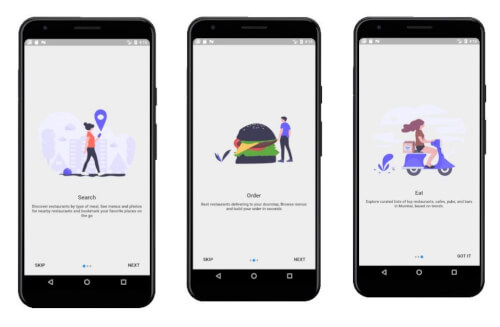
모바일 및 웹 애플리케이션의 온보딩 화면 생성을 간소화하기 위해 설계된 플러터 패키지입니다. 개발자가 부드럽고 상호작용 가능한 방식으로 소개 콘텐츠를 제시할 수 있도록 사용자 정의 가능한 카루셀 인터페이스를 제공합니다. 안드로이드, 아이오스, 웹, 맥OS, 윈도우, 리눅스 등 여러 플랫폼에 내장된 지원을 통해 기기 간 일관된 온보딩 경험을 보장합니다. 쉽게 통합 가능하며 앱 최초 실행 시 사용자 참여도를 향상시킵니다.
사용 사례
앱 온보딩 흐름
사용자 튜토리얼 화면
초기 사용자 경험
제품 기능 소개
다중 페이지 환영 화면
주요 기능
사전 구축된 온보딩 카루셀
사용자 정의 가능한 UI 구성 요소
크로스 플랫폼 호환성
Flutter와의 간편한 통합
애니메이션 및 전환 지원
적합한 대상
새로운 앱 개발자
사용자 경험 중심 프로젝트
모바일 및 웹 앱
온보딩 중심 애플리케이션
최소 설정 요구 사항
고려 사항
기본 스타일링을 넘어서는 사용자 정의가 제한적
외부 종속성에 의존함
추가 상태 관리가 필요할 수 있습니다
복잡한 탐색 패턴에는 적합하지 않음
내장 분석 추적 없음
원본 README
연결된 소스 저장소의 README 원문 스냅샷입니다. 최신 내용은 저장소에서 확인하세요.
flutter onboarding screen
A new Flutter package for both android and iOS which help developer in creating a onboarding screen of their app.
classTestScreenextendsStatelessWidget{
/*here we have a list of OnbordingScreen which we want to have, each OnbordingScreen have a imagePath,title and an desc.
*/finalList<OnbordingData> list = [
OnbordingData(
imagePath: "images/pic11.png",
title: "Search",
desc:"Discover restaurants by type of meal, See menus and photos for nearby restaurants and bookmark your favorite places on the go",
),
OnbordingData(
imagePath: "images/pic12.png",
title: "Order",
desc:"Best restaurants delivering to your doorstep, Browse menus and build your order in seconds",
),
OnbordingData(
imagePath: "images/pic13.png",
title: "Eat",
desc:"Explore curated lists of top restaurants, cafes, pubs, and bars in Mumbai, based on trends.",
),
];
@overrideWidgetbuild(BuildContext context) {
/* remove the back button in the AppBar is to set automaticallyImplyLeading to false
here we need to pass the list and the route for the next page to be opened after this. */returnnewIntroScreen(list,MaterialPageRoute(builder: (context) => NextScreen()),
);
}
}