패키지, 저장소 및 앱 카테고리 검색

flutter_persistent_keyboard_height 표지
패키지 상세v1.0.5

flutter_persistent_keyboard_height

키보드 높이를 얻는 Flutter 패키지입니다. 올바른 높이로 스티커/이모티콘 모달을 표시하는 데 사용할 수 있습니다.

AndroidiOS
30일 다운로드
52
좋아요
33
Pub 점수
150

패키지 설치

flutter pub add flutter_persistent_keyboard_height

패키지 개요

공개 정보를 바탕으로 생성한 선택 가이드입니다.

화면 키보드의 높이를 지속적으로 제공하여 정확한 UI 조정을 가능하게 하는 플러터 패키지입니다. 스티커나 이모티콘 모달과 같은 요소를 키보드에 따라 정렬하는 데 특히 유용합니다. 이 패키지는 안드로이드와 iOS 플랫폼 모두에서 작동하며 일관된 동작을 보장합니다. 키보드 상태 변경을 감지하고 스트림을 통해 현재 높이를 노출하므로 반응형 레이아웃에 쉽게 통합할 수 있습니다.

사용 사례

  • 키보드가 나타날 때 UI 레이아웃 조정
  • 키보드 위에 모달 배치하기
  • 입력 중에 콘텐츠가 보이도록 유지하는 것 확인
  • 동적 입력 영역을 갖춘 채팅 인터페이스 만들기
  • 실시간 키보드 인식을 활용한 폼 작성

주요 기능

  • 실시간 키보드 높이 모니터링
  • 크로스 플랫폼 지원 (Android 및 iOS)
  • 반응형 업데이트를 위한 스트림 기반 API
  • 최소한의 설정 및 통합
  • 애니메이션 중에도 정확한 높이 감지 가능

적합한 대상

  • 채팅 앱 개발자
  • 폼 빌더
  • 키보드 인식이 필요한 UI 컴포넌트
  • 입력 중심 인터페이스를 개발하는 개발자
  • 키보드 근처에 플로팅 액션 버튼이 있는 앱

고려 사항

  • 메모리 누수를 방지하기 위해 스트림을 올바르게 해제해야 합니다
  • 분할 키보드와 같은 에지 케이스를 처리하기 위해 추가 로직이 필요할 수 있습니다
  • 정적 키보드 높이 시나리오에 적합하지 않습니다
  • 플랫폼별 키보드 이벤트에 의존합니다
  • 여러 기기 및 OS 버전에서 테스트되어야 합니다

원본 README

연결된 소스 저장소의 README 원문 스냅샷입니다. 최신 내용은 저장소에서 확인하세요.

flutter_persistent_keyboard_height Pub version

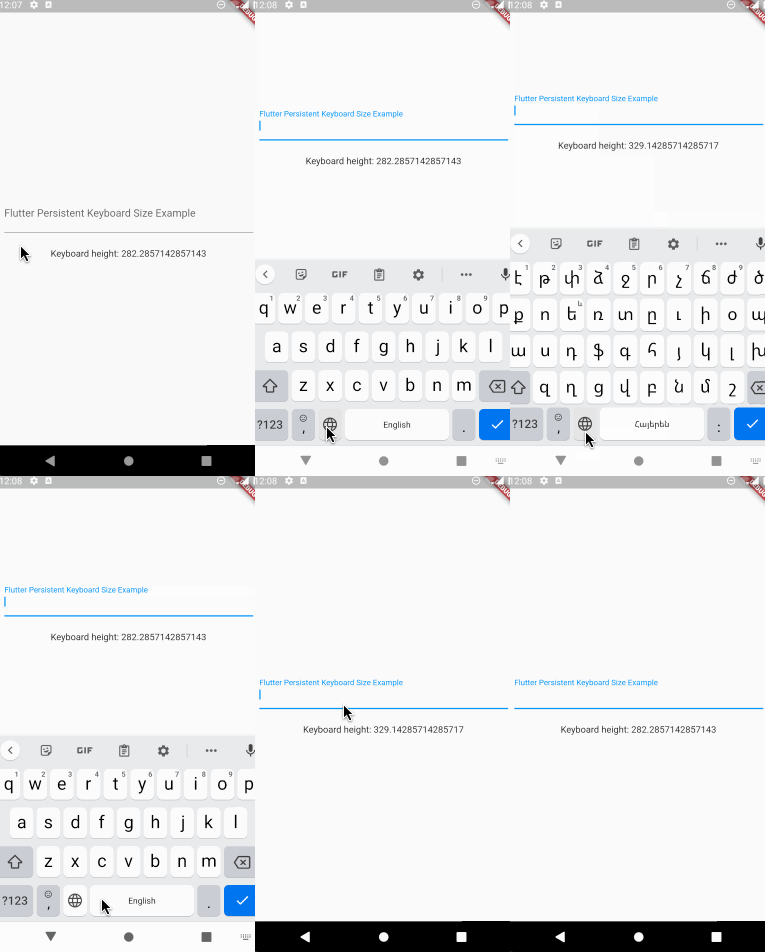
Flutter package to get keyboard height. The height is persisted during app sessions and keyboard states (you can use the height when keyboard is closed).

Usage

Registering the provider

First thing you need to do is wrap a widget from children of which you want to get the keyboard height with PersistentKeyboardHeightProvider. Add it to the builder of your app widget (perhaps MaterialApp) if you want to get keyboard height from all widgets.

class MyApp extends StatelessWidget {
  const MyApp({Key? key}) : super(key: key);

  @override
  Widget build(BuildContext context) {
    return MaterialApp(
      title: 'Flutter Persistent Keyboard Height Example',
      home: const FlutterPersistentKeyboardHeightExample(),
      builder: (context, child) => PersistentKeyboardHeightProvider(
        child: child!,
      ),
    );
  }
}
Getting the keyboard height

In order to get keyboard height use the PersistentKeyboardHeight inherited widget:

Widget build(BuildContext context) {
  final keyboardHeight = PersistentKeyboardHeight.of(context).keyboardHeight;

  return Scaffold(
    body: Column(
      mainAxisAlignment: MainAxisAlignment.center,
      children: [
        const Padding(
          padding: EdgeInsets.all(16.0),
          child: TextField(
            decoration: InputDecoration(
              labelText: 'Flutter Persistent Keyboard Size Example',
            ),
          ),
        ),
        const SizedBox(height: 8),
        Text('Keyboard height: $keyboardHeight'),
      ],
    ),
  );
}
Using a custom storage provider

By default, the package uses shared_preferences to preserve the keyboard height but if you want to use a custom solution for preserving the height you can do that by implementing the IPersistentKeyboardHeightStorageProvider interface and passing an instance of the class to PersistentKeyboardHeightProvider:

class CustomPersistentKeyboardHeightStorageProvider
    implements IPersistentKeyboardHeightStorageProvider {
  const CustomPersistentKeyboardHeightStorageProvider();

  @override
  Future<double> getHeight() {
    // read the height from storage
  }

  @override
  Future<void> setHeight(double height) {
    // save the height to storage
  }
}

class MyApp extends StatelessWidget {
  const MyApp({Key? key}) : super(key: key);

  @override
  Widget build(BuildContext context) {
    return MaterialApp(
      title: 'Flutter Persistent Keyboard Height Example',
      home: const FlutterPersistentKeyboardHeightExample(),
      builder: (context, child) => PersistentKeyboardHeightProvider(
        child: child!,
      ),
    );
  }
}

Check out the example directory for a complete example app.

The development process

The first version of this package was developed in two livestreams. Unfortunately, my voice disappeared at the middle of the first livestream but the second livestream is okay. In case you want to check them out, here are the links: Part 1, Part 2.

Thanks to

카테고리

의존성

의존성 목록 2 개

소스 저장소

이 패키지를 사용하는 프로젝트

아직 데이터가 없습니다.