패키지, 저장소 및 앱 카테고리 검색

flutter_popup 표지
패키지 상세v3.3.9

flutter_popup

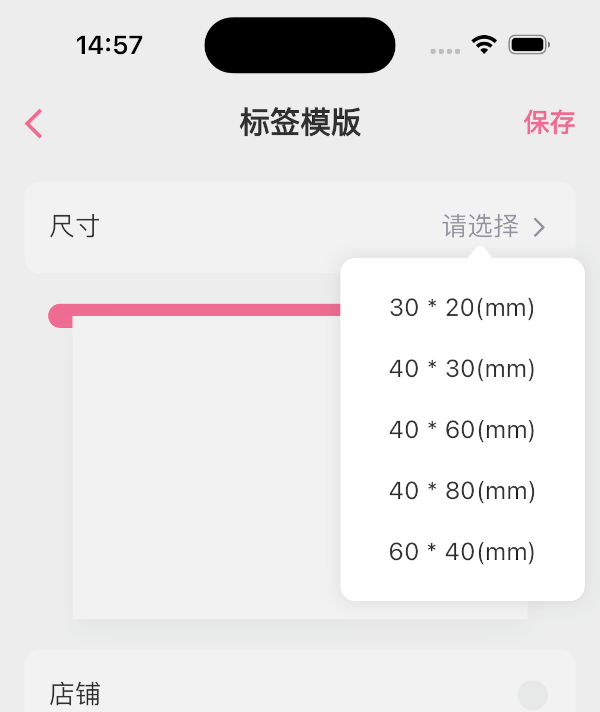
flutter_popup 패키지는 Flutter 앱에서 사용자 정의 가능한 팝업을 생성하는 데 사용되는 유용한 도구입니다. 강조 기능은 특정 영역에 사용자의 주의를 효과적으로 집중시킵니다

AndroidiOSWebmacOSWindowsLinux
30일 다운로드
9.2천
좋아요
205
Pub 점수
145

패키지 설치

flutter pub add flutter_popup

패키지 개요

공개 정보를 바탕으로 생성한 선택 가이드입니다.

flutter_popup 패키지는 Flutter 애플리케이션에서 팝업을 생성하기 위한 유연하고 사용자 정의 가능한 솔루션을 제공합니다. 사용자 경험을 향상시키기 위해 설계되었으며, 특정 UI 영역에 주목을 끌어내는 데 효과적이며, 튜토리얼, 알림 또는 안내형 상호작용에 이상적입니다. Android, iOS, Web, macOS, Windows, Linux 등 모든 주요 플랫폼을 지원하여 어디서나 일관된 동작을 보장합니다. pub.dev를 통해 쉽게 통합할 수 있으며, 개발자가 팝업의 외관과 동작을 맞춤화할 수 있는 깔끔한 API를 제공합니다.

사용 사례

  • 사용자 온보딩 튜토리얼
  • 컨텍스트 알림
  • 안내된 앱 워크스루
  • 인터랙티브 툴팁
  • 양식 검증 힌트

주요 기능

  • 사용자 정의 가능한 팝업 콘텐츠
  • 크로스 플랫폼 호환성
  • 포커스 강조
  • pub.dev과의 간편한 통합
  • 반응형 디자인 지원

적합한 대상

  • 인터랙티브 앱을 개발하는 개발자
  • 온보딩 기능이 필요한 팀
  • 사용자 안내가 필요한 앱
  • Flutter를 사용하는 UI/UX 디자이너
  • 여러 플랫폼을 대상으로 하는 프로젝트

고려 사항

  • 핵심 UI를 가리지 않도록 주의 깊게 배치해야 합니다
  • 복잡한 레이아웃을 위해 추가 스타일링이 필요할 수 있습니다
  • 많은 동시 팝업으로 인한 성능 영향
  • 기본 전환 외에 내장 애니메이션 기능이 제한적
  • 정확한 위치를 위해 적절한 맥락이 필요합니다

원본 README

연결된 소스 저장소의 README 원문 스냅샷입니다. 최신 내용은 저장소에서 확인하세요.

flutter_popup

The flutter_popup package is a convenient tool that enables you to display a straightforward and customizable popup within your Flutter application. It offers a highlight feature that can be utilized to direct the user's attention to a specific area as needed.

Getting Started

image image image image

How to use

dependencies:
  flutter_popup: ^latest_version
import 'package:flutter_popup/flutter_popup.dart';
// easy to use
CustomPopup(
  content: Text('George says everything looks fine'),
  child: Icon(Icons.help),
),

CustomPopup(
  arrowColor: Colors.orange,
  barrierColor: Colors.green.withOpacity(0.1),
  backgroundColor: Colors.white,
  content: Text('George says everything looks fine'),
  child: Icon(Icons.help),
),

CustomPopup(
  content: _Slider(),
  position: PopupPosition.top,
  child:Text('slider'),
)

CustomPopup(
  content: Column(
  mainAxisSize: MainAxisSize.min,
    children: List.generate(5, (index) => Text('menu$index')),
  ),
  child: const Icon(Icons.add_circle_outline),
)

Container(
  decoration: BoxDecoration(color: Colors.white),
  padding: EdgeInsets.symmetric(vertical: 10),
  child: Row(
    mainAxisAlignment: MainAxisAlignment.spaceAround,
    children: [
      CustomPopup(
      showArrow: false,
      contentPadding:EdgeInsets.symmetric(horizontal: 30, vertical: 10),
      barrierColor: Colors.transparent,
      contentDecoration: BoxDecoration(color: Colors.white),
      content: SizedBox(
        width: double.infinity,
        child: Column(
          mainAxisSize: MainAxisSize.min,
          crossAxisAlignment: CrossAxisAlignment.start,
          children: List.generate(4,(index) => Text('item$index'),),),),
            child: Text('filter1'),
          ),
              Text('filter2'),
              Text('filter3'),
        ],
  ),
)

// Show the popup programmatically
final popupKey = GlobalKey<CustomPopupState>();
// ...
CustomPopup(
  key: popupKey,
  content: Text('George says everything looks fine'),
  child: Icon(Icons.help),
);
// ...
popupKey.currentState?.show();

last

Our full-stack freelance team is opening to new projects

If you have any questions about Flutter, or if you need me to customize a Flutter application for you, please feel free to contact me: QQ: 965471570 Gmail: herowws90@gmail.com

如果您有任何关于Flutter的问题,或者需要我为您定制一个Flutter应用程序,请联系我: QQ:965471570 Gmail:herowws90@gmail.com

카테고리

소스 저장소

이 패키지를 사용하는 프로젝트