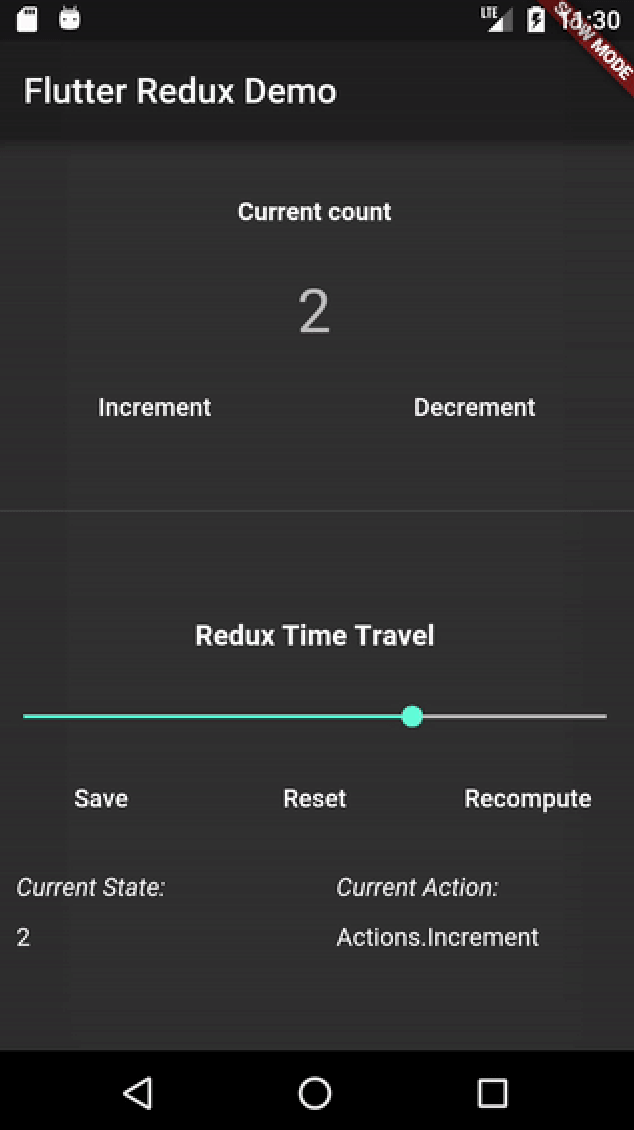
Flutter용 시간여행형 Redux 디버거로 앱 개발 중 상태 변경을 검사하고 재생할 수 있게 해줍니다. Redux와 원활하게 통합되어 작업 추적, 상태 전이 보기, 앱의 이력을 앞뒤로 스텝하여 문제를 디버깅할 수 있는 시각적 인터페이스를 제공합니다. 복잡한 상태 관리 워크플로우에 적합하며 디버깅 효율성을 높이고 상태 변화 과정을 더 잘 이해하도록 도와줍니다. 도구는 라이트 모드와 다크 모드를 모두 지원하며 Flutter의 테마 기능과 일치합니다.
사용 사례
복잡한 상태 전이 디버깅
문제 재현을 위한 사용자 작업 재생
시간에 따른 상태 변화 시각화
Redux 미들웨어 동작 테스트
상태 로직에서 팀 협업 개선
주요 기능
시간여행 디버깅
실시간 상태 점검
액션 리플레이 기능
라이트 모드 및 다크 모드 지원
무결점 리덕스 통합
적합한 대상
Flutter에서 Redux를 사용하는 개발자
상태가 많은 애플리케이션을 개발하는 팀
상태 문제 디버깅에 집중하는 프론트엔드 엔지니어
복잡한 비즈니스 로직을 가진 플러터 앱
향상된 디버깅 도구를 찾는 사람
고려 사항
Redux 설정이 필요합니다
생산 빌드에 적합하지 않습니다
개발 환경에 한정
앱 시작 시간이 증가할 수 있습니다
구조가 잘 잡힌 상태 모델과 함께 사용할 때 가장 효과적입니다
원본 README
연결된 소스 저장소의 README 원문 스냅샷입니다. 최신 내용은 저장소에서 확인하세요.
flutter_redux_dev_tools
A Widget you can use to show a Redux Time Travel UI. Simply put it in a part of your UI that makes sense (Such as a Dev Tools Drawer), pass it a DevToolsStore and you'll be good to go!
Note: This Widget does not work with a normal ReduxStore. It is meant to work with the redux_dev_tools package, which provides a DevToolsStore. The DevToolsStore is a drop-in replacement for your Store during Development!
Demo
A simple Flutter app that allows you to Increment and Decrement a counter.
Usage
Create a main_dev.dart file
In this file, create a DevToolsStore in place of a normal redux Store
Create a ReduxDevTools widget, passing through the Store. You can place this Widget wherever makes sense in your app! One good suggestion: In a "Dev Tools Drawer." This is generally the endDrawer in your Scaffold, and can contain different types of tools for a Dev Build of your app.
Example
This example paints only a broad outline of how to use the ReduxDevTools. For a complete example, see the example folder.
intaddReducer(int state, action) => state + 1;
// Create a DevToolsStore instead of a normal Store during Developmentfinal store = DevToolsStore<int>(
addReducer,
initialState: 0,
);
// Finally, create your app with a Redux Dev Toolsmain() {
runApp(MaterialApp(
home: Scaffold(
endDrawer: ReduxDevTools<int>(store),
),
));
}