패키지, 저장소 및 앱 카테고리 검색

패키지 상세v0.0.5

flutter_shine

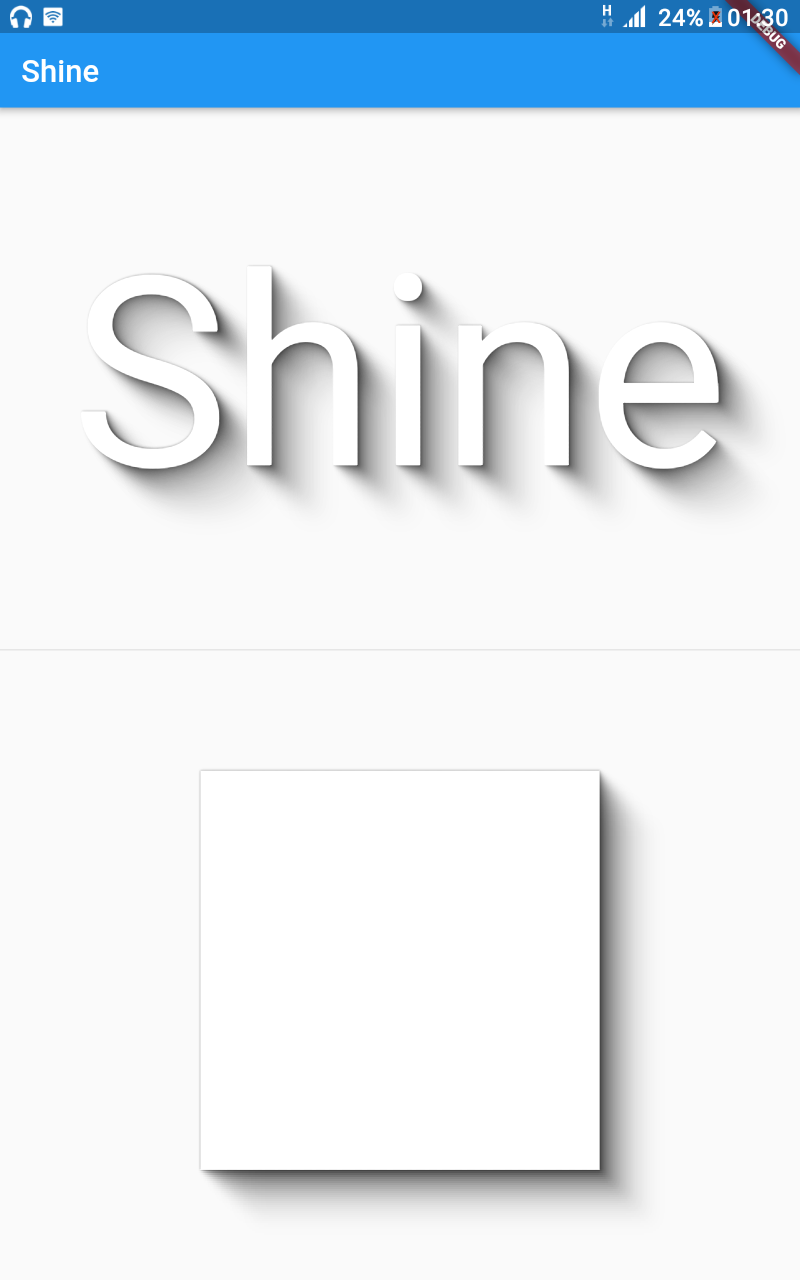
Flutter Shine은 아름다운 그림자, 동적 빛 위치, 매우 사용자 정의 가능한 그림자, 라이브러리 종속성 없이 콘텐츠 기반 텍스트 또는 박스 그림자를 제공하는 라이브러리입니다.

30일 다운로드
49
좋아요
49
Pub 점수
35

패키지 설치

flutter pub add flutter_shine

패키지 개요

공개 정보를 바탕으로 생성한 선택 가이드입니다.

Flutter Shine은 가볍고 종속성이 없는 라이브러리로, Flutter 애플리케이션에서 시각적으로 매력적이고 동적인 그림자를 가능하게 합니다. 콘텐츠에 맞춰 자동 조정되는 텍스트 및 박스 그림자를 지원하며, 현실적인 조명 효과를 위해 사용자 정의 가능한 광원 위치를 제공합니다. 단순성과 유연성을 고려해 설계되었으며, 외부 라이브러리 없이 미세하고 애니메이션된 그림자를 UI에 추가할 수 있습니다. 깊이감과 상호작용이 중요한 현대적이고 세련된 인터페이스에 적합합니다.

사용 사례

  • 버튼에 동적 그림자를 만드는 방법
  • 현실적인 조명 효과로 텍스트 강화
  • 인터랙티브 UI 요소 설계
  • 카드와 컨테이너에 깊이 추가
  • 애니메이션 시각 피드백 구축
  • 최소한의 코드로 앱 미적 요소 향상

주요 기능

  • 동적 라이트 위치 지정
  • 사용자 정의 가능한 그림자 강도 및 색상
  • 외부 종속성 없음
  • 텍스트 및 박스 그림자 지원
  • 콘텐츠 인식 그림자 렌더링
  • 경량이고 성능이 뛰어남

적합한 대상

  • 시각적 완성도를 추구하는 UI 디자이너
  • 최소한의 설정을 원하는 개발자
  • 상호작용 또는 애니메이션 요소를 가진 앱
  • 현대적인 매터리얼 디자인에 초점을 맞춘 프로젝트
  • 성능과 크기를 우선시하는 팀

고려 사항

  • 그림자 효과만 가능
  • 내장 애니메이션 컨트롤 없음
  • 복잡한 동작을 위해 수동 구성이 필요합니다
  • 무거운 3D 효과에 적합하지 않음
  • 간결하고 깔끔한 UI 레이아웃과 함께 사용하는 것이 가장 좋습니다

원본 README

연결된 소스 저장소의 README 원문 스냅샷입니다. 최신 내용은 저장소에서 확인하세요.

Image 1

Flutter Shine

Pub Build Status Awesome Flutter

Show some :heart: and star the repo to support the project

GitHub stars GitHub forks GitHub watchers GitHub followers
Twitter Follow

Flutter widget inspired by Shine

Installation

Add the Package

dependencies:
  flutter_shine: ^0.0.5

❔ Usage

Import this class
import 'package:flutter_shine/flutter_shine.dart';
Flutter Shine

See how easy it is to create a shadow on text and on a container.

Exemple
FlutterShine(
    builder: (BuildContext context, ShineShadow shineShadow) {
        return Column(
            crossAxisAlignment: CrossAxisAlignment.center,
            mainAxisAlignment: MainAxisAlignment.spaceEvenly,
            mainAxisSize: MainAxisSize.max,
            children: <Widget>[
                Text(
                    "Shine",
                    style: TextStyle(
                        fontSize: 100,
                        color: Colors.white,
                        shadows: shineShadow.shadows),
                ),
                Divider(),
                Container(
                    width: 300,
                    height: 300,
                    decoration: BoxDecoration(
                        color: Colors.white, boxShadow: shineShadow.boxShadows),
                )
            ],
        );
    },
),

Extremely customizable shadow with a dynamic light positions.

You can customize follows values :

  • number of Steps : The density of the shadow
  • opacity : The opacity of the shadow
  • opacity Power : The opacity power
  • offset : The offset of the shadow
  • offset Power : The offset power
  • blur : The blur of the shadow
  • blur Power : The blur power
  • shadow Color : The color of the shadow
Exemple
FlutterShine(
    [config: Config(shadowColor: Colors.red[300]),]
    [light: Light(intensity: 1, position: Point(x, y)),]
    builder: (BuildContext context, ShineShadow shineShadow) {
        return Column(
            crossAxisAlignment: CrossAxisAlignment.center,
            mainAxisAlignment: MainAxisAlignment.spaceEvenly,
            mainAxisSize: MainAxisSize.max,
            children: <Widget>[
                Text(
                    "Shine",
                    style: TextStyle(
                        fontSize: 100,
                        color: Colors.white,
                        shadows: shineShadow.shadows),
                ),
                Divider(),
                Container(
                    width: 300,
                    height: 300,
                    decoration: BoxDecoration(
                        color: Colors.white, boxShadow: shineShadow.boxShadows),
                )
            ],
        );
    },
),

Examples

Web and command-line examples can be found in the example folder.

Web Examples

In order to run the web examples, please follow these steps:

  1. Clone this repo and enter the directory
  2. Run pub get
  3. Run pub run build_runner serve example
  4. Navigate to http://localhost:8080/web/ in your browser
Command Line Examples

In order to run the command line example, please follow these steps:

  1. Clone this repo and enter the directory
  2. Run pub get
  3. Run dart example/lib/main.dart
Flutter Example
Install Flutter

In order to run the flutter example, you must have Flutter installed. For installation instructions, view the online documentation.

Run the app
  1. Open up an Android Emulator, the iOS Simulator, or connect an appropriate mobile device for debugging.
  2. Open up a terminal
  3. cd into the example/lib/ directory
  4. Run flutter doctor to ensure you have all Flutter dependencies working.
  5. Run flutter packages get
  6. Run flutter run

Stargazers over time

Stargazers over time

License

MIT License

Copyright (c) 2020 Jonathan Monga

Permission is hereby granted, free of charge, to any person obtaining a copy
of this software and associated documentation files (the "Software"), to deal
in the Software without restriction, including without limitation the rights
to use, copy, modify, merge, publish, distribute, sublicense, and/or sell
copies of the Software, and to permit persons to whom the Software is
furnished to do so, subject to the following conditions:

The above copyright notice and this permission notice shall be included in all
copies or substantial portions of the Software.

THE SOFTWARE IS PROVIDED "AS IS", WITHOUT WARRANTY OF ANY KIND, EXPRESS OR
IMPLIED, INCLUDING BUT NOT LIMITED TO THE WARRANTIES OF MERCHANTABILITY,
FITNESS FOR A PARTICULAR PURPOSE AND NONINFRINGEMENT. IN NO EVENT SHALL THE
AUTHORS OR COPYRIGHT HOLDERS BE LIABLE FOR ANY CLAIM, DAMAGES OR OTHER
LIABILITY, WHETHER IN AN ACTION OF CONTRACT, TORT OR OTHERWISE, ARISING FROM,
OUT OF OR IN CONNECTION WITH THE SOFTWARE OR THE USE OR OTHER DEALINGS IN THE
SOFTWARE.


카테고리

소스 저장소

이 패키지를 사용하는 프로젝트

아직 데이터가 없습니다.