패키지, 저장소 및 앱 카테고리 검색

flutter_summernote 표지
패키지 상세v1.1.1

flutter_summernote

Summernote 0.8.18 자바스크립트 래퍼를 기반으로 한 WYSIWYG HTML 코드를 자유롭게 작성하는 데 도움이 되는 플러터용 Android 및 iOS 텍스트 에디터입니다.

AndroidiOSmacOS
30일 다운로드
219
좋아요
107
Pub 점수
140

패키지 설치

flutter pub add flutter_summernote

패키지 개요

공개 정보를 바탕으로 생성한 선택 가이드입니다.

flutter_summernote는 Summernote 0.8.18 자바스크립트 라이브러리로 구동되는 Android, iOS, macOS용 WYSIWYG HTML 텍스트 에디터를 제공하는 플러터 패키지입니다. 사용자는 플러터 앱 내에서 풍부한 텍스트 기능을 활용해 자유롭게 콘텐츠를 작성하고 형식을 지정할 수 있습니다. HTML 출력을 지원하여 블로그, 콘텐츠 관리 시스템 또는 메시징 플랫폼과 같은 형식화된 텍스트 입력이 필요한 애플리케이션에 적합합니다. 간단한 pub add 명령어로 플러터 프로젝트에 원활하게 통합할 수 있습니다.

사용 사례

  • 모바일 앱에서의 콘텐츠 제작
  • 블로그 게시물 편집기
  • 리치 텍스트 메시지 인터페이스
  • 서식이 적용된 폼 입력
  • HTML 기반 콘텐츠 관리

주요 기능

  • WYSIWYG HTML 편집
  • Summernote 0.8.18 지원
  • 크로스 플랫폼(안드로이드, iOS, macOS)
  • HTML 출력 생성
  • pub를 통한 간단한 통합
  • 사용자 정의 가능한 도구 모음

적합한 대상

  • 풍부한 텍스트 입력 양식을 구축하는 개발자
  • HTML 풍부한 콘텐츠 입력이 필요한 앱
  • 모바일 콘텐츠 편집기
  • Flutter에서 Summernote 기능을 사용하는 프로젝트

고려 사항

  • 렌더링을 위해 웹뷰가 필요합니다
  • 제한된 네이티브 플러터 위젯 제어
  • 외부 JavaScript 라이브러리에 의존
  • 저사양 기기에서 성능 오버헤드가 발생할 수 있습니다
  • HTML 출력 없이 순수한 네이티브 텍스트 편집에 적합하지 않습니다

원본 README

연결된 소스 저장소의 README 원문 스냅샷입니다. 최신 내용은 저장소에서 확인하세요.

Flutter Summernote

All Contributors

Text Editor in Flutter for Android and iOS to help free write WYSIWYG HTML code based on Summernote 0.8.18 javascript wrapper.

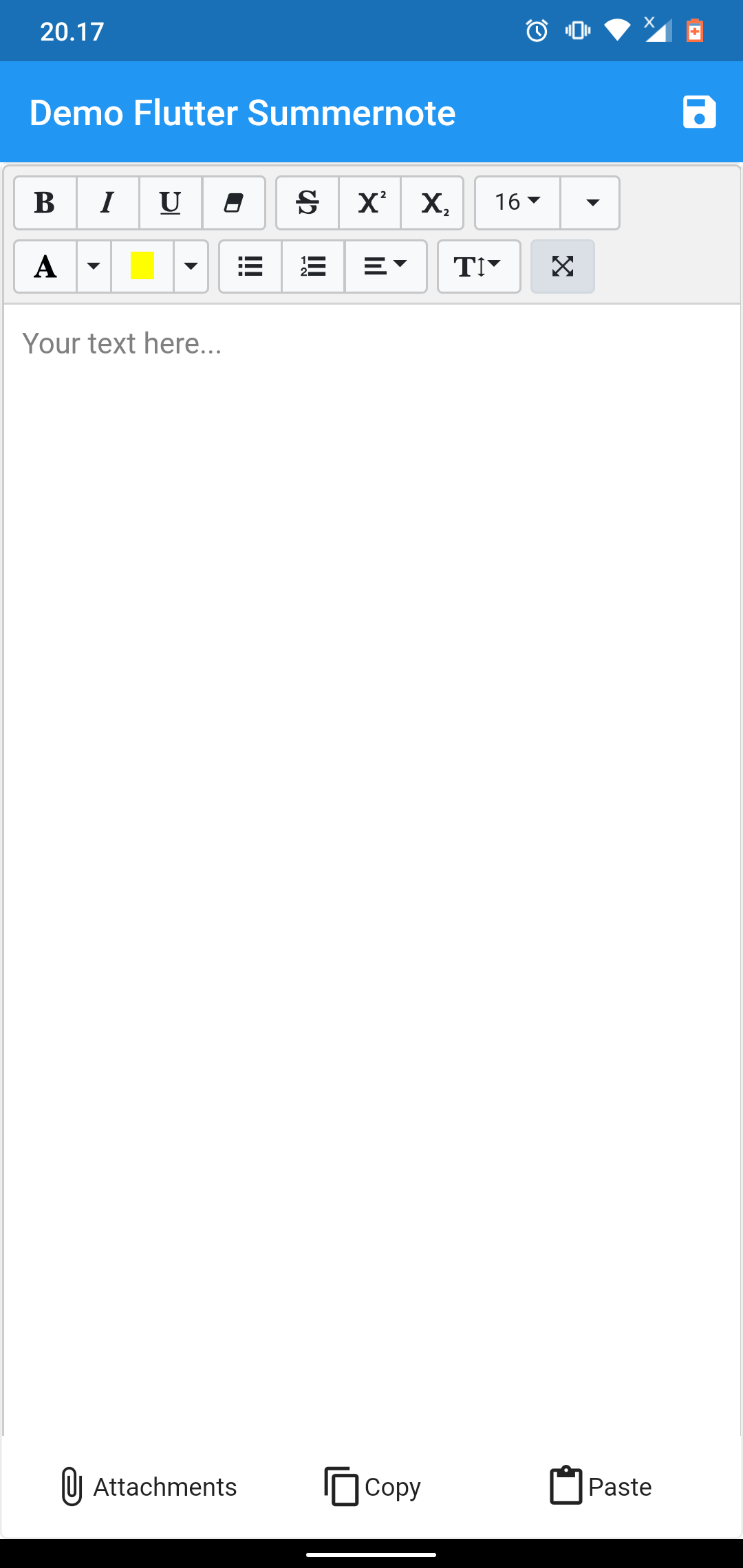
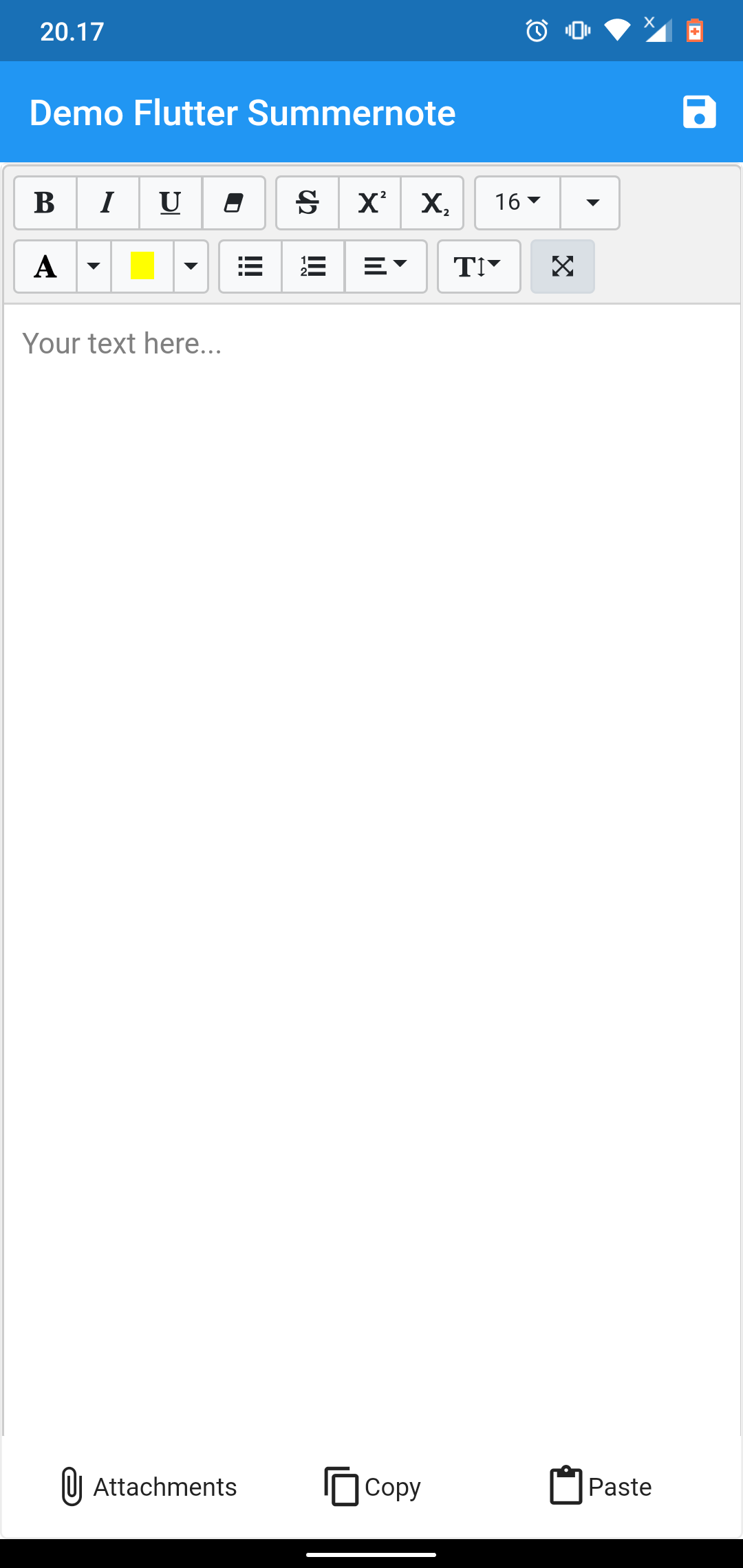
demo example demo example

NOTICE

This package dependent to the Official WebView Plugin. In this package can't add image, video, or another file using editor toolbar. To handle attach image this package give you another solution using image Image Picker at bottom of editor. This package can't use enableinteractiveSelection from TextField, to handle that this package give you another solution using copy paste at bottom of editor. Thank you for all your support.

Setup

add flutter_summernote: ^latest as deppendecy to pubspec.yaml

iOS

Add the following keys to your Info.plist file, located in /ios/Runner/Info.plist:

    <key>io.flutter.embedded_views_preview</key>
    <true/>

    <key>NSCameraUsageDescription</key>
    <string>Used to demonstrate image picker plugin</string>
    <key>NSMicrophoneUsageDescription</key>
    <string>Used to capture audio for image picker plugin</string>
    <key>NSPhotoLibraryUsageDescription</key>
    <string>Used to demonstrate image picker plugin</string>

    <key>NSAppTransportSecurity</key>
    <dict>
        <key>NSAllowsArbitraryLoads</key>
         <true/>
    </dict>
Usage
  1. import flutter html editor
    import 'package:flutter_summernote/flutter_summernote.dart';
  1. Create Global key from HTML Editor State
    GlobalKey<FlutterSummernoteState> _keyEditor = GlobalKey();
  1. Add HTML Editor to widget
    FlutterSummernote(
        hint: "Your text here...",
        key: _keyEditor
    ),
    FlutterSummernote(
        hint: "Your text here...",
        key: _keyEditor,
        customToolbar: """
            [
                ['style', ['bold', 'italic', 'underline', 'clear']],
                ['font', ['strikethrough', 'superscript', 'subscript']]
            ]"""
    )
  1. Get text from Html Editor
    final _etEditor = await keyEditor.currentState.getText();
Avalaible option parameters
Parameter Type Default Description
key GlobalKey required for get method & reset
value String empty initiate text content for text editor
height double 380 height of text editor
decoration BoxDecoration empty Decoration editor
widthImage String 100% width of image picker
hint String empty Placeholder hint text
customToolbar String empty Add all available Toolbar. Don't use insert (video & picture), please use hasAttachment option.
customPopover String empty Add all available Popover (the same paragraph as for toolbar, but below)
hasAttachment Boolean false Use this option if you want to show or hide attachment button
showBottomToolbar Boolean false Use this option if you want to show or hide bottom toolbar
returnContent Function null Use this callback to return text content on await keyEditor.currentState.getText() function call.

License

This project is licensed under the MIT License - see the LICENSE file for details.

Contributors ✨

Thanks goes to these wonderful people (emoji key):

Chandra Abdul Fattah

🚇 💻
yusuf afandi
yusuf afandi

💻
Ivan Terekhin
Ivan Terekhin

💻

This project follows the all-contributors specification. Contributions of any kind welcome!

카테고리

의존성

의존성 목록 5 개

소스 저장소

이 패키지를 사용하는 프로젝트

아직 데이터가 없습니다.