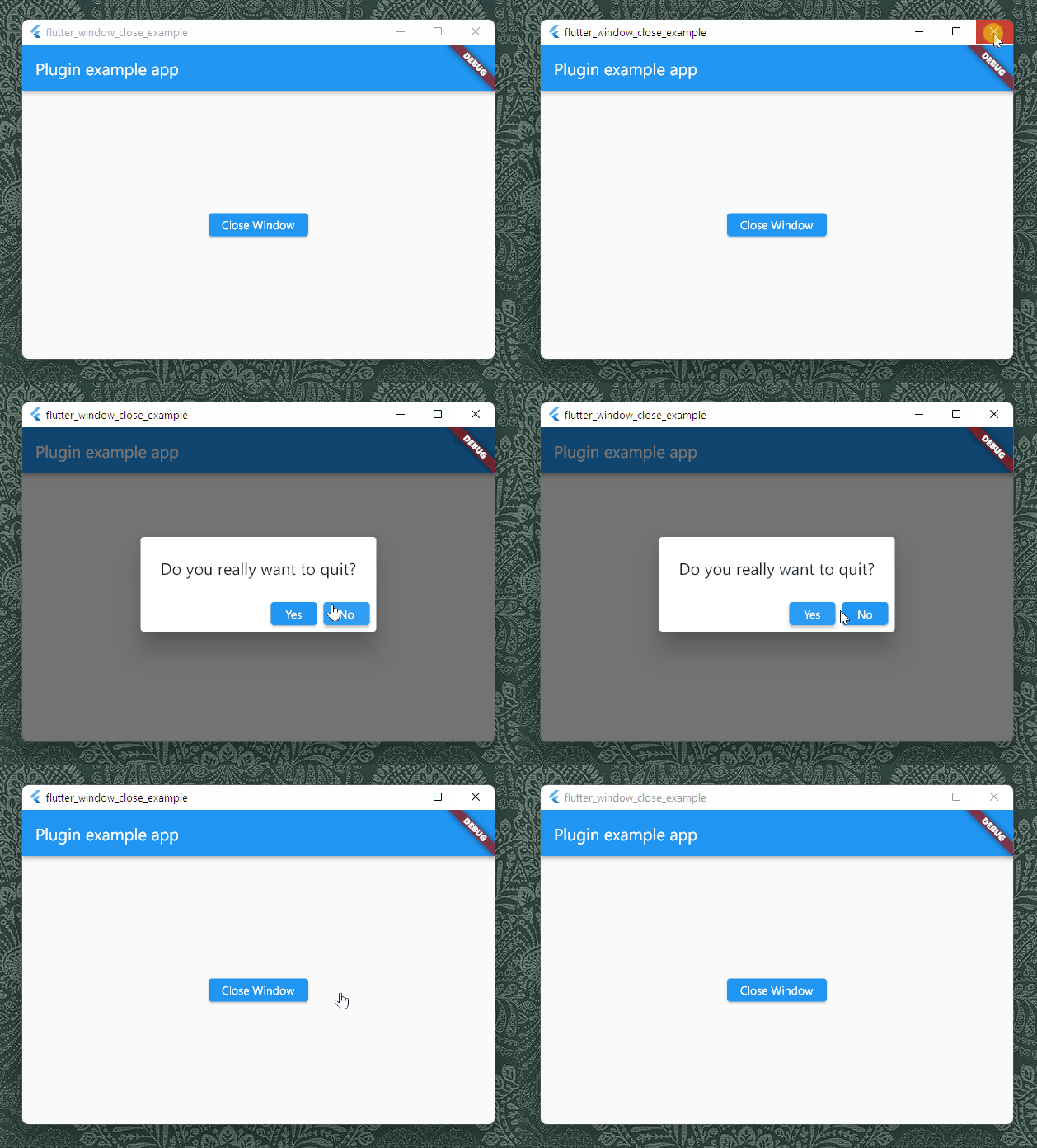
flutter_window_close 패키지는 데스크톱 플랫폼에서 Flutter 애플리케이션의 창 닫기 이벤트를 가로채고 종료 전 사용자에게 확인을 요청할 수 있게 해줍니다. 저장되지 않은 데이터를 저장하거나 실수로 종료되는 것을 방지해야 하는 앱에 특히 유용합니다. 사용자가 창을 닫으려 할 때 실행되는 콜백을 등록할 수 있는 간단한 API를 제공하여 개발자가 사용자 정의 대화 상자를 표시하거나 정리 작업을 수행할 수 있도록 합니다. 이 패키지는 macOS, Windows, Linux 및 Web을 지원하므로, 부드러운 종료 처리가 필요한 크로스플랫폼 데스크톱 앱에 이상적입니다.
flutter_window_close lets your Flutter app has a chance to confirm if the user
wants to close your app. It works on desktop platforms including Windows, macOS
and Linux.
Getting Started
It is very common that an app would prompt a message like "Do you really want to
quit" when users click on the close button, in order to notify that there are
still undone tasks and the users may lose their data if they want to quit
anyway. It prevents the users from losing data unwillingly.
To let a Flutter desktop app to support that, the plug-in listens to the events
from the window hosting Flutter's view, and send the events to Flutter. What you
need to do is to assign an anonymous function that can answer if the window
should be closed. For example, you can show an alert dialog to ask what the
current user is willing to do:
It does not support mobile platforms, since there is no such event for closing
windows. You can use a custom
WillPopScope
to capture if a user is leaving your app with a back key.
macOS
There could be some issues while using the package on macOS. Each platform has
its paradigm and the developer framework macOS sees window objects in a
different way from Windows and Linux.
On Windows and Linux, windows are more like controllers in MVC pattern , and
when it comes to Flutter, there would be always a root window in the process of
an app, and our plugin could easily know which is the window to listen to. In
the code level, we use
GetActiveWindow
while we can use
gtk_widget_get_ancestor
or
gtk_widget_get_toplevel.
On the contrary, windows are more like views on macOS. An app can have multiple
windows, and the app can stay still open event all windows are closed. We can
also create an object with multiple IBOutlets to multiple windows. Flutter macOS
does not tell plugins which window is the one running Flutter as well.
The plugin listens to the first window in the
windows
list of the singleton
NSApplication
object. It works if you have only one window in your macOS Flutter app. If you
just create a new app using the official template for macOS, you may need not to
change anything. However, if your app has multiple windows, the behavior of the
plugin might be unexpectable.
Flutter Web
We can do little when a user is closing the tab or window hosting your Flutter
Web app. The only way to let a user to confirm if he or she really want to close
is to set the return value of the
onbeforeunload
event. You can use the setWebReturnValue method to set the return value.