연결된 소스 저장소의 README 원문 스냅샷입니다. 최신 내용은 저장소에서 확인하세요.
flutter_xupdate


A Flutter plugin for XUpdate -- Android Update Library。See the use Chinese Document for details。
About me
Video tutorial
How to use flutter_xupdate
Stargazers over time

Getting Started
You should ensure that you add the flutter_xupdate as a dependency in your flutter project.
// pub 集成
dependencies:
  flutter_xupdate: ^3.0.0

//github  集成
dependencies:
  flutter_xupdate:
    git:
      url: git://github.com/xuexiangjys/flutter_xupdate.git
      ref: master
UseCase
Initialization
void initXUpdate() {
if (Platform.isAndroid) {
FlutterXUpdate.init(
debug: true,
isPost: false,
isPostJson: false,
timeout: 25000,
isWifiOnly: false,
isAutoMode: false,
supportSilentInstall: false,
enableRetry: false
).then((value) {
updateMessage("初始化成功: $value");
}).catchError((error) {
print(error);
});
FlutterXUpdate.setErrorHandler(
onUpdateError: (Map<String, dynamic> message) async {
print(message);
setState(() {
_message = "$message";
});
});
} else {
updateMessage("ios暂不支持XUpdate更新");
}
}
JSON Format
{
"Code": 0,
"Msg": "",
"UpdateStatus": 1,
"VersionCode": 3,
"VersionName": "1.0.2",
"ModifyContent": "1、优化api接口。\r\n2、添加使用demo演示。\r\n3、新增自定义更新服务API接口。\r\n4、优化更新提示界面。",
"DownloadUrl": "https://raw.githubusercontent.com/xuexiangjys/XUpdate/master/apk/xupdate_demo_1.0.2.apk",
"ApkSize": 2048
"ApkMd5": "..."
}
CheckUpdate
void checkUpdateDefault() {
FlutterXUpdate.checkUpdate(url: _updateUrl);
}
void checkUpdateSupportBackground() {
FlutterXUpdate.checkUpdate(url: _updateUrl, supportBackgroundUpdate: true);
}
void checkUpdateRatio() {
FlutterXUpdate.checkUpdate(url: _updateUrl, widthRatio: 0.6);
}
void checkUpdateForce() {
FlutterXUpdate.checkUpdate(url: mUpdateUrl2);
}
void checkUpdateAutoMode() {
FlutterXUpdate.checkUpdate(url: _updateUrl, isAutoMode: true);
}
void enableChangeDownLoadType() {
FlutterXUpdate.checkUpdate(
url: _updateUrl,
overrideGlobalRetryStrategy: true,
enableRetry: true,
retryContent: "Github下载速度太慢了,是否考虑切换蒲公英下载?",
retryUrl: "https://www.pgyer.com/flutter_learn");
}
Custom JSON Format
1.Setting up a custom update parser
FlutterXUpdate.setCustomParseHandler(onUpdateParse: (String json) async {
return customParseJson(json);
});
UpdateEntity customParseJson(String json) {
AppInfo appInfo = AppInfo.fromJson(json);
return UpdateEntity(
hasUpdate: appInfo.hasUpdate,
isIgnorable: appInfo.isIgnorable,
versionCode: appInfo.versionCode,
versionName: appInfo.versionName,
updateContent: appInfo.updateLog,
downloadUrl: appInfo.apkUrl,
apkSize: appInfo.apkSize);
}
2.Set the parameter isCustomParse to true
FlutterXUpdate.checkUpdate(url: _updateUrl3, isCustomParse: true);
Update By UpdateEntity Directly
void checkUpdate8() {
FlutterXUpdate.updateByInfo(updateEntity: customParseJson(_customJson));
}
Custom Update Prompt Style
Currently, only theme color and top picture customization are supported!
1.Configure top picture, Path: android/app/src/main/res/values/drawable, For example:
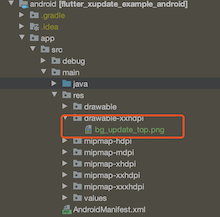
2.Set the parameter themeColor 、 topImageRes and buttonTextColor
void customPromptDialog() {
FlutterXUpdate.checkUpdate(url: _updateUrl, themeColor: '#FFFFAC5D', topImageRes: 'bg_update_top', buttonTextColor: '#FFFFFFFF');
}
【Note】: When you use the command flutter build apk to make a release package, If you use the topImageRes property, you must configure shrinkResources to false, otherwise the pop-up window will display an exception!
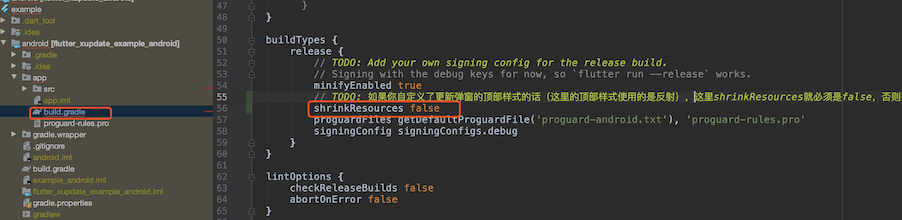
Property value
Initialization
| Name |
Type |
Default |
Description |
| debug |
bool |
false |
Whether Output log |
| isPost |
bool |
false |
Whether use post request |
| isPostJson |
bool |
false |
Whether post request upload json format |
| timeout |
int |
20000(ms) |
Request response timeout |
| isWifiOnly |
bool |
true |
Whether update only under WiFi |
| isAutoMode |
bool |
false |
Whether to turn on automatic mode |
| supportSilentInstall |
bool |
false |
Whether to support silent installation requires that the device has root permission |
| enableRetry |
bool |
false |
In the process of downloading, if you click Cancel, whether the pop-up window for retrying to switch the download mode will pop up |
| retryContent |
String |
'' |
Try the prompt content of the prompt pop-up window again |
| retryUrl |
String |
'' |
Retrying prompt pop-up URL to jump after clicking |
| params |
Map |
/ |
Public parameters to be set |
CheckUpdate
| Name |
Type |
Default |
Description |
| url |
String |
/ |
URL of version check |
| params |
Map |
/ |
Parameters |
| supportBackgroundUpdate |
bool |
false |
Whether to support background updates |
| isAutoMode |
bool |
false |
Whether to turn on automatic mode |
| isCustomParse |
bool |
false |
Is it a custom resolution protocol |
| themeColor |
String |
'' |
Apply pop-up theme color |
| topImageRes |
String |
'' |
The name of the top picture resource in the pop-up window |
| buttonTextColor |
String |
'' |
The color of the button text |
| widthRatio |
double |
/ |
Proportion of version update Prompter width to screen |
| heightRatio |
double |
/ |
Proportion of version update Prompter height to screen |
| overrideGlobalRetryStrategy |
bool |
false |
Whether to override the global retry policy |
| enableRetry |
bool |
false |
In the process of downloading, if you click Cancel, whether the pop-up window for retrying to switch the download mode will pop up |
| retryContent |
String |
'' |
Try the prompt content of the prompt pop-up window again |
| retryUrl |
String |
'' |
Retrying prompt pop-up URL to jump after clicking |
