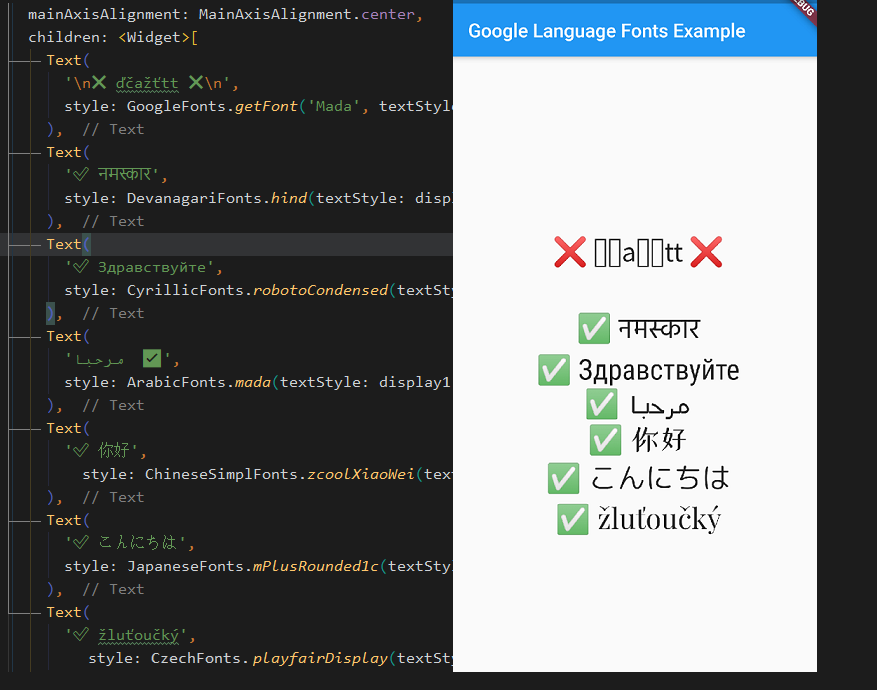
google_language_fonts 패키지는 다양한 언어를 지원하는 Google 폰트를 Flutter 애플리케이션에 통합하는 것을 간소화합니다. 개발자들이 수동 구성이나 자산 관리 없이 언어 호환 폰트를 쉽게 포함할 수 있도록 합니다. 이 패키지는 폰트 로딩을 자동으로 처리하고, 다양한 문자 체계와 지역에서 올바르게 렌더링되도록 보장합니다. 다국어 앱에 이상적이며 타이포그래피의 일관성과 접근성을 향상시킵니다. 단일 명령어로 최소한의 설정만으로 폰트 포함을 간편하게 하면서도 성능과 확장성을 유지합니다.
사용 사례
다국어 앱 인터페이스
국제화된 콘텐츠 표시
스크립트 간 텍스트 가독성 개선
동적 글꼴 전환
접근성 중심 디자인
로컬라이즈된 사용자 경험
주요 기능
Flutter와의 간편한 통합
자동 글꼴 로드
다중 언어 스크립트 지원
필수 구성 최소화
최적화된 성능
크로스 플랫폼 호환성
적합한 대상
국제 앱을 개발하는 개발자
글로벌 대상 사용자를 위한 앱
다양한 스크립트 지원이 필요한 프로젝트
타이포그래피 일관성을 우선시하는 팀
접근성 있는 텍스트 렌더링이 필요한 애플리케이션
고려 사항
Google 폰트만 사용 가능
오프라인 글꼴 캐싱 없음
초기 로드를 위해 인터넷 연결에 의존합니다
앱 크기가 약간 증가할 수 있습니다
고도로 맞춤형 글꼴 워크플로에 적합하지 않음
언어별 글리프에 대한 신중한 선택이 필요합니다
원본 README
연결된 소스 저장소의 README 원문 스냅샷입니다. 최신 내용은 저장소에서 확인하세요.
google_language_fonts
A simple way to use compatible fonts with your languages, without worrying about unrecognized characters.
This unofficial google_language_fonts package is an extension of the google_fonts package and it allows you to easily use more than 950 fonts
(and their variants) from fonts.google.com in your Flutter app.
These fonts are matched with the 27 languages listed below so you can use them right away from your IDE.
To use it as a language font simply add Fonts suffix to any of these currently supported languages below
** This language subset contains almost all fonts (same as base GoogleFonts)
Getting Started
With the google_language_fonts package, .ttf or .otf files do not need to be stored in your assets folder and mapped in
the pubspec. Instead, they can be fetched once via http at runtime, and cached in the app's file system. This is ideal for development, and can be the preferred behavior for production apps that
are looking to reduce the app bundle size. Still, you may at any time choose to include the font file in the assets, and the Google Fonts package will prioritize pre-bundled files over http fetching.
Because of this, the Google Fonts package allows developers to choose between pre-bundling the fonts and loading them over http, while using the same API.
For example, say you want to use any of the Cyrillic fonts from Google Fonts in your Flutter app. You would need to try one by one until you find what satisfies your needs. With this package, you can try your fonts right away from IDE thanks to auto-suggestions.
To use for example LatinFonts with the default TextStyle:
Text(
  'This is Google Fonts',
  style: LatinFonts.playfairDisplay(),
),
Or, if you want to load the font dynamically:
Text(
  'This is Google Fonts',
  style: GoogleFonts.getFont('Lato'),
),
To use GoogleFonts with an existing TextStyle:
Text(
  'This is Google Fonts',
  style: CyrillicFonts.robotoCondensed(
    textStyle: TextStyle(color: Colors.blue, letterSpacing: .5),
  ),
),
or
Text(
  'This is Google Fonts',
  style: CyrillicFonts.robotoCondensed(textStyle: Theme.of(context).textTheme.display1),
),
To override the fontSize, fontWeight, or fontStyle:
Text(
  'This is Google Fonts',
  style: LatinFonts.playfairDisplay(
    textStyle: Theme.of(context).textTheme.display1,
    fontSize: 48,
    fontWeight: FontWeight.w700,
    fontStyle: FontStyle.italic,
  ),
),
You can also use for example CyrillicFonts.robotoCondensedTextTheme() to make or modify an entire text theme to use the "robotoCondensedTextTheme" font.
The google_language_fonts package will automatically use matching font files in your pubspec.yaml's
assets (rather than fetching them at runtime via HTTP). Once you've settled on the fonts
you want to use:
Download the font files from https://fonts.google.com.
You only need to download the weights and styles you are using for any given family.
Italic styles will include Italic in the filename. Font weights map to file names as follows:
Move those fonts to a top-level app directory (e.g. google_fonts).
Ensure that you have listed the folder (e.g. google_fonts/) in your pubspec.yaml under assets.
Note: Since these files are listed as assets, there is no need to list them in the fonts section
of the pubspec.yaml. This can be done because the files are consistently named from the Google Fonts API
(so be sure not to rename them!)
Compatibility
In this package calling fonts from the GoogleFonts class is not possible due to having faster IDE auto-suggestions and to not clash with the official package. However, this package is compatible with the official google_fonts package. If you want to access any font without having to be limited to a language then you can either:
just use LatinFonts prefix, which contains almost all fonts from the base GoogleFonts, e.g.: LatinFonts.lato(),
or call a font dynamically: GoogleFonts.getFont('Lato'),
// you can not access e.g.: GoogleFonts.lato(), only dynamically via GoogleFonts.getFont('Lato')import'package:google_language_fonts/google_language_fonts.dart';
or add official google_fonts package and use GoogleFonts in this way:
// only if you add google_fonts package then you can access it with 'as' keyword like:import'package:google_fonts/google_fonts.dart'as basic; // basic.GoogleFonts.lato()
Licensing Fonts
The fonts on fonts.google.com include license files for each font. For
example, the Lato font comes with an OFL.txt file.
Once you've decided on the fonts you want in your published app, you should download and add the appropriate
licenses to your flutter app's LicenseRegistry.