패키지, 저장소 및 앱 카테고리 검색

hashtagable 표지
패키지 상세v2.3.0+1

hashtagable

해시태그 장식 텍스트를 구현하기 위한 위젯과 함수입니다. Twitter처럼 `#`로 시작하는 단어를 꾸며줍니다.

30일 다운로드
151
좋아요
136
Pub 점수
70

패키지 설치

flutter pub add hashtagable

패키지 개요

공개 정보를 바탕으로 생성한 선택 가이드입니다.

트위터 스타일과 유사한 해시태그 장식 텍스트를 생성할 수 있는 플러터 패키지입니다. '#' 기호로 시작하는 단어를 자동으로 감지하고 스타일링하는 위젯과 유틸리티 함수를 제공하여 소셜 미디어 스타일의 텍스트 표시를 강화합니다. 사용자 생성 콘텐츠에서 상호작용형 또는 시각적으로 두드러진 해시태그가 필요한 앱에 적합합니다. 간단한 명령어로 쉽게 통합 가능하며 오픈소스로 GitHub에 호스팅되어 있습니다. 현재 플랫폼별 제한은 없지만 고급 스타일링을 위해서는 추가적인 커스터마이징이 필요할 수 있습니다.

사용 사례

  • 소셜 미디어 앱 피드
  • 사용자 댓글 섹션
  • 해시태그 추적 인터페이스
  • 인터랙티브 텍스트 입력 필드
  • 콘텐츠 태깅 시스템

주요 기능

  • 자동 해시태그 탐지
  • 트위터 스타일 해시태그 스타일링
  • 사용자 지정 장식 옵션
  • pub를 통한 간단한 통합
  • 오픈소스 코드베이스

적합한 대상

  • 소셜 플랫폼을 구축하는 개발자
  • 사용자 생성 콘텐츠를 포함한 앱
  • 메타데이터 강조가 있는 텍스트 렌더링
  • 시각적 해시태그 구분이 필요한 사용자 인터페이스
  • 경량 텍스트 장식을 사용하는 프로젝트

고려 사항

  • 기본 해시태그 스타일링만 가능
  • 터치 시 내장된 탐색 없음
  • 경계 사례에 대해 맞춤 처리가 필요할 수 있습니다
  • 외부 GitHub 저장소에 의존
  • 소스 코드 외에 공식 문서 없음

원본 README

연결된 소스 저장소의 README 원문 스냅샷입니다. 최신 내용은 저장소에서 확인하세요.

All Contributors

hashtagable

test pub package License: MIT

Widgets and functions to implement hashTag decorated text.

Detects the words start with # like a Twitter.

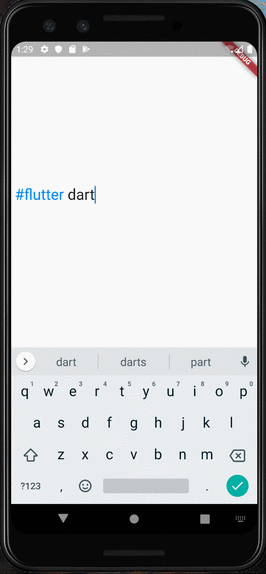
RPReplay_Final1599932903

Usage

  • As TextField

You can use HashTagTextField to decorate input text.

    HashTagTextField(
    decoratedStyle: TextStyle(fontSize: 14, color: Colors.blue),
    basicStyle: TextStyle(fontSize: 14, color: Colors.black),
    ),

decoratedStyle is the textStyle of tagged text. basicStyle is for untagged text.

Other arguments are basically same as those of material TextField

  • As ReadOnlyText

If you want to decorate the text only to display, HashTagText will help you.

    HashTagText(
        text: "#Welcome to #hashtagable \n This is #ReadOnlyText",
        decoratedStyle: TextStyle(fontSize: 22,color:Colors.red),
        basicStyle: TextStyle(fontSize: 22,color:Colors.black),
        onTap: (text) {
          print(text);
        },
    )

The argument onTap(String) is called when user tapped a hashTag.

You can add some actions in this callback with the tapped hashTag.

Customize with useful functions

  • Check if the text has hashTags
   print(hasHashtags("Hello #World")); 
   // true
   
   print(hasHashtags("Hello World"));
   // false
   
  • Extract hashTags from text
   final List<String> hashTags = extractHashTags("#Hello World #Flutter Dart #Thank you");
   // ["#Hello", "#Flutter", "#Thank"]

Tips

  • DetectableTextField is published as a refinement of this package. hashtagale forces you to use hashtag, but this one allows you to detect anything you want.

  • If you also want to decorate At sign, you can do that by adding the argument decorateAtSign: true.

    HashTagText(
        text: "#Hello World @flutter_developers",
        decoratedStyle: TextStyle(fontSize: 14,color:Colors.red),
        basicStyle: TextStyle(fontSize: 14,color:Colors.black),
        onTap: (text) {
          print(text);
        },
        decorateAtSign: true,
    )

Then HashTagText and HashtagTextField come to decorate the words start with # or @.

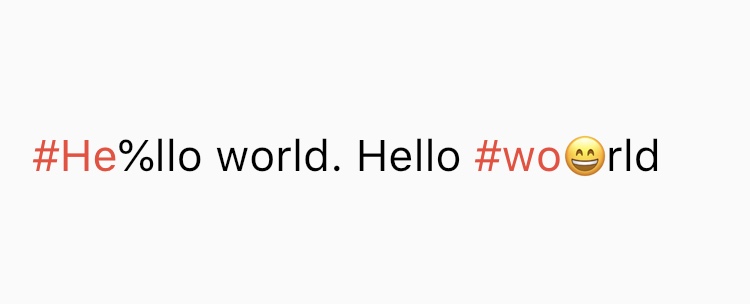
  • The decoration rules are almost same as twitter. It does not decorate the tags which contain emoji or symbol. It needs space before # (or @) to decorate.
  • Supported Languages are English, Japanese, Korean, Spanish, Arabic, Thai, Norwegian and German.

If you have any requests or questions, please feel free to ask on github.


Contributors: Santa Takahashi, Matheus Perez, Marcel Schneider, Ho Kim, Burak

Contributors ✨

Thanks goes to these wonderful people (emoji key):

JorisObert
JorisObert

💻

This project follows the all-contributors specification. Contributions of any kind welcome!

카테고리

소스 저장소

이 패키지를 사용하는 프로젝트

아직 데이터가 없습니다.