ImageMagick Q8는 ImageMagick C 라이브러리용 Dart 바인딩으로, Flutter 애플리케이션 내에서 강력한 이미지 편집 기능을 가능하게 합니다. 크기 조정, 자르기, 포맷 변환 및 필터링과 같은 작업을 지원하며, 견고한 ImageMagick 엔진을 활용합니다. 고품질 이미지 처리(Q8 정밀도)를 위해 설계되었으며, Android, Windows, Linux에서 실행됩니다. 이 패키지는 ImageMagick의 기능에 저수준 접근을 제공하여, 크로스플랫폼 앱에서 고급 이미지 조작이 필요한 개발자에게 이상적입니다.
Interact with the underlying ImageMagick C api just as you used to do in C (not with pointers, of
course 🙂).
What Can It Do?
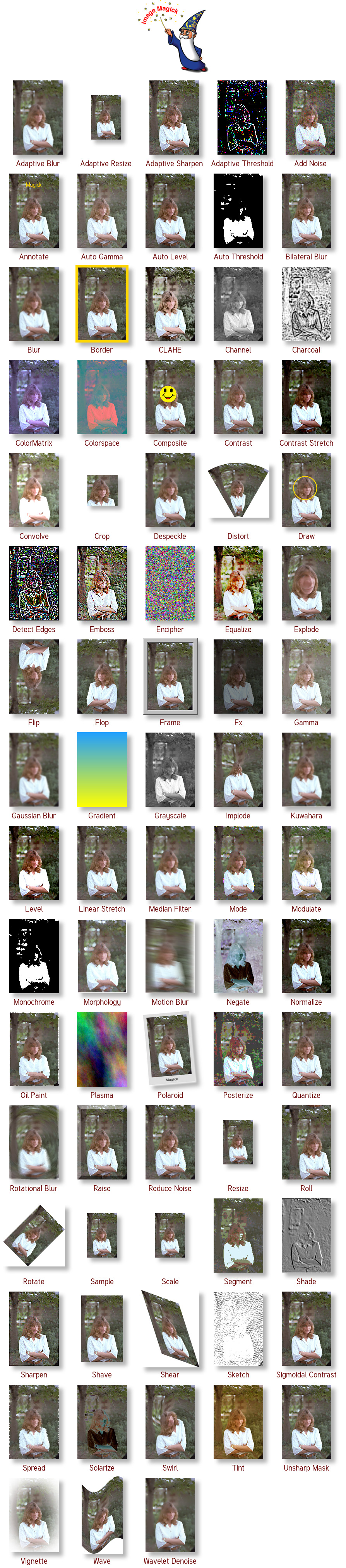
Here are some of the things you can do with this plugin, along with the names of the functions that you can use to do them.
Have a look the #Usage section below for more insights.
Variants
This plugin provides the Q8 variant of ImageMagick only. If you want to use another variant, then use the corresponding package for that variant.
Windows
Windows x64 (32 bits) and window x86 (32 bits) are both supported.
Android
Currently only arm64-v8a (64 bits) is supported. If you want to help add support to armeabi-v7a (
32 bits), have a look here
.
Also note that you might need to get write permissions from the system
for some operations as writing an image.
Linux
Coming Soon.
Macos
Your contributions to provide the binaries are welcomed.
IOS
Your contributions to provide the binaries are welcomed,
Usage
In a Flutter app:
Initialize a MagickWand
@overridevoidinitState() {
_wand = MagickWand.newMagickWand(); // create a MagickWand to edit images// set a callback to be called when image processing progress changesWidgetsBinding.instance.addPostFrameCallback(
(timeStamp) async => await _wand.magickSetProgressMonitor(
(info, offset, size, clientData) => setState(() =>
status = '[${info.split('/').first}, $offset, $size, $clientData]'),
),
);
super.initState();
}
Use the MagickWand
// read an image, do some operations on it, then save itFuture<String> _handlePress() async {
try {
setState(() => isLoading = true);
String? result;
await _wand.magickReadImage(_inputFile!.path); // read the image_throwWandExceptionIfExists(_wand);
///////////////////////// Do Some Operations On The Wand /////////////////////////// resize the imageawait _wand.magickAdaptiveResizeImage(1200, 800);
_throwWandExceptionIfExists(_wand);
// flip the imageawait _wand.magickFlipImage();
_throwWandExceptionIfExists(_wand);
// enhance the imageawait _wand.magickEnhanceImage();
_throwWandExceptionIfExists(_wand);
// add noise to the imageawait _wand.magickAddNoiseImage(NoiseType.GaussianNoise, 1.5);
_throwWandExceptionIfExists(_wand);
/////////////////////////////////////////////////////////////////////////////////String outputFilePath = _getOutputFilePath();
await _wand.magickWriteImage(
outputFilePath); // write the image to a file_throwWandExceptionIfExists(_wand);
_outputFile = File(outputFilePath);
isLoading = false;
return result ?? 'Operation Successful!';
} catch (e) {
_outputFile = null;
isLoading = false;
return'Error: ${e.toString()}';
}
}
String_getOutputFilePath() {
finalString ps = Platform.pathSeparator;
finalString inputFileNameWithoutExtension =
_inputFile!.path.split(ps).last.split('.').first;
finalString outputFilePath =
'${_outputDirectory!.path}${ps}out_$inputFileNameWithoutExtension.png';
return outputFilePath;
}
void_throwWandExceptionIfExists(MagickWand wand) {
MagickGetExceptionResult e =
_wand.magickGetException(); // get the exception if anyif (e.severity != ExceptionType.UndefinedException) {
throw e;
}
}
Dispose the MagickWand and the plugin
@overridedispose() {
_wand.destroyMagickWand(); // we are done with the wand disposeImageMagick(); // we are done with the whole pluginsuper.dispose();
}
In a pure Dart app:
Depend on the plugin in your pubspec.yaml just as any other package.
You then have to copy the dependencies (.lib files, .dll files) manually to the same path as your executable (unfortunately, this is how it is done now in dart). To get these dependencies, you can build a flutter app then copy the dependencies from there.
Then you can use the plugin normally, for ex:
import'dart:io';
import'package:image_magick_ffi/image_magick_ffi.dart';
Future<void> main(List<String> arguments) async {
finalFile inputFile1 = File("D:\\magick\\Screenshot.png");
finalFile inputFile2 = File("D:\\magick\\fayruz_love.png");
finalFile inputFile3 = File("D:\\magick\\untitled.png");
print('Magick Dart App Started!');
initializeImageMagick(); // initialize the pluginMagickWand wand1 = MagickWand.newMagickWand(); // create a MagickWandMagickWand wand2 = MagickWand.newMagickWand(); // create a MagickWand// await setProgressMonitor(wand1, 'wand1');// throwWandExceptionIfExists(wand1);//// await setProgressMonitor(wand2, 'wand2');// throwWandExceptionIfExists(wand2);await wand1.magickReadImage(inputFile3.path);
throwWandExceptionIfExists(wand1);
await wand2.magickReadImage(inputFile2.path);
throwWandExceptionIfExists(wand2);
Stopwatch stopwatch = Stopwatch()..start();
///////////////////////////////// Use MagickWand here /////////////////////////////////final imagePage =
wand1.magickGetImagePage(); // get the dimensions of the imagethrowWandExceptionIfExists(wand1);
finalint width = imagePage!.width;
finalint height = imagePage.height;
finalint x = 0;
finalint y = 0;
final cropWand = await wand1.magickGetImageRegion(
width: width ~/ 2,
height: height ~/ 2,
x: x,
y: y,
); // crop the image into a new wandawait cropWand!.magickWriteImage(getOutputFilePath(inputFile1.path));
throwWandExceptionIfExists(wand2);
///////////////////////////////// Use MagickWand here /////////////////////////////////print('elapsed time: ${stopwatch.elapsedMilliseconds} millis');
await wand1.destroyMagickWand(); // dispose the MagickWandawait wand2.destroyMagickWand(); // dispose the MagickWandawait cropWand.destroyMagickWand(); // dispose the MagickWanddisposeImageMagick(); // dispose the pluginprint('Magick Dart App Ended!');
}
StringgetOutputFilePath(String inputFilePath) {
finalString outputFilePath = inputFilePath.replaceAll(
RegExp(r'\.(png|jpg|jpeg|gif|bmp|tiff|tif|webp|pdf|ps|eps|svg|ico)$'),
'_output.png');
return outputFilePath;
}
Future<void> setProgressMonitor(MagickWand wand, [String? wandName]) async {
await wand.magickSetProgressMonitor((info, offset, size, clientData) {
print('[${wandName ?? 'unnamed wand'}] $info, $offset, $size, $clientData');
});
}
voidthrowWandExceptionIfExists(MagickWand wand) {
final exception = wand.magickGetException();
if (exception.severity != ExceptionType.UndefinedException) {
throwException(
'An exception occurred with the wand: ${exception.description}');
}
}
Learn how to use the plugin
For more info about code usage, have a look at the example app in this repo, there is a complete working app there that is ready for you to play around with.