패키지, 저장소 및 앱 카테고리 검색

image_picker_gallery_camera 표지
패키지 상세v0.3.0

image_picker_gallery_camera

갤러리 또는 카메라에서 이미지를 선택하는 데 사용할 수 있는 Flutter 패키지입니다. 이 패키지는 카메라, 갤러리 및 둘 다에서 이미지를 선택하는 기능을 지원합니다.

AndroidiOSWeb
30일 다운로드
228
좋아요
46
Pub 점수
140

패키지 설치

flutter pub add image_picker_gallery_camera

패키지 개요

공개 정보를 바탕으로 생성한 선택 가이드입니다.

기기 갤러리, 카메라 또는 둘 다에서 이미지를 선택할 수 있는 플러터 패키지입니다. 안드로이드, iOS, 웹 플랫폼에서 간단하고 일관된 인터페이스를 제공합니다. 프로필, 업로드 또는 미디어 처리를 위한 이미지 입력이 필요한 플러터 앱에 원활하게 통합됩니다. 단일 및 다중 이미지 선택을 모두 지원하여 양식, 소셜 기능, 콘텐츠 생성 도구에 이상적입니다. 사용의 용이성을 중심으로 설계되어 플랫폼별 복잡성을 추상화했습니다.

사용 사례

  • 사용자 프로필 사진 업로드
  • 소셜 미디어 게시물 생성
  • 카메라를 사용한 문서 스캔
  • 전자상거래 제품 이미지 캡처
  • 양식 기반 이미지 제출

주요 기능

  • 갤러리 또는 카메라에서 선택
  • 갤러리 및 카메라 모드 모두를 지원합니다
  • 크로스 플랫폼 호환성 (Android, iOS, Web)
  • 간단한 API 통합
  • 여러 이미지 선택
  • 내장된 권한 처리

적합한 대상

  • 모바일 앱 개발자
  • 이미지 입력이 필요한 웹 애플리케이션
  • 사용자 생성 콘텐츠가 필요한 앱
  • 이미지 첨부가 있는 폼
  • 콘텐츠 관리 시스템

고려 사항

  • Android 및 iOS에 적절한 권한이 필요합니다
  • 웹 지원은 브라우저에 따라 제한될 수 있습니다
  • 큰 이미지 크기는 성능에 영향을 미칠 수 있습니다
  • 피커 UI의 사용자 정의가 제한적
  • 내장된 이미지 편집 기능 없음
  • 기반 플랫폼 카메라/갤러리 API에 의존합니다

원본 README

연결된 소스 저장소의 README 원문 스냅샷입니다. 최신 내용은 저장소에서 확인하세요.

image_picker_gallery_camera

Flutter Package to Pick Image From Gallery or Camera

Getting Started

A Flutter plugin for iOS and Android for picking images from the image library, and taking new pictures with the camera. You can use both Camera and Gallery Option.

Installation

First, add image_picker_gallery_camera as a dependency in your pubspec.yaml file.

iOS

Add the following keys to your Info.plist file, located in /ios/Runner/Info.plist:

NSPhotoLibraryUsageDescription - describe why your app needs permission for the photo library. This is called Privacy - Photo Library Usage Description in the visual editor.
NSCameraUsageDescription - describe why your app needs access to the camera. This is called Privacy - Camera Usage Description in the visual editor.
NSMicrophoneUsageDescription - describe why your app needs access to the microphone, if you intend to record videos. This is called Privacy - Microphone Usage Description in the visual editor.
Android

No configuration required - the plugin should work out of the box.

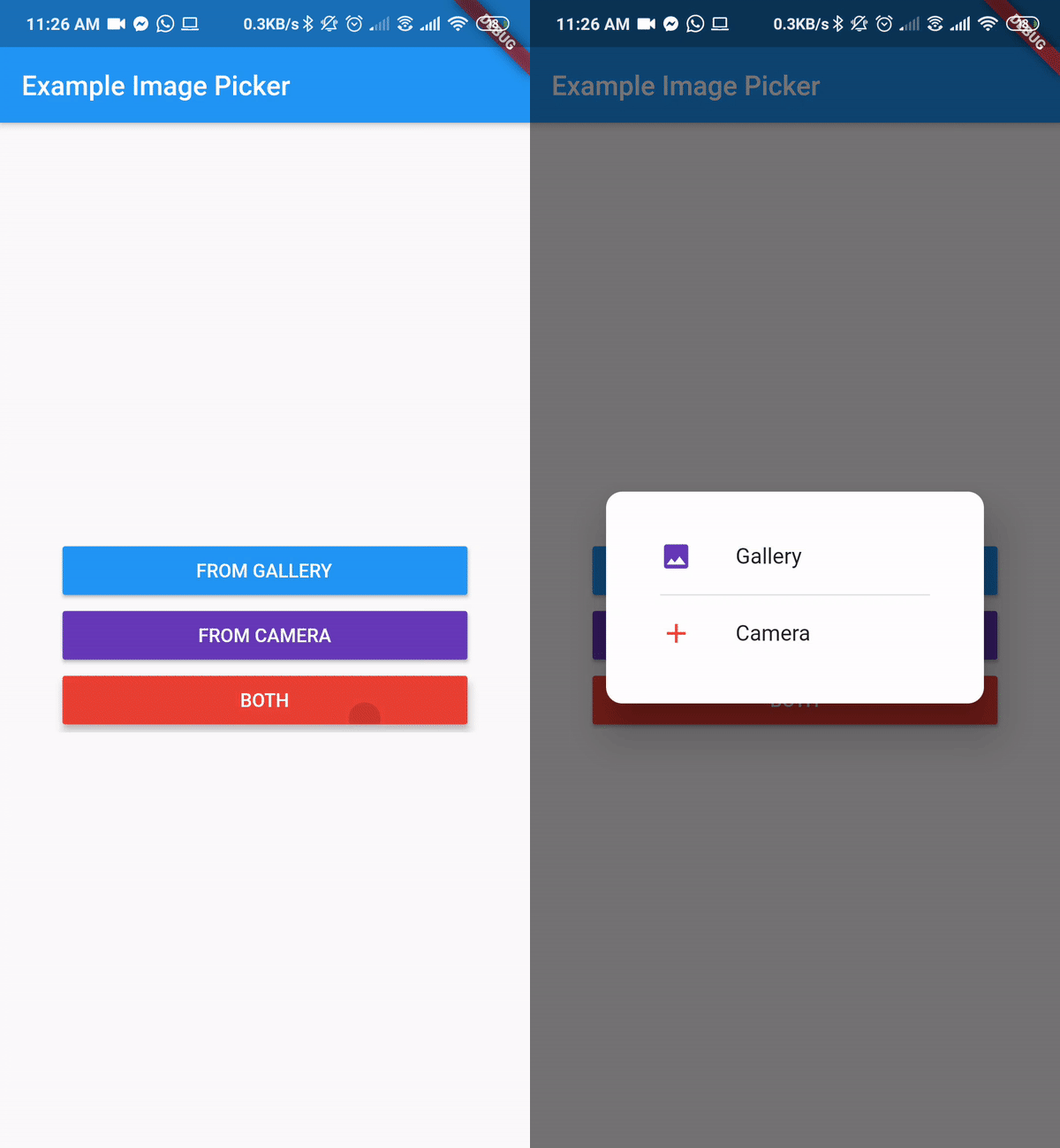
Final Output

Example

import 'dart:io';

import 'package:flutter/material.dart';
import 'package:image_picker_gallery_camera/image_picker_gallery_camera.dart';

void main() => runApp(MyApp());

class MyApp extends StatelessWidget {
  // This widget is the root of your application.
  @override
  Widget build(BuildContext context) {
    return MaterialApp(
      title: 'Example Image Picker',
      theme: ThemeData(
        primarySwatch: Colors.blue,
      ),
      home: MyHomePage(title: 'Example Image Picker'),
    );
  }
}

class MyHomePage extends StatefulWidget {
  MyHomePage({Key key, this.title}) : super(key: key);
  final String title;

  @override
  _MyHomePageState createState() => _MyHomePageState();
}

class _MyHomePageState extends State<MyHomePage> {
  var _image;

  Future getImage(ImgSource source) async {
    var image = await ImagePickerGC.pickImage(
        enableCloseButton: true,
        closeIcon: Icon(
          Icons.close,
          color: Colors.red,
          size: 12,
        ),
        context: context,
        source: source,
        barrierDismissible: true,
        cameraIcon: Icon(
          Icons.camera_alt,
          color: Colors.red,
        ), //cameraIcon and galleryIcon can change. If no icon provided default icon will be present
        cameraText: Text(
          "From Camera",
          style: TextStyle(color: Colors.red),
        ),
        galleryText: Text(
          "From Gallery",
          style: TextStyle(color: Colors.blue),
        ));
    setState(() {
      _image = image;
    });
  }

  @override
  Widget build(BuildContext context) {
    return Scaffold(
      appBar: AppBar(
        title: Text(widget.title),
      ),
      body: Center(
        child: SingleChildScrollView(
          child: Column(
            mainAxisAlignment: MainAxisAlignment.center,
            children: <Widget>[
              Container(
                width: 300,
                child: ElevatedButton(
                  onPressed: () => getImage(ImgSource.Gallery),
                  style: ElevatedButton.styleFrom(
                    primary: Colors.blue,
                  ),
                  child: Text(
                    "From Gallery".toUpperCase(),
                    style: TextStyle(color: Colors.white),
                  ),
                ),
              ),
              Container(
                width: 300,
                child: ElevatedButton(
                  onPressed: () => getImage(ImgSource.Camera),
                  style: ElevatedButton.styleFrom(
                    primary: Colors.deepPurple,
                  ),
                  child: Text(
                    "From Camera".toUpperCase(),
                    style: TextStyle(color: Colors.white),
                  ),
                ),
              ),
              Container(
                width: 300,
                child: ElevatedButton(
                  onPressed: () => getImage(ImgSource.Both),
                  style: ElevatedButton.styleFrom(
                    primary: Colors.red,
                  ),
                  child: Text(
                    "Both".toUpperCase(),
                    style: TextStyle(color: Colors.white),
                  ),
                ),
              ),
              _image != null ? Image.file(File(_image.path)) : Container(),
            ],
          ),
        ),
      ),
    );
  }
}

카테고리

의존성

의존성 목록 1 개

소스 저장소

이 패키지를 사용하는 프로젝트

아직 데이터가 없습니다.