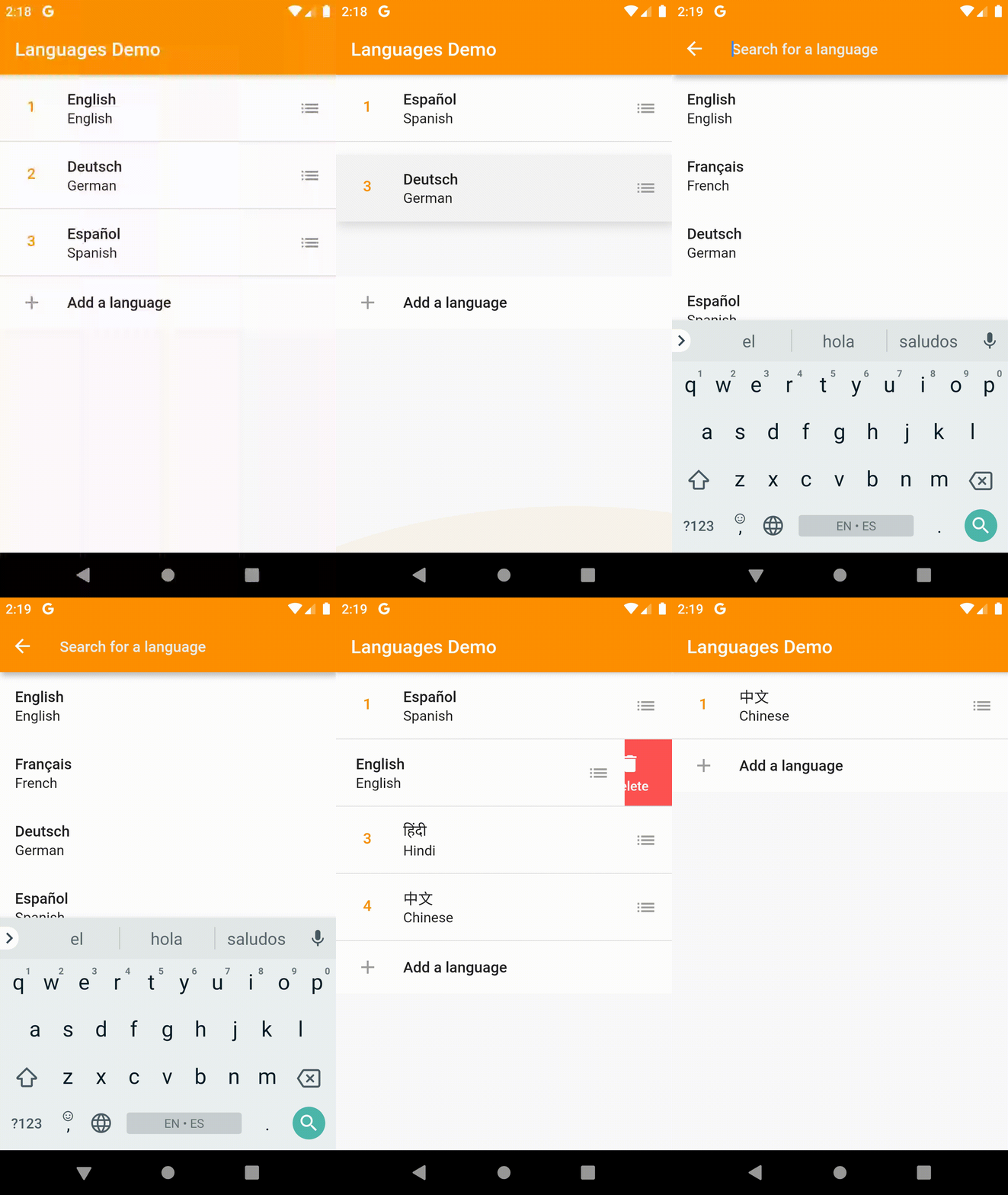
다른 목록 간의 부드러운 전환 애니메이션을 지원하는 ListView를 제공하는 플러터 패키지로, 항목 재정렬 기능도 내장되어 있습니다. 명시적인 애니메이션 컨트롤러 없이 자동으로 진입, 종료 및 재정렬 애니메이션을 처리함으로써 동적 리스트 상호작용 구현을 단순화합니다. 여러 플랫폼에서 유연한 리스트 업데이트와 드래그 앤 드롭 기능이 필요한 앱에 적합합니다.
사용 사례
드래그 앤 드롭 리스트 재정렬
부드러운 전환 효과를 갖춘 동적 목록 업데이트
인터랙티브 작업 또는 항목 관리
실시간 협업 목록 편집
리스트 수정 중 시각적 피드백
주요 기능
리스트 상태 간 자동 애니메이션
내장된 재정렬 지원
수동 애니메이션 컨트롤러 필요 없음
크로스 플랫폼 호환성
최소한의 보일러플레이트 코드
부드러운 진입/종료/재정렬 애니메이션
적합한 대상
인터랙티브 리스트 인터페이스를 구축하는 개발자
직관적인 항목 재정렬이 필요한 앱
다중 플랫폼을 대상으로 하는 프로젝트
정제되고 유지보수 가능한 코드를 우선시하는 팀
박스 밖의 애니메이션 동작을 원하는 사용자
고려 사항
매우 큰 목록과 함께 성능에 영향을 줄 수 있습니다
개별 애니메이션 곡선에 대한 사용자 정의 제한
기본 플러터 렌더링 파이프라인에 의존합니다
복잡한 사용자 정의 애니메이션에 적합하지 않습니다
다른 애니메이션 위젯과 함께 사용할 때 상태 관리에 주의가 필요합니다
원본 README
연결된 소스 저장소의 README 원문 스냅샷입니다. 최신 내용은 저장소에서 확인하세요.
Implicitly Animated Reorderable List
A Flutter ListView that implicitly calculates the changes between two lists using the MyersDiff algorithm and animates between them for you. The ImplicitlyAnimatedReorderableList adds reordering support to its items with fully custom animations.
If you like this package, consider supporting it by giving it a star on GitHub and a like on pub.dev :heart:
Usage
The package contains two ListViews: ImplicitlyAnimatedList which is the base class and offers implicit animation for item insertions, removals as well as updates, and ImplicitlyAnimatedReorderableList which extends the ImplicitlyAnimatedList and adds reordering support to its items. See examples below on how to use them.
ImplicitlyAnimatedList
ImplicitlyAnimatedList is based on AnimatedList and uses the MyersDiff algorithm to calculate the difference between two lists and calls insertItem and removeItem on the AnimatedListState for you.
Example
// Specify the generic type of the data in the list.ImplicitlyAnimatedList<MyGenericType>(
// The current items in the list.
items: items,
// Called by the DiffUtil to decide whether two object represent the same item.// For example, if your items have unique ids, this method should check their id equality.
areItemsTheSame: (a, b) => a.id == b.id,
// Called, as needed, to build list item widgets.// List items are only built when they're scrolled into view.
itemBuilder: (context, animation, item, index) {
// Specifiy a transition to be used by the ImplicitlyAnimatedList.// See the Transitions section on how to import this transition.returnSizeFadeTransition(
sizeFraction: 0.7,
curve: Curves.easeInOut,
animation: animation,
child: Text(item.name),
);
},
// An optional builder when an item was removed from the list.// If not specified, the List uses the itemBuilder with // the animation reversed.
removeItemBuilder: (context, animation, oldItem) {
returnFadeTransition(
opacity: animation,
child: Text(oldItem.name),
);
},
);
If you have a CustomScrollView you can use the SliverImplicitlyAnimatedList.
As AnimatedList doesn't support item moves, a move is handled by removing the item from the old index and inserting it at the new index.
ImplicitlyAnimatedReorderableList
ImplicitlyAnimatedReorderableList is based on ImplicitlyAnimatedList and adds reordering support to the list.
Example
ImplicitlyAnimatedReorderableList<MyGenericType>(
items: items,
areItemsTheSame: (oldItem, newItem) => oldItem.id == newItem.id,
onReorderFinished: (item, from, to, newItems) {
// Remember to update the underlying data when the list has been// reordered.setState(() {
items
..clear()
..addAll(newItems);
});
},
itemBuilder: (context, itemAnimation, item, index) {
// Each item must be wrapped in a Reorderable widget.returnReorderable(
// Each item must have an unique key.
key: ValueKey(item),
// The animation of the Reorderable builder can be used to// change to appearance of the item between dragged and normal// state. For example to add elevation when the item is being dragged.// This is not to be confused with the animation of the itemBuilder.// Implicit animations (like AnimatedContainer) are sadly not yet supported.
builder: (context, dragAnimation, inDrag) {
final t = dragAnimation.value;
final elevation = lerpDouble(0, 8, t);
final color = Color.lerp(Colors.white, Colors.white.withOpacity(0.8), t);
returnSizeFadeTransition(
sizeFraction: 0.7,
curve: Curves.easeInOut,
animation: itemAnimation,
child: Material(
color: color,
elevation: elevation,
type: MaterialType.transparency,
child: ListTile(
title: Text(item.name),
// The child of a Handle can initialize a drag/reorder.// This could for example be an Icon or the whole item itself. You can// use the delay parameter to specify the duration for how long a pointer// must press the child, until it can be dragged.
trailing: Handle(
delay: constDuration(milliseconds: 100),
child: Icon(
Icons.list,
color: Colors.grey,
),
),
),
),
);
},
);
},
// Since version 0.2.0 you can also display a widget// before the reorderable items...
header: Container(
height: 200,
color: Colors.red,
),
// ...and after. Note that this feature - as the list itself - is still in beta!
footer: Container(
height: 200,
color: Colors.green,
),
// If you want to use headers or footers, you should set shrinkWrap to true
shrinkWrap: true,
);
If you want to contribute your own custom transitions, feel free to make a pull request.
Caveats
Note that this package is still in its very early phase and not enough testing has been done to guarantee stability.
Also note that computing the diff between two very large lists may take a significant amount of time (the computation is done on a background isolate though unless spawnIsolate is set to false).
Acknowledgements
The diff algorithm that ImplicitlyAnimatedList uses was written by Dawid Bota at GitLab.