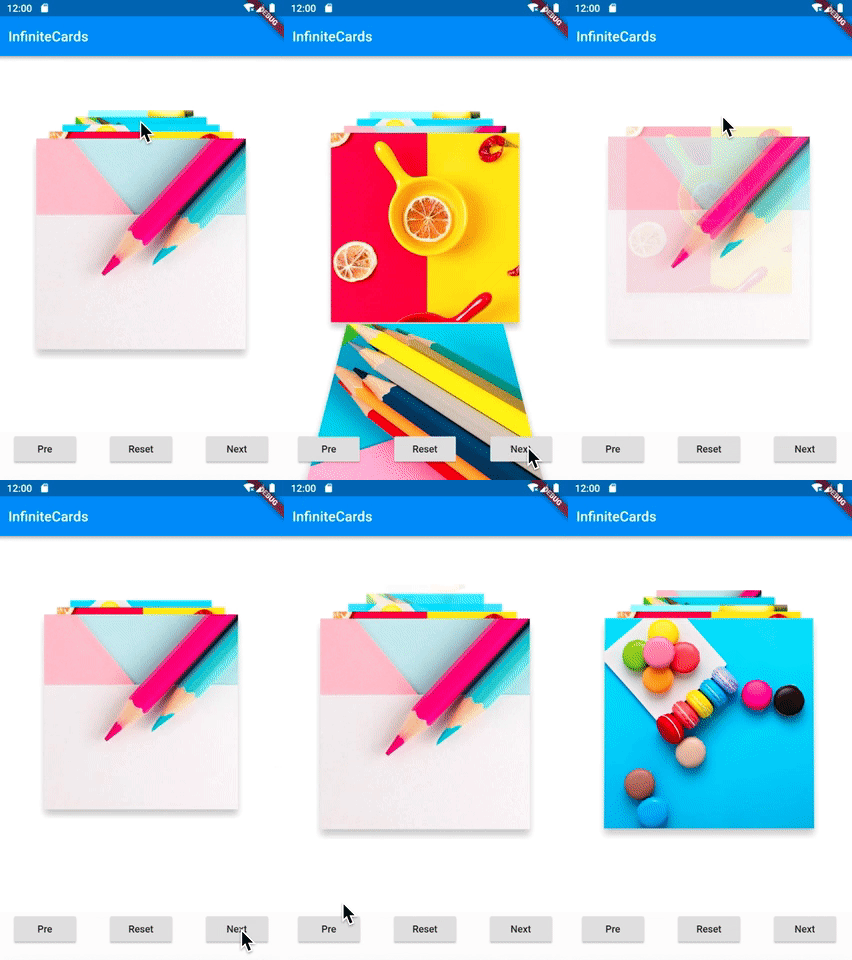
플러터 패키지로 무한 카드 전환 인터페이스를 제공하여 부드럽고 사용자 정의 가능한 카드 전환을 가능하게 합니다. 사용자 정의 애니메이션을 지원하여 커버 플로우 또는 끝없는 카드 스와이핑 경험과 유사한 매력적이고 상호작용 가능한 UI를 개발자가 만들 수 있습니다. 이미지, 프로필, 제품 목록과 같은 콘텐츠를 시각적으로 역동적인 방식으로 보여주는 데 이상적입니다. 간편하고 유연한 설계로 pub.dev를 통해 쉽게 통합할 수 있으며, 몰입형 카드 기반 탐색이 필요한 앱에 특히 유용합니다.
사용 사례
인터랙티브 제품 캐러셀
프로필 브라우징 인터페이스
스와이프 제스처가 있는 이미지 갤러리
동적 콘텐츠 슬라이더
사용자 온보딩 흐름
주요 기능
무한 카드 루핑
사용자 정의 전환 애니메이션
Flutter와의 간단한 통합
수평 카드 스와이프 지원
확장 가능한 애니메이션 제어
적합한 대상
카드 기반 UI를 구축하는 개발자
매력적인 콘텐츠 탐색이 필요한 앱
상호작용형 프로토타입을 찾는 디자이너
동적 데이터 표시를 갖춘 프로젝트
시각적 스토리텔링을 갖춘 모바일 앱
고려 사항
대규모 데이터 세트에 대한 성능 최적화가 필요할 수 있습니다
사용자 정의 애니메이션은 지연을 방지하기 위해 신중하게 처리해야 합니다
제한된 플랫폼별 사용자 정의 옵션
수직 스크롤링에 최적화되지 않음
업데이트를 위해 외부 GitHub 저장소에 의존합니다
원본 README
연결된 소스 저장소의 README 원문 스냅샷입니다. 최신 내용은 저장소에서 확인하세요.
InfiniteCards
An infinite card switching UI for Flutter, support custom animation
可自定义动效的卡片切换视图(中文文档)
Transform_defaultCommonTransform(Widget item,
double fraction, double curveFraction, double cardHeight, double cardWidth, int fromPosition, int toPosition)
{
//Count of card which needs to move overint positionCount = fromPosition - toPosition;
//0.8 scale for the first card, and -0.1 per card behind//(0.8 - 0.1 * fromPosition) = current specific card scale//(0.1 * fraction * positionCount) = scale while movingdouble scale = (0.8 - 0.1 * fromPosition) + (0.1 * fraction * positionCount);
//translate -0.02 * cardHeight per card behind//-cardHeight * (0.8 - scale) * 0.5 to center the carddouble translationY = -cardHeight * (0.8 - scale) * 0.5 -
cardHeight * (0.02 * fromPosition - 0.02 * fraction * positionCount);
//return the Widget after scale and translatereturnTransform.translate(
offset: Offset(0, translationY),
child: Transform.scale(
scale: scale,
child: item,
),
);
}
License
InfiniteCards is released under the Apache 2.0 license.
Copyright2019BakerJ.
Licensed under the ApacheLicense, Version2.0 (the "License");
you may not use this file except in compliance with the License.
You may obtain a copy of the License at following link.
http://www.apache.org/licenses/LICENSE-2.0Unlessrequired by applicable law or agreed to in writing, software
distributed under the Licenseis distributed on an "AS IS" BASIS,
WITHOUT WARRANTIES OR CONDITIONS OF ANY KIND, either express or implied.
See the Licensefor the specific language governing permissions and
limitations under the License.