패키지, 저장소 및 앱 카테고리 검색

input_history_text_field 표지
패키지 상세v0.4.0

input_history_text_field

input_history_text_field 위젯은 자동으로 저장되며, 입력할 때마다 제안을 제공합니다.

AndroidiOSWebmacOSWindowsLinux
30일 다운로드
1.3천
좋아요
80
Pub 점수
150

패키지 설치

flutter pub add input_history_text_field

패키지 개요

공개 정보를 바탕으로 생성한 선택 가이드입니다.

input_history_text_field 패키지는 사용자 입력 기록을 자동으로 저장하고 사용자가 입력할 때 제안을 제공하는 Flutter 위젯을 제공합니다. 이전에 입력한 항목을 기억함으로써 폼의 사용성을 향상시키고 반복적인 타이핑을 줄입니다. 검색 필드, 로그인 폼 또는 과거 입력이 유용한 모든 입력 영역에 적합합니다. 이 위젯은 Android, iOS, Web, macOS, Windows, Linux 등 여러 플랫폼을 지원하며 장치 간 일관된 동작을 보장합니다. 단순성과 성능을 고려해 설계되었으며 기존의 Flutter 애플리케이션에 원활하게 통합될 수 있습니다.

사용 사례

  • 자동 제안이 있는 검색 창
  • 기록 보존 기능이 있는 폼 입력
  • 로그인 또는 등록 필드
  • 사용자 선호 설정
  • 자주 입력하는 텍스트에 빠르게 접근
  • 데이터 입력에서 사용자 경험 향상

주요 기능

  • 자동 입력 기록 저장
  • 입력 시 실시간 제안
  • 크로스 플랫폼 호환성
  • 기존 양식과의 간단한 통합
  • 가볍고 성능이 뛰어남
  • 모든 주요 플러터 플랫폼을 지원합니다

적합한 대상

  • 검색 인터페이스를 구축하는 개발자
  • 반복적인 사용자 입력이 필요한 앱
  • UX 향상을 목표로 하는 양식
  • 여러 플랫폼을 대상으로 하는 프로젝트
  • 히스토리 기능을 위한 최소한의 설정을 원하는 팀

고려 사항

  • 저장소 지속성에 대한 수동 처리가 필요합니다
  • 대규모 데이터셋에 맞춰 사용자 정의가 필요할 수 있습니다
  • 로컬 저장으로 인해 민감한 데이터에 적합하지 않습니다
  • 제한된 내장 스타일 옵션
  • 고급 사용 사례를 위해 외부 상태 관리에 의존합니다

원본 README

연결된 소스 저장소의 README 원문 스냅샷입니다. 최신 내용은 저장소에서 확인하세요.

input_history_text_field

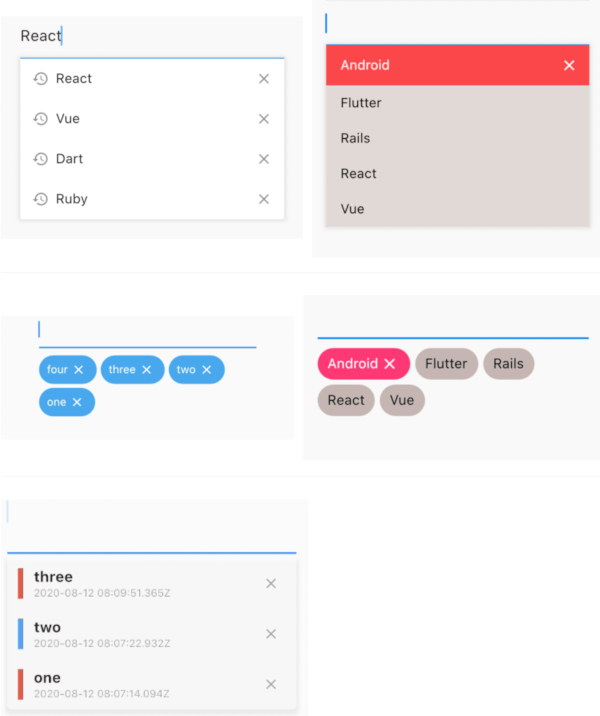
A input_history_text_field widget is automatically saved and suggest as you type.

Overview

List

example1 example2
image image

Badge

example1 example2
image image

Customize

 
image

Getting Started

Usage

The only key in the your widget of application set to historyKey, supports like a text_field.

InputHistoryTextField(
    historyKey: "01",
),

a saved automatically as you type.( save up to limit, default to 5 )

input_history_text_field-1

a input history is suggested.

input_history_text_field-2

input history can be deleted.

input_history_text_field-3

Example

simple

All you need is a historyKey.

InputHistoryTextField(
    historyKey: "01",
),
badge style

Change style to badge is listStyle = ListStyle.Badge

InputHistoryTextField(
    historyKey: "01",
    listStyle: ListStyle.Badge,
),

 
image
Default items

If there is an item you want to display from the beginning or an item you want the user to selected.

InputHistoryTextField(
    historyKey: "01",
    lockItems: ['Flutter', 'Rails', 'React', 'Vue'],
),

List
image
change icon

Can hide or change the icon.

InputHistoryTextField(
    historyKey: "01",
    showHistoryIcon: true,
    showDeleteIcon: true,
    historyIcon: Icons.add,
    deleteIcon: Icons.delete,
),
 
image
gradually transmitted

enableOpacityGradient is input history list is gradually transmitted.

InputHistoryTextField(
    historyKey: "01",
    enableOpacityGradient: true,
),
 
image
lines decoration

listRowDecoration is input history lines as a decoration.

InputHistoryTextField(
    historyKey: "01",
    listRowDecoration: BoxDecoration(
        border: Border(
        left: BorderSide(color: Colors.blue, width: 8),
        ),
    ),
),

 
image
list decoration

listDecoration is input history list as a decoration.

InputHistoryTextField(
    historyKey: "01",
    listDecoration: BoxDecoration(
        color: Colors.cyan,
        borderRadius: BorderRadius.only(
            bottomLeft: Radius.circular(20),
            bottomRight: Radius.circular(20)),
        boxShadow: [
        BoxShadow(
            color: Colors.grey.withOpacity(0.2),
            spreadRadius: 8,
            blurRadius: 8,
            offset: Offset(0, 3)),
        ],
    ),
),

 
image
list layout builder

If you want to customize everything, to use historyListItemLayoutBuilder.

InputHistoryTextField(
    historyKey: "01",
    historyListItemLayoutBuilder: (controller, value, index) {
        return InkWell(
        onTap: () => controller.select(value.text),
        child: Row(
            children: [
            Expanded(
                flex: 1,
                child: Container(
                    margin: const EdgeInsets.only(left: 10.0),
                    padding: const EdgeInsets.only(left: 10.0),
                    decoration: BoxDecoration(
                    border: Border(
                        left: BorderSide(
                        width: 5.0,
                        color: index % 2 == 0
                            ? Colors.red
                            : Colors.blue,
                        ),
                    ),
                    ),
                    child: Column(
                    crossAxisAlignment: CrossAxisAlignment.start,
                    children: [
                        Text(
                        value.textToSingleLine,
                        overflow: TextOverflow.ellipsis,
                        style:
                            TextStyle(fontWeight: FontWeight.bold),
                        ),
                        Text(
                        DateTime.fromMillisecondsSinceEpoch(
                                value.createdTime)
                            .toUtc()
                            .toString(),
                        overflow: TextOverflow.ellipsis,
                        style: TextStyle(
                            fontSize: 10,
                            color: Theme.of(context).disabledColor),
                        ),
                    ],
                    )),
            ),
            IconButton(
                icon: Icon(
                Icons.close,
                size: 16,
                color: Theme.of(context).disabledColor,
                ),
                onPressed: () {
                controller.remove(value);
                },
            ),
            ],
        ),
    );}
)
 
image
API
name ex note
historyKey key-01 String a only key in the your application,saved with this key.
limit 5 int max limit of input history
hasFocusExpand true bool show input history of edit text focused
showHistoryIcon true bool icon of input history at left positioned
showDeleteIcon true bool icon of delete at right positioned
enableHistory true bool enabled/disabled of input history
enableSave true bool enabled/disabled saved history
enableOpacityGradient true bool make the input history list gradually transparent
enableFilterHistory true bool suggest filters when input text
showHistoryList true bool show/hide of input history list
historyIcon Icons.add IconData IconData for history icon.
historyIconTheme IconTheme IconTheme IconTheme for history icon.
deleteIcon Icons.delete IconData IconData for delete icon.
deleteIconTheme IconTheme IconTheme IconTheme for delete icon.
listOffset Offset(0, 5) Offset set a position for list.
listTextStyle TextStyle(fontSize: 30) TextStyle sets a text style for list.
listRowDecoration BoxDecoration Decoration a row of input history for decoration
listDecoration BoxDecoration Decoration a list of input history for decoration
listStyle ListStyle.List ListStyle change style List or Badge
textColor Colors.black Color a text color
backGroundColor Colors.grey Color a background color
historyIconColor Colors.white Color a history icon color
deleteIconColor Colors.white Color a delete icon color
lockItems ['Flutter', 'Rails', 'React', 'Vue'] List
fixed shown, cannot be delete items
lockTextColor Colors.black Color a lock items text color
lockBackgroundColor Colors.grey Color a lock items background color
historyListItemLayoutBuilder Widget Widget a customize full layout.
InputHistoryController InputHistoryController InputHistoryController Select or delete the input history list

카테고리

의존성

의존성 목록 1 개

소스 저장소

이 패키지를 사용하는 프로젝트

아직 데이터가 없습니다.