패키지, 저장소 및 앱 카테고리 검색

패키지 상세v1.4.0

intent

Android Intents를 다루는 간편한 사용법의 Flutter 플러그인 - Android Intents에 대한 단일 솔루션입니다.

30일 다운로드
223
좋아요
122
Pub 점수
40

패키지 설치

flutter pub add intent

패키지 개요

공개 정보를 바탕으로 생성한 선택 가이드입니다.

intent 패키지는 Android Intent 처리를 단순화하기 위해 설계된 간단한 Flutter 플러그인입니다. Flutter 앱과 네이티브 Android 컴포넌트 간의 원활한 통신을 가능하게 하며, 최소한의 코드로 활동 시작, 브로드캐스트 전송 및 인텐트 관리를 할 수 있습니다. 데이터 공유, 외부 앱 열기, 이메일 또는 메시지 보내기와 같은 시스템 작업을 트리거하는 데 이상적입니다. 이 플러그인은 Android의 복잡한 Intent API를 사용하기 쉬운 Dart 메서드로 추상화하여 초보자도 쉽게 활용할 수 있도록 합니다. 명확한 문서와 적극적인 유지보수를 통해 Flutter와 Android의 네이티브 기능 사이의 신뢰할 수 있는 연결 고리 역할을 합니다.

사용 사례

  • 앱 간에 콘텐츠 공유
  • 외부 응용 프로그램 실행
  • 브로드캐스트 인텐트 전송
  • 시스템 설정 열기
  • 딥링크 처리
  • 장치 작업 트리거

주요 기능

  • Android Intents용 간단한 Dart 인터페이스
  • 암시적 및 명시적 인텐트를 지원합니다
  • Flutter 워크플로우와의 간편한 통합
  • 최소한의 보일러플레이트 코드
  • 활성 GitHub 저장소
  • 명확한 문서

적합한 대상

  • 안드로이드를 대상으로 하는 플러터 개발자
  • 안드로이드 전용 작업이 필요한 앱
  • 공유 및 심층 링크 기능
  • 초보자가 Android 통합을 배우는 중

고려 사항

  • Android 전용 기능
  • Android 플랫폼에 한정
  • 고급 사용을 위해서는 Android SDK 지식이 필요합니다
  • iOS 지원 없음
  • 일부 인텐트에 추가 권한이 필요할 수 있습니다

원본 README

연결된 소스 저장소의 README 원문 스냅샷입니다. 최신 내용은 저장소에서 확인하세요.

Warning I've stopped maintaining this project !

intent

A simple flutter plugin to deal with Android Intents - your one stop solution for Android Intents, written with :heart:.

Show some :heart: by putting :star:

intent tries to help you in launching another android activity using Android Intents. This Dart API replicates Android Intent API, so for detailed information on how to use it efficiently, when to send what kind of data, you may be interested in taking a look here, which explains things more elaborately.

intent is readily available for use.

what does it do ?

  • intent is your one stop solution for handling different Android Intents from Flutter app.
  • It provides an easy to use Dart API, which can be used to launch different kind of Android Activities
  • You can view / create documents
  • Pick document(s) from Document Tree
  • Open default Assist Activity
  • Perform a Web Search
  • Request definition of a certain string to default Assist Activity
  • Open image for editing / viewing
  • Share text / multimedia to another activity
  • Send Email to specific user, while also setting CC & BCC
  • Share multiple documents at a time
  • Sync system content
  • Translate text
  • Set Wallpaper
  • Open any URL
  • Open Dialer for calling a specific number
  • Can pick a contact from your default phone activity
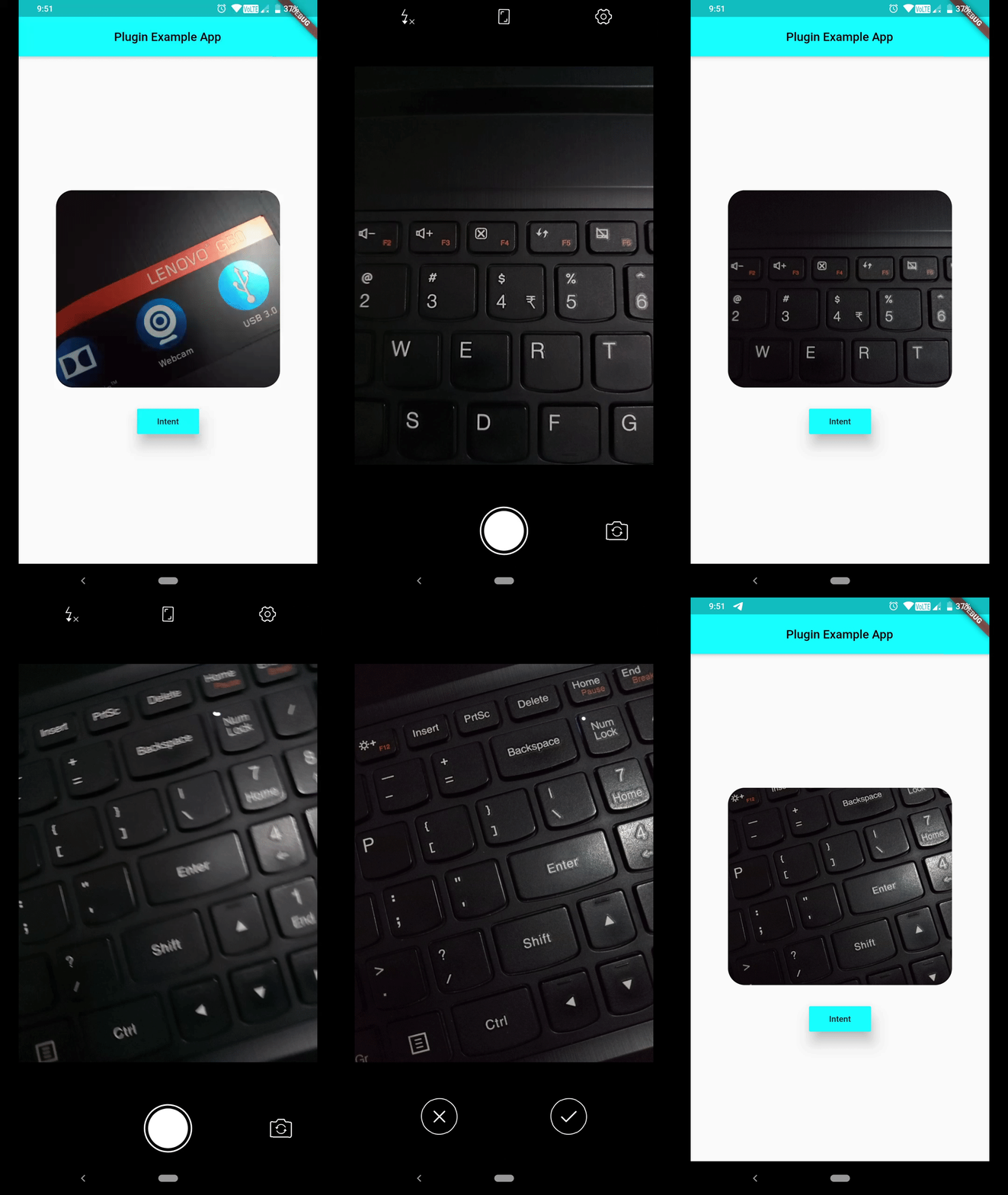
  • Can capture a photo using default Camera Activity
latest addition

Newest Addition: You can pass extra data's type information, while invoking Intent.putExtra(String extra, dynamic data, {String type}) as optional named param type. You don't even need to hardcode type names as Strings, rather a class named TypedExtra has been given to developers, which has all currently supported type names as static variables. Consider using them. And last but not least, this is not a breaking change !!!

import 'package:intent/intent.dart' as android_intent;
import 'package:intent/extra.dart' as android_extra;
import 'package:intent/typedExtra.dart' as android_typedExtra;
import 'package:intent/action.dart' as android_action;

// more codes ...

android_intent.Intent()
        ..setAction(android_action.Action.ACTION_SHOW_APP_INFO)
        ..putExtra(android_extra.Extra.EXTRA_PACKAGE_NAME, "com.whatsapp", type: android_typedExtra.TypedExtra.stringExtra)
        ..startActivity().catchError((e) => print(e));

how to use it ?

Well make sure, you include intent in your pubspec.yaml.

Define a Term :
Intent()
        ..setAction(Action.ACTION_DEFINE)
        ..putExtra(Extra.EXTRA_TEXT, "json")
        ..startActivity().catchError((e) => print(e));
Show Desired Application Info :

Make sure you address app using its unique package id.

Intent()
        ..setAction(Action.ACTION_SHOW_APP_INFO)
        ..putExtra(Extra.EXTRA_PACKAGE_NAME, "com.whatsapp")
        ..startActivity().catchError((e) => print(e));
Show Application Preference Activity :
Intent()
        ..setAction(Action.ACTION_APPLICATION_PREFERENCES)
        ..startActivity().catchError((e) => print(e));
Launch Application Error Reporting Activity :
Intent()
        ..setAction(Action.ACTION_APP_ERROR)
        ..startActivity().catchError((e) => print(e));
Launch Default Assist Activity :
Intent()
        ..setAction(Action.ACTION_ASSIST)
        ..startActivity().catchError((e) => print(e));
Report Bug :
Intent()
        ..setAction(Action.ACTION_BUG_REPORT)
        ..startActivity().catchError((e) => print(e));
View a URI :

Which activity to be launched, depends upon type of URI passed.

In case of passing tel URI, opens dialer up.

Intent()
        ..setAction(Action.ACTION_VIEW)
        ..setData(Uri(scheme: "tel", path: "123"))
        ..startActivity().catchError((e) => print(e));

If you pass a mailto URI, it'll open email app.

Intent()
        ..setAction(Action.ACTION_VIEW)
        ..setData(Uri(scheme: "mailto", path: "someone@example.com"))
        ..startActivity().catchError((e) => print(e));

In case of http/ https URI, opens browser up.

Intent()
        ..setAction(Action.ACTION_VIEW)
        ..setData(Uri(scheme: "https", host:"google.com"))
        ..startActivity().catchError((e) => print(e));
Dial a Number using Default Dial Activity :

Setting data using tel URI, will open dialer, number as input.

Intent()
        ..setAction(Action.ACTION_DIAL)
        ..setData(Uri(scheme: 'tel', path: '121'))
        ..startActivity().catchError((e) => print(e));

But if you're interested in opening dialer without any numbers dialer, make sure you don't set data field.

Intent()
        ..setAction(Action.ACTION_DIAL)
        ..startActivity().catchError((e) => print(e));
Calling a Number :

You can simply call a number, but make sure you've necessary permissions to do so.

Intent()
        ..setAction(Action.ACTION_CALL)
        ..setData(Uri(scheme: 'tel', path: '121'))
        ..startActivity().catchError((e) => print(e));

It'll always be a wise decision to use ACTION_DIAL, because that won't require any kind of permissions.

Create Precomposed Email :
Intent()
        ..setPackage("com.google.android.gm")
        ..setAction(Action.ACTION_SEND);
        ..setType("message/rfc822");
        ..putExtra(Extra.EXTRA_EMAIL, ["john.doe@exampleemail.com"]);
        ..putExtra(Extra.EXTRA_CC, ["jane.doe@exampleemail.com"]);
        ..putExtra(Extra.EXTRA_SUBJECT, "Foo bar");
        ..putExtra(Extra.EXTRA_TEXT, "Lorem ipsum");
        ..startActivity().catchError((e) => print(e));
Create a Document :

Content type of document is set text/plain, category is CATEGORY_OPENABLE and file name is passed as an extra i.e. EXTRA_TITLE.

Intent()
        ..setAction(Action.ACTION_CREATE_DOCUMENT)
        ..setType("text/plain")
        ..addCategory(Category.CATEGORY_OPENABLE)
        ..putExtra(Extra.EXTRA_TITLE, "test.txt")
        ..startActivity().catchError((e) => print(e));

You can also set path of file using data field. But make sure data field is a valid path URI.

Edit Document :

You can edit image/ text or any other kind of data using appropriate activity.

Intent()
        ..setAction(Action.ACTION_EDIT)
        ..setData(Uri(scheme: 'content',
                path:
                'path-to-image'))
        ..setType('image/*')
        ..startActivity().catchError((e) => print(e));
Add a Contact to your Contact Database :
Intent()
        ..setAction('com.android.contacts.action.SHOW_OR_CREATE_CONTACT')
        ..setData(Uri(scheme: 'tel', path: '1234567890'))
        ..startActivity().catchError((e) => print(e));
Search for a Term :

Opens up a list of eligible candidates, which can provides search activity.

Intent()
        ..setAction(Action.ACTION_SEARCH)
        ..putExtra(Extra.EXTRA_TEXT, 'json')
        ..startActivity().catchError((e) => print(e));
Share Text/ Media :

Make sure you've set appropriate path URI for sharing documents/ media using EXTRA_STREAM and also set type properly.

Following one will share a plain text. For sharing html formatted text, set type to text/html.

Intent()
        ..setAction(Action.ACTION_SEND)
        ..setType('text/plain')
        ..putExtra(Extra.EXTRA_TEXT, 'json')
        ..startActivity().catchError((e) => print(e));

But if you're interested in creating a chooser i.e. all eligible candidates shown up system, which can handle this intent, make sure you set createChooser named parameter to true, which is by default false.

Send Email to certain ID while setting Content and CC/ BCC :
Intent()
        ..setAction(Action.ACTION_SENDTO)
        ..setData(Uri(scheme: 'mailto', path: 'anjanroy@yandex.com'))
        ..putExtra(Extra.EXTRA_CC, ['someone@example.com'])
        ..putExtra(Extra.EXTRA_TEXT, 'Hello World')
        ..startActivity().catchError((e) => print(e));
Translate a Text using default Assist Activity :
Intent()
        ..setAction(Action.ACTION_TRANSLATE)
        ..putExtra(Extra.EXTRA_TEXT, "I Love Computers")
        ..startActivity().catchError((e) => print(e));
Pick a Contact up from Phone :
  • Opens default Phone Activity and let user pick a contact up, selected contact will be returned as Future<List<String>> from startActivityForResult().
        Intent()
                ..setAction(Action.ACTION_PICK)
                ..setData(Uri.parse('content://contacts'))
                ..setType("vnd.android.cursor.dir/phone_v2")
                ..startActivityForResult().then((data) => print(data),
                onError: (e) => print(e));
Capture Image using default Camera activity :

Path to captured image can be grabbed from Intent().startActivityForResult().then(() { ... } ), which will be provided in form of List<String>, open file using that path, File(data[0]). Now you can work on that image file.

        Intent()
                ..setAction(Action.ACTION_IMAGE_CAPTURE)
                ..startActivityForResult().then((data) => print(data[0]), // gets you path to image captured
                onError: (e) => print(e));

image_capture_using_intent

If you're not interested in showing default activity launch animation, set following flag.

Intent()..addFlag(Flag.FLAG_ACTIVITY_NO_ANIMATION);

If you don't want this activity to be displayed in recents, set following flag.

Intent()..addFlag(Flag.FLAG_ACTIVITY_EXCLUDE_FROM_RECENTS);

If you request for certain Activity and no eligible candidate was found, you'll receive one error message, which you can listen for using Future.catchError((e) {},) method.

PlatformException(Error, android.content.ActivityNotFoundException: No Activity found to handle Intent { act=android.intent.action.SYSTEM_TUTORIAL }, null)

Currently a limited number of Actions are provided in Action class, but you can always use a string constant as an Action, which will help you in dealing with many more Activities.

Hoping this helps :wink:

카테고리

소스 저장소

이 패키지를 사용하는 프로젝트

아직 데이터가 없습니다.