패키지, 저장소 및 앱 카테고리 검색

패키지 상세v1.0.2

internet_connectivity_checker

기기의 인터넷 연결 상태에 따라 위젯을 쉽게 동적으로 관리할 수 있도록 도와주는 플러터 패키지입니다.

AndroidiOSmacOSWindowsLinux
30일 다운로드
458
좋아요
38
Pub 점수
160

패키지 설치

flutter pub add internet_connectivity_checker

패키지 개요

공개 정보를 바탕으로 생성한 선택 가이드입니다.

기기의 현재 인터넷 연결 상태에 따라 동적 위젯 관리를 가능하게 하는 플러터 패키지입니다. 여러 플랫폼에서 네트워크 가용성을 실시간으로 모니터링하여 개발자가 조건부로 콘텐츠를 표시하거나 로딩 인디케이터를 표시하거나 오프라인 시 대체 UI를 트리거할 수 있도록 합니다. 다양한 네트워크 조건에서 반응형 동작이 필요한 앱에 원활하게 통합됩니다. 간단한 API와 크로스플랫폼 지원을 통해 연결 상태에 관계없이 일관된 사용자 경험을 보장합니다.

사용 사례

  • 오프라인 배너 표시
  • 네트워크 종속 위젯을 조건부로 렌더링하기
  • 오프라인 상태일 때 재시도 버튼 표시
  • 연결 손실 중 로딩 자리 표시자
  • 네트워크 인식 기능을 갖춘 API 요청 처리
  • 실시간 연결 상태 변경에 따라 UI 업데이트

주요 기능

  • 실시간 연결 모니터링
  • 크로스 플랫폼 호환성
  • 위젯 제어를 위한 간단한 API
  • 자동 상태 업데이트
  • 모든 주요 데스크톱 및 모바일 플랫폼을 지원합니다
  • 경량이며 통합이 쉬움

적합한 대상

  • 오프라인 모드 지원이 필요한 앱
  • 네트워크 민감 응용 프로그램
  • 동적 피드백이 필요한 사용자 인터페이스
  • 반응형 네트워크 인식 기능을 구축하는 개발자
  • Android, iOS, macOS, Windows 및 Linux를 대상으로 하는 프로젝트

고려 사항

  • 일부 플랫폼에서는 적절한 권한이 필요합니다
  • 예외적인 경우를 처리하기 위해 추가적인 오류 처리가 필요할 수 있습니다
  • 고주파 폴링 시나리오에 적합하지 않습니다
  • 접속 상태에 한정됨(대역폭 제외)
  • 시스템 수준의 네트워크 탐지 API에 의존합니다

원본 README

연결된 소스 저장소의 README 원문 스냅샷입니다. 최신 내용은 저장소에서 확인하세요.

internet_connectivity_checker

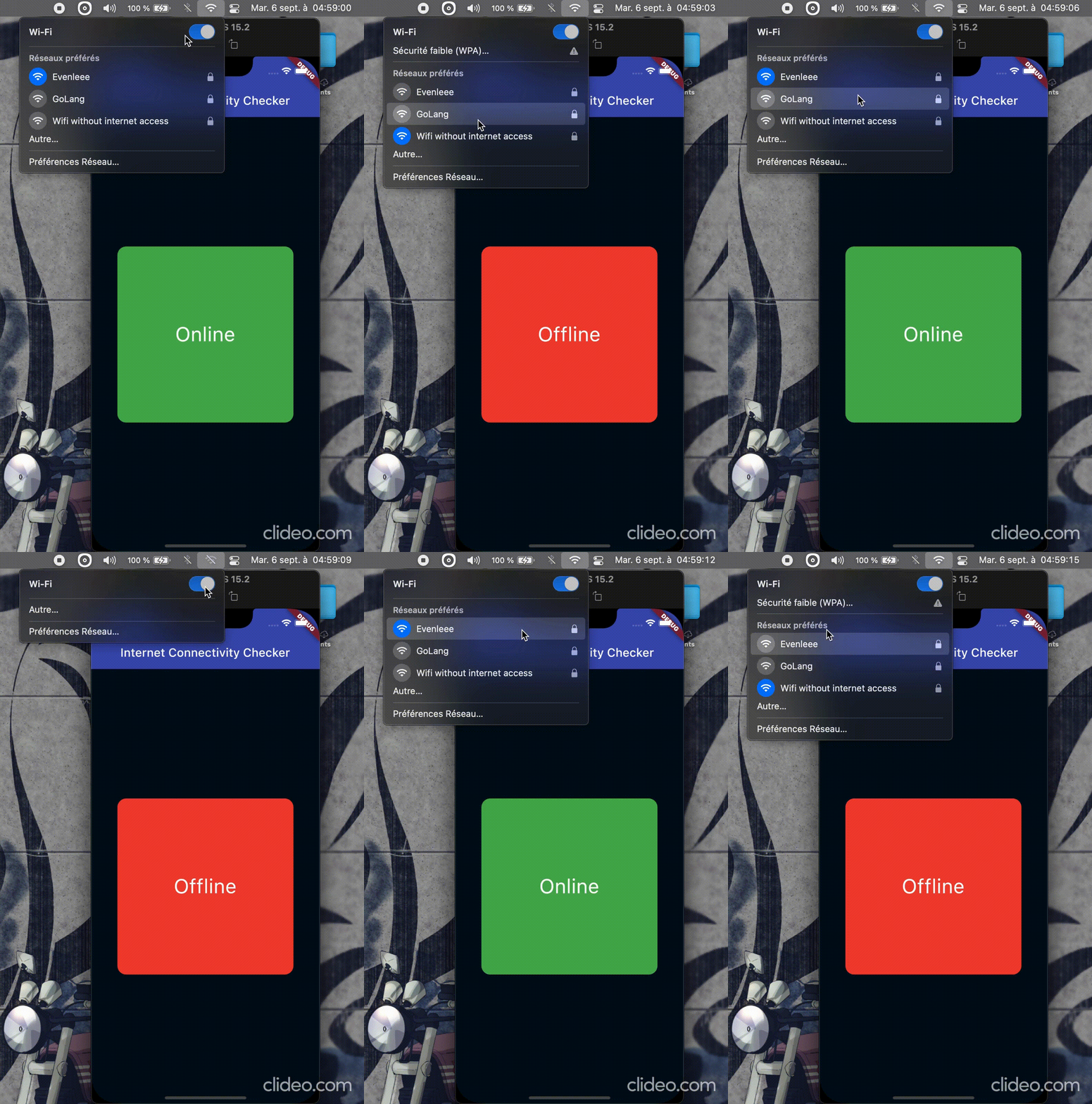
The connectivity package and other similar packages only provides information if there is a network connection, but not if the network is connected to the Internet. That's why the internet_connectivity_checker package helps you easily manage widgets dynamically based on the device's internet access.


Demo


🧑‍💻 Getting started

flutter pub add internet_connectivity_checker

🛠️ Usage

Simply import package:internet_connectivity_checker/internet_connectivity_checker.dart' and use the ConnectivityBuilder widget. It takes a builder and an optional parameter, interval(Duration object) which is the time interval to wait between each internet connectivity verification; default is 5 seconds.


Exemple
class Hello extends StatelessWidget {
  const Hello({super.key});

  @override
  Widget build(BuildContext context) {
    return ConnectivityBuilder(
      builder: (status) {
        bool connected = status == ConnectivityStatus.online;
        return Text(connected ? "Online" : "Offline");
      },
    );
  }
}

A more complete example.

ConnectivityBuilder(
  builder: (ConnectivityStatus status) {
    if (status == ConnectivityStatus.online) {
      return Container(
        decoration: BoxDecoration(
          color: Colors.green,
          borderRadius: BorderRadius.circular(15),
        ),
        child: Center(child: Text("Online", style: kTextStyle)),
      );
    } else if (status == ConnectivityStatus.offline) {
      return Container(
        decoration: BoxDecoration(
          color: Colors.red,
          borderRadius: BorderRadius.circular(15),
        ),
        child: Center(child: Text("Offline", style: kTextStyle)),
      );
    } else { // status == ConnectivityStatus.checking
      return const Center(
        child: SizedBox(
          width: 25,
          height: 25,
          child: CircularProgressIndicator(strokeWidth: 2),
        ),
      );
    }
  },
),

You can also use the ConnectivityChecker().stream stream, provided be the package, to handle the logic yourself.

class Foo extends StatelessWidget {
  const Foo({super.key});

  @override
  Widget build(BuildContext context) {
    return StreamBuilder(
      stream: ConnectivityChecker(interval: const Duration(seconds: 10)).stream,
      builder: (context, snapshot) {
        if (snapshot.hasData && (snapshot.data as bool) == true) {
          return const Text("Online");
        } else if (snapshot.connectionState == ConnectionState.waiting) {
          return const Center(child: CircularProgressIndicator());
        } else {
          return const Text("Offline");
        }
      },
    );
  }
}

ℹ️ Additional Information

Contribute to this project by making a PR ⬆️ or creating a new issue 🐞 on GitHub.
Do not hesitate to let a 🌟 on the repo if you find it useful.

👷 Maintainers

Created & maintained with 💖 by moustapha.dev.

📄 License

MIT License

Copyright (c) Moustapha Ndoye (@csof3cen), 2023.

Permission is hereby granted, free of charge, to any person obtaining a copy
of this software and associated documentation files (the "Software"), to deal
in the Software without restriction, including without limitation the rights
to use, copy, modify, merge, publish, distribute, sublicense, and/or sell
copies of the Software, and to permit persons to whom the Software is
furnished to do so, subject to the following conditions:

The above copyright notice and this permission notice shall be included in all
copies or substantial portions of the Software.

THE SOFTWARE IS PROVIDED "AS IS", WITHOUT WARRANTY OF ANY KIND, EXPRESS OR
IMPLIED, INCLUDING BUT NOT LIMITED TO THE WARRANTIES OF MERCHANTABILITY,
FITNESS FOR A PARTICULAR PURPOSE AND NONINFRINGEMENT. IN NO EVENT SHALL THE
AUTHORS OR COPYRIGHT HOLDERS BE LIABLE FOR ANY CLAIM, DAMAGES OR OTHER
LIABILITY, WHETHER IN AN ACTION OF CONTRACT, TORT OR OTHERWISE, ARISING FROM,
OUT OF OR IN CONNECTION WITH THE SOFTWARE OR THE USE OR OTHER DEALINGS IN THE
SOFTWARE.

카테고리

소스 저장소

이 패키지를 사용하는 프로젝트

아직 데이터가 없습니다.