패키지, 저장소 및 앱 카테고리 검색

keymap 표지
패키지 상세v0.0.92

keymap

유연하고 최소한의 UI 및 포커스 처리를 갖춘 재사용 가능한 키보드 단축키 위젯입니다.

AndroidiOSmacOSWindowsLinux
30일 다운로드
1.1천
좋아요
34
Pub 점수
140

패키지 설치

flutter pub add keymap

패키지 개요

공개 정보를 바탕으로 생성한 선택 가이드입니다.

Keymap은 최소한의 유연한 UI를 갖춘 키보드 단축키를 구현하기 위한 재사용 가능한 위젯을 제공하는 Flutter 패키지입니다. 포커스 관리를 지원하며 Android, iOS, macOS, Windows, Linux 등 여러 플랫폼에서 작동합니다. 개발자는 키 조합을 쉽게 정의하고 봐라플레이트 코드 없이 사용자 입력에 반응할 수 있습니다. 효율적인 키보드 탐색이나 핫키가 필요한 애플리케이션에 적합하며 직관적인 단축키 처리를 통해 접근성과 사용자 경험을 향상시킵니다.

사용 사례

  • 데스크톱 앱에서 키보드 단축키 구현하기
  • 생산성 도구 내 접근성 향상
  • 게임 컨트롤용 핫키 만들기
  • 반응형 웹 및 데스크톱 인터페이스 구축
  • 양식에서 빠른 탐색 사용

주요 기능

  • 유연하고 최소한의 UI 디자인
  • 내장된 포커스 처리
  • 크로스 플랫폼 지원
  • 재사용 가능한 단축키 정의
  • 키 조합 매핑을 위한 간단한 API

적합한 대상

  • 데스크톱 애플리케이션 개발자
  • 접근성 중심 프로젝트
  • 생산성 도구 제작자
  • 웹 및 다중 플랫폼 플러터 앱
  • 키보드 탐색이 필요한 UI

고려 사항

  • 복잡한 위젯에서는 수동 포커스 관리가 필요합니다
  • 사용자 정의 외관을 위해 추가 스타일링이 필요할 수 있습니다
  • 제한된 내장 시각 피드백
  • 모바일 전용 사용 사례에 최적화되지 않음
  • 플랫폼별 키보드 이벤트 처리에 의존합니다

원본 README

연결된 소스 저장소의 README 원문 스냅샷입니다. 최신 내용은 저장소에서 확인하세요.

Keymap

A keymap widget letting a developer easily allow end users to use keyboard shortcuts and an associated help screen overlay to any app.

This is pre-alpha and the API will probably change in the future.

Getting started

pub package

dependencies:
  keymap: <latest-version>

Features

  • Easily add keyboard shortcuts to any widget tree
  • Clear, readable help screen
  • Allows rich text introductions with images using the Markdown format
  • Handles focus, passing up unhandled key events
  • Respects application theme colors and fonts

Usage

Add a KeyMap widget to your tree in the build method

@override
Widget build(BuildContext context) {
  return KeyboardWidget(
    bindings: [
      KeyAction.fromString('A','increment the counter', () {
        setState(() {
          count++;
        });}, isControlPressed: true),
      KeyAction(LogicalKeyboardKey.keyD, 'decrement the counter', () {
        setState(() {
          count--;
        });
      }, isAltPressed: true, isControlPressed: true),
    ],
    child: Column(
      children: [
        const Text('Up arrow for adding, down arrow to subtract'),
        Text('count: $count'),
      ],
    ),
  );
}

You can optionally set the number of columns for the text shown in the help screen

  @override
  Widget build(BuildContext context) {
    return KeyboardWidget(
      columnCount: 2,
      child: Scaffold(

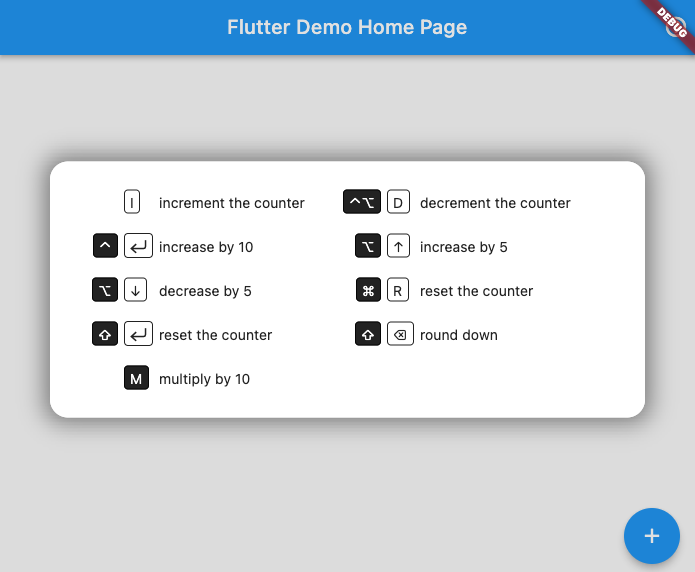
This creates keyboard shortcuts that call the referenced methods and a help screen that can be called up by pressing F1 (or any key you choose):

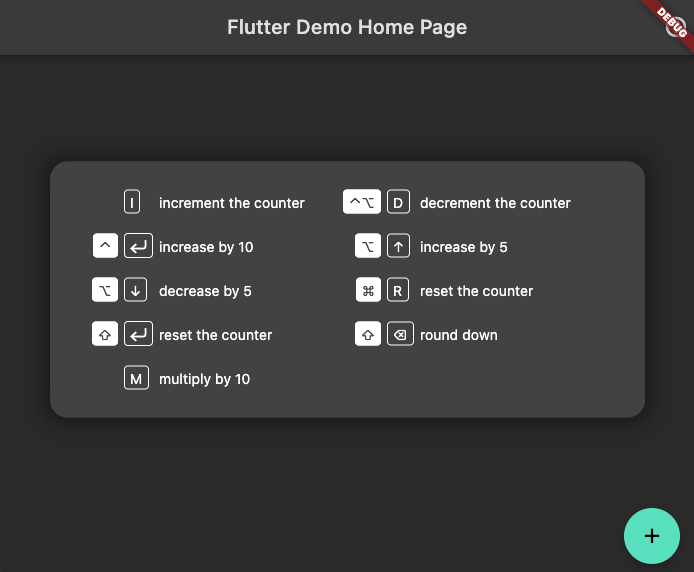
It will shift colors to match your app's theme (here in dark mode)

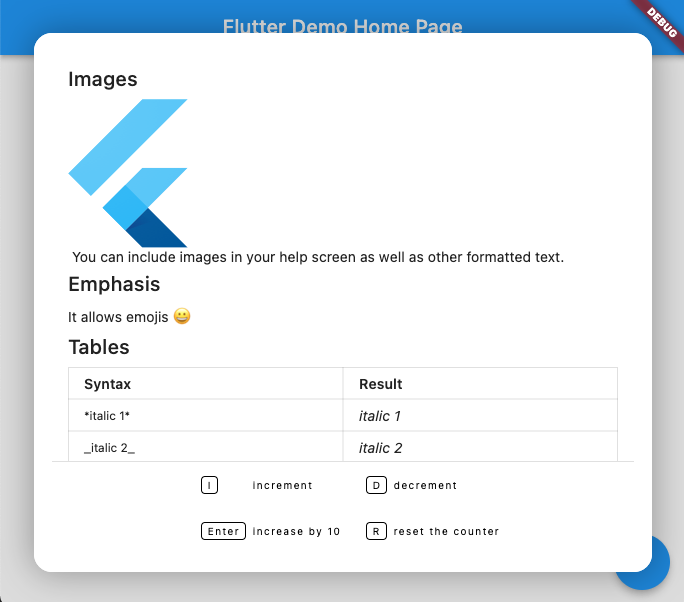
You can add rich text (using Markdown format) above the keyboard map. A code sample showing how to do this can be found in the examples directory

카테고리

의존성

의존성 목록 1 개

소스 저장소

이 패키지를 사용하는 프로젝트