LuaDardo는 Dart로 구현된 Lua 5.3 가상 머신으로, Dart 애플리케이션 내에서 Lua 스크립팅을 원활하게 통합할 수 있게 해줍니다. 개발자들은 Flutter 및 기타 Dart 환경에서 여러 플랫폼에서 직접 Lua 코드를 실행할 수 있습니다. 이 패키지는 응용 프로그램 로직을 동적으로 확장하는 데 이상적인 경량이고 임베드 가능한 스크립트 솔루션을 제공합니다. Android, iOS, macOS, Windows, Linux를 완전히 지원하며, 크로스플랫폼의 일관성과 성능을 제공합니다. Lua 5.3 표준과의 호환성을 중시한 설계로, Lua로 작성된 스크립트의 신뢰할 수 있는 동작을 보장합니다.
사용 사례
Flutter 앱에 Lua 스크립트 삽입
동적 게임 로직 스크립팅
확장 가능한 구성 시스템
런타임 코드 평가
플러그인 기반 아키텍처
주요 기능
Lua 5.3 호환성
크로스 플랫폼 지원
경량 가상 머신
Dart 네이티브 통합
문자열 또는 파일에서 스크립트 실행
적합한 대상
스크립팅이 필요한 플러터 개발자
동적 행동을 갖춘 게임 개발
플러그인 확장성을 필요로 하는 응용 프로그램
임베디드 스크립팅이 필요한 도구
고려 사항
Lua 문법에 대한 이해가 필요합니다
Lua 5.3 기능에 제한됨
성능은 스크립트의 복잡성에 따라 달라집니다
내장된 디버깅 도구 없음
원본 README
연결된 소스 저장소의 README 원문 스냅샷입니다. 최신 내용은 저장소에서 확인하세요.
LuaDardo
A Lua virtual machine written in Dart, which implements Lua5.3 version.
Example:
dependencies:lua_dardo:^0.0.3
import'package:lua_dardo/lua.dart';
voidmain(List<String> arguments) {
LuaState state = LuaState.newState();
state.openLibs();
state.loadString(r'''
a=10
while( a < 20 ) do
print("a value is", a)
a = a+1
end
''');
state.call(0, 0);
}
Usage
The LuaDardo library is compatible with most Lua C APIs. For the mutual call between Dart and Lua, please refer to the Lua C API guide.
Some simple examples:
LuaState state = LuaState.newState();
// Load the Lua standard library
state.openLibs();
state.loadString("print('hello')");
state.call(0, 0);
Dart calls Lua
Get Lua variables:
-- test.lua
a = 100
b = 120
Dart code:
LuaState ls = LuaState.newState();
ls.openLibs();
ls.doFile("test.lua");

// a push into the stack
ls.getGlobal("a");
if(ls.isNumber(-1)){
    var a = ls.toNumber(-1);
    print("a=$a");
}
// b push into the stack
ls.getGlobal("b");
if(ls.isNumber(-1)){
    var b = ls.toNumber(-1);
    print("b=$b");
}
ls.getGlobal("mytable");
ls.pushString("k1");
// Pop the key at the top of the stack, get the value of the key, and push the result onto the top of the stack
ls.getTable(-2);
if(ls.isInteger(-1)){
// Get the value of key k1var k1 = ls.toInteger(-1);
}
// Repeat
ls.pushString("k2");
ls.getTable(-2);
if(ls.isNumber(-1)){
var k2 = ls.toNumber(-1);
}
A simpler alternative: getField
    ls.getGlobal("mytable");
    ls.getField(-1, "k1");
    if(ls.isInteger(-1)){
      var k1 = ls.toInteger(-1);
    }
Call lua function:
-- test.lua

function myFunc()
    print("myFunc run")
end
The pCall method has three parameters. The first parameter indicates the number of parameters of the called Lua function, and the second parameter indicates the number of return values of the called Lua function.
Lua calls Dart
// Push value onto stack
ls.pushString("Alex");
// Set variable name
ls.setGlobal("name");
Lua:
-- Get global variable name
print(name) -- Alex
Define global table in Dart:
    // Create a table and push it onto the stack
    ls.newTable();
    // Push a key onto the stack
    ls.pushString("name");
    // Push the value onto the stack. Note that at this time the index of the table in the stack becomes -3
    ls.pushString("Alex");
    // Set the above key-value pair to the table, and pop up the key and value
    ls.setTable(-3);
    // Set the variable name to the table, and pop up the table
    ls.setGlobal("students");
Lua:
-- Equivalent to a table:students = {name="Alex"}
print(students.name)
Call Dart function:
import'package:lua_dardo/lua.dart';
import'dart:math';
// wrapper function must use this signature:int Function(LuaState ls)// the return is the number of returned valuesintrandomInt(LuaState ls) {
int max = ls.checkInteger(1);
ls.pop(1);
var random = Random();
var randVal = random.nextInt(max);
ls.pushInteger(randVal);
return1;
}
voidmain(List<String> arguments) {
LuaState state = LuaState.newState();
state.openLibs();
state.pushDartFunction(randomInt);
state.setGlobal('randomInt');
// execute the Lua script to test the randomInt function
state.loadString('''
rand_val = randomInt(10)
print('random value is '..rand_val)
''');
state.call(0, 0);
}
Some people are curious about how to access Lua tables in Dart. Here is a simple example:
  state.loadString('''
rand_val = randomInt(10,{ ["hello"] = "World", ["hello22"] = "World132414" })
print('random value is '..rand_val)
''');
intrandomInt(LuaState ls) {
int? max = ls.checkInteger(1);
ls.getField(2, "hello");
// This is a debugging method that looks at the stack
ls.printStack();
var hello = ls.toStr(-1);
print(hello);
ls.pop(1);
ls.getField(2, "hello22");
var hello22 = ls.toStr(-1);
print(hello22);
ls.pop(1);
var random = Random();
var randVal = random.nextInt(max!);
ls.pushInteger(randVal);
return1;
}
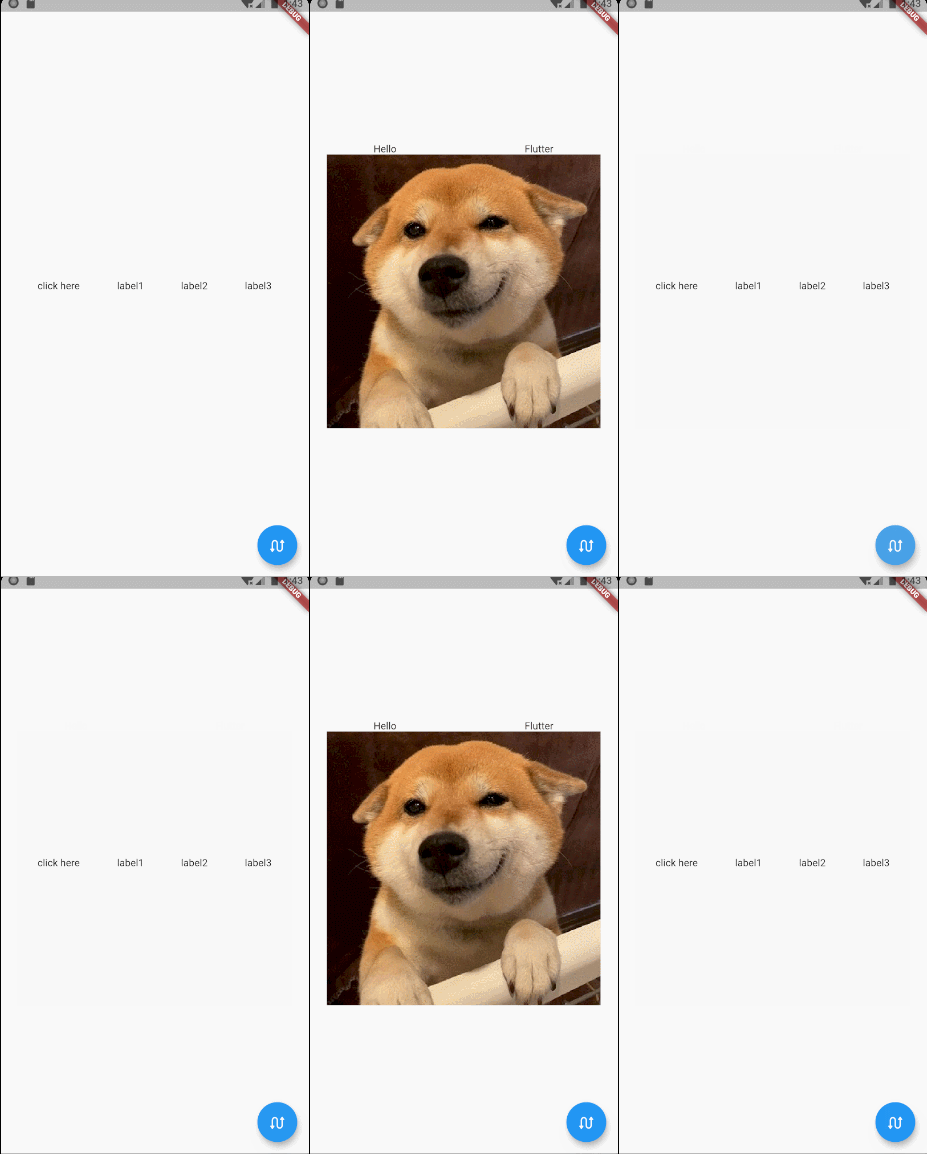
Try on Flutter
function getContent1()
    return Row:new({
        children={
            GestureDetector:new({
                onTap=function()
                    flutter.debugPrint("--------------onTap--------------")
                end,

                child=Text:new("click here")}),
            Text:new("label1"),
            Text:new("label2"),
            Text:new("label3"),
        },
        mainAxisAlign=MainAxisAlign.spaceEvenly,
    })
end

function getContent2()
    return Column:new({
        children={
            Row:new({
                children={Text:new("Hello"),Text:new("Flutter")},
                mainAxisAlign=MainAxisAlign.spaceAround
            }),
            Image:network('https://gitee.com/arcticfox1919/ImageHosting/raw/master/img/flutter_lua_test.png'
                ,{fit=BoxFit.cover})
        },
        mainAxisSize=MainAxisSize.min,
        crossAxisAlign=CrossAxisAlign.center
    })
end