Map Launcher는 Android 및 iOS 기기에서 사용 가능한 지도 앱을 감지하고 지정된 위치 또는 경로와 함께 실행하는 Flutter 플러그인입니다. 사용자는 Google Maps나 Apple Maps와 같은 선호하는 지도 애플리케이션을 사용하여 마커를 확인하거나 경로 안내를 받을 수 있습니다. 각 플랫폼에 맞게 맞춤 구현을 하지 않아도 되는 원격 지도 기능과의 통합을 간소화합니다. 정적 위치와 점 간의 동적 라우팅 모두를 지원합니다.
사용 사례
지도 앱에서 특정 위치 열기
턴바이턴 내비게이션 시작
지정된 좌표에 마커 표시
위치 기반 서비스와의 통합
사용자 지정 맵 제공업체 선택 가능하게 하기
주요 기능
설치된 지도 앱을 자동으로 감지
Android 및 iOS 모두를 지원합니다
지도를 시작하는 간단한 API
라우팅 및 마커 처리
크로스 플랫폼 호환성
적합한 대상
지도 통합이 필요한 앱
여행 또는 배송 애플리케이션
위치 공유 기능
내비게이션 도구
사용자 중심의 지도 선택
고려 사항
위치 액세스를 위해 적절한 권한이 필요합니다
지도 앱이 설치되어 있지 않으면 작동하지 않을 수 있습니다
플랫폼 간에 동작이 약간 다릅니다
앱 내 지도 렌더링을 포함하지 않습니다
기능을 위해 외부 지도 앱에 의존합니다
원본 README
연결된 소스 저장소의 README 원문 스냅샷입니다. 최신 내용은 저장소에서 확인하세요.
Map Launcher
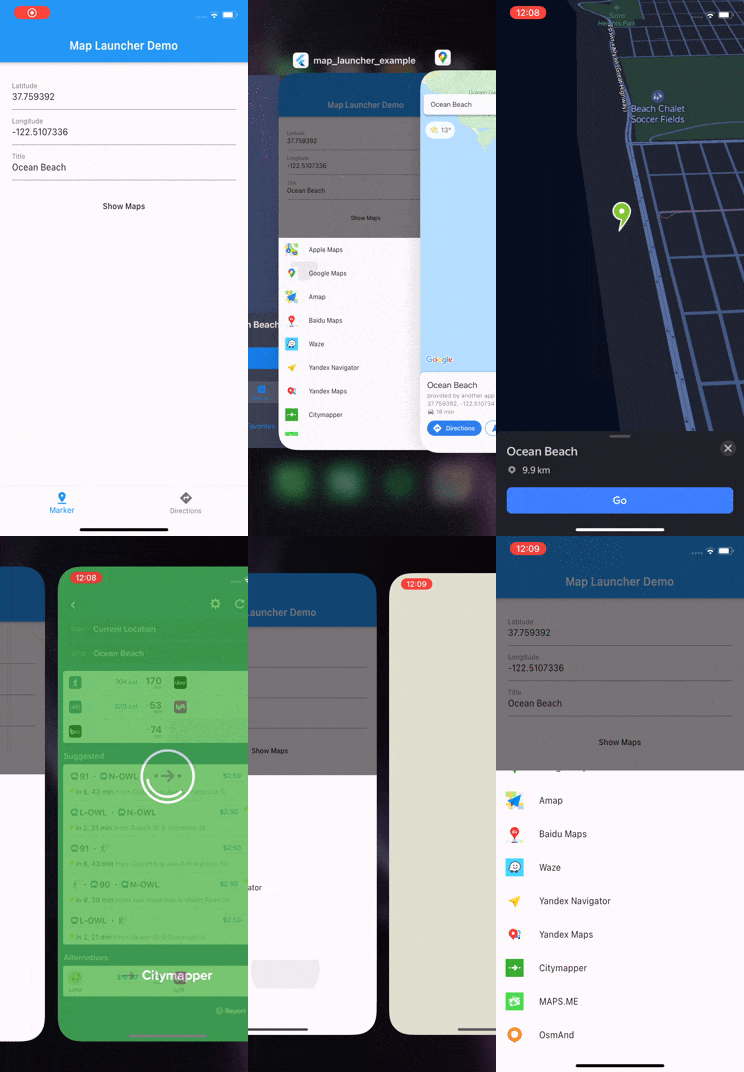
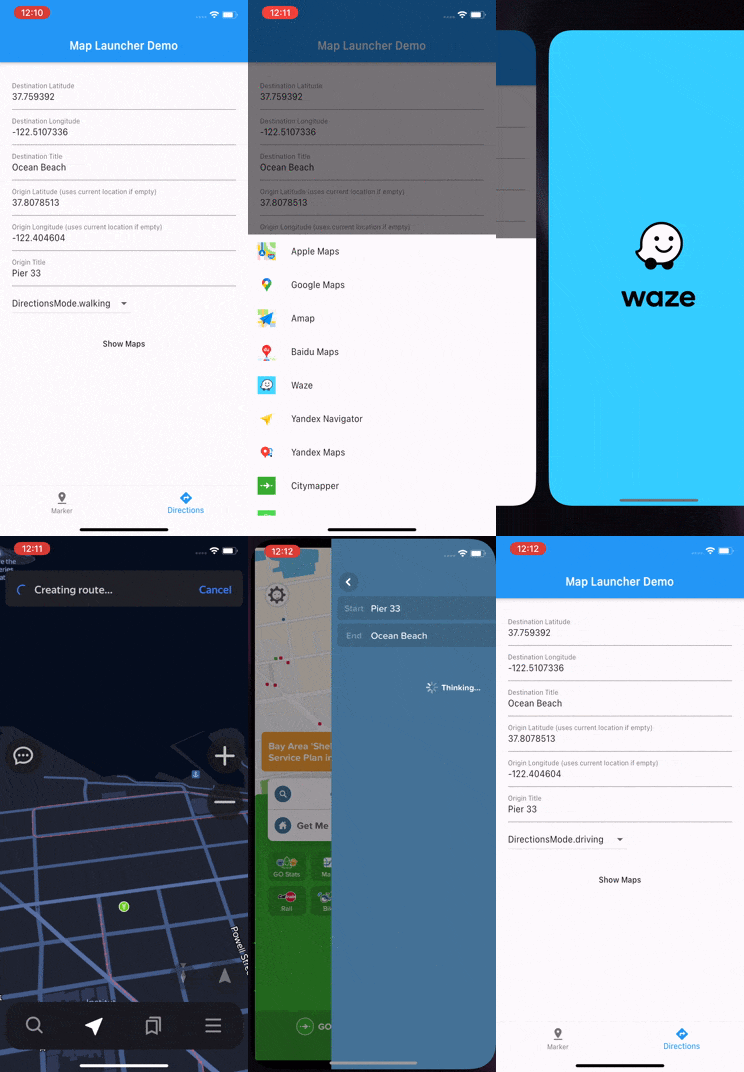
Map Launcher is a Flutter plugin to open maps on all platforms: iOS, Android, web, and desktop. Show markers, get directions, or search across 30 supported maps.
Uses universal links (HTTPS URLs), with native app detection on mobile.
Maps are tree-shakeable: only the maps you reference are compiled into your app. No URL schemes, package names, store ids, or icons of unused maps ever ship in your binary. See Binary Size & App Store Compliance.
import'package:map_launcher/map_launcher.dart';
// Show a marker (opens the best available map)awaitMapLauncher.marker(.coords(59.33, 18.07, title: 'Gamla Stan')).show();
// Show directionsawaitMapLauncher.directions(.coords(59.33, 18.07), mode: .walking).show();
// SearchawaitMapLauncher.marker(.search('Fika near Södermalm')).show();
// Specific mapawaitMapLauncher.marker(.coords(59.33, 18.07)).show(map: .google);
// Discover available maps (pass the maps your app supports)final maps = awaitMapLauncher.marker(.coords(59.33, 18.07))
.getSupportedMaps([.apple, .google, .waze]);
await maps.first.show();
Setup
iOS: Add URL schemes to Info.plist
Required for detecting installed native apps. Add only the schemes for the
maps your app uses. Each entry is visible to App Store review, so keep the
list as short as your map list:
<key>LSApplicationQueriesSchemes</key><array><string>comgooglemaps</string><!-- Google Maps --><!-- Add more only if you use them:
<string>waze</string> Waze
<string>iosamap</string> Amap
<string>baidumap</string> Baidu Maps
<string>yandexmaps</string> Yandex Maps
<string>yandexnavi</string> Yandex Navigator
<string>citymapper</string> Citymapper
<string>mapswithme</string> MAPS.ME
<string>osmandmaps</string> OsmAnd
<string>dgis</string> 2GIS
<string>qqmap</string> Tencent (QQ Maps)
<string>here-location</string> HERE WeGo
<string>tomtomgo</string> TomTom Go
<string>copilot</string> CoPilot
<string>com.sygic.aura</string> Sygic Truck
<string>nmap</string> Naver Map
<string>kakaomap</string> Kakao Maps
<string>tmap</string> TMap
<string>szn-mapy</string> Mapy.cz
<string>mappls</string> Mappls
<string>moovit</string> Moovit
<string>neshan</string> Neshan
<string>airnavpro</string> Air Navigation Pro
<string>magicearth</string> Magic Earth
--></array>
Apple Maps needs no entry. Each map's scheme is also available in code as
MapApp.<name>.iosScheme.
If you pass a map to discovery but forget its plist entry, debug builds print
a warning naming the exact scheme to add. Without the entry the map can
never be detected, which is otherwise indistinguishable from "not installed".
Android: No setup needed
The plugin ships a <queries> manifest block so installed map apps are
visible to detection. If you want your merged manifest to list only the maps
you use, remove entries in your app's AndroidManifest.xml:
// By coordinatesawaitMapLauncher.marker(.coords(59.33, 18.07, title: 'Gamla Stan')).show();
// With zoom levelawaitMapLauncher.marker(.coords(59.33, 18.07), zoom: 14).show();
// By search query (Google & Apple Maps)awaitMapLauncher.marker(.search('Vasa Museum Stockholm')).show();
Error Handling
show() throws MapLaunchException if the map cannot be opened:
try {
awaitMapLauncher.marker(.coords(59.33, 18.07)).show(map: .google);
} onMapLaunchExceptioncatch (e) {
print('Failed to open map: $e');
}
// Specific mapawaitMapLauncher.marker(.coords(59.33, 18.07)).show(map: .google);
// If map is omitted, the best available map is used automatically:// • iOS/macOS → Apple Maps// • Other platforms → Google Maps// • Falls back to web if native app unavailable
Discovering Maps
Discovery takes the list of maps your app supports. Only the maps you
reference are compiled into your binary. Declare the list once as a
constant and reuse it:
const myMaps = <MapApp>[.apple, .google, .waze, .citymapper];
// Maps that support a specific marker requestfinal marker = MapLauncher.marker(.coords(59.33, 18.07));
final maps = await marker.getSupportedMaps(myMaps);
for (final map in maps) {
print('${map.name} (installed: ${map.isInstalled})');
}
await maps.first.show(); // launches the marker request with that map// Maps that support a specific directions requestfinal directions = MapLauncher.directions(.coords(59.33, 18.07), mode: .walking);
final navMaps = await directions.getSupportedMaps(myMaps);
// All maps available on this platform (installed + universal link)final allAvailable = awaitMapLauncher.getAvailableMaps(myMaps);
// Every supported map (opts out of tree shaking, see// "Binary Size & App Store Compliance" below)final everything = awaitMapLauncher.getAvailableMaps(MapApp.all);
URL Inspection
final marker = MapLauncher.marker(.coords(59.33, 18.07, title: 'Gamla Stan'));
// Best URL for this platform (scheme on mobile, universal on web)final url = marker.getUrl(map: .google);
// Universal (HTTPS) URL, always works in browserfinal universal = marker.getUniversalUrl(map: .google);
// → https://www.google.com/maps/search/?api=1&query=59.33%2C18.07// Native scheme URL, only works with installed appfinal scheme = marker.getSchemeUrl(map: .google);
// → comgooglemaps://?q=59.33,18.07// Preview scheme URL for a different platformfinal iosScheme = marker.getSchemeUrl(map: .google, platform: .ios);
final androidScheme = marker.getSchemeUrl(map: .google, platform: .android);
Map Info & Store Links
MapApp properties are synchronous:
MapApp.waze.name // "Waze"MapApp.waze.id // "waze", stable and safe to persist in preferencesMapApp.waze.iconBytes // PNG bytes, use with Image.memory()MapApp.waze.appStoreUrl // "https://apps.apple.com/app/id323229106"MapApp.waze.playStoreUrl // "https://play.google.com/store/apps/details?id=com.waze"MapApp.waze.hasUniversalLink // true
Each map is a const object, and only the maps your code references are
compiled into your app: their URL strings, package names, store ids, and
icons. Everything else is removed by Dart's tree shaking in release builds.
This matters beyond binary size: App Store review scans binaries for
references to embargoed services, and there is precedent for apps being
rejected over identifiers they never actually used. With 6.0, if you don't
reference a map, nothing about it exists in your build.
Things to know:
MapApp.all references every map, so using it opts out of tree shaking.
All 30 maps' identifiers will ship in your binary. Prefer an explicit list.
Your LSApplicationQueriesSchemes is part of your app, not the plugin.
Declare only the schemes you use and prune stale ones (see Setup).
The plugin's Android <queries> entries can be removed per map with
tools:node="remove" if you want a minimal manifest (see Setup).
Custom Maps
Subclass MapApp to add a map the plugin doesn't ship. No fork needed:
classAcmeMapsextendsMapApp{
constAcmeMaps();
@overrideStringget id => 'acmeMaps';
@overrideStringget name => 'Acme Maps';
@overrideString? get playStoreId => 'com.acme.maps';
@overrideString? get iosScheme => 'acmemaps://';
@overrideUint8Listget iconBytes => myIconPngBytes;
@overrideString? markerUrl(LocationCoords coords, {int? zoom}) =>
'https://maps.acme.com/?ll=${coords.latlng}';
@overrideString? directionsUrl({
requiredLocationCoords destination,
LocationCoords? origin,
List<LocationCoords>? waypoints,
TravelMode? travelMode,
}) => 'https://maps.acme.com/directions?to=${destination.latlng}';
}
// Works everywhere a built-in map does:awaitMapLauncher.marker(.coords(59.33, 18.07)).show(map: constAcmeMaps());
final maps = await request.getSupportedMaps([.google, constAcmeMaps()]);
Override the scheme-URL methods and capability flags (supportsWaypoints,
supportsMarkerSearch, ...) as needed. See any map in
lib/src/maps/ for a template.
For a custom map to be detected as installed, add its identifiers to your
own app config. The plugin's bundled entries only cover built-in maps:
iOS: add its scheme to LSApplicationQueriesSchemes (debug builds warn
if you forget).
Android: add a <queries> entry to your AndroidManifest.xml:
Note there is no warning for this on Android. The OS gives apps no way to
check their own <queries>, so a missing entry looks exactly like "app
not installed". Launching (show(map: const AcmeMaps())) works either way;
only detection needs these entries.
Migrating from 5.x
Call sites like show(map: .google) compile unchanged. The full guide is in
MIGRATION.md. The short version:
5.x
6.0
MapType.google
MapApp.google
getSupportedMaps()
getSupportedMaps([.apple, .google, .waze])
MapLauncher.getAvailableMaps()
MapLauncher.getAvailableMaps(myMaps)
map.mapType
map.map
map.displayName
map.name
SvgPicture.asset(map.icon)
Image.memory(map.iconBytes)
MapType.values.byName(saved)
myMaps.firstWhere((m) => m.id == saved)
Known Issues
On iOS it's possible to "delete" Apple Maps which actually just removes it from the home screen and does not actually delete it. Because of that Apple Maps will always show up as available on iOS. More info
Contributing
Pull requests are welcome. See CONTRIBUTING.md for setup instructions and guidelines.






 Google Maps
 Apple Maps
 Waze
 Yandex Maps
 2GIS
 HERE WeGo
 Mapy.cz
 Mappls
 Baidu Maps
 Amap
 Tencent (QQ)
 Yandex Navi
 Google Maps Go
 Naver Map
 Kakao Maps
 TMap
 OsmAnd
 OsmAnd+
 Petal Maps
 MAPS.ME
 Neshan
 CoPilot
 Moovit
 Citymapper
 TomTom Go
 TomTom Go Fleet
 Sygic Truck
 Flitsmeister
 Air Nav Pro
 Magic Earth