measure_size 패키지는 크기 변경 시 콜백을 트리거하는 Flutter 위젯으로, 실제 렌더링된 치수를 기반으로 동적 레이아웃 조정을 가능하게 합니다. 이 패키지는 자식 위젯을 감싸고 빌드 및 레이아웃 단계에서 그 크기를 모니터링하여 반응형 디자인이나 정확한 측정에 의존하는 애니메이션에 이상적입니다. 이 패키지는 Android, iOS, 웹, macOS, Windows, Linux 등 모든 주요 플랫폼에서 작동하며 일관된 동작을 보장합니다. 고정된 값에 의존하지 않고 컨테이너 크기의 변화에 반응해야 할 때 특히 유용합니다.
사용 사례
동적 크기 조정을 갖춘 반응형 UI
위젯 차원을 기반으로 한 애니메이션
레이아웃 디버깅
동적 콘텐츠 렌더링
실시간 크기 모니터링
주요 기능
크기 변경 시 콜백을 트리거합니다
크로스 플랫폼 호환성
기존 위젯과의 간단한 통합
모든 플러터 플랫폼을 지원합니다
외부 종속성 없음
적합한 대상
실시간 크기 피드백이 필요한 개발자
적응형 레이아웃을 필요로 하는 UI 구성 요소
레이아웃 문제 테스트 및 디버깅
동적 또는 유동적인 디자인 시스템을 가진 프로젝트
고려 사항
과도하게 사용할 경우 성능에 영향을 줄 수 있습니다
레이아웃 중에 콜백이 여러 번 발생할 수 있습니다
고정 크기 요구 사항에 적합하지 않습니다
복잡한 위젯 트리에서는 신중한 처리가 필요합니다
크기 변경에 한정되며, 위치나 오프셋은 제외
원본 README
연결된 소스 저장소의 README 원문 스냅샷입니다. 최신 내용은 저장소에서 확인하세요.
measure_size
A Flutter package for efficiently measuring widget sizes and building size-aware, adaptive layouts with minimal overhead.
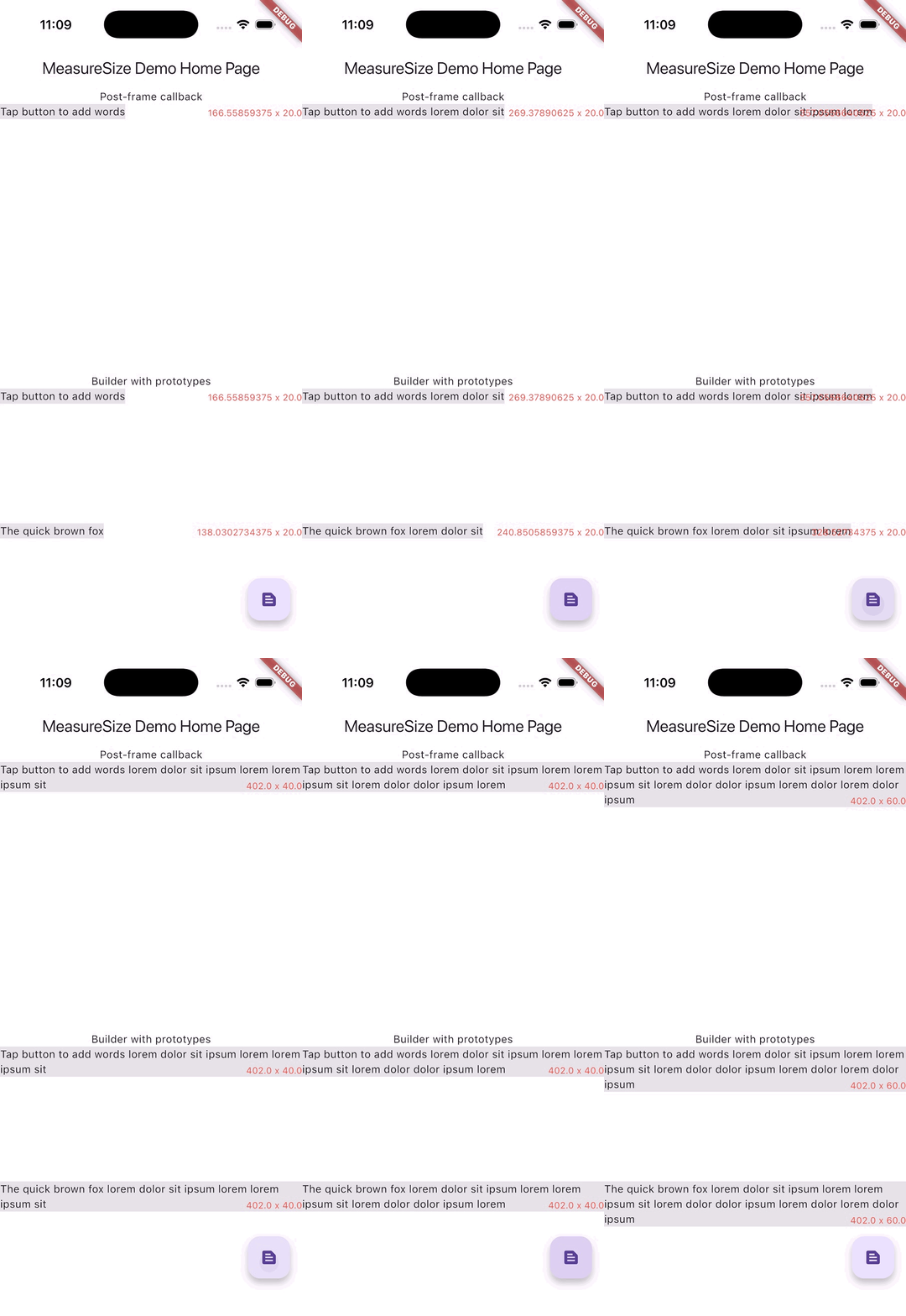
Measuring text and drawing an overlay with matching size
MeasureSize
MeasureSizeBuilder
Purpose
Monitor size changes
Prototype-driven layout
Callback timing
Post-frame
During layout (invokeLayoutCallback)
Measurements
Single widget
Multiple prototypes
Use case
Reactive to size changes
Proactive layout decisions
Complexity
Simple
Advanced
Performance
Good
Excellent (single pass)
PreferredSizeWidget limitation
Does not work
First frame problematic
import'package:measure_size/measure_size.dart';
Widget child = Text('Lorem ipsum dolor sit amet');
MeasureSize(
onChange: (Size newSize) {
/// [newSize] will be the displayed size of [Widget child]
},
child: child,
);
MeasureSizeBuilder<String>(
prototypeConstraints: (constraints) => BoxConstraints(
minWidth: 0,
maxWidth: constraints.maxWidth,
minHeight: 0,
maxHeight: double.infinity,
),
prototypes: [
PrototypeId(
id: 'lorem',
child: child,
),
],
builder: (context, sizes) {
// [sizes['lorem']] will be the layed out size of [Widget child]return child;
}
);
MeasureSize
Required
Widget child - This widget will be displayed and and measured.
Optional
void onChange(Size newSize) - A callback that is fired exactly once after the first frame of the child widget is rendered.
MeasureSizeBuilder<T>
Required
List<PrototypeId<T>> prototypes - Wrap widgets you'd like to measure with PrototypeId and provide a unique identifier for each widget.
PrototypeWidgetBuilder<T> builder - A builder function that contains the sizes of all prototypes.
PrototypeConstraintCalculator prototypeConstraints - Constraints to be assigned to each prototype widget.
Example
A demonstration can be found in the example directory. To run the example: