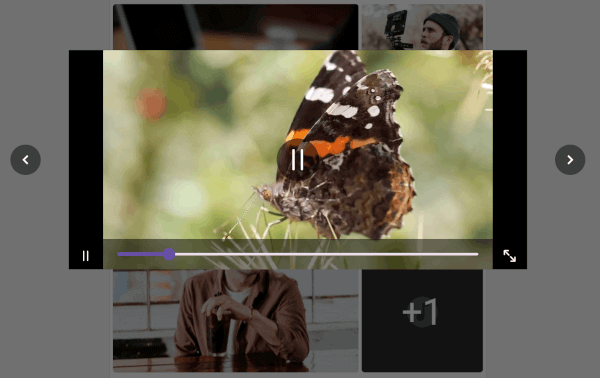
이미지, 오디오 및 비디오 파일을 포함한 미디어 컬렉션을 효율적으로 미리보기 및 표시하기 위해 설계된 플러터 패키지입니다. 부드러운 전환과 반응형 제어를 갖춘 상호작용적이고 사용자 친화적인 인터페이스를 제공하여 미디어 탐색을 가능하게 합니다. 크로스플랫폼 지원으로 안드로이드, iOS, 웹을 모두 지원하며, 풍부한 미디어 탐색 기능을 필요로 하는 앱에 이상적입니다. 최소한의 설정으로 미디어 미리보기를 쉽게 통합할 수 있어 사진 갤러리, 미디어 플레이어 또는 콘텐츠 관리 인터페이스에서 사용자 경험을 향상시킵니다.
사용 사례
사진 갤러리 애플리케이션
미디어 콘텐츠 브라우징
인터랙티브 미디어 슬라이더
콘텐츠 관리 대시보드
오디오/비디오 재생 미리보기
주요 기능
크로스 플랫폼 지원 (Android, iOS, Web)
인터랙티브 미디어 탐색
부드러운 전환 애니메이션
이미지, 오디오 및 비디오 지원
최소 구성으로 간단한 통합
적합한 대상
미디어 중심 앱을 개발하는 개발자
인터랙티브 미리보기가 필요한 UI 디자이너
미디어 컬렉션 브라우징이 필요한 앱
교육 또는 창의적 콘텐츠 플랫폼
풍부한 미디어를 갖춘 모바일 및 웹 애플리케이션
고려 사항
모바일 플랫폼에서는 적절한 미디어 권한이 필요합니다
대규모 미디어 라이브러리에 대한 최적화가 필요할 수 있습니다
고급 UI 스타일링을 위한 제한된 사용자 정의
기반 플랫폼 미디어 처리에 따라 다릅니다
중간 규모의 컬렉션에 가장 적합
원본 README
연결된 소스 저장소의 README 원문 스냅샷입니다. 최신 내용은 저장소에서 확인하세요.
The media_collection_previewer is a versatile Flutter package designed to simplify the way you preview various media
files,
including images, audio, and video, within your Flutter applications.
This package enables developers to open and interact with a comprehensive viewer for media files by simply clicking on
them,
thereby enhancing the user experience and the overall quality of your application.
Note: This package is still under development and is subject to change.
Features
Supports multiple file formats: Effortlessly preview image, video, and audio files all in one place.
Supported image formats: JPEG, PNG, GIF.
Supported video formats: MP4, MOV.
Supported audio formats: MP3, WAV.
Supports media playback from local assets, and remote URLs.
Getting started
To use this package, add media_collection_previewer as a dependency in your pubspec.yaml file.
Installation
In your pubspec.yaml file within your Flutter Project add media_collection_previewer under dependencies: