패키지, 저장소 및 앱 카테고리 검색

ml_linalg 표지
패키지 상세v13.12.9

ml_linalg

SIMD 기반의 선형 대수 및 통계, 숫자 데이터 효율적 조작

AndroidiOSWebmacOSWindowsLinux
30일 다운로드
2만
좋아요
88
Pub 점수
150

패키지 설치

flutter pub add ml_linalg

패키지 개요

공개 정보를 바탕으로 생성한 선택 가이드입니다.

ml_linalg는 Dart용 고성능, SIMD 최적화 라이브러리로 선형 대수 및 통계 연산을 제공합니다. 효율적인 수치 데이터 조작을 위해 설계되어 머신러닝, 과학 계산, 데이터 분석에 필수적인 빠른 행렬 및 벡터 계산을 가능하게 합니다. Android, iOS, Web, macOS, Windows, Linux 등 다양한 플랫폼을 지원하여 밀도 높은 수학 처리가 필요한 크로스플랫폼 애플리케이션에 적합합니다. 성능을 우선시해 설계되었으며, 저수준 최적화를 활용하여 속도와 정밀도를 제공합니다.

사용 사례

  • 머신러닝 모델 훈련
  • 과학 시뮬레이션
  • 데이터 변환 파이프라인
  • 실시간 분석
  • 통계 모델링
  • 수치 최적화

주요 기능

  • SIMD 가속 계산
  • 크로스 플랫폼 호환성
  • 행렬 및 벡터 연산
  • 통계 함수
  • 모든 지원되는 플랫폼에서 높은 성능
  • 효율적인 메모리 사용

적합한 대상

  • ML 애플리케이션을 개발하는 개발자
  • Dart를 사용하는 데이터 과학자
  • 빠른 수치 처리가 필요한 응용 프로그램
  • 다중 플랫폼 수학 중심 앱
  • 성능 중심의 수치 코드

고려 사항

  • 선형 대수에 대한 이해가 필요합니다
  • 숫자 데이터 워크로드에 가장 적합
  • 문서가 제한될 수 있습니다
  • 일반적인 용도로 사용하기 위한 것이 아님
  • 특정 하드웨어 기능에 최적화됨

원본 README

연결된 소스 저장소의 README 원문 스냅샷입니다. 최신 내용은 저장소에서 확인하세요.

Build Status pub package

SIMD-based linear algebra and statistics for data science with Dart

TABLE OF CONTENTS

Linear algebra

    In a few words, linear algebra is a branch of mathematics that works with vectors and matrices. Vectors and matrices are practical tools in real-life applications, such as machine learning algorithms. These significant mathematical entities are implemented in plenty of programming languages.

    As Dart offers developers good instrumentation, e.g. highly optimized virtual machine, specific data types and rich out-of-the-box library, Dart-based implementation of vectors and matrices has to be quite performant.

    Among numerous standard Dart tools, there are SIMD data types, and support of SIMD computational architecture served as inspiration for creating this library.

What is SIMD?

    SIMD stands for Single instruction, multiple data - it's a computer architecture that allows to perform uniform mathematical operations in parallel on a list-like data structure. For instance, one has two arrays:

final a = [10, 20, 30, 40];
final b = [50, 60, 70, 80];

and one needs to add these arrays element-wise. Using the regular architecture this operation could be done in the following manner:

final c = List(4);

c[0] = a[0] + b[0]; // operation 1
c[1] = a[1] + b[1]; // operation 2
c[2] = a[2] + b[2]; // operation 3
c[3] = a[3] + b[3]; // operation 4

    As you may have noticed, we need to do 4 operations one by one in a row using regular computational approach. But with help of SIMD architecture we may do one arithmetic operation on several operands in parallel, thus element-wise sum of two arrays can be done for just one step:

Vectors

A couple of words about the underlying architecture

    The library contains two high performant vector classes based on Float32x4 and Float64x2 data types - Float32x4Vector and Float64x2Vector (the second one is generated from the source code of the first vector's implementation)

    Most of element-wise operations in the first one are performed in four "threads" and in the second one - in two "threads".

    Implementation of both classes is hidden from the library's users. You can create a Float32x4Vector or a Float64x2Vector instance via Vector factory (see examples below).

One can create Float32x4-based vectors the following way:

import 'package:ml_linalg/linalg.dart';

void main() {
  final vector = Vector.fromList([1.0, 2.0, 3.0, 4.0, 5.0], dtype: DType.float32);
}

or simply

import 'package:ml_linalg/linalg.dart';

void main() {
  final vector = Vector.fromList([1.0, 2.0, 3.0, 4.0, 5.0]);
}

since dtype is set to DType.float32 by default.

One can create Float64x2-based vectors the following way:

import 'package:ml_linalg/linalg.dart';

void main() {
  final vector = Vector.fromList([1.0, 2.0, 3.0, 4.0, 5.0], dtype: DType.float64);
}

    Float32x4-based vectors are much faster than Float64x2-based ones, but Float64x2-based vectors are more precise since they use 64 bits to represent numbers in the memory versus 32 bits for Float32x4-based vectors.

    Nevertheless, Float32x4 representation uses by default since usually 32 bits is enough for number precision, and along with that, this representation is more performant.

    The vectors are immutable: once created, the vector cannot be changed. All the vector operations lead to creation of a new vector instance (of course, if the operation is supposed to return a Vector).

    Both classes implement Iterable<double> interface, so it's possible to use them as regular iterable collections.

    It's possible to use vector instances as keys for HashMap and similar data structures and to look up a value by the vector-key, since the hash code for equal vectors is the same:

import 'package:ml_linalg/vector.dart';

final map = HashMap<Vector, bool>();

map[Vector.fromList([1, 2, 3, 4, 5])] = true;

print(map[Vector.fromList([1, 2, 3, 4, 5])]); // true
print(Vector.fromList([1, 2, 3, 4, 5]).hashCode == Vector.fromList([1, 2, 3, 4, 5]).hashCode); // true
Vector benchmarks

    To see the performance benefits provided by the library's vector classes, one may visit benchmark directory: one may find there a baseline benchmark - element-wise summation of two regular List instances and a benchmark of a similar operation, but performed on two Float32x4Vector instances on the same amount of elements and compare the timings:

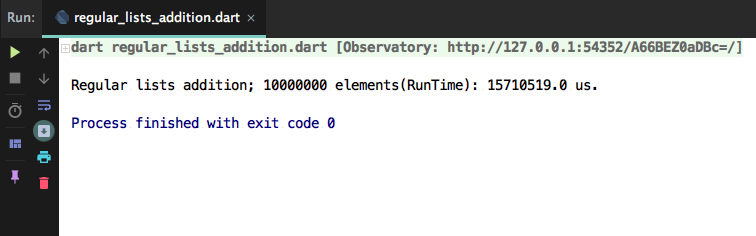
  • Baseline benchmark (executed on Macbook Air mid 2017), 2 regular lists each with 10,000,000 elements:

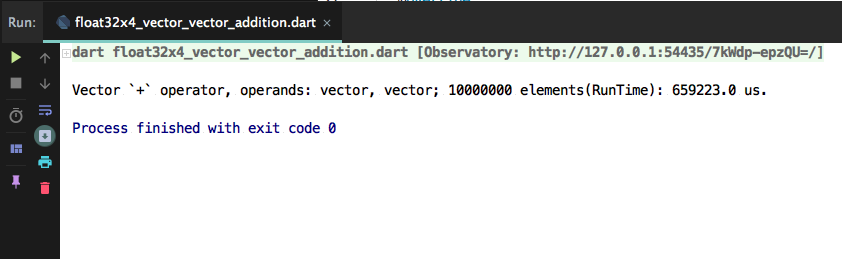
  • Actual benchmark (executed on Macbook Air mid 2017), 2 vectors each with 10,000,000 elements:

It took 15 seconds to create a new regular list by summing the elements of two lists, and 0.7 second to sum two vectors - the difference is significant.

Vector operations examples
Vector summation
  import 'package:ml_linalg/linalg.dart';

  final vector1 = Vector.fromList([1.0, 2.0, 3.0, 4.0, 5.0]);
  final vector2 = Vector.fromList([2.0, 3.0, 4.0, 5.0, 6.0]);
  final result = vector1 + vector2;

  print(result.toList()); // [3.0, 5.0, 7.0, 9.0, 11.0]
Vector and List summation

This operation doesn't benefit from SIMD

  import 'package:ml_linalg/linalg.dart';

  final vector = Vector.fromList([1.0, 2.0, 3.0, 4.0, 5.0]);
  final result = vector + [2.0, 3.0, 4.0, 5.0, 6.0];

  print(result.toList()); // [3.0, 5.0, 7.0, 9.0, 11.0]
Summation of Vectors of different dtype

This operation doesn't benefit from SIMD

  import 'package:ml_linalg/linalg.dart';

  final vector1 = Vector.fromList([1.0, 2.0, 3.0, 4.0, 5.0], dtype: DType.float32);
  final vector2 = Vector.fromList([2.0, 3.0, 4.0, 5.0, 6.0], dtype: DType.float64);
  final result = vector1 + vector2;

  print(result.toList()); // [3.0, 5.0, 7.0, 9.0, 11.0]
Vector subtraction
  import 'package:ml_linalg/linalg.dart';

  final vector1 = Vector.fromList([4.0, 5.0, 6.0, 7.0, 8.0]);
  final vector2 = Vector.fromList([2.0, 3.0, 2.0, 3.0, 2.0]);
  final result = vector1 - vector2;

  print(result.toList()); // [2.0, 2.0, 4.0, 4.0, 6.0]
Vector and List subtraction

This operation doesn't benefit from SIMD

  import 'package:ml_linalg/linalg.dart';

  final vector = Vector.fromList([4.0, 5.0, 6.0, 7.0, 8.0]);
  final result = vector - [2.0, 3.0, 2.0, 3.0, 2.0];

  print(result.toList()); // [2.0, 2.0, 4.0, 4.0, 6.0]
Subtraction of vectors of different dtype

This operation doesn't benefit from SIMD

  import 'package:ml_linalg/linalg.dart';

  final vector1 = Vector.fromList([4.0, 5.0, 6.0, 7.0, 8.0], dtype: DType.float32);
  final vector2 = Vector.fromList([2.0, 3.0, 2.0, 3.0, 2.0], dtype: DType.float64);
  final result = vector1 - vector2;

  print(result.toList()); // [2.0, 2.0, 4.0, 4.0, 6.0]
Element wise Vector by Vector multiplication
  import 'package:ml_linalg/linalg.dart';

  final vector1 = Vector.fromList([1.0, 2.0, 3.0, 4.0, 5.0]);
  final vector2 = Vector.fromList([2.0, 3.0, 4.0, 5.0, 6.0]);
  final result = vector1 * vector2;

  print(result.toList()); // [2.0, 6.0, 12.0, 20.0, 30.0]
Element wise Vector and List multiplication

This operation doesn't benefit from SIMD

  import 'package:ml_linalg/linalg.dart';

  final vector = Vector.fromList([1.0, 2.0, 3.0, 4.0, 5.0]);
  final result = vector * [2.0, 3.0, 4.0, 5.0, 6.0];

  print(result.toList()); // [2.0, 6.0, 12.0, 20.0, 30.0]
Element wise multiplication of Vectors of different dtype

This operation doesn't benefit from SIMD

  import 'package:ml_linalg/linalg.dart';

  final vector1 = Vector.fromList([1.0, 2.0, 3.0, 4.0, 5.0], dtype: DType.float32);
  final vector2 = Vector.fromList([2.0, 3.0, 4.0, 5.0, 6.0], dtype: DType.float64);
  final result = vector1 * vector2;

  print(result.toList()); // [2.0, 6.0, 12.0, 20.0, 30.0]
Element wise Vector by Vector division
  import 'package:ml_linalg/linalg.dart';

  final vector1 = Vector.fromList([6.0, 12.0, 24.0, 48.0, 96.0]);
  final vector2 = Vector.fromList([3.0, 4.0, 6.0, 8.0, 12.0]);
  final result = vector1 / vector2;

  print(result.toList()); // [2.0, 3.0, 4.0, 6.0, 8.0]
Element-wise Vector and List division

This operation doesn't benefit from SIMD

  import 'package:ml_linalg/linalg.dart';

  final vector = Vector.fromList([6.0, 12.0, 24.0, 48.0, 96.0]);
  final result = vector / [3.0, 4.0, 6.0, 8.0, 12.0];

  print(result.toList()); // [2.0, 3.0, 4.0, 6.0, 8.0]
Element wise division of vectors of different dtype

This operation doesn't benefit from SIMD

  import 'package:ml_linalg/linalg.dart';

  final vector1 = Vector.fromList([6.0, 12.0, 24.0, 48.0, 96.0], dtype: DType.float32);
  final vector2 = Vector.fromList([3.0, 4.0, 6.0, 8.0, 12.0], dtype: DType.float64);
  final result = vector1 / vector2;

  print(result.toList()); // [2.0, 3.0, 4.0, 6.0, 8.0]
Euclidean norm
  import 'package:ml_linalg/linalg.dart';

  final vector = Vector.fromList([2.0, 3.0, 4.0, 5.0, 6.0]);
  final result = vector.norm();

  print(result); // sqrt(2^2 + 3^2 + 4^2 + 5^2 + 6^2) = sqrt(90) ~~ 9.48
Manhattan norm
  import 'package:ml_linalg/linalg.dart';

  final vector = Vector.fromList([2.0, 3.0, 4.0, 5.0, 6.0]);
  final result = vector.norm(Norm.manhattan);

  print(result); // 2 + 3 + 4 + 5 + 6 = 20.0
Mean value
  import 'package:ml_linalg/linalg.dart';

  final vector = Vector.fromList([2.0, 3.0, 4.0, 5.0, 6.0]);
  final result = vector.mean();

  print(result); // (2 + 3 + 4 + 5 + 6) / 5 = 4.0
Median value
Even length
  import 'package:ml_linalg/linalg.dart';

  final vector = Vector.fromList([10, 12, 4, 7, 9, 12]);
  final result = vector.median();

  print(result); // 9.5
Odd length
  import 'package:ml_linalg/linalg.dart';

  final vector = Vector.fromList([10, 12, 4, 7, 9, 12, 34]);
  final result = vector.median();

  print(result); // 10
Sum of all vector elements
  import 'package:ml_linalg/linalg.dart';

  final vector = Vector.fromList([2.0, 3.0, 4.0, 5.0, 6.0]);
  final result = vector.sum();

  print(result); // 2 + 3 + 4 + 5 + 6 = 20.0
Product of all vector elements
  import 'package:ml_linalg/linalg.dart';

  final vector = Vector.fromList([2.0, 3.0, 4.0, 5.0, 6.0]);
  final result = vector.prod();

  print(result); // 2 * 3 * 4 * 5 * 6 = 720
Element-wise power
  import 'package:ml_linalg/linalg.dart';

  final vector = Vector.fromList([2.0, 3.0, 4.0, 5.0, 6.0]);
  final result = vector.pow(3);
  
  print(result); // [2 ^ 3 = 8.0, 3 ^ 3 = 27.0, 4 ^ 3 = 64.0, 5 ^3 = 125.0, 6 ^ 3 = 216.0]
Element-wise exp
  import 'package:ml_linalg/linalg.dart';

  final vector = Vector.fromList([2.0, 3.0, 4.0, 5.0, 6.0]);
  final result = vector.exp();
  
  print(result); // [e ^ 2, e ^ 3, e ^ 4, e ^ 5, e ^ 6]
Dot product of two vectors
  import 'package:ml_linalg/linalg.dart';

  final vector1 = Vector.fromList([1.0, 2.0, 3.0, 4.0, 5.0]);
  final vector2 = Vector.fromList([2.0, 3.0, 4.0, 5.0, 6.0]);
  final result = vector1.dot(vector2);

  print(result); // 1.0 * 2.0 + 2.0 * 3.0 + 3.0 * 4.0 + 4.0 * 5.0 + 5.0 * 6.0 = 70.0
Sum of a vector and a scalar
  import 'package:ml_linalg/linalg.dart';

  final vector = Vector.fromList([1.0, 2.0, 3.0, 4.0, 5.0]);
  final scalar = 5.0;
  final result = vector + scalar;

  print(result.toList()); // [6.0, 7.0, 8.0, 9.0, 10.0]
Subtraction of a scalar from a vector
  import 'package:ml_linalg/linalg.dart';

  final vector = Vector.fromList([1.0, 2.0, 3.0, 4.0, 5.0]);
  final scalar = 5.0;
  final result = vector - scalar;

  print(result.toList()); // [-4.0, -3.0, -2.0, -1.0, 0.0]
Multiplication of a vector by a scalar
  import 'package:ml_linalg/linalg.dart';

  final vector = Vector.fromList([1.0, 2.0, 3.0, 4.0, 5.0]);
  final scalar = 5.0;
  final result = vector * scalar;

  print(result.toList()); // [5.0, 10.0, 15.0, 20.0, 25.0]
Division of a vector by a scalar
  import 'package:ml_linalg/linalg.dart';

  final vector = Vector.fromList([25.0, 50.0, 75.0, 100.0, 125.0]);
  final scalar = 5.0;
  final result = vector.scalarDiv(scalar);

  print(result.toList()); // [5.0, 10.0, 15.0, 20.0, 25.0]
Euclidean distance between two vectors
  import 'package:ml_linalg/linalg.dart';

  final vector1 = Vector.fromList([1.0, 2.0, 3.0, 4.0, 5.0]);
  final vector2 = Vector.fromList([2.0, 3.0, 4.0, 5.0, 6.0]);
  final result = vector1.distanceTo(vector2, distance: Distance.euclidean);

  print(result); // ~~2.23
Manhattan distance between two vectors
  import 'package:ml_linalg/linalg.dart';

  final vector1 = Vector.fromList([1.0, 2.0, 3.0, 4.0, 5.0]);
  final vector2 = Vector.fromList([2.0, 3.0, 4.0, 5.0, 6.0]);
  final result = vector1.distanceTo(vector2, distance: Distance.manhattan);

  print(result); // 5.0
Cosine distance between two vectors
  import 'package:ml_linalg/linalg.dart';

  final vector1 = Vector.fromList([1.0, 2.0, 3.0, 4.0, 5.0]);
  final vector2 = Vector.fromList([2.0, 3.0, 4.0, 5.0, 6.0]);
  final result = vector1.distanceTo(vector2, distance: Distance.cosine);

  print(result); // 0.00506
Vector normalization using Euclidean norm
  import 'package:ml_linalg/linalg.dart';

  final vector = Vector.fromList([1.0, 2.0, 3.0, 4.0, 5.0]);
  final result = vector.normalize(Norm.euclidean);

  print(result); // [0.134, 0.269, 0.404, 0.539, 0.674]
Vector normalization using Manhattan norm
  import 'package:ml_linalg/linalg.dart';

  final vector = Vector.fromList([1.0, -2.0, 3.0, -4.0, 5.0]);
  final result = vector.normalize(Norm.manhattan);

  print(result); // [0.066, -0.133, 0.200, -0.266, 0.333]
Vector rescaling (min-max normalization)
  import 'package:ml_linalg/linalg.dart';

  final vector = Vector.fromList([1.0, -2.0, 3.0, -4.0, 5.0, 0.0]);
  final result = vector.rescale();

  print(result); // [0.555, 0.222, 0.777, 0.0, 1.0, 0.444]
Vector serialization
  import 'package:ml_linalg/linalg.dart';

  final vector = Vector.fromList([1.0, -2.0, 3.0, -4.0, 5.0, 0.0]);
  final serialized = vector.toJson();
  print(serialized); // it yields a serializable representation of the vector

  final restoredVector = Vector.fromJson(serialized);
  print(restoredVector); // [1.0, -2.0, 3.0, -4.0, 5.0, 0.0]
Vector mapping
  import 'package:ml_linalg/linalg.dart';

  final vector = Vector.fromList([1.0, -2.0, 3.0, -4.0, 5.0, 0.0]);
  final mapped = vector.mapToVector((el) => el * 2);
  
  print(mapped); // [2.0, -4.0, 6.0, -8.0, 10.0, 0.0]
  print(mapped is Vector); // true
  print(identical(vector, mapped)); // false

Matrices

    Along with SIMD vectors, the library contains SIMD-based Matrices. One can use the matrices via Matrix factory. The matrices are immutable as well as vectors and also they implement Iterable interface (to be more precise, Iterable<Iterable<double>>), thus it's possible to use them as a regular iterable collection.

Matrices are serializable, and that means that one can easily convert a Matrix instance to a json-serializable map via toJson method, see the examples below.

Matrix operations examples
Creation of diagonal matrix
import 'package:ml_linalg/matrix.dart';

final matrix = Matrix.diagonal([1, 2, 3, 4, 5]);

print(matrix);

The output:

Matrix 5 x 5:
(1.0, 0.0, 0.0, 0.0, 0.0)
(0.0, 2.0, 0.0, 0.0, 0.0)
(0.0, 0.0, 3.0, 0.0, 0.0)
(0.0, 0.0, 0.0, 4.0, 0.0)
(0.0, 0.0, 0.0, 0.0, 5.0)
Creation of scalar matrix
import 'package:ml_linalg/matrix.dart';

final matrix = Matrix.scalar(3, 5);

print(matrix);

The output:

Matrix 5 x 5:
(3.0, 0.0, 0.0, 0.0, 0.0)
(0.0, 3.0, 0.0, 0.0, 0.0)
(0.0, 0.0, 3.0, 0.0, 0.0)
(0.0, 0.0, 0.0, 3.0, 0.0)
(0.0, 0.0, 0.0, 0.0, 3.0)
Creation of identity matrix
import 'package:ml_linalg/matrix.dart';

final matrix = Matrix.identity(5);

print(matrix);

The output:

Matrix 5 x 5:
(1.0, 0.0, 0.0, 0.0, 0.0)
(0.0, 1.0, 0.0, 0.0, 0.0)
(0.0, 0.0, 1.0, 0.0, 0.0)
(0.0, 0.0, 0.0, 1.0, 0.0)
(0.0, 0.0, 0.0, 0.0, 1.0)
Creation of column matrix
final matrix = Matrix.column([1, 2, 3, 4, 5]);

print(matrix);

The output:

Matrix 5 x 1:
(1.0)
(2.0)
(3.0)
(4.0)
(5.0)
Creation of row matrix
final matrix = Matrix.row([1, 2, 3, 4, 5]);

print(matrix);

The output:

Matrix 1 x 5:
(1.0, 2.0, 3.0, 4.0, 5.0)
Sum of a matrix and another matrix
import 'package:ml_linalg/linalg.dart';

final matrix1 = Matrix.fromList([
  [1.0, 2.0, 3.0, 4.0],
  [5.0, 6.0, 7.0, 8.0],
  [9.0, .0, -2.0, -3.0],
]);
final matrix2 = Matrix.fromList([
  [10.0, 20.0, 30.0, 40.0],
  [-5.0, 16.0, 2.0, 18.0],
  [2.0, -1.0, -2.0, -7.0],
]);
print(matrix1 + matrix2);
// [
//  [11.0, 22.0, 33.0, 44.0],
//  [0.0, 22.0, 9.0, 26.0],
//  [11.0, -1.0, -4.0, -10.0],
// ];
Sum of a matrix and a scalar
import 'package:ml_linalg/linalg.dart';

final matrix = Matrix.fromList([
  [1.0, 2.0, 3.0, 4.0],
  [5.0, 6.0, 7.0, 8.0],
  [9.0, .0, -2.0, -3.0],
]);
print(matrix + 7);
//  [
//    [8.0, 9.0, 10.0, 11.0],
//    [12.0, 13.0, 14.0, 15.0],
//    [16.0, 7.0, 5.0, 4.0],
//  ];
Multiplication of a matrix and a vector
  import 'package:ml_linalg/linalg.dart';

  final matrix = Matrix.fromList([
    [1.0, 2.0, 3.0, 4.0],
    [5.0, 6.0, 7.0, 8.0],
    [9.0, .0, -2.0, -3.0],
  ]);
  final vector = Vector.fromList([2.0, 3.0, 4.0, 5.0]);
  final result = matrix * vector;
  print(result); 
  // a vector-column [
  //  [40],
  //  [96],
  //  [-5],
  //]
Multiplication of a matrix and another matrix
  import 'package:ml_linalg/linalg.dart';

  final matrix1 = Matrix.fromList([
    [1.0, 2.0, 3.0, 4.0],
    [5.0, 6.0, 7.0, 8.0],
    [9.0, .0, -2.0, -3.0],
  ]);
  final matrix2 = Matrix.fromList([
    [1.0, 2.0],
    [5.0, 6.0],
    [9.0, .0],
    [-9.0, 1.0],
  ]);
  final result = matrix1 * matrix2;
  print(result);
  //[
  // [2.0, 18.0],
  // [26.0, 54.0],
  // [18.0, 15.0],
  //]
Multiplication of a matrix and a scalar
import 'package:ml_linalg/linalg.dart';

final matrix = Matrix.fromList([
  [1.0, 2.0, 3.0, 4.0],
  [5.0, 6.0, 7.0, 8.0],
  [9.0, .0, -2.0, -3.0],
]);
print(matrix * 3);
// [
//   [3.0, 6.0, 9.0, 12.0],
//   [15.0, 18.0, 21.0, 24.0],
//   [27.0, .0, -6.0, -9.0],
// ];
Hadamard product (element-wise matrices multiplication)
import 'package:ml_linalg/linalg.dart';

final matrix1 = Matrix.fromList([
  [1.0, 2.0,  3.0,  4.0],
  [5.0, 6.0,  7.0,  8.0],
  [9.0, 0.0, -2.0, -3.0],
]);
final matrix2 = Matrix.fromList([
  [7.0,   1.0,  9.0,  2.0],
  [2.0,   4.0,  3.0, -8.0],
  [0.0, -10.0, -2.0, -3.0],
]);
print(matrix1.multiply(matrix2));
// [
//   [ 7.0,  2.0, 27.0,   8.0],
//   [10.0, 24.0, 21.0, -64.0],
//   [ 0.0,  0.0,  4.0,   9.0],
// ];
Element wise matrices subtraction
import 'package:ml_linalg/linalg.dart';

final matrix1 = Matrix.fromList([
  [1.0, 2.0, 3.0, 4.0],
  [5.0, 6.0, 7.0, 8.0],
  [9.0, .0, -2.0, -3.0],
]);
final matrix2 = Matrix.fromList([
  [10.0, 20.0, 30.0, 40.0],
  [-5.0, 16.0, 2.0, 18.0],
  [2.0, -1.0, -2.0, -7.0],
]);
print(matrix1 - matrix2);
// [
//   [-9.0, -18.0, -27.0, -36.0],
//   [10.0, -10.0, 5.0, -10.0],
//   [7.0, 1.0, .0, 4.0],
// ];
Matrix transposition
  import 'package:ml_linalg/linalg.dart';
  
  final matrix = Matrix.fromList([
    [1.0, 2.0, 3.0, 4.0],
    [5.0, 6.0, 7.0, 8.0],
    [9.0, .0, -2.0, -3.0],
  ]);
  final result = matrix.transpose();
  print(result);
  //[
  // [1.0, 5.0, 9.0],
  // [2.0, 6.0, .0],
  // [3.0, 7.0, -2.0],
  // [4.0, 8.0, -3.0],
  //]
Matrix LU decomposition
  final matrix = Matrix.fromList([
    [4, 12, -16],
    [12, 37, -43],
    [-16, -43, 98],
  ], dtype: dtype);
  final decomposed = matrix.decompose(Decomposition.LU);
  
  // yields approximately the same matrix as the original one:
  print(decomposed.first * decomposed.last);
Matrix Cholesky decomposition
  final matrix = Matrix.fromList([
    [4, 12, -16],
    [12, 37, -43],
    [-16, -43, 98],
  ], dtype: dtype);
  final decomposed = matrix.decompose(Decomposition.cholesky);
  
  // yields approximately the same matrix as the original one:
  print(decomposed.first * decomposed.last);

Keep in mind that Cholesky decomposition is applicable only for positive definite and symmetric matrices

Matrix LU inversion
  final matrix = Matrix.fromList([
    [-16, -43, 98],
    [33, 12.4, 37],
    [12, -88.3, 4],
  ], dtype: dtype);
  final inverted = matrix.inverse(Inverse.LU);

  print(inverted * matrix);
  // The output (there can be some round-off errors):
  // [1, 0, 0],
  // [0, 1, 0],
  // [0, 0, 1],
Matrix Cholesky inversion
  final matrix = Matrix.fromList([
    [4, 12, -16],
    [12, 37, -43],
    [-16, -43, 98],
  ], dtype: dtype);
  final inverted = matrix.inverse(Inverse.cholesky);

  print(inverted * matrix);
  // The output (there can be some round-off errors):
  // [1, 0, 0],
  // [0, 1, 0],
  // [0, 0, 1],

Keep in mind that since this kind of inversion is based on Cholesky decomposition, the inversion is applicable only for positive definite and symmetric matrices

Lower triangular matrix inversion
  final matrix = Matrix.fromList([
    [  4,   0,  0],
    [ 12,  37,  0],
    [-16, -43, 98],
  ], dtype: dtype);
  final inverted = matrix.inverse(Inverse.forwardSubstitution);

  print(inverted * matrix);
  // The output (there can be some round-off errors):
  // [1, 0, 0],
  // [0, 1, 0],
  // [0, 0, 1],
Upper triangular matrix inversion
  final matrix = Matrix.fromList([
    [4, 12, -16],
    [0, 37, -43],
    [0,  0, -98],
  ], dtype: dtype);
  final inverted = matrix.inverse(Inverse.backwardSubstitution);

  print(inverted * matrix);
  // The output (there can be some round-off errors):
  // [1, 0, 0],
  // [0, 1, 0],
  // [0, 0, 1],
Solving a system of linear equations

A matrix notation for a system of linear equations:

AX=B

To solve the system and find X, one may use the solve method:

import 'package:ml_linalg/linalg.dart';

void main() {
  final A = Matrix.fromList([
    [1, 1, 1],
    [0, 2, 5],
    [2, 5, -1],
  ], dtype: dtype);
  final B = Matrix.fromList([
    [6],
    [-4],
    [27],
  ], dtype: dtype);
  final result = A.solve(B);
  
  print(result); // the output is close to [[5], [3], [-2]]
}
Obtaining Matrix eigenvectors and eigenvalues, Power Iteration method

The method returns a collection of pairs of an eigenvector and its corresponding eigenvalue. By default Power iteration method is used.

  final matrix = Matrix.fromList([
    [1, 0],
    [0, 2],
  ]);
  final eigen = matrix.eigen();
  
  print(eigen); // It prints the following: [Value: 1.999, Vector: (0.001, 0.999);]
Matrix row-wise reduce
  import 'package:ml_linalg/linalg.dart';

  final matrix = Matrix.fromList([
    [1.0, 2.0, 3.0, 4.0],
    [5.0, 6.0, 7.0, 8.0],
  ]); 
  final reduced = matrix.reduceRows((combine, row) => combine + row);
  print(reduced); // [6.0, 8.0, 10.0, 12.0]
Matrix column-wise reduce
  import 'package:ml_linalg/linalg.dart';

  final matrix = Matrix.fromList([
    [11.0, 12.0, 13.0, 14.0],
    [15.0, 16.0, 17.0, 18.0],
    [21.0, 22.0, 23.0, 24.0],
  ]);
  final result = matrix.reduceColumns((combine, vector) => combine + vector);
  print(result); // [50, 66, 90]
Matrix row-wise mapping
  import 'package:ml_linalg/linalg.dart';

  final matrix = Matrix.fromList([
    [1.0, 2.0, 3.0, 4.0],
    [5.0, 6.0, 7.0, 8.0],
  ]); 
  final modifier = Vector.filled(4, 2.0);
  final newMatrix = matrix.rowsMap((row) => row + modifier);
  print(newMatrix); 
  // [
  //  [3.0, 4.0, 5.0, 6.0],
  //  [7.0, 8.0, 9.0, 10.0],
  // ]
Matrix column-wise mapping
  import 'package:ml_linalg/linalg.dart';

  final matrix = Matrix.fromList([
    [1.0, 2.0, 3.0, 4.0],
    [5.0, 6.0, 7.0, 8.0],
  ]); 
  final modifier = Vector.filled(2, 2.0);
  final newMatrix = matrix.columnsMap((column) => column + modifier);
  print(newMatrix); 
  // [
  //  [3.0, 4.0, 5.0, 6.0],
  //  [7.0, 8.0, 9.0, 10.0],
  // ]
Matrix element-wise mapping
import 'package:ml_linalg/linalg.dart';

final matrix = Matrix.fromList([
  [11.0, 12.0, 13.0, 14.0],
  [15.0, 16.0, 0.0, 18.0],
  [21.0, 22.0, -23.0, 24.0],
], dtype: DType.float32);
final result = matrix.mapElements((element) => element * 2);

print(result);
// [
//  [22.0, 24.0,  26.0, 28.0],
//  [30.0, 32.0,   0.0, 36.0],
//  [42.0, 44.0, -46.0, 48.0],
// ]
Matrix' columns filtering (by column index)
import 'package:ml_linalg/linalg.dart';

final matrix = Matrix.fromList([
  [11.0, 12.0, 13.0, 14.0],
  [15.0, 16.0, 17.0, 18.0],
  [21.0, 22.0, 23.0, 24.0],
], dtype: dtype);

final indicesToExclude = [0, 3];
final result = matrix.filterColumns((column, idx) => !indicesToExclude.contains(idx));

print(result);
// [
//   [12.0, 13.0],
//   [16.0, 17.0],
//   [22.0, 23.0],
// ]
Matrix' columns filtering (by column)
import 'package:ml_linalg/linalg.dart';

final matrix = Matrix.fromList([
  [11.0, 33.0, 13.0, 14.0],
  [15.0, 92.0, 17.0, 18.0],
  [21.0, 22.0, 23.0, 24.0],
], dtype: dtype);

final result = matrix.filterColumns((column, _) => column.sum() > 100);

print(result);
// [
//   [33.0],
//   [92.0],
//   [22.0],
// ];
Getting max value of the matrix
  import 'package:ml_linalg/linalg.dart';

  final matrix = Matrix.fromList([
    [11.0, 12.0, 13.0, 14.0],
    [15.0, 16.0, 17.0, 18.0],
    [21.0, 22.0, 23.0, 24.0],
    [24.0, 32.0, 53.0, 74.0],
  ]);
  final maxValue = matrix.max();
  print(maxValue);
  // 74.0
Getting min value of the matrix
  import 'package:ml_linalg/linalg.dart';

  final matrix = Matrix.fromList([
    [11.0, 12.0, 13.0, 14.0],
    [15.0, 16.0, 0.0, 18.0],
    [21.0, 22.0, -23.0, 24.0],
    [24.0, 32.0, 53.0, 74.0],
  ]);
  final minValue = matrix.min();
  print(minValue);
  // -23.0
Matrix element-wise power
  import 'package:ml_linalg/linalg.dart';

  final matrix = Matrix.fromList([
    [1.0, 2.0, 3.0],
    [4.0, 5.0, 6.0],
    [7.0, 8.0, 9.0],
  ]);
  final result = matrix.pow(3.0);
  
  print(result);
  // [1 ^ 3 = 1,   2 ^ 3 = 8,   3 ^ 3 = 27 ]
  // [4 ^ 3 = 64,  5 ^ 3 = 125, 6 ^ 3 = 216]
  // [7 ^ 3 = 343, 8 ^ 3 = 512, 9 ^ 3 = 729]
Matrix element-wise exp
  import 'package:ml_linalg/linalg.dart';

  final matrix = Matrix.fromList([
    [1.0, 2.0, 3.0],
    [4.0, 5.0, 6.0],
    [7.0, 8.0, 9.0],
  ]);
  final result = matrix.exp();
  
  print(result);
  // [e ^ 1, e ^ 2, e ^ 3]
  // [e ^ 4, e ^ 5, e ^ 6]
  // [e ^ 7, e ^ 8, e ^ 9]
Sum of all matrix elements
  import 'package:ml_linalg/linalg.dart';

  final matrix = Matrix.fromList([
    [1.0, 2.0, 3.0],
    [4.0, 5.0, 6.0],
    [7.0, 8.0, 9.0],
  ]);
  final result = matrix.sum();
  
  print(result); // 1.0 + 2.0 + 3.0 + 4.0 + 5.0 + 6.0 + 7.0 + 8.0 + 9.0
Product of all matrix elements
  import 'package:ml_linalg/linalg.dart';

  final matrix = Matrix.fromList([
    [1.0, 2.0, 3.0],
    [4.0, 5.0, 6.0],
    [7.0, 8.0, 9.0],
  ]);
  final result = matrix.product();
  
  print(result); // 1.0 * 2.0 * 3.0 * 4.0 * 5.0 * 6.0 * 7.0 * 8.0 * 9.0
Matrix indexing and sampling

    To access a certain row vector of the matrix one may use [] operator:

import 'package:ml_linalg/linalg.dart';

final matrix = Matrix.fromList([
    [11.0, 12.0, 13.0, 14.0],
    [15.0, 16.0, 0.0, 18.0],
    [21.0, 22.0, -23.0, 24.0],
    [24.0, 32.0, 53.0, 74.0],
  ]);

final row = matrix[2];

print(row); // [21.0, 22.0, -23.0, 24.0]

    The library's matrix interface offers sample method that is supposed to return a new matrix, consisting of different segments of a source matrix. It's possible to build a new matrix from certain columns and vectors and they should not be necessarily subsequent.

    For example, one needs to create a matrix from rows 1, 3, 5 and columns 1 and 3. To do so, it's needed to perform the following:

import 'package:ml_linalg/linalg.dart';

final matrix = Matrix.fromList([
//| 1 |         | 3 |                
  [4.0,   8.0,   12.0,   16.0,  34.0], // 1 Range(0, 1)
  [20.0,  24.0,  28.0,   32.0,  23.0],
  [36.0,  .0,   -8.0,   -12.0,  12.0], // 3 Range(2, 3)
  [16.0,  1.0,  -18.0,   3.0,   11.0],
  [112.0, 10.0,  34.0,   2.0,   10.0], // 5 Range(4, 5)
]);
final result = matrix.sample(
  rowIndices: [0, 2, 4],
  columnIndices: [0, 2],
);
print(result);
/*
  [4.0,   12.0],
  [36.0,  -8.0],
  [112.0, 34.0]
*/
Add new columns to a matrix
import 'package:ml_linalg/linalg.dart';

final matrix = Matrix.fromList([
  [11.0, 12.0, 13.0, 14.0],
  [15.0, 16.0, 0.0, 18.0],
  [21.0, 22.0, -23.0, 24.0],
  [24.0, 32.0, 53.0, 74.0],
], dtype: DType.float32);

final updatedMatrix = matrix.insertColumns(0, [
  Vector.fromList([1.0, 2.0, 3.0, 4.0]),
  Vector.fromList([-1.0, -2.0, -3.0, -4.0]),
]);

print(updatedMatrix);
// [
//  [1.0, -1.0, 11.0, 12.0, 13.0, 14.0],
//  [2.0, -2.0, 15.0, 16.0, 0.0, 18.0],
//  [3.0, -3.0, 21.0, 22.0, -23.0, 24.0],
//  [4.0, -4.0, 24.0, 32.0, 53.0, 74.0],
// ]

print(updatedMatrix == matrix); // false
Matrix serialization/deserialization

    To convert a matrix to a json-serializable map one may use toJson method:

import 'package:ml_linalg/linalg.dart';

final matrix = Matrix.fromList([
    [11.0, 12.0, 13.0, 14.0],
    [15.0, 16.0, 0.0, 18.0],
    [21.0, 22.0, -23.0, 24.0],
    [24.0, 32.0, 53.0, 74.0],
  ]);

final serialized = matrix.toJson();

To restore a serialized matrix one may use Matrix.fromJson constructor:

import 'package:ml_linalg/linalg.dart';

final matrix = Matrix.fromJson(serialized);

Differences between vector math and ml linalg

There are similar solutions on the internet, the most famous of which is vector_math by the Google team. At first glance, vector_math and ml_linalg look similar - both of them are based on SIMD, but in fact, these are two completely different libraries:

vector_math supports only four dimensions for vectors and matrices at max; ml_linalg can handle vectors and matrices of potentially infinite length, keeping SIMD nature.

Contacts

If you have questions, feel free to write me on

카테고리

의존성

의존성 목록 1 개

소스 저장소

이 패키지를 사용하는 프로젝트