nfc_in_flutter는 Android 및 iOS에서 NFC 태그 읽기를 가능하게 하는 Flutter 플러그인으로, 현재 NDEF 형식의 태그만 지원합니다. 이 플러그인은 NFC 태그에서 데이터를 감지하고 가져오는 간단한 인터페이스를 제공하여 비접촉 데이터 교환을 필요로 하는 애플리케이션에 적합합니다. 최소한의 설정으로 크로스플랫폼 NFC 기능을 원하는 개발자를 위해 설계되었습니다. 읽기 전용 기능은 사용 가능하지만 쓰기 작업은 아직 지원되지 않습니다. 패키지는 활발히 유지보수되고 오픈소스이며, GitHub 리포지토리에서 문서와 예제를 확인할 수 있습니다.
사용 사례
소매 앱에서 NDEF 태그 읽기
비접촉 접근 제어 활성화
이벤트 체크인 지원
NFC를 통한 소규모 데이터 전송
스마트 포스터와의 통합
주요 기능
크로스 플랫폼 지원 (Android 및 iOS)
NDEF 태그 읽기 전용
NFC 감지용 간단한 API
오픈소스이며 지속적으로 유지 관리되고 있습니다
경량 통합
적합한 대상
NFC 데이터 검색을 요구하는 모바일 앱
무접촉 솔루션을 개발하는 개발자
NDEF 형식 태그를 사용하는 프로젝트
NFC 기능 프로토타이핑
Android 및 iOS 사용자를 대상으로 하는 앱
고려 사항
쓰기 작업은 지원되지 않습니다
NDEF 형식만 가능
기기 호환성 필요
iOS는 백그라운드 스캔을 제한했을 수 있습니다
플랫폼별 권한이 필요합니다
원본 README
연결된 소스 저장소의 README 원문 스냅샷입니다. 최신 내용은 저장소에서 확인하세요.
nfc_in_flutter
NFC in Flutter is a plugin for reading and writing NFC tags in Flutter. It works on both Android and iOS with a simple stream interface.
⚠️ Currently only NDEF formatted tags are supported.
Usage
Read NFC tags
// NFC.readNDEF returns a stream of NDEFMessageStream<NDEFMessage> stream = NFC.readNDEF();
stream.listen((NDEFMessage message) {
print("records: ${message.records.length}");
});
Read one NFC tag
NDEFMessage message = await NFC.readNDEF(once: true).first;
print("payload: ${message.payload}");
// once: true` only scans one tag!
Writing to tags
You can access a message's NFC tag using the NDEFMessage's .tag property. The tag has a .write method, which allows you to write a NDEF message to the tag.
Note that the read stream must still be open when the .write method is called. This means that the once argument in .readNDEF() cannot be used.
On iOS you must add turn on the Near Field Communication capability, add a NFC usage description and a NFC entitlement.
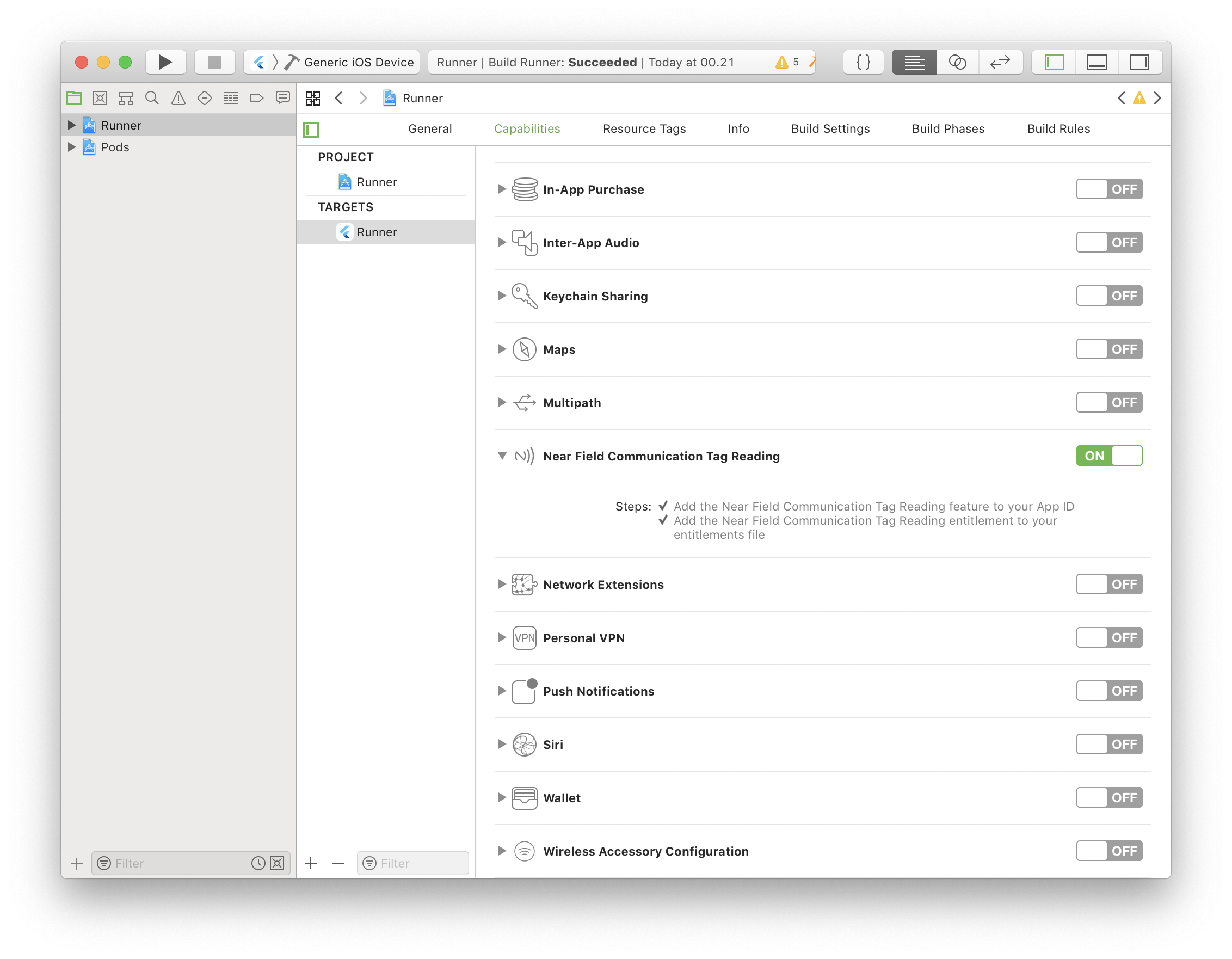
Turn on Near Field Communication Tag Reading
Open your iOS project in Xcode, find your project's target and navigate to Capabilities. Scroll down to 'Near Field Communication Tag Reading' and turn it on.
Turning on 'Near Field Communication Tag reading'
Adds the NFC tag-reading feature to the App ID.
Adds the Near Field Communication Tag Reader Session Formats Entitlement to the entitlements file.
Open your ios/Runner/Info.plist file and add a new NFCReaderUsageDescription key. It's value should be a description of what you plan on using NFC for.
If you're new to NFC you may come to expect a lot of readNFC() calls, but instead you see readNDEF() and NDEFMessage. NDEF is just a formatting standard the tags can be encoded in. There are other encodings than NDEF, but NDEF is the most common one. Currently NFC in Flutter only supports NDEF formatted tags.
Host Card Emulation
NFC in Flutter supports reading from emulated host cards*.
To read from emulated host cards, you need to do a few things.
Call readNDEF() with the readerMode argument set to an instance of NFCDispatchReaderMode.
Insert the following <intent-filter /> in your AndroidManifest.xml activity:
If you start a readNDEF() stream with the reader mode set to an instance of NFCDispatchReaderMode, while another stream is active with the NFCNormalReaderMode, it will throw a NFCMultipleReaderModesException.
Platform differences
When you call readNDEF() on iOS, Core NFC (the iOS framework that allows NFC reading) opens a little window. On Android it just starts listening for NFC tag reads in the background.
⚠️ This will also freeze Flutter while open. Please send a Pull Request if you can fix this.
Error handling
Errors are no exception to NFC in Flutter (hah, get it). The stream returned by NFC.readNDEF() can send 7 different exceptions, and even worse: they are different for each platform!
See the full example in the example directory for an example on how to check for errors.
Exceptions for both platforms
NDEFReadingUnsupportedException
Thrown when a reading session is started, but not actually supported.
iOS
NFCUserCanceledSessionException
Thrown when the user clicks Cancel/Done core NFC popup. If you don't need to know if the user canceled the session you can start reading with the throwOnUserCancel argument set to false like so: readNDEF(throwOnUserCancel: false)
NFCSessionTimeoutException
Core NFC limits NFC reading sessions to 60 seconds. NFCSessionTimeoutException is thrown when the session has been active for 60 seconds.
NFCSessionTerminatedUnexpectedlyException
Thrown when the reading session terminates unexpectedly.
NFCSystemIsBusyException
Throw when the reading session fails because the system is too busy.
Android
NFCIOException
Thrown when a I/O exception occurs. Will for example happen if a tag is lost while being read or a tag could not be connected to.
NDEFBadFormatException
Thrown when the tag is expected to NDEF formatted, but it is incorrectly formatted.