패키지, 저장소 및 앱 카테고리 검색

pandabar 표지
패키지 상세v0.1.2

pandabar

판다를 위한 세련된 하단 탐색 바. 판다바는 새로운 뉴모포닉 디자인 트렌드를 위해 설계되었습니다.

AndroidiOSWebmacOSWindowsLinux
30일 다운로드
64
좋아요
66
Pub 점수
140

패키지 설치

flutter pub add pandabar

패키지 개요

공개 정보를 바탕으로 생성한 선택 가이드입니다.

Pandabar는 네오모포지즘 디자인 트렌드에서 영감을 받은 플러터 애플리케이션용 시각적으로 매력적인 하단 탐색 바입니다. 현대적이고 부드러운 에지의 미학을 제공하며, 미세한 그림자와 그라데이션으로 사용자 인터페이스의 매력을 높입니다. 표준 탐색 바의 새로운 대안을 찾는 개발자를 위해 설계되었으며, 안드로이드, iOS, 웹, 맥OS, 윈도우, 리눅스 등 다양한 플랫폼을 지원합니다. 사용자 정의 가능한 외관 덕분에 다양한 앱 테마에 쉽게 통합할 수 있으며, 원활한 성능과 직관적인 상호작용을 유지합니다. 간단한 pub add 명령어로 쉽게 설치할 수 있습니다.

사용 사례

  • 현대적인 앱 인터페이스
  • 뉴모포빅 테마 디자인
  • 크로스플랫폼 모바일 및 데스크톱 앱
  • 개선된 사용자 탐색
  • 장치 간 시각적 일관성

주요 기능

  • Neumorphic design style
  • 사용자 정의 가능한 색상과 형태
  • 크로스 플랫폼 호환성
  • 부드러운 애니메이션
  • pub를 통한 간편한 통합
  • 반응형 레이아웃

적합한 대상

  • 디자인 중심의 플러터 개발자
  • 현대적인 미학을 겨냥한 앱
  • 고유한 탐색 UI가 필요한 프로젝트
  • 다중 플랫폼 배포
  • 크리에이티브 UI 실험

고려 사항

  • 다크 모드를 위해 추가적인 스타일링이 필요할 수 있습니다
  • 저사양 장치에 대한 성능 영향
  • 네오모포닉 테마 외에 사용자 정의가 제한적
  • 미니멀리즘 또는 평면 디자인 접근 방식에 적합하지 않음
  • 밀집된 인터페이스에서의 시각적 혼잡 가능성

원본 README

연결된 소스 저장소의 README 원문 스냅샷입니다. 최신 내용은 저장소에서 확인하세요.

Pub

PandaBar

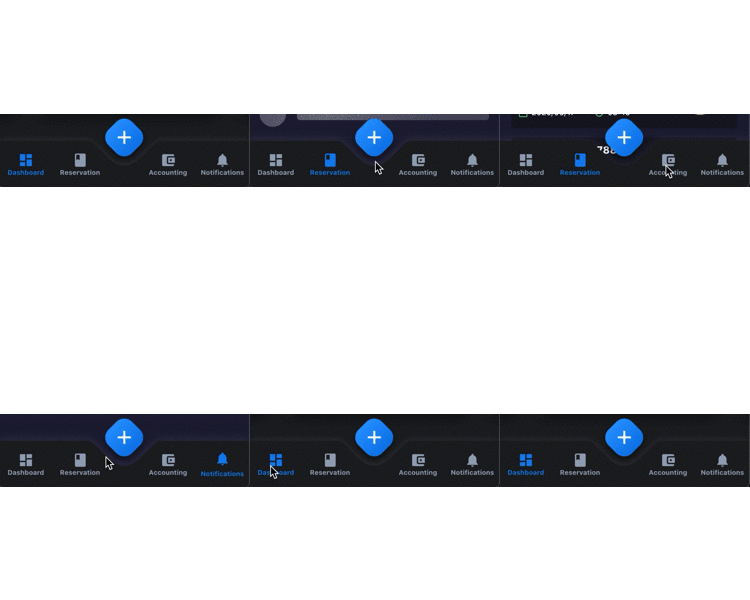
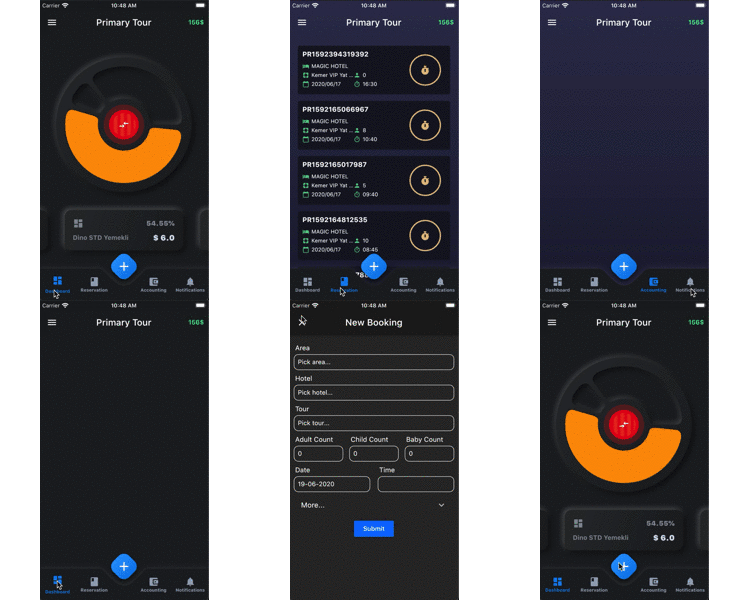
A fancy bottom navigation bar for pandas. Pandabar designed for new neumorphic design trend.

Preview PageView
BottomNavBar Gif Fix Gif
PandaBar
  • buttonColor - to change button color
  • buttonSelectedColor - to change button selected color
  • backgroundColor - the navigation bar's background color
  • buttonData - navigation items, required more than one item and less than 5
  • fabIcon - the navigation bar's fab button icon
  • fabColors - the navigation bar's fab button gradient colors
  • onFabButtonPressed - required to listen fab button is pressed
  • onChange - required to listen when a item is pressed it provide the selected item's id
PandaBarButtonData
  • id - the id of this item
  • icon - the icon of this item
  • title - the title of this item

Getting Started

Add the dependency in pubspec.yaml:

dependencies:
  ...
  pandabar: ^0.1.1

Basic Usage

class HomePage extends StatefulWidget {
  @override
  _HomePageState createState() => _HomePageState();
}

class _HomePageState extends State<HomePage> {

  String page = 'Grey';

  @override
  Widget build(BuildContext context) {
    return Scaffold(
      extendBody: true,
      bottomNavigationBar: PandaBar(
        buttonData: [
          PandaBarButtonData(
            id: 'Grey',
            icon: Icons.dashboard,
            title: 'Grey'
          ),
          PandaBarButtonData(
            id: 'Blue',
            icon: Icons.book,
            title: 'Blue'
          ),
          PandaBarButtonData(
            id: 'Red',
            icon: Icons.account_balance_wallet,
            title: 'Red'
          ),
          PandaBarButtonData(
            id: 'Yellow',
            icon: Icons.notifications,
            title: 'Yellow'
          ),
        ],
        onChange: (id) {
          setState(() {
            page = id;
          });
        },
        onFabButtonPressed: () {

        },
      ),
      body: Builder(
        builder: (context) {

          switch (page) {
            case 'Grey':
              return Container(color: Colors.grey.shade900);
            case 'Blue':
              return Container(color: Colors.blue.shade900);
            case 'Red':
              return Container(color: Colors.red.shade900);
            case 'Yellow':
              return Container(color: Colors.yellow.shade700);
            default:
              return Container();
              
          }

        },
      ),
    );
  }
}

카테고리

소스 저장소

이 패키지를 사용하는 프로젝트

아직 데이터가 없습니다.