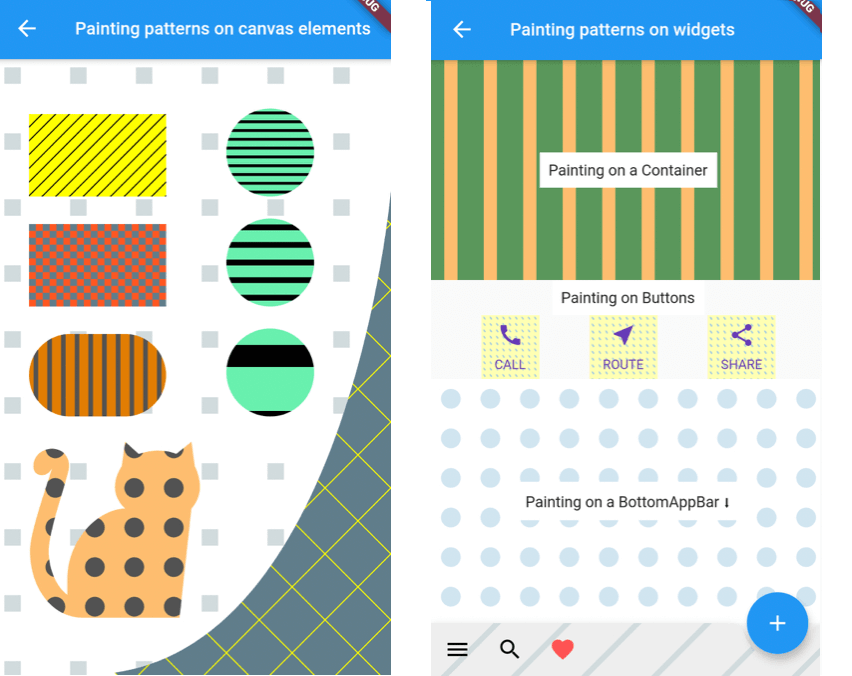
캔버스 요소나 위젯에 스트라이프, 도트, 격자와 같은 사용자 정의 가능한 패턴을 생성할 수 있는 플러터 패키지입니다. 디자인과 미학에 중점을 둔 앱에서 장식용 배경, 텍스처 또는 시각적 효과를 추가하는 데 이상적입니다. 안드로이드, iOS, 웹, macOS, 윈도우, 리눅스 등 여러 플랫폼을 지원하여 크로스플랫폼 개발에 유연하게 활용할 수 있습니다. 간단한 API를 통해 개발자는 UI 컴포넌트에 패턴 렌더링을 쉽게 통합할 수 있습니다.
사용 사례
질감 있는 배경 만들기
사용자 정의 UI 요소 설계
장식적 오버레이 추가
반복 패턴 생성
셰이더를 사용한 앱 시각 효과 향상
예술적 인터페이스 구축
주요 기능
스트라이프, 점, 그리드 패턴을 지원합니다
크로스 플랫폼 호환성
Canvas 및 Widgets와의 간편한 통합
사용자 지정 가능한 패턴 크기 및 색상
고성능 렌더링
확장 가능한 패턴 정의
적합한 대상
시각적 다양성을 찾는 UI 디자이너
예술적 또는 창의적인 앱을 개발하는 개발자
동적 배경 효과가 필요한 앱
그림 그리기 및 페인팅에 중점을 둔 프로젝트
다중 플랫폼 디자인에 종사하는 팀
고려 사항
복잡한 패턴과 함께 성능에 영향을 미칠 수 있습니다
Canvas 렌더링에 대한 이해가 필요합니다
패턴 기반 그래픽에 한정
고정밀 벡터 그래픽에 적합하지 않음
최적의 렌더링 전략과 함께 사용하는 것이 가장 좋습니다
원본 README
연결된 소스 저장소의 README 원문 스냅샷입니다. 최신 내용은 저장소에서 확인하세요.
Patterns
Flutter library to draw patterns like stripes or dots on Canvas elements or widgets.
patterns_canvas
A utility library that lets you paint Canvas shapes or widgets with patterns like dots, stripes, squares, etc.:
Simple Example
Inside your CustomPainter class's paint method, create a Pattern class with background (bgColor) and foreground (fgColor) colors and use one of its paintOn methods:
classMyPainterextendsCustomPainter{
@overridevoidpaint(Canvas canvas, Size size) {
// Prepare a rectangle shape to draw the pattern on.final rect = Rect.fromLTWH(80, 50, 200, 100);
// Create a Pattern object of diagonal stripes with the colors we want.finalPattern pattern = DiagonalStripesThick(bgColor: Colors.lightGreenAccent, fgColor: Colors.black);
// Paint the pattern on the rectangle.
pattern.paintOnRect(canvas, size, rect);
}
}
Results in this pattern drawn:
Pattern constructors and types:
You can construct a Pattern with three different ways:
Rectangular widgets, like Containers, Rows, Columns, IconButtons, etc. can be painted directly with the above method. For widgets that have a custom shape, like a BottomAppbar, you need to provide a different clipBehavior property, e.g. Clip.antiAlias, to make sure the pattern is clipped to the special shape. Check the second screen in the example app for more.
Patterns and settings
Available patterns
All Patterns require a background and foreground color on instantiation. The currently available patterns are:
Description
Class
PatternType enum
Horizontal Stripes Light
HorizontalStripesLight(Color bgColor, Color fgColor)
PatternType.horizontalLight
Horizontal Stripes Thick
HorizontalStripesThick(Color bgColor, Color fgColor)
PatternType.horizontalThick
Vertical Stripes Light
VerticalStripesLight(Color bgColor, Color fgColor)
PatternType.verticalLight
Vertical Stripes Thick
VerticalStripesThick(Color bgColor, Color fgColor)
PatternType.verticalThick
Diagonal Stripes Light
DiagonalStripesLight(Color bgColor, Color fgColor)
PatternType.diagonalLight
Diagonal Stripes Thick
DiagonalStripesThick(Color bgColor, Color fgColor)
PatternType.diagonalThick
Checkers
Checkers(Color bgColor, Color fgColor)
PatternType.checkers
Crosshatch
Crosshatch(Color bgColor, Color fgColor)
PatternType.crosshatch
Dots
Dots(Color bgColor, Color fgColor)
PatternType.dots
Raindrops
Raindrops(Color bgColor, Color fgColor)
PatternType.raindrops
Subtle Patch
SubtlePatch(Color bgColor, Color fgColor)
PatternType.subtlepatch
Texture
TexturePattern(Color bgColor, Color fgColor)
PatternType.texture
Setting the number of pattern features to draw
You can pass a featuresCount argument when creating a Pattern, to set how many features, e.g. how many stripes, you want to be drawn.
All patterns are by default scaled to their container (patternScaleBehavior = PatternScaleBehavior.container). This means that, regardless of its size, a Rectangle will contain 15 diagonal stripes or 10 dots.
You can change this behavior by providing a different argument to the paintOn method:
Pass patternScaleBehavior: PatternScaleBehavior.canvas to scale the pattern to the whole Canvas area. Now the Canvas will contain 15 diagonal stripes or 10 dots, so, a Rectangle will contain as many dots or stripes as it can fit:
Pass patternScaleBehavior: PatternScaleBehavior.customRect and a customRect (e.g. a Rectangle with half the Canvas height) to further customize the Pattern size: