패키지, 저장소 및 앱 카테고리 검색

payment_card 표지
패키지 상세v0.0.1

payment_card

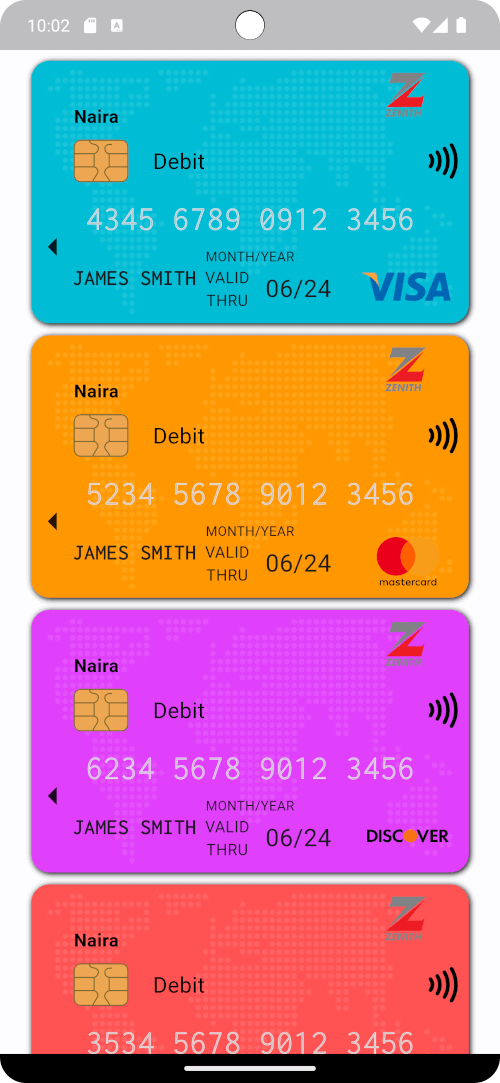
Flutter에서 아름다운 결제(예: 신용카드 또는 디비트카드) 카드를 만들기 위한 사용자 정의 위젯입니다.

AndroidiOSWebmacOSWindowsLinux
30일 다운로드
11
좋아요
11
Pub 점수
130

패키지 설치

flutter pub add payment_card

패키지 개요

공개 정보를 바탕으로 생성한 선택 가이드입니다.

시각적으로 매력적인 결제 카드(신용카드 또는 직불카드 등)를 만들기 위해 설계된 플러터 위젯으로, 사용자 정의 가능한 스타일과 레이아웃을 지원합니다. 안드로이드, iOS, 웹, 맥OS, 윈도우, 리눅스 등 여러 플랫폼을 지원하여 카드 UI 컴포넌트가 필요한 크로스플랫폼 애플리케이션에 이상적입니다. 이 패키지는 번호, 만료일, 이름 등의 카드 정보를 표시하기 위한 깔끔하고 재사용 가능한 인터페이스를 제공하여 결제 관련 워크플로에서 사용자 경험을 향상시킵니다.

사용 사례

  • 결제 양식 인터페이스
  • 디지털 지갑 표시
  • 이커머스 체크아웃 화면
  • 카드 미리보기 구성 요소
  • 사용자 프로필 카드 관리

주요 기능

  • 사용자 정의 가능한 카드 디자인
  • 크로스 플랫폼 호환성
  • 반응형 레이아웃 지원
  • 폼과의 간편한 통합
  • 카드 번호 형식을 지원합니다

적합한 대상

  • 전자상거래 앱을 개발하는 개발자
  • 일관된 카드 UI가 필요한 디자이너
  • 결제 처리 기능을 갖춘 앱
  • 프론트엔드 중심의 플러터 프로젝트

고려 사항

  • 실제 결제 처리를 지원하지 않습니다
  • 수동 입력 검증이 필요합니다
  • 제한된 내장 보안 조치
  • 생산용 결제 게이트웨이에는 적합하지 않습니다

원본 README

연결된 소스 저장소의 README 원문 스냅샷입니다. 최신 내용은 저장소에서 확인하세요.

PaymentCard

pub package pub points popularity likes Star on Github Awesome Flutter License: BSD

Overview

The PaymentCard widget is a flexible Flutter widget designed to display payment card information with customizable properties. It enables developers to showcase payment card details such as the card number, card type, cardholder name, and background image in a visually appealing manner.

Table of Contents

Installation

To use PaymentCard in your Flutter project, add the following dependency to your pubspec.yaml file:

dependencies:
  payment_card: ^0.0.1

Then, run:

flutter pub get

Usage

Import the package:

import 'package:payment_card/payment_card.dart';

Add the PaymentCard widget to your UI, providing the necessary parameters:

PaymentCard(
  cardIssuerIcon: Icons.credit_card,
  backgroundColor: Colors.blue,
  currency: 'USD',
  cardNumber: '1234567890123456',
  validity: '12/24',
  holder: 'John Doe',
  cardType: CardNetwork.visa,
  cardTypeTextStyle: TextStyle(fontSize: 16, fontWeight: FontWeight.bold),
  cardNumberStyles: CardNumberStyles.lightStyle1,
  margin: EdgeInsets.all(16),
)

Features

  • Customization: Customize various aspects of the payment card, including the card issuer icon, background color, background image, currency, card number, validity, cardholder name, card type, and more.
  • Flexible Design: The PaymentCard widget allows for flexible design configurations, enabling developers to tailor the appearance of the payment card to suit their app's visual style and branding.
  • Easy Integration: Integrating the PaymentCard widget into Flutter projects is straightforward, making it accessible to developers of all skill levels.
  • Highly Configurable: With support for customizing card number styles, card type text styles, and margins, developers can fine-tune the presentation of payment card details to meet specific requirements.

Examples

Here's a basic example demonstrating the usage of the PaymentCard widget:

import 'package:flutter/material.dart';
import 'package:payment_card/payment_card.dart';

void main() {
  runApp(const MyApp());
}

class MyApp extends StatelessWidget {
  const MyApp({super.key});

  @override
  Widget build(BuildContext context) {
    return MaterialApp(
      debugShowCheckedModeBanner: false,
      home: Scaffold(
        backgroundColor: Colors.black12,
        body: SingleChildScrollView(
          child: Padding(
            padding: const EdgeInsets.all(16.0),
            child: Column(
              crossAxisAlignment: CrossAxisAlignment.stretch,
              children: [
                buildPaymentCardExample1(),
                const SizedBox(height: 16),
                buildPaymentCardExample2(),
                const SizedBox(height: 16),
                buildPaymentCardExample3(),
                const SizedBox(height: 16),
                buildPaymentCardExample4(),
              ],
            ),
          ),
        ),
      ),
    );
  }

  Widget buildPaymentCardExample1() {
    return const PaymentCard(
      cardIssuerIcon: CardIcon(icon: Icons.credit_card),
      backgroundColor: Colors.blue,
      backgroundGradient: LinearGradient(
        colors: [Colors.purple, Colors.indigo],
        begin: Alignment.topLeft,
        end: Alignment.bottomRight,
      ),
      currency: Text('EUR'),
      cardNumber: '1234567890123456',
      validity: '10/24',
      holder: 'Jane Doe',
      isStrict: false,
      cardNetwork: CardNetwork.visa,
      cardTypeTextStyle: TextStyle(fontSize: 16, fontWeight: FontWeight.bold),
      cardNumberStyles: CardNumberStyles.darkStyle4,
      backgroundImage: null,
    );
  }

  Widget buildPaymentCardExample2() {
    return const PaymentCard(
      cardIssuerIcon: CardIcon(icon: Icons.credit_card),
      currency: Text('GBP'),
      cardNumber: '1234567890123456',
      isStrict: false,
      validity: '08/23',
      holder: 'John Smith',
      cardNetwork: CardNetwork.mastercard,
      cardTypeTextStyle: TextStyle(fontSize: 16, fontWeight: FontWeight.bold, color: Colors.white),
      cardNumberStyles: CardNumberStyles.lightStyle2,
      backgroundImage: null,
      backgroundColor: Colors.grey,
    );
  }

  Widget buildPaymentCardExample3() {
    return const PaymentCard(
      cardIssuerIcon: CardIcon(icon: Icons.credit_card),
      backgroundColor: Colors.green,
      backgroundImage: null,
      currency: Text('USD'),
      cardNumber: '1234567890123456',
      validity: '06/22',
      holder: 'Alice Johnson',
      isStrict: false,
      cardNetwork: CardNetwork.americanExpress,
      cardTypeTextStyle: TextStyle(fontSize: 16, fontWeight: FontWeight.bold),
      cardNumberStyles: CardNumberStyles.lightStyle3,
    );
  }

  Widget buildPaymentCardExample4() {
    return const PaymentCard(
      cardIssuerIcon: CardIcon(icon: Icons.credit_card),
      backgroundColor: Colors.orange,
      currency: Text('USD'),
      cardNumber: '1234567890123456',
      validity: '09/25',
      holder: 'Robert Brown',
      isStrict: false,
      cardNetwork: CardNetwork.discover,
      cardTypeTextStyle: TextStyle(fontSize: 16, fontWeight: FontWeight.bold),
      cardNumberStyles: CardNumberStyles.darkStyle5,
      backgroundImage: null,
    );
  }
}

Screenshots

Screenshot 1 Screenshot 2 Screenshot 3
Screenshot 4 Screenshot 5 Screenshot 6

Contributing

Contributions are welcome! Feel free to open issues or submit pull requests.

  • Issues: If you encounter any bugs, have feature requests, or want to suggest improvements, please open an issue on our GitHub repository. Provide as much detail as possible to help us understand the problem or idea better.

  • Pull Requests: If you'd like to contribute code changes, feel free to submit a pull request. Before doing so, make sure to fork the repository and create a new branch for your changes. Follow the existing coding style and guidelines, and write clear and concise commit messages. Your pull request will undergo review, and we'll work together to ensure the changes align with the project's goals.

  • Feature Requests: If you have ideas for new features or enhancements, please open an issue to discuss them. We value community feedback and want to ensure that new features align with the project's direction and objectives.

  • Spread the Word: Help us grow the FontResoft community by sharing the project with others. Whether through social media, blog posts, or word of mouth, spreading the word about FontResoft helps attract more users and contributors.

License

This project is licensed under the BSD 3-Clause License - see the LICENSE file for details.

카테고리

의존성

의존성 목록 1 개

소스 저장소

이 패키지를 사용하는 프로젝트

아직 데이터가 없습니다.