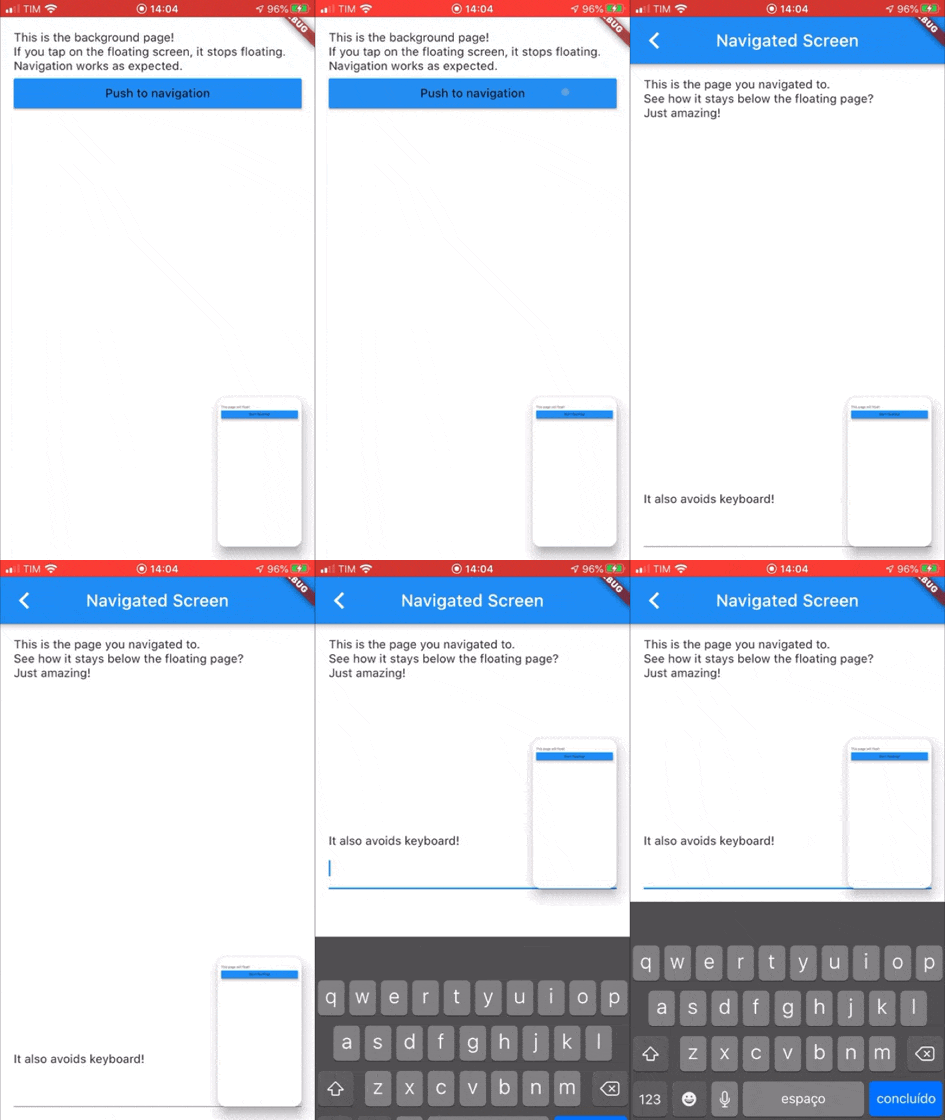
pip_view 패키지는 개발자가 플로팅 오버레이 아래에 위젯을 표시할 수 있게 해주며, 일반적으로 피처 인 피처 기능에 사용됩니다. 이는 더 큰 앱 인터페이스 내에서 작은 드래그 가능한 콘텐츠 영역을 원활하게 통합할 수 있게 하여 비디오 재생이나 라이브 피드에 적합합니다. 이 패키지는 Android, iOS, Web, macOS, Windows, Linux 등 여러 플랫폼을 지원하여 크로스플랫폼 일관성을 보장합니다. 가볍고 최소한의 구성으로 쉽게 구현할 수 있도록 설계되어 있으며, 메인 UI 흐름을 방해하지 않으면서도 동적이고 상호작용 가능한 오버레이가 필요한 앱에 적합합니다.
사용 사례
피처 인 피처 모드에서 비디오 재생
라이브 카메라 피드 오버레이
인터랙티브 플로팅 컨트롤
다중 작업 앱 인터페이스
실시간 데이터 모니터링 표시
주요 기능
드래그 지원이 있는 플로팅 위젯
메인 콘텐츠 아래에 오버레이 렌더링
크로스 플랫폼 호환성
최소한의 설정 필요
사용자 정의 크기 및 위치
적합한 대상
미디어 애플리케이션
이중 화면 레이아웃을 갖춘 교육 도구
협업 작업 앱
실시간 모니터링 대시보드
지속적인 부유형 UI 요소가 필요한 앱
고려 사항
복잡한 제스처를 처리하기 위해 추가 조치가 필요할 수 있습니다
저사양 장치에 대한 성능 영향
고급 애니메이션을 위한 제한된 사용자 정의
전체 화면 대체를 위한 것이 아님
복잡한 UI에서는 적절한 레이아웃 관리가 필요합니다
원본 README
연결된 소스 저장소의 README 원문 스냅샷입니다. 최신 내용은 저장소에서 확인하세요.
pip_view
Widget to allow the presentation of a widget below a floating one. It supports moving the floating widget around which sticks to the corners.
Usage
Create a PIPView widget, the prop builder will be the view rendered floating when requested. To present a view below the floating view use PIPView.of(context).presentBelow(MyWidget()).
Props:
avoidKeyboard: whether the floating view should avoid the keyboard;
builder: a builder for the widget to float, the second parameter indicates if the view is floating;
initialCorner: the corner in which the floating view will be sticked initially
Possible values are: PIPViewCorner.topLeft, PIPViewCorner.topRight, PIPViewCorner.bottomLeft, PIPViewCorner.bottomRight;
floatingHeight: the height of the foreground view when floating. If not set is calculated from the floatingWidth to keep aspect ratio of the screen;
floatingWidth: the width of the foreground view when floating. If not set and floatingHeight is set, it is calculated from the floatingHeight value to keep aspect ratio of the screen. If not set and floatingHeight is not set, defaults to 100.0;
Example:
classMyScreenextendsStatelessWidget{
@overrideWidgetbuild(BuildContext context) {
returnPIPView(
builder: (context, isFloating) {
returnScaffold(
body: Column(
children: [
Text('This is the screen that will float!');
MaterialButton(
child: Text('Start floating');
onPressed: () {
PIPView.of(context).presentBelow(MyBackgroundScreen());
},
),
],
);
);
},
);
}
}
classMyBackgroundScreenextendsStatelessWidget{
@overrideWidgetbuild(BuildContext context) {
returnScaffold(
body: Text('This is my background screen!');
);
}
}
NOTE: If you want a more declarative way of using the PIPView, you can use RawPIPView instead.