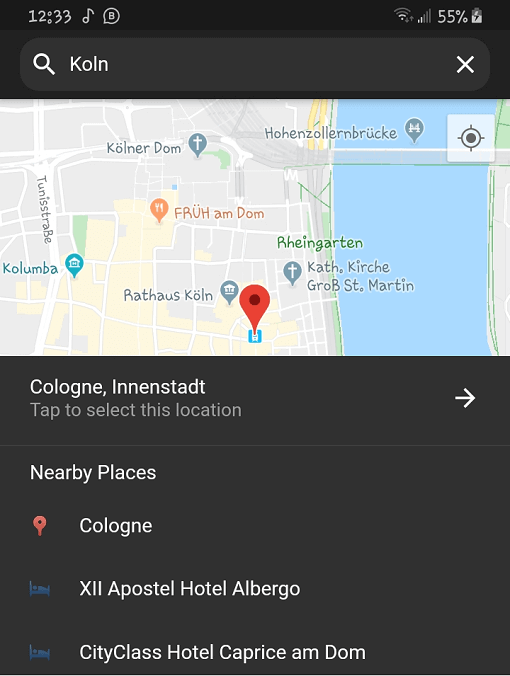
플레이스 피커는 위치 선택을 위한 완전히 다트로 작성된 플러터 패키지로, 자동 완성 제안과 근처 장소 목록을 제공합니다. 로컬라이제이션을 지원하여 다국어 사용자 경험을 가능하게 합니다. 플러터 앱에 원활하게 통합되도록 설계되어 직관적인 UI 컴포넌트를 통해 주소 및 위치 입력을 간편하게 만듭니다. 정확한 지리 정보를 얻기 위해 백엔드에서 구글 맵스를 활용하며, 스마트한 제안과 실시간 피드백을 통해 사용자 경험을 향상시킵니다. 정밀한 위치 선택이 필요한 앱에 적합합니다.
사용 사례
양식 내 주소 입력
배송 서비스를 위한 위치 선택
여행 및 지도 애플리케이션
사용자 프로필 위치 설정
이벤트 또는 장소 등록
주요 기능
자동 완성 제안
근처 위치 목록
내장된 로컬라이제이션
Google 지도 통합
완전히 사용자 정의 가능한 UI
순수 Dart 구현
적합한 대상
위치 입력이 필요한 모바일 앱
국제 사용자를 대상으로 하는 앱
순수한 Dart 솔루션을 사용하는 개발자
경량 위치 선택기 필요 프로젝트
지도 기능을 갖춘 Flutter 앱
고려 사항
Google Maps API 키가 필요합니다
Google Maps 백엔드에 한정
사용자 정의 테마를 위해 추가적인 스타일링이 필요할 수 있습니다
인터넷 연결에 의존합니다
오프라인 위치 선택에 적합하지 않습니다
원본 README
연결된 소스 저장소의 README 원문 스냅샷입니다. 최신 내용은 저장소에서 확인하세요.
Flutter Place Picker
The missing location picker made in Flutter for Flutter. With dark theme and custom localization support.
⚠️ Please note: This library will NOT be affected by the deprecation of Place Picker as indicated here.
🍭 Remember to enable Places API, Maps SDK for Android, Maps SDK for iOS and Geocoding API for your API key.
Opt-in to the embedded views preview by adding a boolean property to the app's Info.plist file
with the key io.flutter.embedded_views_preview and the value YES.
Also add these to the dict values in Info.plist for location request to work on iOS
Sample Usage
Import the package into your code
import'package:place_picker/place_picker.dart';
Create a method like below, and call it in onTap of a button or InkWell. A LocationResult will be returned
with the name and lat/lng of the selected place. You can then handle the result in any way you want.
Pass in an optional LatLng displayLocation to display that location instead. This is useful when you want the map
to display the previously selected location.
voidshowPlacePicker() async {
LocationResult result = awaitNavigator.of(context).push(MaterialPageRoute(
builder: (context) =>
PlacePicker("YOUR API KEY",
displayLocation: customLocation,
)));
// Handle the result in your wayprint(result);
}