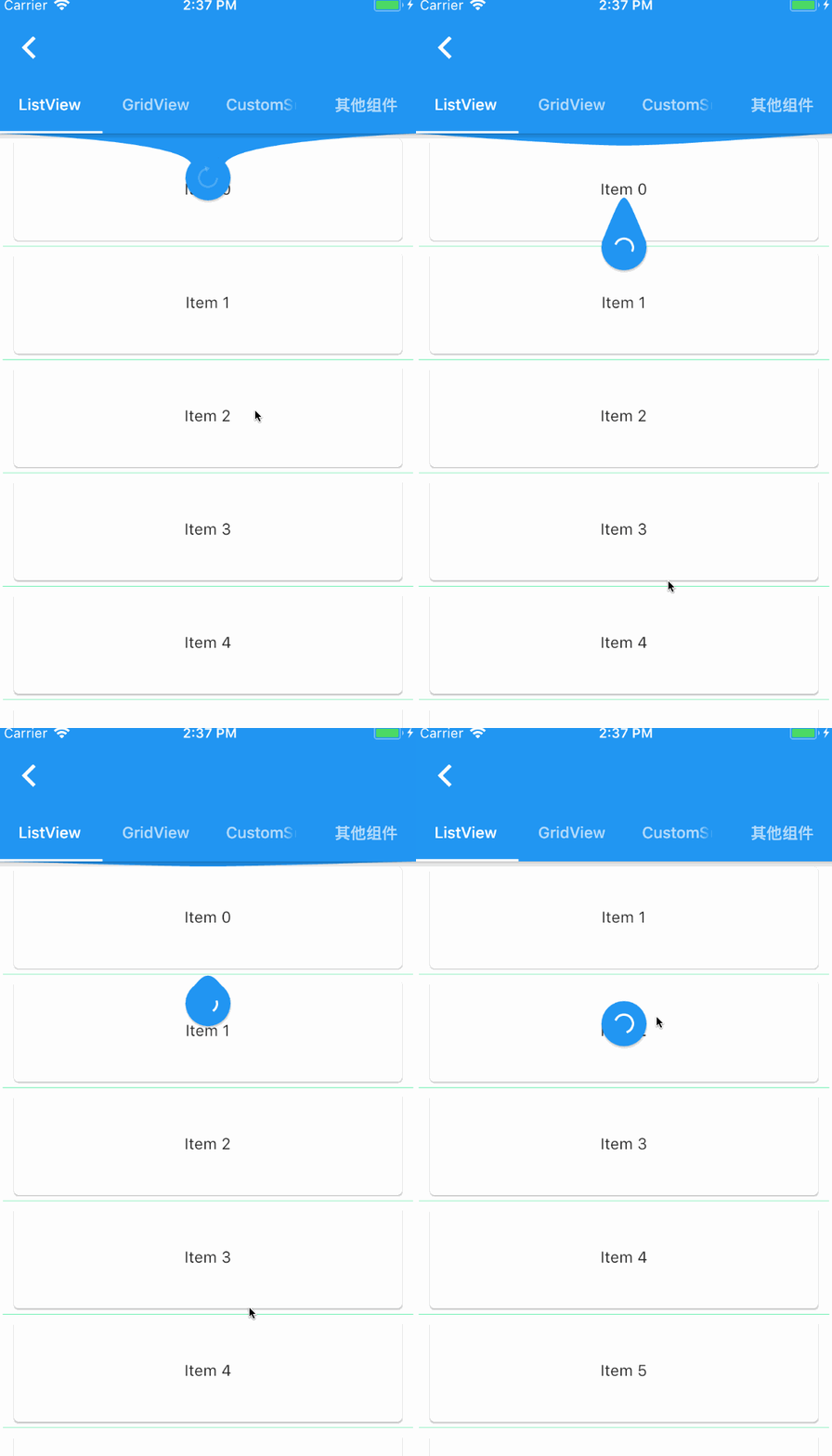
PullToRefresh는 스크롤 가능한 위젯에 아래로 당겨서 새로 고치기 및 위로 당겨서 더 많은 내용을 로드하는 기능을 제공하는 Flutter 패키지입니다. 이 패키지는 모든 주요 플랫폼에서 리스트 및 기타 스크롤 가능한 컴포넌트에 부드럽고 사용자 정의 가능한 새로 고침 인디케이터를 제공합니다. ListView, GridView 및 기타 스크롤 뷰와 원활하게 통합되어 개발자가 네이티브처럼 느껴지는 새로 고침 경험을 쉽게 구현할 수 있도록 도와줍니다. Android, iOS, Web, macOS, Windows, Linux를 모두 지원하여 다양한 장치 간 일관된 동작을 보장합니다. 소스 코드는 오픈소스이며 GitHub에서 활발히 유지 관리되고 있습니다.
사용 사례
리스트 뷰에서 풀투리프레시 구현하기
로드-더 많은 제스처와 함께 무한 스크롤 추가
반응형 데이터 피드 생성
모바일 및 웹 앱에서 사용자 경험 향상
동적 콘텐츠 목록 만들기
주요 기능
하단으로 당겨 새로 고치기 제스처
업로드 로드 더 기능
사용자 지정 가능한 새로 고침 표시기
크로스 플랫폼 호환성
ScrollView와의 간편한 통합
사용자 정의 리프레시 트리거
적합한 대상
리스트 중심 앱을 개발하는 개발자
UX 일관성을 우선시하는 팀
실시간 데이터 업데이트가 필요한 앱
웹 및 모바일 하이브리드 프로젝트
경량 로딩 인디케이터가 필요한 프로젝트
고려 사항
추가 상태 관리가 필요할 수 있습니다
대규모 데이터 세트의 성능 영향
사용자 정의 스타일링을 위해서는 애니메이션 API에 대한 이해가 필요합니다
제한된 내장 오류 처리
스크롤되지 않는 콘텐츠에는 적합하지 않습니다
원본 README
연결된 소스 저장소의 README 원문 스냅샷입니다. 최신 내용은 저장소에서 확인하세요.
flutter_pulltorefresh
Intro
a widget provided to the flutter scroll component drop-down refresh and pull up load.support android and ios.
If you are Chinese,click here(中文文档)
Features
pull up load and pull down refresh
It's almost fit for all Scroll witgets,like GridView,ListView...
provide global setting of default indicator and property
provide some most common indicators
Support Android and iOS default ScrollPhysics,the overScroll distance can be controlled,custom spring animate,damping,speed.
horizontal and vertical refresh,support reverse ScrollView also(four direction)
provide more refreshStyle: Behind,Follow,UnFollow,Front,provide more loadmore style
Support twoLevel refresh,implments just like TaoBao twoLevel,Wechat TwoLevel
enable link indicator which placing other place,just like Wechat FriendCircle refresh effect
simple example,It must be noted here that ListView must be the child of SmartRefresher and cannot be separated from it. For detailed reasons, see here
List<String> items = ["1", "2", "3", "4", "5", "6", "7", "8"];
RefreshController _refreshController =
RefreshController(initialRefresh: false);
void_onRefresh() async{
// monitor network fetchawaitFuture.delayed(Duration(milliseconds: 1000));
// if failed,use refreshFailed()
_refreshController.refreshCompleted();
}
void_onLoading() async{
// monitor network fetchawaitFuture.delayed(Duration(milliseconds: 1000));
// if failed,use loadFailed(),if no data return,use LoadNodata()
items.add((items.length+1).toString());
if(mounted)
setState(() {
});
_refreshController.loadComplete();
}
@overrideWidgetbuild(BuildContext context) {
returnScaffold(
body: SmartRefresher(
enablePullDown: true,
enablePullUp: true,
header: WaterDropHeader(),
footer: CustomFooter(
builder: (BuildContext context,LoadStatus mode){
Widget body ;
if(mode==LoadStatus.idle){
body = Text("pull up load");
}
elseif(mode==LoadStatus.loading){
body = CupertinoActivityIndicator();
}
elseif(mode == LoadStatus.failed){
body = Text("Load Failed!Click retry!");
}
elseif(mode == LoadStatus.canLoading){
body = Text("release to load more");
}
else{
body = Text("No more Data");
}
returnContainer(
height: 55.0,
child: Center(child:body),
);
},
),
controller: _refreshController,
onRefresh: _onRefresh,
onLoading: _onLoading,
child: ListView.builder(
itemBuilder: (c, i) => Card(child: Center(child: Text(items[i]))),
itemExtent: 100.0,
itemCount: items.length,
),
),
);
}
// from 1.5.0, it is not necessary to add this line//@override// void dispose() {// TODO: implement dispose// _refreshController.dispose();// super.dispose();// }
The global configuration RefreshConfiguration, which configures all Smart Refresher representations under the subtree, is generally stored at the root of MaterialApp and is similar in usage to ScrollConfiguration.
In addition, if one of your SmartRefresher behaves differently from the rest of the world, you can use RefreshConfiguration.copyAncestor() to copy attributes from your ancestor RefreshConfiguration and replace
attributes that are not empty.
// Smart Refresher under the global configuration subtree, here are a few particularly important attributesRefreshConfiguration(
headerBuilder: () => WaterDropHeader(), // Configure the default header indicator. If you have the same header indicator for each page, you need to set this
footerBuilder: () => ClassicFooter(), // Configure default bottom indicator
headerTriggerDistance: 80.0, // header trigger refresh trigger distance
springDescription:SpringDescription(stiffness: 170, damping: 16, mass: 1.9), // custom spring back animate,the props meaning see the flutter api
maxOverScrollExtent :100, //The maximum dragging range of the head. Set this property if a rush out of the view area occurs
maxUnderScrollExtent:0, // Maximum dragging range at the bottom
enableScrollWhenRefreshCompleted: true, //This property is incompatible with PageView and TabBarView. If you need TabBarView to slide left and right, you need to set it to true.
enableLoadingWhenFailed : true, //In the case of load failure, users can still trigger more loads by gesture pull-up.
hideFooterWhenNotFull: false, // Disable pull-up to load more functionality when Viewport is less than one screen
enableBallisticLoad: true, // trigger load more by BallisticScrollActivity
child: MaterialApp(
........
)
);
1.5.6 add new feather: localization ,you can add following code in MaterialApp or CupertinoApp:
MaterialApp(
localizationsDelegates: [
// this line is importantRefreshLocalizations.delegate,
GlobalWidgetsLocalizations.delegate,
GlobalMaterialLocalizations.delegate
],
supportedLocales: [
constLocale('en'),
constLocale('zh'),
],
localeResolutionCallback:
(Locale locale, Iterable<Locale> supportedLocales) {
//print("change language");return locale;
},
)
Since 1.4.3, the child attribute has changed from ScrollView to Widget, but this does not mean that all widgets are processed the same. SmartRefresher's internal implementation mechanism is not like NestedScrollView
There are two main types of processing mechanisms here, the first categoryis the component inherited from ScrollView. At present, there are only three types,
ListView, GridView, CustomScrollView. The second category is components that are not inherited from ScrollView, which generally put empty views,
NoScrollable views (NoScrollable convert Scrollable), PageView, and you don't need to estimate height by LayoutBuilder yourself.
For the first type of mechanism, slivers are taken out of the system "illegally". The second is to put children directly into classes such as `SliverToBox Adapter'. By splicing headers and footers back and forth to form slivers, and then putting slivers inside Smart Refresher into CustomScrollView, you can understand Smart Refresher as CustomScrollView,
because the inside is to return to CustomScrollView. So, there's a big difference between a child node and a ScrollView.
Now, guess you have a requirement: you need to add background, scrollbars or something outside ScrollView. Here's a demonstration of errors and correct practices
The above mistake led to scrollable nesting another scrollable, causing you to not see the header and footer no matter how slippery you are.
Similarly, you may need to work with components like NotificationListener, ScrollConfiguration..., remember, don't store them outside ScrollView (you want to add refresh parts) and Smart Refresher memory.。
about NestedScrollView,When you slide down and then slide up quickly, it will return back. The main reason is that
NestedScrollView does not consider the problem of cross-border elasticity under
bouncingScrollPhysics. Relevant flutter issues: 34316, 33367, 29264. This problem
can only wait for flutter to fix this.
SmartRefresher does not have refresh injection into ScrollView under the subtree, that is, if you put AnimatedList or RecordableListView in the child
is impossible. I have tried many ways to solve this problem and failed. Because of the
principle of implementation, I have to append it to the head and tail of slivers. In fact, the problem is not that much of my
Component issues, such as AnimatedList, can't be used with AnimatedList and GridView unless
I convert AnimatedList to SliverAnimatedList is the solution. At the moment,
I have a temporary solution to this problem, but it's a bit cumbersome to rewrite the code inside it and then outside ScrollView.
Add SmartRefresher, see my two examples Example 1和Example 2
MIT LicenseCopyright (c) 2018JpengPermissionis hereby granted, free of charge, to any person obtaining a copy
of this software and associated documentation files (the "Software"), to deal
in the Software without restriction, including without limitation the rights
to use, copy, modify, merge, publish, distribute, sublicense, and/or sell
copies of the Software, and to permit persons to whom the Softwareis
furnished to do so, subject to the following conditions:
The above copyright notice and this permission notice shall be included in all
copies or substantial portions of the Software.
THE SOFTWARE IS PROVIDED "AS IS", WITHOUT WARRANTY OF ANY KIND, EXPRESS OR
IMPLIED, INCLUDING BUT NOT LIMITED TO THE WARRANTIES OF MERCHANTABILITY,
FITNESS FOR A PARTICULAR PURPOSE AND NONINFRINGEMENT. IN NO EVENT SHALL THE
AUTHORS OR COPYRIGHT HOLDERS BE LIABLE FOR ANY CLAIM, DAMAGES OR OTHER
LIABILITY, WHETHER IN AN ACTION OF CONTRACT, TORT OR OTHERWISE, ARISING FROM,
OUT OF OR IN CONNECTION WITH THE SOFTWARE OR THE USE OR OTHER DEALINGS IN THE
SOFTWARE.