연결된 소스 저장소의 README 원문 스냅샷입니다. 최신 내용은 저장소에서 확인하세요.
Quds UI Kit
This library consists of:
Animating widgets with simple controlling, events capturing.
Page Transitions
Toasts
Bottom sheets
Dialogs
Pagination
Simple Drawer
Splash Screen View
Another Viewers
To use this package see the following example .
Animation:
Icons:
QudsAnimatedIcon
QudsAnimatedIcon (
iconData: AnimatedIcons .play_pause,
showStartIcon: _isPlaying,
)
QudsAnimatedCombinedIcons
QudsAnimatedCombinedIcons (
startIcon: Icons .accessible,
endIcon: Icons .accessibility_new,
showStartIcon: _onChair,
),
QudsAnimatedText (
_isPlaying ? 'Playing' : 'Paused' ,
)
QudsAnimatedCounter (
counter,
duration: Duration (milliseconds: 200 ),
length: 4 ,
style: TextStyle (fontSize: 30 ),
)
Buttons
All animated icons in this library wrapped in buttons with capturing tap ability.
QudsAnimatedCombinedIconsButton (
tooltip: 'Toggle' ,
startIcon: Icons .arrow_forward,
onPressed: _toggle,
),
Other Buttons:
QudsAnimatedIconButton
QudsAnimatedCombinedIconsButton
QudsCheckbox
QudsCheckboxListTile
QudsCheckboxWithText
Page Transitions
Wide collection of page route tranistion are now supported in Quds UI Kit
Fade QudsFadePageRoute({duration, curve})
Rotation QudsRotatePageRoute({duration, curve, alignment})
Slide QudsSlidePageRoute({direction[Up Down Left Right Start End], duration, curve})
Zoom QudsZoomPageRoute({duration, curve, alignment})
Combined QudsTransitionPageRoute({withFade, withRotate, withSlide, withScale, rotateAlignment, scaleAlignment, duration, curve})
Navigator .push (
context,
QudsSlidePageRoute (
builder: (c) => _SecondScreen (),
slideDirection: SlideDirection .Up ,
))
Toasts
Customized toasts with easy control,
showQudsToast (context,
content: Text ('Copied!' ),
toastTime: QudsToastTime .VeryShort ,
leadingActions: [
QudsAutoAnimatedCombinedIcons (
startIcon: Icons .copy,
endIcon: Icons .paste,
showStartIcon: false ,
)
])
Bottom Sheets
showQudsModalBottomSheet (
context,
(c) => Column (
children: [
for (int i = 0 ; i < 5 ; i++) ListTile (title: Text ('Hi' ))
],
),
titleText: 'Test Bottom Sheet' )
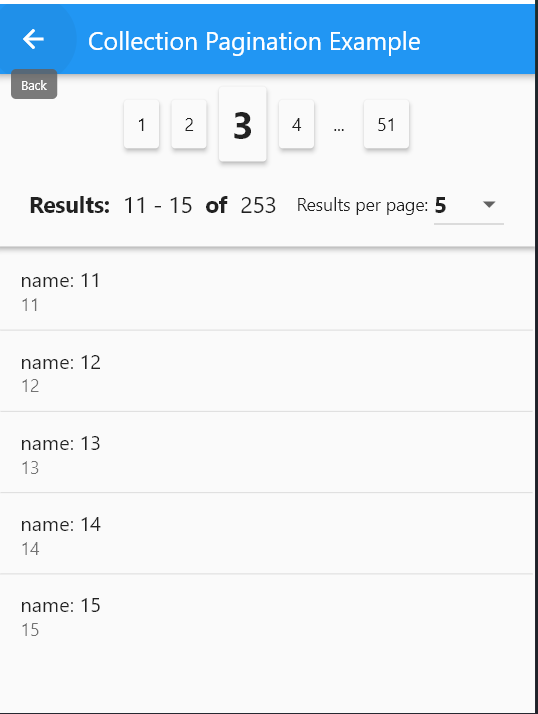
Pagination
QudsCollectionPagination <_ExampleModel >(
resultsPerPage: itemsPerPage,
itemsPadding: EdgeInsets .all (2 ),
onResultsPerPageChanged: (p) {
page = 1 ;
itemsPerPage = p;
_fillItems ();
},
currentPageItems: currItems,
onPageChanged: (p) {
page = p;
_fillItems ();
},
selectedPage: page,
total: provider.list.length,
itemBuilder: (c, i, o) => ListTile (
title: Text (o.name),
subtitle: Text (o.id.toString ()),
),
)
Dialogs
General Dialogs
showQudsDialog (context,
title: Text ('Save' ),
builder: (c) => Text (
'Would you like to save the document before existing?' ));
Pre-prepared dialogs:
showQudsConfirmDeleteDialog (context,
onDeletePressed: () => showQudsToast (context,
toastTime: QudsToastTime .VeryShort ,
leadingActions: [
QudsAutoAnimatedCombinedIcons (
startIcon: Icons .delete, endIcon: Icons .done)
],
content: Text ('Deleted!' ),
trailingActions: [
InkWell (
onTap: () {
showQudsToast (context,
toastTime: QudsToastTime .VeryShort ,
content: Text ('Undo pressed' ));
},
child: Container (
padding: EdgeInsets .all (5 ),
child: QudsAutoAnimatedCombinedIcons (
startIcon: CupertinoIcons .delete,
endIcon: CupertinoIcons .arrow_turn_up_left,
showStartIcon: false ,
)))
]))
QudsLightDrawer
class MainDrawer extends StatelessWidget @override
Widget build (BuildContext context) {
return QudsLightDrawer (
bottomAboutButton: ...,
bottomButton: ...,
body: ...;
}
}
QudsPopupMenu
QudsPopupButton (
tooltip: 'T' ,
items: getMenuItems (),
child: Icon (Icons .menu)),
List <QudsPopupMenuBase > getMenuItems () {
return [
QudsPopupMenuSection (
backgroundColor: Colors .yellow.shade200,
titleText: 'أبو أسعد الأمير' ,
subTitle: Text ('See your profile' ),
leading: Icon (
Icons .redeem,
size: 40 ,
),
subItems: [
QudsPopupMenuSection (
titleText: 'Settings' ,
leading: Icon (Icons .settings),
subItems: [
QudsPopupMenuItem (
leading: Icon (Icons .logout),
title: Text ('Logout' ),
onPressed: () {
showToast ('Logout Pressed!' );
})
]),
]),
QudsPopupMenuDivider (),
QudsPopupMenuItem (
leading: Icon (Icons .info_outline),
title: Text ('Give Feedback' ),
subTitle: Text ('Help us improve our new app' ),
onPressed: () {
showToast ('Feedback Pressed!' );
}),
QudsPopupMenuDivider (),
QudsPopupMenuSection (
leading: Icon (Icons .place),
titleText: 'Settings & Privacy' ,
subItems: [
QudsPopupMenuItem (
leading: Icon (Icons .settings),
title: Text ('Settings' ),
onPressed: () {
showToast ('Settings Pressed!' );
}),
QudsPopupMenuItem (
leading: Icon (Icons .lock),
title: Text ('Privacy Checkup' ),
onPressed: () {
showToast ('Privacy Checkup Pressed!' );
}),
QudsPopupMenuItem (
leading: Icon (Icons .lock_clock),
title: Text ('Privacy Shortcuts' ),
onPressed: () {
showToast ('Privacy Shourtcuts Pressed!' );
}),
QudsPopupMenuItem (
leading: Icon (Icons .list),
title: Text ('Activity Log' ),
onPressed: () {
showToast ('Activity Log Pressed!' );
}),
QudsPopupMenuItem (
leading: Icon (Icons .card_membership),
title: Text ('News Feed Preferences' ),
onPressed: () {
showToast ('News Feed Preferences Pressed!' );
}),
QudsPopupMenuItem (
leading: Icon (Icons .language),
title: Text ('Language' ),
onPressed: () {
showToast ('Language Pressed!' );
}),
]),
QudsPopupMenuDivider (),
QudsPopupMenuWidget (
builder: (c) => Container (
padding: EdgeInsets .all (10 ),
child: IntrinsicHeight (
child: Row (
mainAxisAlignment: MainAxisAlignment .center,
children: [
IconButton (
onPressed: () {
showToast ('Favourite Pressed!' );
},
icon: Icon (
Icons .favorite,
color: Colors .red,
)),
VerticalDivider (),
IconButton (
onPressed: () {},
icon: Icon (
Icons .music_note,
color: Colors .blue,
)),
VerticalDivider (),
IconButton (
onPressed: () {},
icon: Icon (
Icons .umbrella,
color: Colors .green,
))
],
),
)))
];
}
QudsSplashView
class SplashScreen extends StatelessWidget @override
Widget build (BuildContext context) {
return Scaffold (
body: QudsSplashView (
progressIndicator: ...,
futures: [...],
onCompleted: ...,
),
);
}
}
Another Viewers
QudsDigitalTimeViewer(
hour: 10 ,
minute: 59 ,
second: 40 ,
milliSecond: 10 ,
),
QudsDigitalClockViewer(
showSeconds: true ,
showMilliSeconds: true ,
)