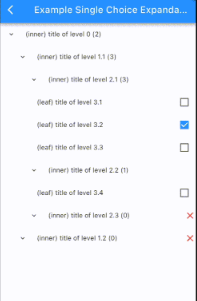
계층형 UI에서 트리 데이터 구조를 시각화하기 위해 설계된 플러터 패키지입니다. 개발자가 중첩된 데이터를 상호작용 가능한 트리 뷰로 렌더링할 수 있도록 하며, 노드의 동적 확장 및 축소를 지원합니다. 이 패키지는 깔끔한 재귀적 렌더링 로직을 강조하며, 대규모 데이터셋에 최적화되어 성능이 우수합니다. 파일 탐색기, 조직도, 카테고리 계층과 같은 구조화된 데이터 표현이 필요한 애플리케이션에 이상적입니다. 플러터의 위젯 시스템으로 구축되어 모든 주요 플랫폼에서 원활하게 통합됩니다.
사용 사례
파일 시스템 디렉터리 표시
조직도 렌더링
카테고리 및 하위 카테고리 계층 구조 표시
구성 트리 빌드
JSON 또는 XML 데이터 구조 시각화
주요 기능
재귀 노드 렌더링
확장 및 축소 가능한 노드
사용자 정의 가능한 노드 스타일
깊은 중첩 지원
크로스 플랫폼 호환성
대규모 트리에 대한 효율적인 렌더링
적합한 대상
계층적 데이터 인터페이스를 구축하는 개발자
상호작용형 트리 탐색이 필요한 앱
중첩된 데이터 모델을 포함한 프로젝트
시각 트리 구조가 필요한 UI
다중 플랫폼을 대상으로 하는 Flutter 앱
고려 사항
매우 큰 트리에 대한 최적화가 필요할 수 있습니다
사용자 정의 스타일링을 위해서는 Flutter 위젯에 대한 이해가 필요합니다
전개/접기 외에 내장된 상호작용은 제한적
평탄한 데이터 구조에 적합하지 않습니다
성능은 노드의 복잡도에 따라 달라집니다
원본 README
연결된 소스 저장소의 README 원문 스냅샷입니다. 최신 내용은 저장소에서 확인하세요.
recursive_tree_flutter
Languages:
The recursive_tree_flutter library helps build a tree data structure and visualizes it as an inheritance tree (stack view or expandable tree view). While most tree-view libraries focus on the interface, recursive_tree_flutter prioritizes the tree data structure, allowing it to support various special UI styles - that's the strength of this library. For example, it can update the tree when a node is selected, return a list of chosen nodes/leaves, return a list of favorite nodes...
Various functions for tree operations, such as finding nodes, searching with text, updating multiple choice/single choice trees, etc.
Allows lazy-loading to expand the tree at runtime.
The tree data structure can be used independently from the Flutter UI.
Visualizes the tree structure using Flutter.
Allows customization of the Flutter UI to suit specific requirements.
Contents
Tree Data Structure (Dart code)
Inspired by the structure of a directory tree on a computer, there are two types of nodes: directories and files. A directory can contain multiple files and other directories, and a file is the smallest level that cannot contain anything else.
Similarly to the directory tree structure on a computer, recursive_tree_flutter will build a tree data structure that includes inner nodes and leaf nodes.
AbsNodeType: An abstract class representing the data type of a node. A node can be either an inner node or a leaf node. This class has the following properties:
id: required, dynamic.
title: required, String.
isInner: boolean, default is true.
isUnavailable: boolean, default is false.
isChosen: nullable boolean, default is false.
isExpanded: boolean, default is false.
isFavorite: boolean, default is false.
isShowedInSearching: boolean, default is true. Also known as isDisplayable, được sử dụng used when the UI tree has a search function.
clone(): abstract method, T extends AbsNodeType. Allows cloning the object.
parent: required, TreeType<T>?. If parent == null, it means we are at the root of the entire tree.
isChildrenLoadedLazily: boolean, default is false. Only used if the current tree is lazy-loading, indicating whether the children have been loaded before or not.
isLeaf: Is current tree at a leaf node?
isRoot: Is current tree at the root node?
clone(tree, parent): static method. Allows cloning a tree.
searchLeavesWithTitleDFS(tree, text, result): Searches for all trees whose root title data contains the searching text using the DFS algorithm. The results are stored in the result variable.
returnChosenLeaves(tree, result): Searches for all leaves whose title data contains the searching text using the DFS algorithm. The results are stored in the result variable.
returnFavoriteNodes(tree, result): Returns all nodes that have been added to the favorite list. The results are stored in the result variable.
findRightmostOfABranch(tree): (Not important) Finds the rightmost node of the current tree branch (a tree with a current level minus 1). This function is used in the VTS Department Tree to determine which node is at the bottom of the branch, so its leading widget will be slightly different.
updateAllUnavailableNodes(tree): Updates the isUnavailable property of all nodes in the current tree. Suppose when parsing data for the first time, some leaves will be unavailable, and we need to update the affected inner nodes. The function returns true if the tree is available (chosenable), otherwise false.
We can see that NodeWidget is a StatefulWidget built recursively and wrapped by SingleChildScrollView to provide scrolling capability to the tree. Updating the tree (data) will change the state/UI of the NodeWidget - this can be done using setState or Provider for management. NodeWidget will inherit ExpandableTreeMixin (as shown in the example VTSDepartmentTreeWidget using setState) with some functions like:
initTree(): Initializes the tree (data) (called in initState()).
initRotationController(): Initializes the rotationController variable used to create an animation effect when expanding the UI tree (called in initState()).
disposeRotationController().
buildView(): Builds the UI of the tree (already written).
buildNode(): Builds the UI of a node (must be implemented). This function allows developers to freely customize the UI in unlimited ways.
buildChildrenNodes(): Builds the child nodes with animation for expansion (already written).
generateChildrenNodesWidget(): Returns List<NodeWidget>, must be implemented (an example is provided in the function documentation).
toggleExpansion(): Determines whether to collapse/expand the child nodes.
updateStateToggleExpansion(): Updates the state after performing the collapse/expand action.
BSD-3-Clause License
Copyright (c) 2023, ViettelSolutionsRedistribution and use in source and binary forms, with or without
modification, are permitted provided that the following conditions are met:
1. Redistributions of source code must retain the above copyright notice, this
list of conditions and the following disclaimer.
2. Redistributionsin binary form must reproduce the above copyright notice,
this list of conditions and the following disclaimer in the documentation
and/or other materials provided with the distribution.
3. Neither the name of the copyright holder nor the names of its
contributors may be used to endorse or promote products derived from
this software without specific prior written permission.
THIS SOFTWARE IS PROVIDED BY THE COPYRIGHT HOLDERS AND CONTRIBUTORS "AS IS"
AND ANY EXPRESS OR IMPLIED WARRANTIES, INCLUDING, BUT NOT LIMITED TO, THE
IMPLIED WARRANTIES OF MERCHANTABILITY AND FITNESS FOR A PARTICULAR PURPOSE ARE
DISCLAIMED. IN NO EVENT SHALL THE COPYRIGHT HOLDER OR CONTRIBUTORS BE LIABLE
FOR ANY DIRECT, INDIRECT, INCIDENTAL, SPECIAL, EXEMPLARY, OR CONSEQUENTIAL
DAMAGES (INCLUDING, BUT NOT LIMITED TO, PROCUREMENT OF SUBSTITUTE GOODS OR
SERVICES; LOSS OF USE, DATA, OR PROFITS; OR BUSINESS INTERRUPTION) HOWEVER
CAUSED AND ON ANY THEORY OF LIABILITY, WHETHER IN CONTRACT, STRICT LIABILITY,
OR TORT (INCLUDING NEGLIGENCE OR OTHERWISE) ARISING IN ANY WAY OUT OF THE USE
OF THIS SOFTWARE, EVEN IF ADVISED OF THE POSSIBILITY OF SUCH DAMAGE.