패키지, 저장소 및 앱 카테고리 검색

rough_notation 표지
패키지 상세v0.0.3

rough_notation

Flutter의 CustomPainter를 사용하여 위젯에 애니메이션 처리된 손그림 스타일의 주석을 만듭니다. Rough Notation JS 라이브러리에서 영감을 받았습니다.

AndroidiOSWebmacOSWindowsLinux
30일 다운로드
68
좋아요
5
Pub 점수
160

패키지 설치

flutter pub add rough_notation

패키지 개요

공개 정보를 바탕으로 생성한 선택 가이드입니다.

Rough Notation은 CustomPainter를 사용하여 위젯에 애니메이션 처리된 손그림 스타일의 주석을 추가할 수 있는 Flutter 패키지입니다. Rough Notation 자바스크립트 라이브러리에서 영감을 받아 텍스트와 UI 요소에 스케치 같은 표현력 있는 외관을 제공합니다. 동적이고 스타일화된 선과 도형으로 콘텐츠의 중요한 부분을 강조하는 데 이상적입니다. Android, iOS, Web, macOS, Windows, Linux 등 여러 플랫폼을 지원하여 크로스플랫폼 앱에 유용합니다. 리치 텍스트, 마크다운, HTML 에디터와도 원활하게 통합됩니다.

사용 사례

  • 교육 앱에서 중요한 텍스트 강조하기
  • 인터랙티브 튜토리얼에 표현적인 주석 추가하기
  • 손그림 스타일 효과로 UI 향상
  • 다시보드에서 데이터 포인트 시각화
  • 매력적인 온보딩 경험 만들기
  • 동적 마커를 사용한 마크다운 콘텐츠 스타일링

주요 기능

  • 애니메이션된 손그림 스타일 라인
  • 사용자 정의 가능한 테두리 및 채우기 속성
  • 여러 주석 유형(밑줄, 박스, 원) 지원
  • CustomPainter와의 내장 통합
  • 크로스 플랫폼 호환성
  • pub add 명령을 통한 간편한 설정

적합한 대상

  • 교육 및 학습 응용 프로그램
  • 시각적 피드백이 있는 인터랙티브 UI
  • 표현력 있는 UI 요소를 찾는 디자이너
  • 풍부한 텍스트 편집기를 구축하는 개발자
  • 유머나 예술적인 주석이 필요한 앱

고려 사항

  • 많은 주석이 있는 경우 성능에 영향을 줄 수 있습니다
  • CustomPainter 기본 사항을 이해해야 합니다
  • 2D 캔버스 렌더링에 제한
  • 고성능 애니메이션에 적합하지 않음
  • 정적 또는 낮은 빈도의 업데이트에 가장 적합

원본 README

연결된 소스 저장소의 README 원문 스냅샷입니다. 최신 내용은 저장소에서 확인하세요.

RoughNotation Flutter

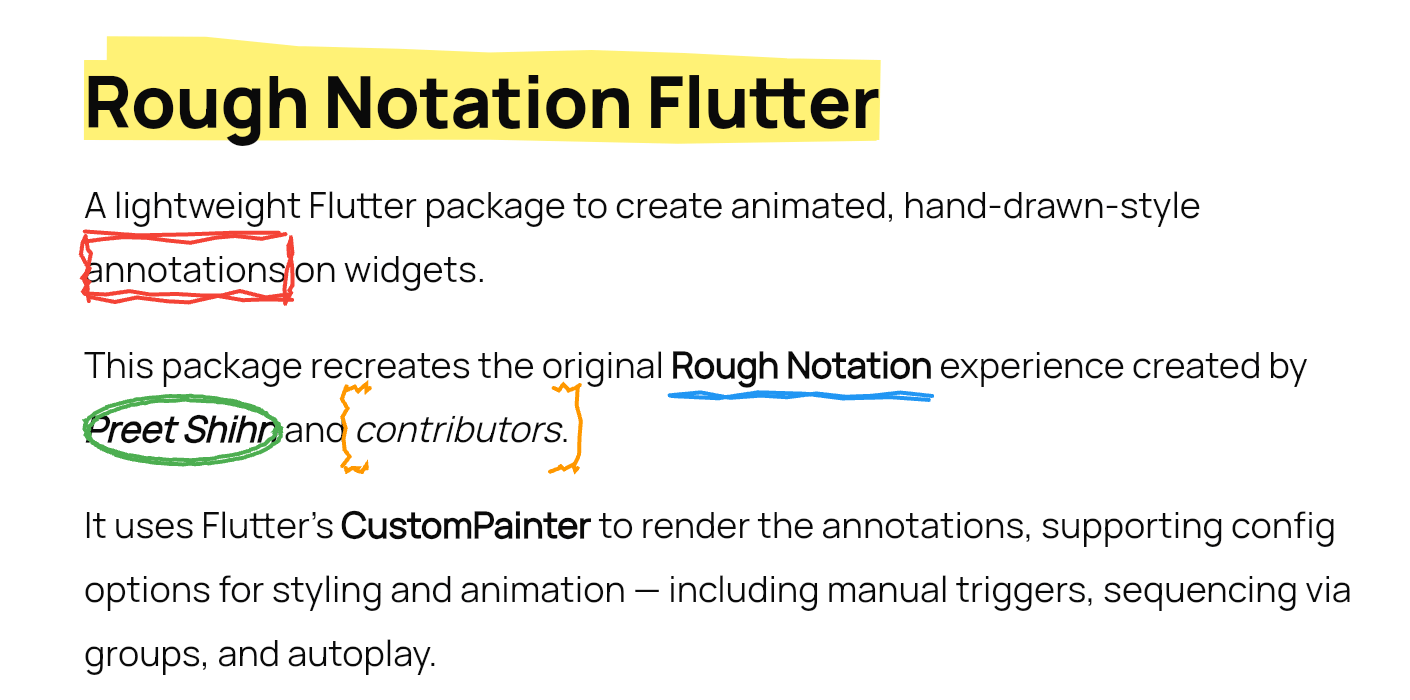
A lightweight Flutter package to create animated, hand-drawn-style annotations on widgets.

This package recreates the original Rough Notation experience created by Preet Shihn and the contributors.

It uses Flutter’s CustomPainter to render the annotations, supporting config options for styling and animation — including manual triggers, sequencing via groups, and autoplay.

demo-gif


🌐 Playground

See the landing page which has the complete showcase: 👉 roughnotation-flutter.web.app

It showcases all use cases, animation types, groupings, styling controls, and more — all built with Flutter Web.

Explore source in the playground/ folder.


✨ Features

  • Hand-drawn-style annotations
  • Built-in styles:
    • Underline
    • Box
    • Circle
    • Highlight
    • Strike-through
    • Crossed-off
    • Bracket
  • Supports:
    • Autoplay animation
    • Manual triggers
    • Group-based sequencing
    • WidgetSpan for rich text use 38: - iterations for sketchier multi-stroke effect

📦 Installation

flutter pub add rough_notation

🚀 Usage

Basic Annotation
RoughUnderlineAnnotation(
  child: Text('Flutter is fun!'),
  iterations: 3, // Optional: default is 2
)
With Controller (Manual Trigger)
final controller = RoughAnnotationController();

RoughBoxAnnotation(
  controller: controller,
  child: Text('Boxed text'),
);

// Manually trigger
controller.show();

🧹 RichText with WidgetSpan

SelectableText.rich(
  TextSpan(
    text: 'Create a ',
    children: [
      WidgetSpan(
        alignment: PlaceholderAlignment.baseline,
        baseline: TextBaseline.alphabetic,
        child: RoughUnderlineAnnotation(
          child: Text('underline'),
        ),
      ),
      TextSpan(text: ' on a span.'),
    ],
  ),
);

🔄 Grouped Annotations

Use group and sequence to define a group and control animation order.

RoughUnderlineAnnotation(
  group: 'intro',
  sequence: 1,
  child: Text('Step 1'),
);

RoughBoxAnnotation(
  group: 'intro',
  sequence: 2,
  child: Text('Step 2'),
);

// Trigger animation
RoughAnnotationRegistry.showGroup('intro');
Autoplay a Group on Widget Init
@override
void initState() {
  super.initState();
  RoughAnnotationRegistry.markGroupForAutoStart('groupName');
}
✅ Note:
  • It doesn't matter where widgets are in the widget tree — grouped annotations can live inside deeply nested widgets or even different build scopes. The registry handles sequencing regardless of position.
  • From Flutter 3.16+, deferred or conditionally built widgets (e.g., in a ListView.builder) won’t throw errors but will skip animations until built.

Optional:

RoughAnnotationRegistry.showGroup(
  'intro',
  delayBetween: Duration(milliseconds: 300),
);

⚠️ Potential Pitfalls & Edge Cases

  • Delays & Durations: Group sequencing introduces its own delays between elements. Avoid adding large delay values on individual annotations if part of a group.
  • Controllers & Autoplay: If using RoughAnnotationController(autoPlay: true), ensure the widget is built first. Internally, we use addPostFrameCallback to delay the trigger.
  • Multiple Controllers: You can reuse the same controller for multiple widgets, but only one annotation may render if others haven't mounted yet.
  • Lazy Lists / Builders: Widgets in a ListView.builder or similar builders that are not yet mounted will not animate. No crash, but no effect either.
  • Visual Misalignments: Styling mismatches may occur across platforms. Future updates will improve drawing precision and painter logic.

🧠 What's Next

We’re aiming to improve:

  • Core painter logic for smoother lines and curves (lib/src/painters)
  • Extend features and stability of annotation widgets (lib/src/annotations)
  • Also the controllers & grouped behaviour (lib/src/controllers)

The original JS library uses roughjs. Although there's a Flutter version (rough), it’s outdated and Dart 3 incompatible.

We’re considering reviving or reimplementing it in parts. All contributions are welcome!

If you're looking to contribute, ideal places to start are:

  • lib/src/painters/
  • lib/src/annotations/

🙏❤️ Acknowledgements

This Flutter package is heavily inspired by the original Rough Notation JS library.

We acknowledge the original creators and contributors of the JS library — including design, animation logic, and documentation.

We are grateful for the coder’s community and the support of open-source enthusiasts everywhere.


📄 License

MIT


🤝 Contributions

Pull requests are welcome. Let’s make annotations ✏️ in Flutter fun and beautiful.

카테고리

소스 저장소

이 패키지를 사용하는 프로젝트

아직 데이터가 없습니다.