seo_renderer 패키지는 Flutter Web 애플리케이션을 위한 Flutter 플러그인으로, 텍스트 위젯을 정적 HTML로 렌더링하여 검색 엔진 최적화를 향상시키는 것을 목적으로 합니다. Flutter의 텍스트 컴포넌트를 정적 HTML로 변환함으로써 앱의 동적 기능을 희생하지 않고도 SEO 가시성을 강화합니다. 이 패키지는 발견성이 중요한 콘텐츠 중심 웹 앱에 특히 유용합니다. 웹, Android, iOS, macOS, Windows, Linux 등 모든 주요 플랫폼을 지원하며, 다양한 환경에서 일관된 렌더링을 보장합니다.
사용 사례
Flutter 웹 콘텐츠의 SEO 개선
검색 엔진을 위한 정적 텍스트 렌더링
블로그 또는 기사 페이지의 가시성 향상
문서 사이트 최적화
구조화된 텍스트로 웹 크롤러 지원하기
서버 측 텍스트 렌더링 활성화
주요 기능
Flutter Text 위젯을 HTML로 변환합니다
검색 엔진 인덱싱을 향상시킵니다
크로스 플랫폼 호환성
경량이며 간편한 통합
텍스트 형식을 유지합니다
Flutter Web과 원활하게 작동합니다
적합한 대상
콘텐츠 기반의 플러터 웹 앱
블로그 및 뉴스 웹사이트
문서 포털
검색 엔진 최적화를 위한 웹 애플리케이션
웹 가시성을 우선시하는 개발자
고려 사항
SEO가 아닌 사용 사례에서는 필요하지 않음
패키지 크기가 약간 증가할 수 있습니다
정적 또는 반정적 콘텐츠에 가장 적합
동적 UI에서 신중한 처리가 필요합니다
텍스트 렌더링에 국한됨, 완전한 위젯 변환은 불가능
대규모 텍스트 블록에 대한 성능 영향
원본 README
연결된 소스 저장소의 README 원문 스냅샷입니다. 최신 내용은 저장소에서 확인하세요.
SEO Renderer [Not Maintaining]
Alternative : https://pub.dev/packages/seo
A flutter plugin (under development) to render text, link, image widgets as html elements for SEO purpose.
Created specifically for issue https://github.com/flutter/flutter/issues/46789
It will automatic detect the crawler using regex and navigator userAgent and add the HtmlElement you choose to the DOM.
All PR's are welcome :)
Getting Started
Add this to your pubspec.yaml
dependencies:seo_renderer:^0.6.0
Get the package from Pub:
flutter packages get
Import it in your file
import'package:seo_renderer/seo_renderer.dart';
Usage
It's required to add a RobotDetector to detect if page is visited by a robot and add seoRouteObserver to observe when widgets change their visibility. To do this simply wrap MaterialApp within RobotDetector and add seoRouteObserver in navigatorObservers:
runApp(
  RobotDetector(
    debug: true, // you can set true to enable robot mode
    child: MaterialApp(
      home: MyApp(),
      navigatorObservers: [seoRouteObserver],
    ),
  ),
);
For more complex projects it's recommended to add these lines in index.html which will force html web renderer in case robot is detected. It's because canvaskit has some stricter limits and potenitally can break.
To render html text element above a child you pass Text, RichText as the child or simply set the text.
TextRenderer(
  child: Text(
    'Lorem Ipsum is simply dummy text of the printing and typesetting industry.',
  ),
)

TextRenderer(
  text: 'Lorem Ipsum is simply dummy text of the printing and typesetting industry.',
  child: CustomWidget(),
)
Optionally you can change the html element between <h1> to <h6> and <p> by setting style. Default value is TextRendererStyle.paragraph.
TextRenderer(
  style: TextRendererStyle.paragraph,
  child: Text(
    'Lorem Ipsum is simply dummy text of the printing and typesetting industry.',
  ),
)

TextRenderer(
  style: TextRendererStyle.header1,
  child: Text(
    'Lorem Ipsum is simply dummy text of the printing and typesetting industry.',
  ),
)
LinkRenderer
To render html link element above a child set text and href.
To render html image element above a child set alt and pass Image.network(...), Image.asset(...), Image.memory(...) as the child or simply set the src.
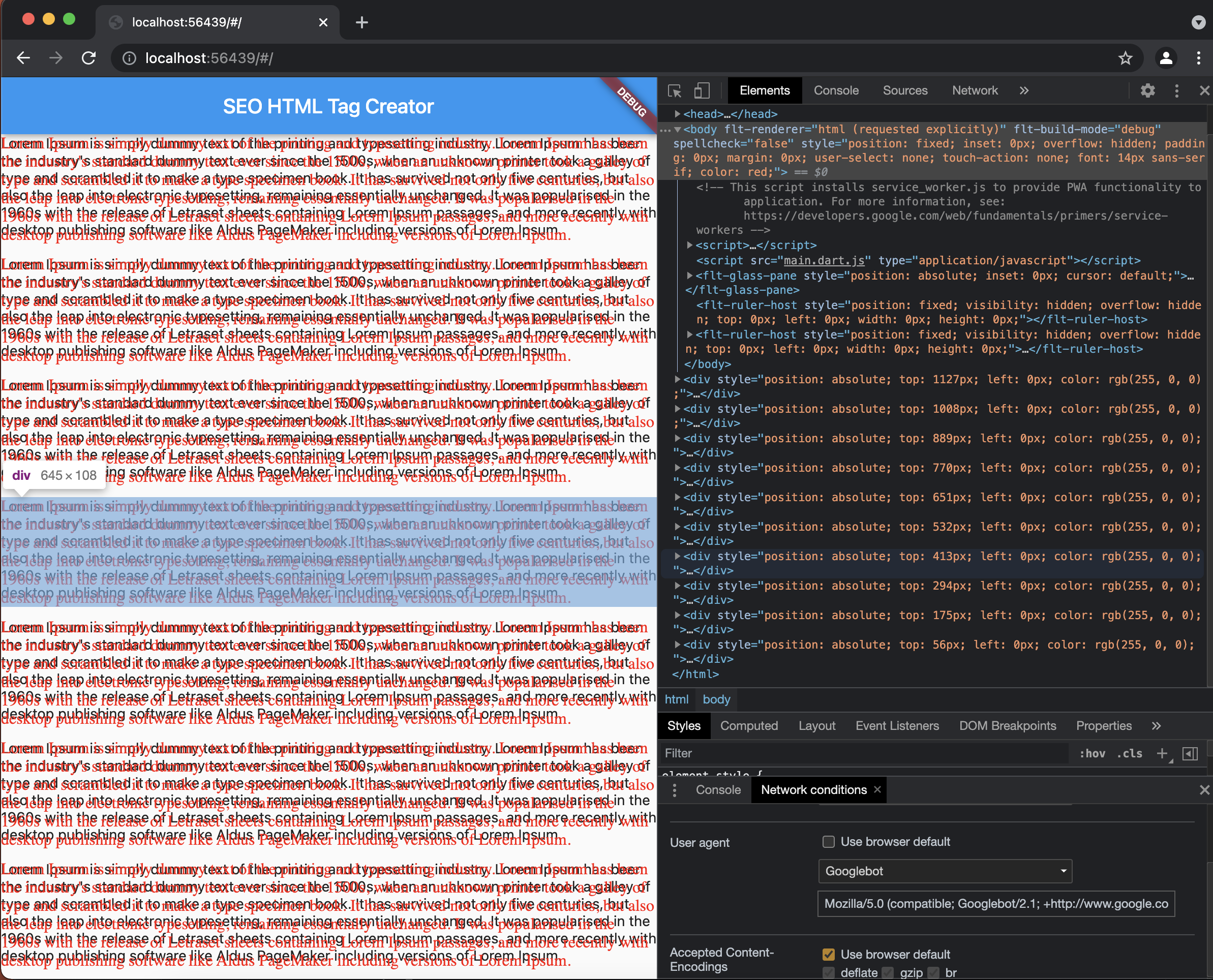
Select GoogleBot here's how as userAgent in Network Condition and refresh the page to see created Div Elements.
License
MIT License

Copyright (c) 2021 Sahdeep Singh

Permission is hereby granted, free of charge, to any person obtaining a copy
of this software and associated documentation files (the "Software"), to deal
in the Software without restriction, including without limitation the rights
to use, copy, modify, merge, publish, distribute, sublicense, and/or sell
copies of the Software, and to permit persons to whom the Software is
furnished to do so, subject to the following conditions:

The above copyright notice and this permission notice shall be included in all
copies or substantial portions of the Software.

THE SOFTWARE IS PROVIDED "AS IS", WITHOUT WARRANTY OF ANY KIND, EXPRESS OR
IMPLIED, INCLUDING BUT NOT LIMITED TO THE WARRANTIES OF MERCHANTABILITY,
FITNESS FOR A PARTICULAR PURPOSE AND NONINFRINGEMENT. IN NO EVENT SHALL THE
AUTHORS OR COPYRIGHT HOLDERS BE LIABLE FOR ANY CLAIM, DAMAGES OR OTHER
LIABILITY, WHETHER IN AN ACTION OF CONTRACT, TORT OR OTHERWISE, ARISING FROM,
OUT OF OR IN CONNECTION WITH THE SOFTWARE OR THE USE OR OTHER DEALINGS IN THE
SOFTWARE.