패키지, 저장소 및 앱 카테고리 검색

side_menu_animation 표지
패키지 상세v1.1.0

side_menu_animation

사용자 정의 가능한 UI를 갖춘 애니메이션 사이드 메뉴. Yalantis 라이브러리(안드로이드/아이오스)에서 영감을 받음.

AndroidiOSWebmacOSWindowsLinux
30일 다운로드
21
좋아요
97
Pub 점수
150

패키지 설치

flutter pub add side_menu_animation

패키지 개요

공개 정보를 바탕으로 생성한 선택 가이드입니다.

Android 및 iOS용 Yalantis 라이브러리에서 영감을 받은 커스터마이즈 가능한 UI를 제공하는 애니메이션 사이드 메뉴를 제공하는 플러터 패키지입니다. 부드러운 전환과 시각 효과를 통해 다양한 플랫폼에서의 탐색 경험을 향상시킵니다. 외관과 동작에 대한 완전한 사용자 정의가 가능하여 현대적이고 인터랙티브한 드로어를 필요로 하는 앱에 이상적입니다. Android, iOS, 웹, macOS, Windows, Linux와 호환되어 크로스 플랫폼 일관성을 보장합니다.

사용 사례

  • 모바일 앱 탐색
  • 웹 대시보드 인터페이스
  • 크로스 플랫폼 애플리케이션
  • 사용자 정의 가능한 서랍 디자인
  • 인터랙티브 UI 컴포넌트

주요 기능

  • 부드러운 애니메이션 전환
  • 매우 사용자 정의 가능한 UI
  • 크로스 플랫폼 지원
  • 반응형 디자인
  • 기존 코드와의 간편한 통합
  • 다크 모드 지원

적합한 대상

  • 모바일 또는 웹 앱을 개발하는 개발자
  • 현대적인 탐색 패턴을 찾는 디자이너
  • 애니메이션 사이드 메뉴가 필요한 프로젝트
  • 다중 플랫폼을 대상으로 하는 앱
  • 플러터를 전체 스택 개발에 사용하는 팀

고려 사항

  • 오래된 장치에서는 성능 튜닝이 필요할 수 있습니다
  • 사용자 지정 옵션은 복잡성을 증가시킬 수 있습니다
  • 기본 설정 외에는 문서가 제한적입니다
  • 다른 탐색 패키지와의 잠재적 충돌
  • 매우 큰 메뉴 항목에 최적화되지 않음
  • Flutter의 애니메이션 시스템에 대한 이해가 필요합니다

원본 README

연결된 소스 저장소의 README 원문 스냅샷입니다. 최신 내용은 저장소에서 확인하세요.

Side Menu Animation

pub package

Animated Side Menu with customizable UI. Inspired in Yalantis library (Android/iOS). Original Design: https://dribbble.com/shots/1689922-Side-Menu-Animation

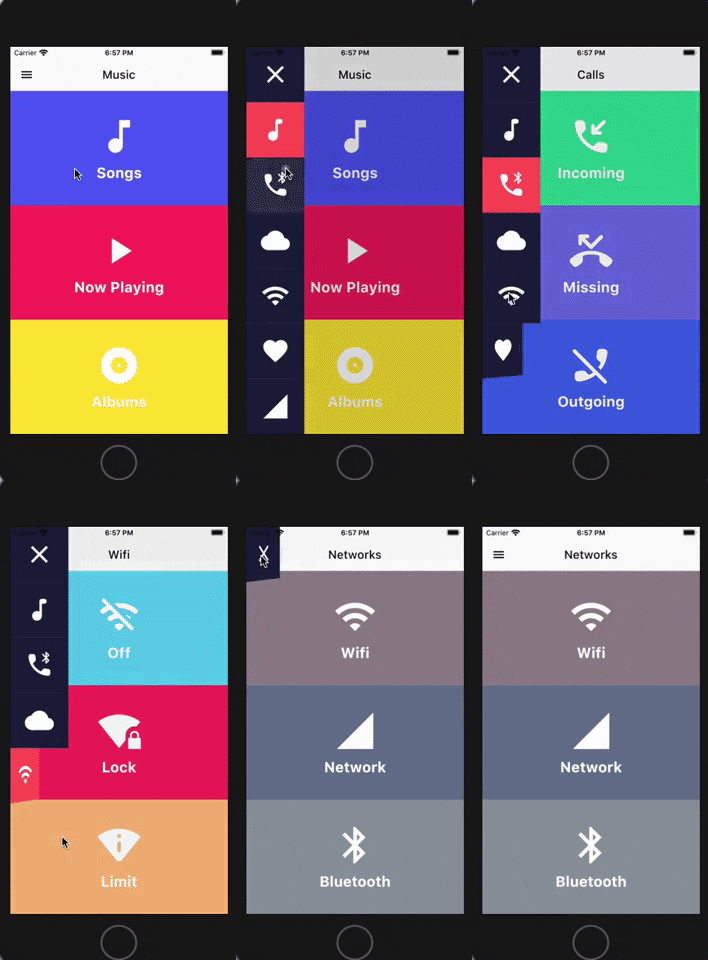
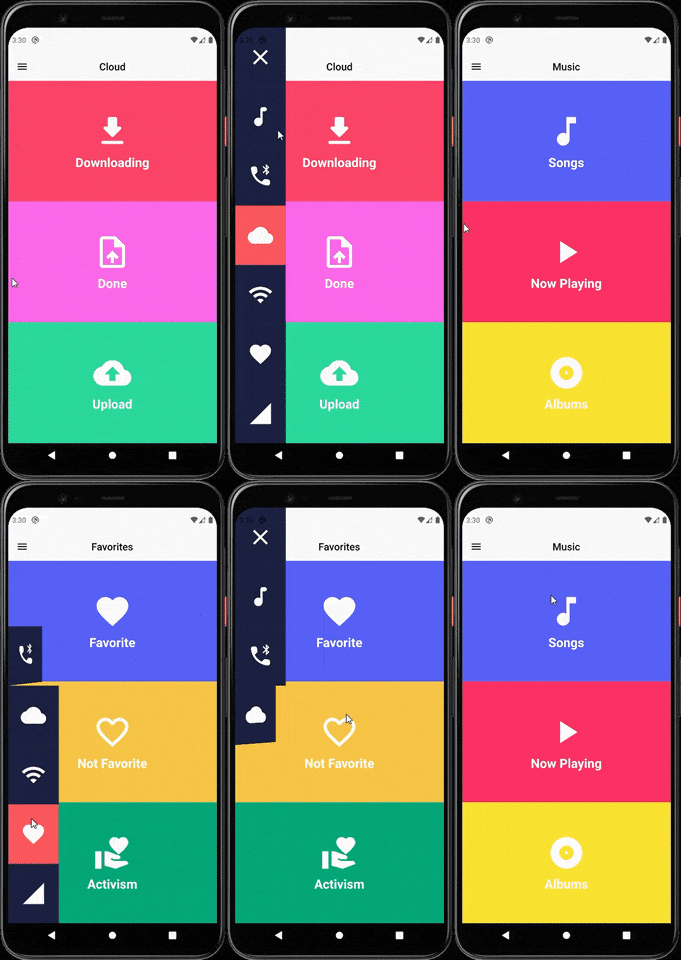
Sample

SIDE MENU ANIMATION SIDE MENU ANIMATION - DRAG GESTURE

Learn how to build this package

  • Video 1: https://www.youtube.com/watch?v=vcdETKdI15E
  • Video 2: https://www.youtube.com/watch?v=W7mxTcwX5Wg

(Don't forget to subscribe and like)

Features

  • Optional parameter to tap outside to dismiss
  • Optional parameter to change the scrimColor
  • Custom color item for the side menu selected
  • Custom color item for the side menu unselected
  • Custom width for the side menu
  • Custom duration of the animation side menu
  • Display the menu from left or right

Getting Started

You should ensure that you add the router as a dependency in your flutter project.

dependencies:
 side_menu_animation: "^0.0.1"

You should then run flutter packages upgrade or update your packages in IntelliJ.

Example Project

There is a example project in the example folder. Check it out. Otherwise, keep reading to get up and running.

Usage

Need to include the import the package to the dart file where it will be used, use the below command,

import 'package:side_menu_animation/side_menu_animation.dart';

SideMenu

class SideMenuScreen extends StatelessWidget {
  final _index = ValueNotifier<int>(1);

  @override
  Widget build(BuildContext context) {
    return Scaffold(
      body: SideMenuAnimation(
        appBarBuilder: (showMenu) => AppBar(
          leading: IconButton(icon: Icon(Icons.menu, color: Colors.black), onPressed: showMenu),
          backgroundColor: Theme.of(context).scaffoldBackgroundColor,
          elevation: 0,
          brightness: Brightness.light,
          centerTitle: true,
          title: ValueListenableBuilder<int>(
            valueListenable: _index,
            builder: (_, value, __) => Text(value.toString(), style: TextStyle(color: Colors.black)),
          ),
        ),
        views: [YourCustomViews1Here(), YourCustomViews2Here()],
        items: [MyCustomItem1Here(), MyCustomItem2Here()],
        selectedColor: Color(0xFFFF595E),
        unselectedColor: Color(0xFF1F2041),
        tapOutsideToDismiss: true,
        scrimColor: Colors.black45,
        onItemSelected: (value) {
          if (value > 0 && value != _index.value) _index.value = value;
        },
      ),
    );
  }
}

SideMenuBuilder

class SideMenuBuilderScreen extends StatelessWidget {
  final _index = ValueNotifier<int>(1);

  @override
  Widget build(BuildContext context) {
    return Scaffold(
      body: SideMenuAnimation.builder(
        builder: (showMenu) {
          return Scaffold(
            appBar: AppBar(
              leading: IconButton(icon: Icon(Icons.menu, color: Colors.black), onPressed: showMenu),
              backgroundColor: Theme.of(context).scaffoldBackgroundColor,
              elevation: 0,
              brightness: Brightness.light,
              centerTitle: true,
              title: ValueListenableBuilder<int>(
                valueListenable: _index,
                builder: (_, value, __) => Text(_value.toString(), style: TextStyle(color: Colors.black)),
              ),
            ),
            body: ValueListenableBuilder<int>(
              valueListenable: _index,
              builder: (_, value, __) => IndexedStack(
                index: value - 1,
                children: [YourCustomViews1Here(), YourCustomViews2Here()],
              ),
            ),
          );
        },
       items: [MyCustomItem1Here(), MyCustomItem2Here()],
        selectedColor: Color(0xFFFF595E),
        unselectedColor: Color(0xFF1F2041),
        onItemSelected: (value) {
          if (value > 0 && value != _index.value) _index.value = value;
        },
      ),
    );
  }
}

For more info about the ussage, check the example project.

Contact

You can follow me on twitter @diegoveloper , Youtube channel

If you want to contribute with the project, just open a Pull request :), all contributions are welcome.

Contribution

If you want to contribute with this package, follow this steps:

  • Fork this repository.
  • Do your changes! You can add your name with link into the CONTRIBUTORS.md file.
  • Before push your changes run dartfmt . -w.
  • Create a Pull request on Github from your fork/branch to my repo(main branch).

카테고리

소스 저장소

이 패키지를 사용하는 프로젝트

아직 데이터가 없습니다.