패키지, 저장소 및 앱 카테고리 검색

simple_timer 표지
패키지 상세v2.0.0

simple_timer

다양한 사용자 정의 옵션을 갖춘 간단한 타이머 위젯으로 타이머 진행 상황을 표시합니다.

30일 다운로드
69
좋아요
55
Pub 점수
70

패키지 설치

flutter pub add simple_timer

패키지 개요

공개 정보를 바탕으로 생성한 선택 가이드입니다.

다운카운트 또는 스톱워치 진행 상황을 표시하기 위한 간단하고 사용자 정의 가능한 타이머 위젯을 제공하는 플러터 패키지입니다. 텍스트 스타일, 색상 및 애니메이션 옵션과 같은 다양한 시각적 및 기능적 커스터마이징을 지원합니다. 최소한의 설정으로 실시간 시간 추적을 필요로 하는 앱에 적합합니다. 가볍고 기존 UI에 쉽게 통합할 수 있습니다. 추가 구성 없이 여러 플랫폼에서 원활하게 작동합니다.

사용 사례

  • 피트니스 앱의 카운트다운 타이머
  • 생산성 도구의 타이머 기능
  • 교육 퀴즈에서 타이머가 표시됨
  • 게임 내 실시간 진행률 표시기
  • 작업 관리자에서 시간 기반 알림

주요 기능

  • 사용자 정의 가능한 타이머 표시
  • 부드러운 진행 애니메이션
  • 카운트다운 및 스톱워치 모드 지원
  • Flutter 위젯과의 간편한 통합
  • 사용자 정의 텍스트 및 색상 테마

적합한 대상

  • 시간 추적 기능을 구축하는 개발자
  • 깨끗한 타이머 컴포넌트가 필요한 UI 디자이너
  • 최소한의 타이머 복잡성을 요구하는 앱
  • 초보 플러터 개발자들이 상태 관리 배우기

고려 사항

  • 기본 타이머 기능에만 제한됨
  • 지속되는 타이머에 대한 내장된 지속성 없음
  • 동시에 여러 타이머를 지원하지 않습니다
  • 플랫폼별 동작은 다를 수 있습니다
  • 타이머 라이프사이클을 수동으로 처리해야 합니다

원본 README

연결된 소스 저장소의 README 원문 스냅샷입니다. 최신 내용은 저장소에서 확인하세요.

SimpleTimer

A Simple Timer Widget that displays the timer progress with various customizable options.

Installing

To Start using this library include simple_timer as a dependency in your puspec.yaml file. Make sure to include the latest version.

Pub link: https://pub.dev/packages/simple_timer

Usage

To use the widget, import the package in your project

import 'package:simple_timer/simple_timer.dart';

The timer can be controlled in two ways:

  • Using a TimerController (preferred) - The TimerController is a convenience wrapper (subclass) of an AnimationController and needs a TickerProvider, so be sure to extend a TickerProvider in your class. Declare and instantiate your timer controller like below:

    // declaration
    TimerController _timerController;
    
    // instantiation
    _timerController = TimerController(this);
    

    Note: Remember to dispose the TimerController

    and set the controller property to the TimerController object like below:

    Container(
        child: SimpleTimer(
            controller: _timerController,
            duration: Duration(seconds: 10),
        )
    )
    

    TimerController methods:

    Method Description
    start Starts the timer e.g. (_timerController.start())
    pause Pauses the timer e.g. (_timerController.pause())
    reset Resets the timer e.g. (_timerController.reset())
    restart Restarts the timer e.g. (_timerController.restart())
    add Increases time left by the specified duration i.e. allows more time e.g. (_timerController.add(Duration(seconds: 10)))
    subtract Decreases time left by the specified duration i.e. reduces the time e.g. (_timerController.subtract(Duration(seconds: 10)))
  • Setting the Status - The timer can also be controler by passing a TimerStatus value to the status property; like below:

    Container(
        child: SimpleTimer(
            status: TimerStatus.start,
            duration: Duration(seconds: 10),
        )
    )
    

Note: The SimpleTimer widget uses its parent size.

Customizable Options

There are various customizable options provided by the SimpleTimer widget, see below:

Property Description Value Type Default Value
duration The duration of the timer Duration
controller A TimerController to control the timer. If this is provided then status must be null. TimerController
status An alternative to the controller that sets the status of the timer. If provided, controller must be null TimerStatus
timerStyle Sets the look of the animated timer widget TimerStyle ring
delay Sets a start delay for timer - i.e. delays the start of the timer by the specified duration Duration Duration(seconds: 0)
backgroundColor The background color of the inner shape (circle) of the timer Color grey
progressIndicatorColor The color of the animating progress indicator. Color green
progressIndicatorDirection The rotating direction of the timer's progress indicator TimerProgressIndicatorDirection clockwise
displayProgressIndicator Sets whether to show the progress indicator bool true
displayProgressText Sets whether to show the progress text bool true
progressTextStyle The TextStyle used by the progress text. TextStyle
progressTextCountDirection The counting direction of the text displayed by the timer TimerProgressTextCountDirection count_down
progressTextFormatter A callback function to format the text displayed by this Timer. String Function(Duration) displays duration in MM:SS format
onStart Callback executed when the timer starts counting VoidCallback
onEnd Callback executed when the timer has finished counting VoidCallback
valueListener The callback executed for each change in the time elapsed void Function(Duration)

Pub link: https://pub.dev/packages/simple_timer

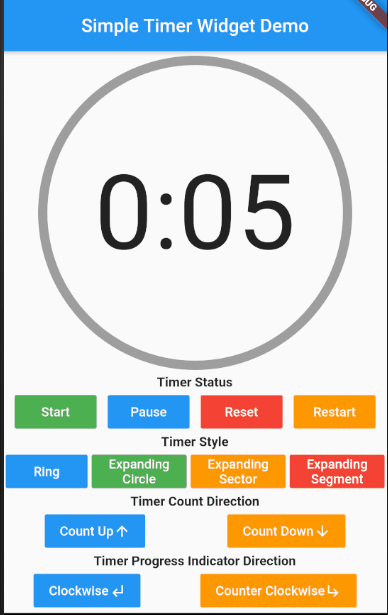
Demo - Controlling the Timer Status

simple_timer_demo_01

Demo - Customizable options

simple_timer_demo_02

카테고리

소스 저장소

이 패키지를 사용하는 프로젝트

아직 데이터가 없습니다.