패키지, 저장소 및 앱 카테고리 검색

패키지 상세v1.0.0

sliver_fab

FlexibleSpacebar의 가장자리에 위젯을 배치할 수 있는 래퍼 위젯

30일 다운로드
1.2천
좋아요
76
Pub 점수
40

패키지 설치

flutter pub add sliver_fab

패키지 개요

공개 정보를 바탕으로 생성한 선택 가이드입니다.

sliver_fab 패키지는 플러터의 FlexibleSpaceBar 가장자리에 플로팅 액션 버튼(FAB) 또는 다른 위젯을 배치할 수 있도록 해주는 래퍼 위젯을 제공합니다. CustomScrollView 내에서 원활하게 작동하도록 설계되어 스크롤 가능한 콘텐츠와 상대적으로 UI 요소를 정확하게 위치시킬 수 있게 합니다. 이는 복잡한 앱 바에 파라랄랙스 효과를 사용할 때 시각적 및 상호작용 경험을 향상시킵니다. 이 패키지는 가볍고 현대적인 플러터 앱에서 특정 레이아웃 문제를 해결하는 데 집중되어 있습니다.

사용 사례

  • 접을 수 있는 앱 바의 가장자리 근처에 FAB 배치하기
  • 시각적으로 일관된 스크롤 가능한 인터페이스 만들기
  • 고정 위치 위젯을 통한 사용자 상호작용 향상
  • FlexibleSpaceBar 레이아웃에 위젯 통합하기
  • 동적 동작을 가진 반응형 앱 바 디자인

주요 기능

  • 위젯의 에지 정확한 배치
  • CustomScrollView와의 호환성
  • FlexibleSpaceBar 통합 지원
  • 최소 성능 오버헤드
  • 일반적인 사용 사례를 위한 간단한 API

적합한 대상

  • 사용자 정의 앱 바를 사용하여 마테리얼 디자인 앱을 개발하는 개발자
  • 부유 요소를 사용하여 스크롤 기반 UI를 구현하는 팀
  • 스크롤 가능한 뷰에서 우아한 FAB 위치 지정이 필요한 프로젝트

고려 사항

  • CustomScrollView 컨텍스트 내에서만 사용 가능
  • 엣지가 아닌 배치를 지원하지 않습니다
  • 슬리버 위젯과 레이아웃 제약 조건에 대한 이해가 필요합니다
  • 복잡한 애니메이션을 위해 추가 스타일링이 필요할 수 있습니다

원본 README

연결된 소스 저장소의 README 원문 스냅샷입니다. 최신 내용은 저장소에서 확인하세요.

sliver_fab

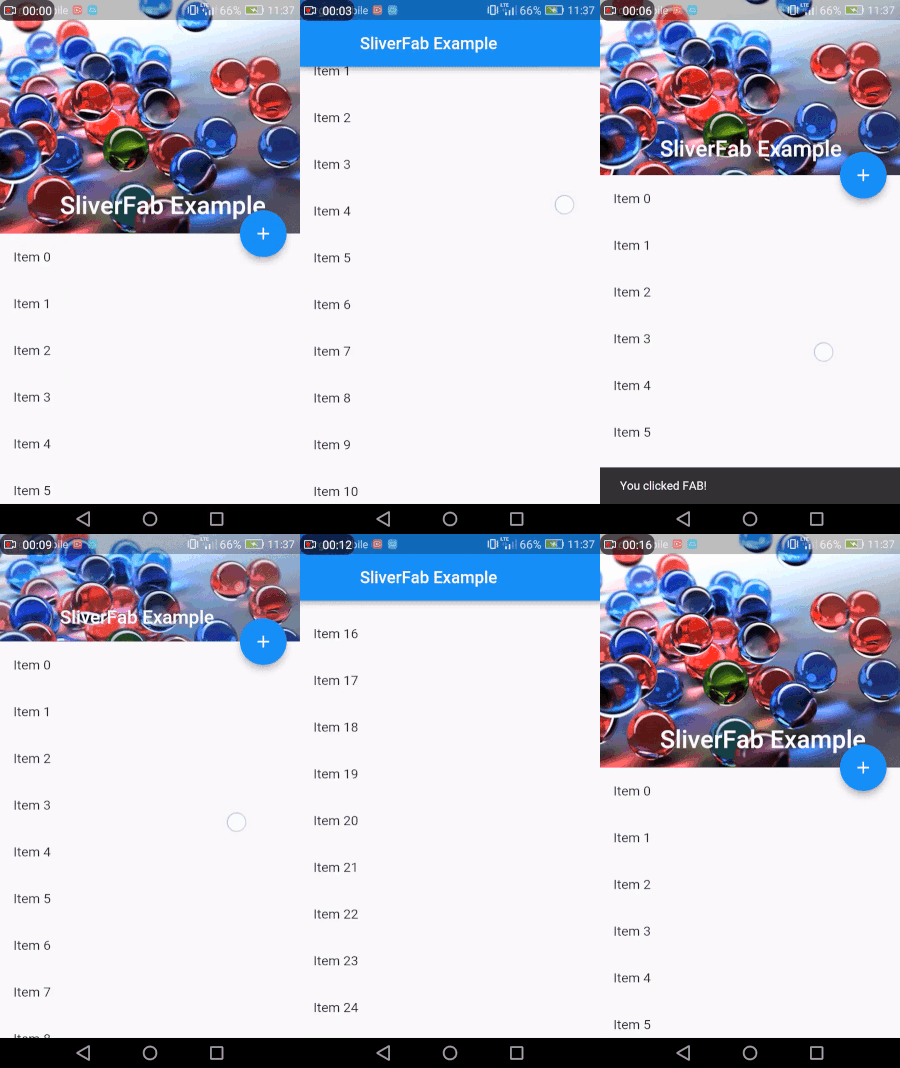
A wrapper widget allowing to place a widget on the edge of FlexibleSpacebar.

gif

gif

Example usage

class MyHomePage extends StatelessWidget {
  @override
  Widget build(BuildContext context) {
    return new Scaffold(
      body: new Builder(
        builder: (context) =>
        new SliverFab(
          floatingWidget: FloatingActionButton(
            onPressed: () =>
                Scaffold.of(context).showSnackBar(
                    SnackBar(content: Text("You clicked FAB!"))),
            child: Icon(Icons.add),
          ),
          floatingPosition: FloatingPosition(right: 16),
          expandedHeight: 256.0,
          slivers: <Widget>[
            new SliverAppBar(
              expandedHeight: 256.0,
              pinned: true,
              flexibleSpace: new FlexibleSpaceBar(
                title: new Text("SliverFab Example"),
                background: new Image.asset(
                  "img.jpg",
                  fit: BoxFit.cover,
                ),
              ),
            ),
            new SliverList(
              delegate: new SliverChildListDelegate(
                new List.generate(
                  30,
                      (int index) =>
                  new ListTile(title: new Text("Item $index")),
                ),
              ),
            ),
          ],
        ),
      ),
    );
  }
}

Installing

1. Depend on it

Add this to your package's pubspec.yaml file:

dependencies:
  sliver_fab: "^1.0.0"

2. Install it

You can install packages from the command line:

with Flutter:

$ flutter packages get

Alternatively, your editor might support packages get. Check the docs for your editor to learn more.

3. Import it

Now in your Dart code, you can use:

import 'package:sliver_fab/sliver_fab.dart';

Contributing

This package was made mostly for use case I needed. If you fill it is missing any features or you have found a bug, pull requests are very welcome!

카테고리

소스 저장소

이 패키지를 사용하는 프로젝트