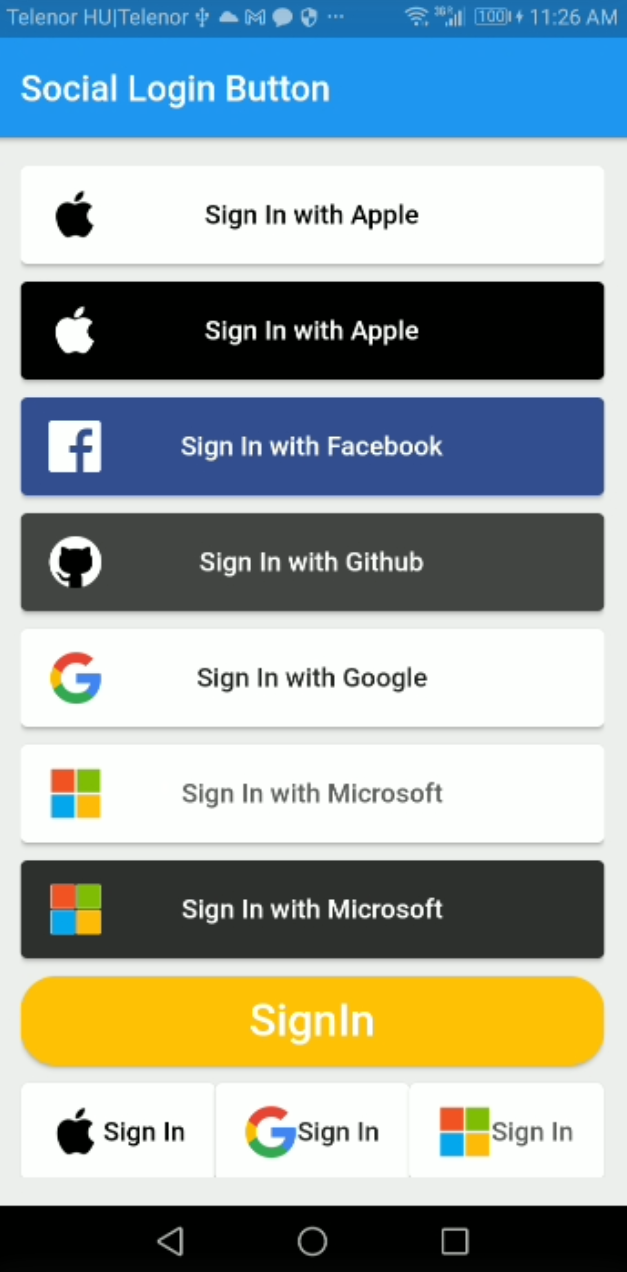
연결된 소스 저장소의 README 원문 스냅샷입니다. 최신 내용은 저장소에서 확인하세요.
Flutter Social Login Button
Social Login Button is a flutter package to create social media login buttons of all common used SSO.
Usage
Add the dependency in pubsec.yaml file.
dependencies:
flutter:
sdk: flutter
social_login_buttons: 1.0 .7
How to Use
SocialLoginButton (
buttonType: SocialLoginButtonType .apple,
onPressed: () {},
)
You can also specify some other arguments which are:
imageURL (if you're specifying the image link from your Github repo, don't forget to change blob with raw)
imagePath (you can also use local image, Local will be preferred incase cpecifed both)
imageWidth
text
backgroundColor
textColor
height
width
borderRadius
fontSize
mode
Below is the example with all arguments supplied:
SocialLoginButton (
backgroundColor: Colors .amber,
height: 50 ,
text: 'SignIn' ,
borderRadius: 20 ,
fontSize: 25 ,
buttonType: SocialLoginButtonType .generalLogin,
imageWidth: 20 ,
imagepath: "assets/file.png" ,
imageURL: "URL" ,
onPressed: () {},
),
Button Types
Facebook
Google
Twitter
Apple
AppleBlack
Microsoft
MicrosoftBlack
Github
General Login
Mode
There are two modes available for the buttons, You can make shorter buttons with single mode.
Example
import 'package:flutter/material.dart' ;
import 'package:social_login_buttons/social_login_buttons.dart' ;
void main () {
runApp (const MyApp ());
}
class MyApp extends StatelessWidget const MyApp ({Key ? key}) : super (key: key);
@override
Widget build (BuildContext context) {
return MaterialApp (
title: 'Flutter Social Login Buttons' ,
debugShowCheckedModeBanner: false ,
theme: ThemeData (
primarySwatch: Colors .blue,
),
home: const MyHomePage (tittle: 'Flutter Social Login Buttons' ),
);
}
}
class MyHomePage extends StatelessWidget const MyHomePage ({Key ? key, required this .tittle}) : super (key: key);
final String tittle;
@override
Widget build (BuildContext context) {
return Scaffold (
appBar: AppBar (
title: const Text ('Social Login Button' ),
elevation: 2.0 ,
),
body: _buildContainer (context),
backgroundColor: Colors .grey[200 ],
);
}
Widget _buildContainer (BuildContext context) {
return Padding (
padding: const EdgeInsets .all (16.0 ),
child: Center (
child: SingleChildScrollView (
child: Column (
crossAxisAlignment: CrossAxisAlignment .stretch,
mainAxisAlignment: MainAxisAlignment .center,
children: <Widget >[
SocialLoginButton (
buttonType: SocialLoginButtonType .apple,
onPressed: () {},
),
const SizedBox (height: 10 ),
SocialLoginButton (
buttonType: SocialLoginButtonType .appleBlack,
onPressed: () {},
),
const SizedBox (height: 10 ),
SocialLoginButton (
buttonType: SocialLoginButtonType .facebook,
onPressed: () {},
),
const SizedBox (height: 10 ),
SocialLoginButton (
buttonType: SocialLoginButtonType .github,
onPressed: () {},
),
const SizedBox (height: 10 ),
SocialLoginButton (
buttonType: SocialLoginButtonType .google,
onPressed: () {},
),
const SizedBox (height: 10 ),
SocialLoginButton (
buttonType: SocialLoginButtonType .microsoft,
onPressed: () {},
),
const SizedBox (height: 10 ),
SocialLoginButton (
buttonType: SocialLoginButtonType .microsoftBlack,
onPressed: () {},
imageWidth: 20 ,
),
const SizedBox (height: 10 ),
SocialLoginButton (
backgroundColor: Colors .amber,
height: 50 ,
text: 'SignIn' ,
borderRadius: 20 ,
fontSize: 25 ,
buttonType: SocialLoginButtonType .generalLogin,
onPressed: () {},
),
const SizedBox (height: 10 ),
Row (
mainAxisAlignment: MainAxisAlignment .spaceBetween,
children: [
SocialLoginButton (
buttonType: SocialLoginButtonType .google,
onPressed: () {},
mode: SocialLoginButtonMode .single,
),
],
)
],
),
),
),
);
}
}
Contributing
Pull requests are welcome. For major changes, please open an issue first to discuss what you would like to change.
License
Apache-2.0
Screenshot