패키지, 저장소 및 앱 카테고리 검색

패키지 상세v1.0.1

steps

Android 및 iOS에서 수직/수평 단계를 표시하고 다른 Flutter 위젯과 함께 사용하기 위한 Flutter 플러그인입니다.

30일 다운로드
53
좋아요
29
Pub 점수
30

패키지 설치

flutter pub add steps

패키지 개요

공개 정보를 바탕으로 생성한 선택 가이드입니다.

steps 패키지는 폼이나 온보딩 흐름과 같은 다단계 프로세스를 사용자에게 안내하기 위해 수직 또는 수평의 단계 표시기를 표시하도록 설계된 Flutter 플러그인입니다. 어떤 Flutter 위젯과도 통합할 수 있으며 각 단계에 맞춤형 콘텐츠를 포함할 수 있습니다. Android 및 iOS 모두와 호환되며 진행 상황을 시각적으로 표현하는 깔끔하고 사용자 정의 가능한 인터페이스를 제공합니다. 가볍고 쉽게 구현할 수 있어 직관적인 탐색 안내가 필요한 앱에 적합합니다.

사용 사례

  • 온보딩 흐름
  • 다단계 폼
  • 프로세스 추적
  • 사용자 여정 시각화
  • 결제 시퀀스

주요 기능

  • 수직 및 수평 단계 레이아웃
  • 사용자 정의 위젯 지원
  • 크로스 플랫폼 호환성 (Android 및 iOS)
  • 간단한 API 통합
  • 진행 상태 표시

적합한 대상

  • 단계 표시기가 필요한 앱 개발자
  • 유연한 진행 상황 UI를 원하는 디자이너
  • 다단계 사용자 상호작용을 갖춘 프로젝트

고려 사항

  • 내장 애니메이션 없음
  • 기본 스타일링을 넘어서는 사용자 정의가 제한적
  • 단계 상태 관리를 수동으로 처리해야 합니다

원본 README

연결된 소스 저장소의 README 원문 스냅샷입니다. 최신 내용은 저장소에서 확인하세요.

Steps package for Flutter

pub package

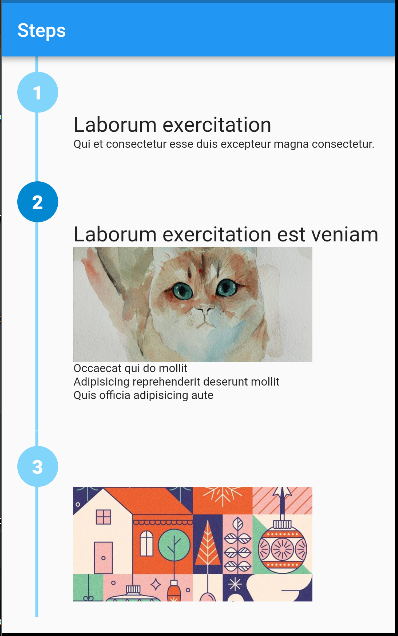
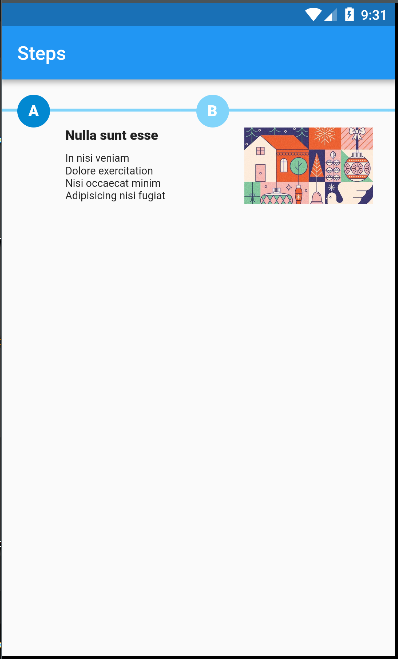
Flutter plugin for displaying vertical/horizontal steps with other Flutter widgets on Android and iOS.

vertical with rich content

horizontal with rich content

Note: This package is still under development. Feedback welcome and Pull Requests are most welcome!

Installation

First, add steps as a dependency in your pubspec.yaml file.

Example
import 'package:flutter/material.dart';
import 'package:steps/steps.dart';

void main() => runApp(MaterialApp(
      debugShowCheckedModeBanner: false,
      home: Home(title: 'Steps'),
    ));

class Home extends StatelessWidget {
  final String title;
  Home({Key key, this.title}) : super(key: key);
  @override
  Widget build(BuildContext context) {
    return Scaffold(
        appBar: AppBar(
          title: Text(title),
        ),
        body: Container(
          alignment: Alignment.topCenter,
          child: Steps(
            direction: Axis.vertical,
            size: 20.0,
            path: {'color': Colors.lightBlue.shade200, 'width': 3.0},
            steps: [
              {
                'color': Colors.white,
                'background': Colors.lightBlue.shade200,
                'label': '1',
                'content': Column(
                  crossAxisAlignment: CrossAxisAlignment.start,
                  children: <Widget>[
                    Text(
                      'Laborum exercitation',
                      style: TextStyle(fontSize: 22.0),
                    ),
                    Text(
                      'Qui et consectetur esse duis excepteur magna consectetur.',
                      style: TextStyle(fontSize: 12.0),
                    ),
                  ],
                ),
              },
              {
                'color': Colors.white,
                'background': Colors.lightBlue.shade700,
                'label': '2',
                'content': Column(
                  crossAxisAlignment: CrossAxisAlignment.start,
                  children: <Widget>[
                    Text(
                      'Laborum exercitation est veniam',
                      style: TextStyle(fontSize: 22.0),
                    ),
                    Image.asset(
                      'assets/cat.jpg',
                      width: 250,
                      height: 120,
                      fit: BoxFit.cover,
                      alignment: Alignment.center,
                    ),
                    Text(
                      '''
Occaecat qui do mollit
Adipisicing reprehenderit deserunt mollit
Quis officia adipisicing aute
                      ''',
                      style: TextStyle(fontSize: 12.0),
                    )
                  ],
                )
              },
              {
                'color': Colors.white,
                'background': Colors.lightBlue.shade200,
                'label': '3',
                'content': Image.asset(
                  'assets/art.jpg',
                  width: 250,
                  height: 120,
                  fit: BoxFit.cover,
                  alignment: Alignment.center,
                ),
              }
            ],
          ),
        ));
  }
}

카테고리

소스 저장소

이 패키지를 사용하는 프로젝트

아직 데이터가 없습니다.