패키지, 저장소 및 앱 카테고리 검색

swipe_cards 표지
패키지 상세v2.0.0+1

swipe_cards

티ン더와 유사한 스와이프 카드.

AndroidiOSWebmacOSWindowsLinux
30일 다운로드
64
좋아요
117
Pub 점수
130

패키지 설치

flutter pub add swipe_cards

패키지 개요

공개 정보를 바탕으로 생성한 선택 가이드입니다.

Swipe Cards는 개발자가 Tinder와 유사한 스와이프 가능한 카드 인터페이스를 만들 수 있도록 해주는 Flutter 패키지입니다. 직관적인 제스처를 통해 수평 스와이프를 지원하며, 사용자가 카드를 왼쪽 또는 오른쪽으로 스와이프할 수 있습니다. 간단함과 커스터마이징 가능성을 고려해 설계되어, 데이트 앱, 제품 전시, 콘텐츠 탐색 기능 등 카드 기반 네비게이션을 필요로 하는 앱에 적합합니다. Android, iOS, Web, macOS, Windows, Linux 등 다양한 플랫폼에서 작동합니다.

사용 사례

  • 데이트 앱 인터페이스
  • 제품 또는 아이템 탐색
  • 콘텐츠 브라우징
  • 사용자 선호도 수집
  • 인터랙티브 온보딩 화면

주요 기능

  • Tinder 스타일의 스와이프 제스처
  • 사용자 지정 가능한 카드 외관
  • 크로스 플랫폼 지원
  • 부드러운 애니메이션 전환
  • 제스처 인식
  • Flutter와의 간편한 통합

적합한 대상

  • 스와이프 기반 UI를 구축하는 개발자
  • 카드 스와이프를 통한 사용자 상호작용을 필요로 하는 앱
  • 다중 플랫폼 대상 프로젝트

고려 사항

  • 상태 관리 처리가 필요합니다
  • 제한된 내장 카드 데이터 처리
  • 복잡한 레이아웃을 위해 추가 스타일링이 필요할 수 있습니다
  • 페이지네이션 없이 대규모 카드 데이터 세트에 최적화되지 않음

원본 README

연결된 소스 저장소의 README 원문 스냅샷입니다. 최신 내용은 저장소에서 확인하세요.

swipe_cards pub package

A Flutter widget for Tinder like swipe cards. The card can be swiped right, left and up for different responses. Currently it supports the following responses:

  • Right swipe for like
  • Left swipe for nope
  • Up swipe for superlike

Install

To install the package, add the following dependency to your pubspec.yaml

dependencies:
  swipe_cards: ^2.0.0+1

Usage

Basic
import 'package:swipe_cards/swipe_cards.dart';

SwipeCards(
            matchEngine: <MatchEngine>,
            itemBuilder: (BuildContext context, int index) {},
            onStackFinished: () {},
            itemChanged: (SwipeItem item, int index) {},
            upSwipeAllowed: <bool>,
            fillSpace: <bool>,
);
Attributes of SwipeCards
Key Description
matchEngine An instance of MatchEngine that acts as controller for trigerring swipes manually.
itemBuilder A function that returns the view inside a swipe card.
likeTag Widget appears in like/right area during swipe.
nopeTag Widget appears in nope/left area during swipe.
superLikeTag Widget appears in super-like/up area during swipe.
onStackFinished A function that is triggered as soon as all the cards have been swiped.
itemChanged A function that is triggered when item in the stack changes (moves to next card).
leftSwipeAllowed To enable/disable left swipe. (Default: true)
rightSwipeAllowed To enable/disable right swipe. (Default: true)
upSwipeAllowed To enable/disable up swipe. (Default: false)
fillSpace Config weather to fill up the space or not. (Default: true)
MatchEngine

MatchEngine is the controller for the swipe cards. It takes swipeItems as an argument and is used to trigger the swipes manually, for example on button press. The data type of swipeItems is List<SwipeItem>.

MatchEngine _matchEngine = MatchEngine(swipeItems: List<SwipeItem>);
Functions in MatchEngine
Key Description
_matchEngine.currentItem.like(); To trigger right swipe manually.
_matchEngine.currentItem.nope(); To trigger left swipe manually.
_matchEngine.currentItem.superLike(); To trigger up swipe manually.
SwipeItem

SwipeItem contains the actual data that can be rendered in the swipe card. Actually it is a wrapper over any dynamic object and just adds the functionality of like, nope and superlike to that object.

SwipeItem(
            content: "Anup Kumar Panwar",
            likeAction: () {
                log("Like");
            },
            nopeAction: () {
                log("Nope");
            },
            superlikeAction: () {
                log("Superlike");
            },
            onSlideUpdate: (SlideRegion? region){
                log("Region $region");
            }
);
Attributes of SwipeItem
Key Description
content An object that contains the actual data to be rendered in the swipe card.
likeAction A function that is triggered when the card is liked.
nopeAction A function that is triggered when the card is not liked / swiped left.
superlikeAction A function that is triggered when the card is superliked.
onSlideUpdate A function that is triggered when the card is being dragged and tells about the current region of the card.
Example
List<SwipeItem> _swipeItems = List<SwipeItem>();
  MatchEngine _matchEngine;
  GlobalKey<ScaffoldState> _scaffoldKey = GlobalKey();
  List<String> _names = ["Red", "Blue", "Green", "Yellow", "Orange"];
  List<Color> _colors = [
    Colors.red,
    Colors.blue,
    Colors.green,
    Colors.yellow,
    Colors.orange
  ];

  @override
  void initState() {
    for (int i = 0; i < _names.length; i++) {
      _swipeItems.add(SwipeItem(
          content: Content(text: _names[i], color: _colors[i]),
          likeAction: () {
            ScaffoldMessenger.of(context).showSnackBar(SnackBar(
              content: Text("Liked ${_names[i]}"),
              duration: Duration(milliseconds: 500),
            ));
          },
          nopeAction: () {
            ScaffoldMessenger.of(context).showSnackBar(SnackBar(
              content: Text("Nope ${_names[i]}"),
              duration: Duration(milliseconds: 500),
            ));
          },
          superlikeAction: () {
            ScaffoldMessenger.of(context).showSnackBar(SnackBar(
              content: Text("Superliked ${_names[i]}"),
              duration: Duration(milliseconds: 500),
            ));
          },
          onSlideUpdate: (SlideRegion? region) async {
            print("Region $region");
          }));
    }

    _matchEngine = MatchEngine(swipeItems: _swipeItems);
    super.initState();
  }

  @override
  Widget build(BuildContext context) {
    return Scaffold(
        key: _scaffoldKey,
        appBar: AppBar(
          title: Text(widget.title),
        ),
        body: Container(
            child: Column(children: [
          Container(
            height: 550,
            child: SwipeCards(
              matchEngine: _matchEngine,
              itemBuilder: (BuildContext context, int index) {
                return Container(
                  alignment: Alignment.center,
                  color: _swipeItems[index].content.color,
                  child: Text(
                    _swipeItems[index].content.text,
                    style: TextStyle(fontSize: 100),
                  ),
                );
                  },
                  onStackFinished: () {
                    ScaffoldMessenger.of(context).showSnackBar(SnackBar(
                      content: Text("Stack Finished"),
                      duration: Duration(milliseconds: 500),
                    ));
                  },
                  itemChanged: (SwipeItem item, int index) {
                    print("item: ${item.content.text}, index: $index");
                  },
                  upSwipeAllowed: true,
                  fillSpace: true,
                ),
              ),
              Row(
                mainAxisAlignment: MainAxisAlignment.spaceEvenly,
                children: [
                  RaisedButton(
                      onPressed: () {
                        _matchEngine.currentItem.nope();
                      },
                      child: Text("Nope")),
                  RaisedButton(
                      onPressed: () {
                        _matchEngine.currentItem.superLike();
                      },
                      child: Text("Superlike")),
                  RaisedButton(
                      onPressed: () {
                        _matchEngine.currentItem.like();
                      },
                      child: Text("Like"))
                ],
              )
            ])));
  }
  class Content {
    final String text;
    final Color color;

    Content({this.text, this.color});
  }

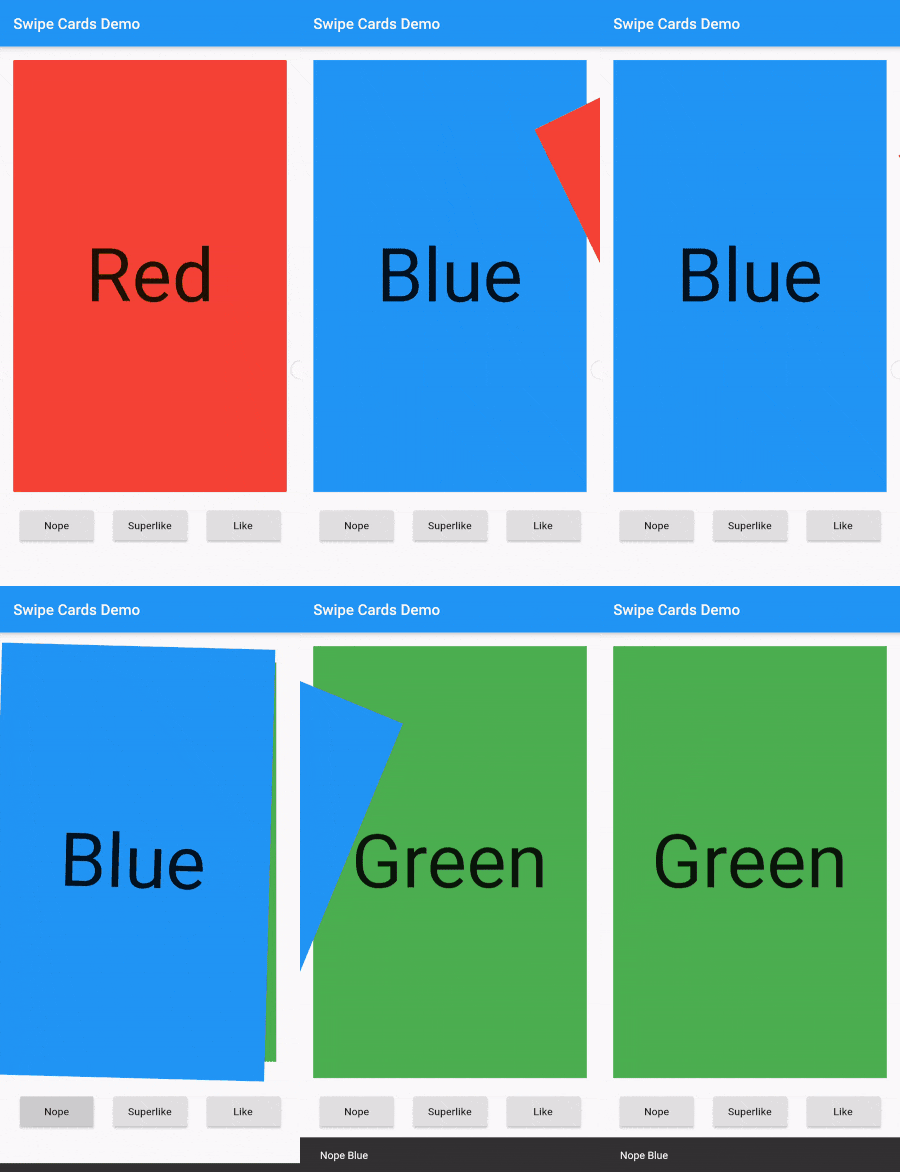
Screenshot

Screenshot

카테고리

소스 저장소

이 패키지를 사용하는 프로젝트

아직 데이터가 없습니다.