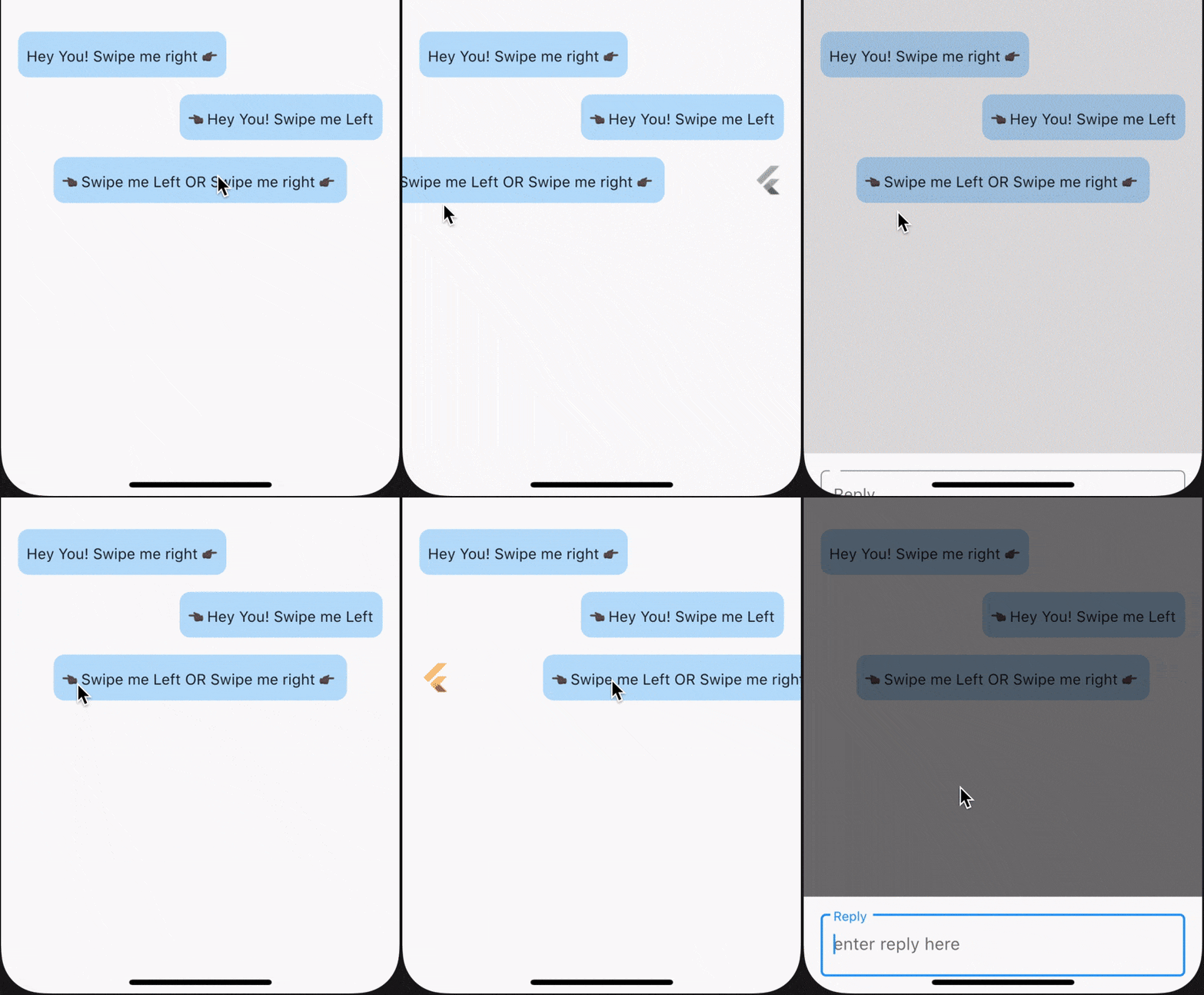
SwipeTo는 Flutter 패키지로 채팅 뷰 위젯을 감싸며 사용자가 수평 스와이프를 수행할 때 콜백을 트리거할 수 있게 해줍니다. 메시지 삭제 또는 빠른 응답과 같은 작업을 시작하기 위해 스와이프 제스처를 사용하는 채팅 인터페이스용으로 설계되었습니다. 이 패키지는 Android, iOS, Web, macOS, Windows, Linux 등 여러 플랫폼을 지원하여 크로스플랫폼 애플리케이션에 유연하게 활용할 수 있습니다. 간단한 API를 통해 기존 채팅 UI에 복잡한 설정 없이 원활하게 통합됩니다. 채팅 요소에 제스처 기반 기능을 추가함으로써 사용자 상호작용을 향상시킵니다.
사용 사례
채팅 메시지 삭제
빠른 응답 작업
제스처 기반 탐색
상호작용 채팅 인터페이스
스와이프하여 닫기 메시지
채팅에서 사용자 참여도 향상
주요 기능
수평 스와이프 감지
스와이프 시 콜백이 트리거됩니다
크로스 플랫폼 호환성
채팅 위젯과의 간단한 통합
다수의 플랫폼을 지원합니다
경량이며 오버헤드가 최소
적합한 대상
채팅 앱을 개발하는 개발자
제스처 상호작용을 찾는 UI 디자이너
스와이프 액션 기능이 필요한 앱
크로스플랫폼 모바일 및 웹 앱
인터랙티브 메시징 인터페이스
고려 사항
올바른 제스처 처리 설정이 필요합니다
복잡한 스와이프 동작을 위해 맞춤 설정이 필요할 수 있습니다
수평 스와이프만 가능
하위 채팅 위젯 구조에 따라 다릅니다
수직 스와이프 시나리오에 적합하지 않습니다
원본 README
연결된 소스 저장소의 README 원문 스냅샷입니다. 최신 내용은 저장소에서 확인하세요.
swipe_to
SwipeTo is a wrapper for a chat view widget which can be used initiate callback when user horizontally swipe on it.
Getting Started
To use this packages, you just simply need to wrap your child component in SwipeTo widget and pass a VoidCallback that you can carry forward with your task.
In the pubspec.yaml of your flutter project, add the following dependency:
dependencies:...swipe_to:1.0.6
In your library add the following import:
import'package:swipe_to/swipe_to.dart';
Parameter Info
child : (@required) StateLess or StateFull flutter widget.
onRightSwipe : callback which will be initiated at the end of right swipe animation. If not passed right swipe will be disabled
onLeftSwipe : callback which will be initiated at the end of left swipe animation. If not passed left swipe will be disabled
iconOnRightSwipe : IconData that will be displayed on left beneath child widget when swiped right. If not specified default is Icons.reply
rightSwipeWidget : Widget that will be displayed beneath child widget when swipe right. If iconOnRightSwipe is defined this will have no effect.
iconOnLeftSwipe : IconData that will be displayed on right beneath child widget when swiped left. If not specified default is Icons.reply
leftSwipeWidget : Widget that will be displayed beneath child widget when swipe left. If iconOnLeftSwipe is defined this will have no effect.
iconSize : Double value defining size of displayed icon beneath child widget. If not specified default it will take 26
iconColor : Color value defining color of displayed icon beneath child widget. If not specified primaryColor from theme will be taken
offsetDx : Double dx value used in Offset() till which position of child widget will get animated. If not specified 0.3 default will be taken. onRightSwipe +dx value will be used and for onLeftSwipe -dx value will be used
animationDuration : Duration value to define animation duration. If not specified default is 150 milliseconds
swipeSensitivity : Swipe sensitivity integer value which will be in range of default min 5 to max 35. Crossing mentioned value of this parameter (+ve in right and -ve in left direction) will trigger swipe animation.
Major changes onwards [ver 0.0.1+5]
For a single child widget, we can now enable swipe for both left and right direction
swipeDirection parameter is removed. Now onLeftSwipe and onRightSwipe callback will enable swiping for a particular direction if passed
iconData is now split into two parameter, iconOnRightSwipe & iconOnLeftSwipe for future use
endOffset is now change to accept a double value only
callBack is now split into two parameter, onLeftSwipe & onRightSwipe
Using SwipeTo widget for ListView items
While using SwipeTo widget for ListView items, make sure to pass a Key() as key parameter of SwipeTo widget. Suggested to use UniqueKey() which will differentiate each individual widget in the Widget Tree. Check example below. To view example code click here.
swipeDirection : Enum value from [swipeToLeft, swipeToRight] only. Make sure to pass relative Offset value according to passed swipeDirection value. If not specified swipeToRight will be taken as default.
iconData : IconData that will be displayed beneath child widget. if not specified default is Icons.reply
endOffset : Offset value till which position of child widget will get animated. if not specified Offset(0.3, 0.0) default will be taken
callBack : (@required) callback which will be initiated at the end of swipe animation
Example : SwipeToRight
Wrap your desired widget with SwipeTo & pass a call to onRightSwipe parameter.
SwipeTo(
child: Container(
padding: constEdgeInsets.symmetric(vertical: 10.0, horizontal: 8.0),
child: Text('Hey You! Swipe me right 👉🏿'),
),
onRightSwipe: (details) {
print('Callback from Swipe To Right');
},
),
Example : SwipeToLeft
Wrap your desired widget with SwipeTo & pass a call to onLeftSwipe parameter.
SwipeTo(
child: Container(
padding: constEdgeInsets.symmetric(vertical: 10.0, horizontal: 8.0),
child: Text('👈🏿 Hey You! Swipe me Left'),
),
onLeftSwipe: (details) {
print('Callback from Swipe To Left');
},
),
Example : SwipeToLeft & SwipeToRight
Wrap your desired widget with SwipeTo & pass a call to onLeftSwipe & onRightSwipe parameters.
SwipeTo(
child: Container(
padding: constEdgeInsets.symmetric(vertical: 10.0, horizontal: 8.0),
child: Text('👈🏿 Swipe me Left | YOU |Swipe me right 👉🏿'),
),
onLeftSwipe: (details) {
print('Callback from Swipe To Left');
},
onRightSwipe: (details) {
print('Callback from Swipe To Right');
},
),